How Do I Choose A Bluetooth Mouse For Work And Play
Choosing the right Bluetooth mouse means understanding your needs, whether you work from home or game on the go. A Bluetooth mouse frees you from cables and gives you flexibility at your desk or on the road. This guide walks you through types, features, and practical tips so you can pick the perfect wireless mouse with confidence.
Finding the right Bluetooth mouse can feel overwhelming at first. There are so many shapes, sizes, and brands on the shelf. But the good news is that you do not need to be a tech expert to make a smart choice. This guide breaks everything down into simple, easy-to-follow steps.
Whether you need a wireless mouse for office work, creative projects, or casual gaming, the right pick makes a big difference. A great wireless peripheral keeps your desk tidy and lets you work comfortably for hours. We will cover everything from sensor types to battery life so you know exactly what to look for.
By the end of this guide, you will feel confident walking into a store or browsing online. You will know which Bluetooth mouse fits your lifestyle and budget. Let us get started.
Key Takeaways
- Match the mouse to your use case: office tasks need comfort and precision, while gaming demands fast response and high DPI.
- Bluetooth connectivity is a game-changer for a clean desk setup, but check your device compatibility first.
- Battery life and rechargeability affect how often you need to charge or replace batteries.
- Ergonomic design prevents hand fatigue during long work sessions or gaming marathons.
- Multi-device pairing lets you switch between a laptop, tablet, and desktop with ease.
- Size and portability matter if you travel frequently or use your mouse on the go.
- DPI and sensor quality directly impact tracking accuracy and cursor speed.
📑 Table of Contents
Why Choose a Bluetooth Mouse Over a Wired One
Freedom From Cables
A Bluetooth mouse removes the mess of cords from your desk. You can move your mouse freely without worrying about cable length or tangling. This is especially helpful if you like a clean, minimal workspace. Many people find that a clutter-free desk helps them focus better.
With Bluetooth connectivity, you also avoid the hassle of a USB receiver. You do not need to plug anything into your computer. This is a huge plus for laptops with limited ports. Some users even prefer this setup because it keeps their USB ports free for other devices.
Portability and Travel
A portable mouse that uses Bluetooth is easy to carry in your bag. You do not need to pack extra cables or worry about losing a small receiver. If you travel for work or study, a compact travel mouse is a smart investment.
Many modern wireless mice are designed to be lightweight and slim. Some fit easily in a jacket pocket. This makes them perfect for people who work from coffee shops, libraries, or co-working spaces.
Multi-Device Flexibility
One of the best features of a modern Bluetooth mouse is multi-device pairing. You can connect one mouse to your laptop, tablet, and desktop computer. Switching between devices is usually as simple as pressing a button. This saves you money and desk space.
For people who use multiple screens or devices throughout the day, this feature is a real game-changer. You no longer need a separate mouse for each device.
Types of Bluetooth Mice
Standard Office Mice
An office mouse is designed for everyday tasks like browsing, typing, and clicking through spreadsheets. These mice are usually comfortable to hold for long periods. They prioritize smooth tracking and reliable Bluetooth connectivity over flashy features.
Most office mice have a simple design with two to three buttons and a scroll wheel. They work well with both Windows and Mac computers. If your main goal is productivity and comfort, an office-style wireless mouse is a solid choice.
Ergonomic Mice
An ergonomic mouse is shaped to reduce strain on your hand and wrist. These mice often have a vertical design that keeps your forearm in a more natural position. If you spend eight or more hours a day at your computer, an ergonomic option can help prevent discomfort.
Some ergonomic models use Bluetooth connectivity to stay wireless. They may cost a bit more than standard mice, but the comfort benefits are worth it for many users. People with wrist pain or repetitive strain issues often find these mice to be a lifesaver.
Gaming Mice
A gaming mouse is built for speed, precision, and customization. These mice usually have higher DPI settings, which means faster and more accurate cursor movement. They also feature extra buttons that you can program for in-game actions.
Not all gaming mice use Bluetooth. Many rely on a dedicated USB receiver for lower click latency. However, Bluetooth gaming mice are improving rapidly. They offer great performance with the added benefit of a clean, cable-free setup.
Compact and Travel Mice
A compact mouse is smaller than a standard mouse and fits easily in a bag or pocket. These are ideal for people who travel often or use multiple computers. They may have a slightly different shape, but they still offer reliable tracking and comfortable clicks.
Travel mice often use Bluetooth connectivity to stay lightweight. Some models can even pair with smartphones and tablets. This makes them a versatile wireless peripheral for people on the move.
Vertical Mice
A vertical mouse holds your hand in a handshake position. This reduces wrist rotation and can help prevent strain over long work sessions. These mice are a popular choice for office workers and anyone who values comfort.
Many vertical mice now support Bluetooth connectivity, so you do not need a cable or receiver. They may take a few days to get used to, but most users say the comfort improvement is significant.
Key Features to Look For
DPI and Sensor Quality
DPI stands for dots per inch. It measures how sensitive your mouse is. A higher DPI means the cursor moves farther with less hand movement. For office work, a DPI between 800 and 1600 is usually plenty. For gaming or design work, you may want 2000 DPI or higher.
The sensor inside the mouse also matters. Optical sensors work well on most surfaces. Laser sensors offer even more precision. When choosing a Bluetooth mouse, check the sensor type to make sure it suits your needs.
Battery Life and Charging
Battery life is one of the most important factors in a wireless mouse. Some mice last for weeks on a single charge, while others need charging every few days. If you hate dealing with dead batteries, look for a model with long-lasting power.
Many modern mice use a rechargeable battery with a USB-C charging cable. This is much more convenient than replacing disposable batteries. A mouse that charges quickly and lasts long will save you time and money.
Bluetooth Range and Stability
The Bluetooth range of a mouse is typically around 30 feet. In real-world use, walls and obstacles can reduce this distance. Most people do not notice any issues unless they move far away from their computer.
Bluetooth version also matters. Newer versions like Bluetooth 5.0 offer better stability and lower power consumption. When you compare options, check which Bluetooth version the mouse supports. A mouse with Bluetooth 5.0 or later will give you a more reliable connection.
Button Layout and Customization
The number of buttons on your mouse depends on what you do. A basic two-button mouse works fine for browsing and office tasks. Gamers and power users often prefer mice with extra programmable buttons. These can be mapped to specific actions or shortcuts.
Some wireless mice come with software that lets you customize every button. This is a great feature for people who want to personalize their setup. Before you buy, think about how many buttons you actually need.
Build Quality and Durability
A good wireless peripheral should feel solid and well-built. Check the materials used and read reviews about long-term durability. A mouse that feels cheap may break after a few months. Spending a little more on quality can save you from replacing it soon.
Look for mice with smooth feet that glide easily on your desk surface. The scroll wheel should feel precise and sturdy. These small details make a big difference in your daily experience.
Compatibility and Connectivity
Does Your Device Support Bluetooth?
Before buying a Bluetooth mouse, make sure your computer or device supports Bluetooth. Most modern laptops and desktops come with built-in Bluetooth. However, older computers may not have this feature.
If your computer does not support Bluetooth, you can add a Bluetooth adapter. This small USB device gives your computer wireless capabilities. Just make sure the adapter is compatible with your operating system.
For those who need extra connectivity options, you might find that USB-C adapters and docks can expand your connection options when setting up a wireless workspace.
Bluetooth Pairing Process
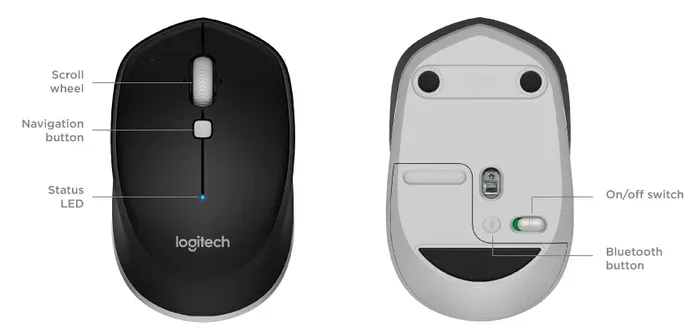
Pairing a Bluetooth mouse is usually straightforward. You turn on the mouse, put it in pairing mode, and select it from your device’s Bluetooth settings. The process is similar to pairing Bluetooth hearing aids or any other wireless device.
Most mice remember previously paired devices. This makes switching between your laptop and tablet quick and easy. If you ever need to reset the pairing, check the manufacturer’s instructions. The process is usually simple and takes just a few seconds.
USB Receiver vs. Bluetooth
Some wireless mice come with a small USB receiver instead of using Bluetooth. A receiver can offer slightly lower click latency and a more stable connection. However, you need to keep track of the small device and plug it into a USB port.
A Bluetooth mouse eliminates this hassle entirely. You just turn it on and connect. For most users, Bluetooth is the better choice. It keeps your setup clean and reduces the number of small accessories you need to manage.
Common Mistakes to Avoid
Ignoring Ergonomics
One of the biggest mistakes people make is picking a mouse based on looks alone. If a mouse does not fit your hand well, it can cause discomfort or even injury over time. Always consider the shape and size of the mouse in relation to your hand.
Try to hold the mouse before you buy it if possible. Your hand should rest naturally without stretching or straining. An ergonomic mouse can prevent long-term problems and keep you comfortable throughout the workday.
Overlooking Battery Needs
It is easy to forget about battery life when you are excited about new features. But a mouse that dies in the middle of an important task is frustrating. Check the battery life rating before you purchase. Look for models with a rechargeable battery that lasts at least a week on a single charge.
Choosing Based on Price Alone
A low price tag does not always mean a good deal. Cheap mice may have poor tracking, uncomfortable shapes, or short battery life. On the other hand, the most expensive mouse is not always the best choice for you either. Focus on features that match your actual needs.
Not Checking Compatibility
Some Bluetooth mice work better with certain operating systems than others. Before you buy, check that the mouse is compatible with your device. Most mice work with both Windows and Mac, but some have limited support for Linux or ChromeOS.
Tips for Getting the Most Out of Your Bluetooth Mouse
Keep Your Mouse Clean
Dust and grime can build up on the sensor and buttons over time. Wipe your mouse down regularly with a soft cloth. Clean sensors track more accurately, and clean buttons feel better to use. A little maintenance goes a long way.
For a deeper clean, you can use a cotton swab dipped in a small amount of rubbing alcohol. Avoid using too much liquid. Let the mouse dry completely before you use it again.
Update Firmware When Available
Some wireless mice allow you to update their firmware through companion software. These updates can improve performance, fix bugs, and add new features. Check the manufacturer’s website periodically for updates.
Use the Right Surface
A Bluetooth mouse works best on a smooth, flat surface. Mouse pads are ideal because they provide a consistent texture for the sensor. Avoid using your mouse on rough, reflective, or glass surfaces. These can interfere with tracking and cause cursor jumps.
Store Your Mouse Properly
When you are not using your portable mouse, store it in a protective case or pouch. This prevents damage during travel and keeps the sensor clean. A little care in storage can extend the life of your mouse significantly.
Final Thoughts
Choosing the right Bluetooth mouse comes down to understanding your needs and preferences. Think about where and how you will use it most. Consider factors like comfort, battery life, DPI, and compatibility. A well-chosen wireless mouse can improve your productivity and make your daily tasks more enjoyable.
Take your time to compare options and read reviews. The right wireless peripheral is an investment in your comfort and efficiency. Whether you are working from home, gaming, or traveling, there is a perfect Bluetooth mouse out there for you. Use the tips in this guide to make a confident, informed choice.
Remember, the best mouse is the one that feels right in your hand and fits your lifestyle. Do not settle for less when you can find a model that checks all your boxes. Happy shopping, and enjoy your new wireless mouse!
Frequently Asked Questions
Can I Use a Bluetooth Mouse With Any Computer?
Most modern computers support Bluetooth, including laptops, desktops, and tablets. If your computer does not have built-in Bluetooth, you can add a Bluetooth adapter. Just make sure the adapter is compatible with your operating system before you buy.
How Long Does a Bluetooth Mouse Battery Last?
Battery life varies by model and usage. Many Bluetooth mice last between one and four weeks on a single charge. Mice with rechargeable batteries and power-saving features tend to last longer. Check the manufacturer’s specs for the most accurate estimate.
Is a Bluetooth Mouse Slower Than a Wired Mouse?
Modern Bluetooth mice have very low click latency and are nearly as fast as wired models. Bluetooth 5.0 and later offer even better performance. For most everyday tasks, you will not notice any difference in speed or responsiveness.
Can I Connect a Bluetooth Mouse to Multiple Devices?
Yes, many wireless mice support multi-device pairing. You can switch between your laptop, tablet, and desktop with the press of a button. This feature is especially useful for people who use multiple devices throughout the day.
Do I Need a USB Receiver for a Bluetooth Mouse?
No, a Bluetooth mouse connects directly to your device without a receiver. This is one of the main advantages of Bluetooth over wireless mice that use a USB dongle. It keeps your setup cleaner and reduces the number of small accessories you need to manage.
What DPI Do I Need for Office Work?
For office tasks like browsing and using spreadsheets, a DPI between 800 and 1600 is usually perfect. You do not need a very high DPI for everyday work. If you do graphic design or gaming, you may want a higher DPI setting for more precision and speed.