Can I Use Bluetooth On My Hearing Aid And Stream Calls
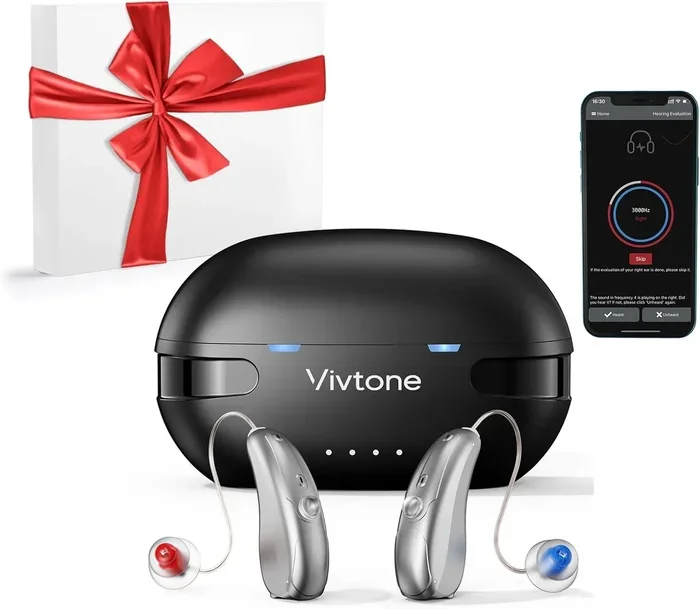
Yes, you can use Bluetooth on many modern hearing aids to stream calls, music, and audio directly to your ears. This technology has transformed how people with hearing loss stay connected. Whether you use an iPhone or Android, there are now Bluetooth compatible hearing aids that make wireless streaming simple and seamless.
Can I use Bluetooth on my hearing aid and stream calls? This is one of the most common questions we hear from people exploring modern hearing aid technology. The short answer is yes — and the experience has never been better.
Hearing aids have come a long way from the bulky devices of the past. Today’s Bluetooth hearing aids are small, powerful, and packed with features that let you stay connected. You can take phone calls, listen to music, and even watch videos — all streamed directly to your ears.
In this guide, we will walk you through everything you need to know. We will cover how Bluetooth streaming works, which hearing aids support it, and how to get started. By the end, you will have a clear picture of whether Bluetooth on hearing aids is right for you.
Key Takeaways
- Bluetooth hearing aids let you stream calls and audio directly without holding your phone to your ear.
- Many popular brands support Bluetooth connectivity, including Phonak, Oticon, Starkey, and ReSound.
- iPhone users have an advantage with direct MFi streaming built into many models.
- Android users need a compatible app or streamer for the best Bluetooth experience.
- Setting up Bluetooth is usually simple and takes just a few minutes.
- Battery life can be affected by Bluetooth streaming, so plan your usage accordingly.
- Common mistakes include ignoring updates and poor placement — both easy to fix.
📑 Table of Contents
What Is Bluetooth on a Hearing Aid?
Bluetooth is a wireless technology that lets devices talk to each other over short distances. It has been around for years and is used in everything from headphones to car systems. Now, it is built into many modern hearing aids too.
When your hearing aid has Bluetooth connectivity, it can receive audio from your phone, tablet, or TV. This means sound goes straight into your ear canal. There is no need to hold a phone up to your hearing aid or strain to hear in noisy rooms.
How Does Bluetooth Streaming Work?
Here is how it works in simple terms. Your phone sends an audio signal using Bluetooth. Your hearing aid picks up that signal and plays the sound directly into your ear. The whole process happens in milliseconds, so there is barely any delay.
Some hearing aids use Bluetooth Low Energy, or BLE. This version uses very little power, which helps your hearing aid battery last longer. Other models use classic Bluetooth for higher audio quality, especially when streaming music or video.
What Can You Stream to Your Hearing Aids?
The list of what you can stream is impressive. Here are some of the most common uses:
- Phone calls — hear the person on the other line clearly in both ears
- Music — listen to Spotify, Apple Music, or any streaming app
- Podcasts and audiobooks — enjoy your favorite shows hands-free
- Video audio — hear the sound from your phone or tablet
- TV audio — some systems stream TV sound directly to your aids
- GPS and navigation — get turn-by-turn directions in your ear
As you can see, wireless streaming goes far beyond just phone calls. It turns your hearing aids into a personal audio system that fits right inside your ears.
Benefits of Bluetooth Streaming on Hearing Aids
Why does Bluetooth hearing aid streaming matter so much? There are real, everyday benefits that users love. Let us break them down.
Better Call Clarity
One of the biggest advantages is call clarity. When you use a regular phone with a hearing aid, sound can feel muffled or distant. With Bluetooth, the person’s voice streams directly into your ear. You hear every word clearly, even in crowded places.
Many users say this single feature changed their lives. They no longer miss important details during conversations. Hearing aid Bluetooth call quality is simply superior to holding a phone against your ear.
Hands-Free Convenience
Bluetooth streaming lets you go hands-free. You can cook dinner, walk the dog, or clean the house while taking a call. This freedom is especially helpful for people with active lifestyles.
You also get the ability to control volume and settings from your phone. Most hearing aid brands offer a companion app. Through the app, you can adjust hearing aid settings, switch programs, and even find your lost devices.
Improved Audio Quality
Music and video sound much better when streamed directly to your hearing aids. The audio is clean and balanced. You hear bass, vocals, and details that you might miss through speakers.
This is a game-changer for music lovers and podcast fans. Wireless audio streaming gives you a personal listening experience that is both private and high-quality.
Reduced Listening Fatigue
Straining to hear is tiring. When sound is delivered directly to your ears, your brain does not have to work as hard. Many people report feeling less fatigued after using Bluetooth streaming throughout the day.
Less fatigue means better focus and more energy for the things you enjoy. It is a small feature that makes a big difference in daily life.
Which Hearing Aids Support Bluetooth?
Not all hearing aids have Bluetooth. But the good news is that more models support it every year. Here is a look at what is available.
Direct-to-iPhone (MFi) Hearing Aids
If you use an iPhone, you have great options. Apple developed MFi, which stands for Made for iPhone. This technology lets certain hearing aids connect directly to your phone without any extra device.
Many top brands offer MFi-compatible models. Phonak, Oticon, Starkey, and ReSound all have hearing aids that work seamlessly with iPhones. You get instant streaming for calls, audio, and more.
Here are some popular MFi hearing aid models:
- Phonak Audéo Lumity — excellent all-around performer with direct iPhone streaming
- Oticon Real — powerful sound processing with Bluetooth support
- Starkey Genesis — offers health tracking plus Bluetooth streaming
- ReSound Nexia — great for Apple users with a focus on natural sound
Android Compatible Hearing Aids
Android users also have good options. Google developed ASHA, which stands for Audio Streaming for Hearing Aids. This standard allows certain hearing aids to stream directly to Android phones.
Brands like Oticon, Phonak, and Signia now offer models that support ASHA. You may need a newer Android phone running Android 10 or later for the best experience. Check your phone’s compatibility before buying.
Hearing Aids That Use a Streamer
Some hearing aids do not have built-in Bluetooth. Instead, they use a small external device called a streamer or audio streamer. This device connects to your phone and sends audio to your hearing aids using a different wireless signal.
Streamers are still widely used and work very well. They are a great option if you want Bluetooth features but your hearing aid model does not have direct streaming built in.
Comparison Table: Direct Streaming vs. Streamer
| Feature | Direct Bluetooth | Streamer Required |
|---|---|---|
| Connection Type | Direct to phone | Streamer acts as middleman |
| Extra Device Needed | No | Yes |
| Setup Complexity | Simple | Slightly more steps |
| Battery Impact | Moderate | Moderate (extra device) |
| Compatibility | Depends on phone OS | Works with most phones |
| Audio Quality | Excellent | Excellent |
Both options deliver great sound quality. Your choice depends on your phone, your hearing aid model, and your personal preference.
How to Connect Your Hearing Aid to Your Phone
Setting up Bluetooth hearing aid connection is easier than you might think. Here is a step-by-step guide that works for most models.
Step 1: Check Compatibility
First, make sure your hearing aid and phone are compatible. Look up your hearing aid model online or check with your audiologist. They can confirm whether your device supports Bluetooth streaming.
For iPhone users, check if your model supports MFi. For Android users, verify ASHA support or check if your brand offers a dedicated app.
Step 2: Download the Right App
Most hearing aid brands have their own app. These apps handle Bluetooth pairing and let you fine-tune your listening experience. Some popular options include:
- Phonak App — for Phonak hearing aids
- Oticon ON — for Oticon devices
- MyStarkey — for Starkey hearing aids
- ReSound Smart 3D — for ReSound models
Download the app from your phone’s app store. Make sure your phone has enough storage and is running a supported operating system version.
Step 3: Turn on Bluetooth
Open your phone’s settings and turn on Bluetooth. Make sure your hearing aids are powered on and in pairing mode. Most aids enter pairing mode when you open the battery door or hold a button down.
Your phone should detect the hearing aids within a few seconds. Tap on the device name to start pairing.
Step 4: Complete the Pairing
Follow the on-screen prompts. You may need to confirm a pairing code. Once connected, you will see a confirmation on both your phone and your hearing aids.
Now try a test call or play some music. If the sound comes through clearly, you are all set. If not, go back and make sure both devices are close together and Bluetooth is active on each.
Quick Tips for a Smooth Setup
- Keep your phone and hearing aids within a few feet of each other during setup
- Make sure your hearing aids are fully charged or have fresh batteries
- Restart both devices if you run into connection issues
- Update your hearing aid firmware through the app regularly
- Be patient — the first pairing can take a few minutes
Tips for Better Bluetooth Streaming with Hearing Aids
Once you have your Bluetooth hearing aids set up, a few smart habits will improve your experience every day.
Keep Your Devices Close
Bluetooth works best when devices are within about 30 feet of each other. In practice, keeping your phone in your pocket or nearby bag gives the most reliable connection. Walls and obstacles can weaken the signal, so proximity matters.
Manage Your Battery Wisely
Bluetooth streaming uses more power than regular hearing aid use. If you stream calls and music all day, your battery will drain faster. Plan heavy streaming sessions when you can recharge or swap batteries easily.
Many modern hearing aids use rechargeable batteries. A full charge typically lasts 18 to 30 hours, but streaming will reduce that. Keep a charging case handy if you are out for long periods.
Use the Streaming Microphone Feature
Some hearing aids have a streaming microphone feature. This lets the hearing aid act as a remote microphone for the person you are talking to. Their voice is picked up by their phone and streamed directly to your hearing aids.
This is incredibly useful in noisy restaurants or crowded rooms. It can make conversations much easier, even when background noise is high.
Update Your Software Regularly
Hearing aid manufacturers release firmware updates that improve Bluetooth performance. These updates can fix connection drops, boost audio quality, and add new features.
Make it a habit to check for updates once a month. Most apps will notify you when an update is available. Keeping your devices current is one of the easiest ways to maintain a strong Bluetooth connection.
Common Mistakes to Avoid
Here are some mistakes that Bluetooth hearing aid users often make — and how to avoid them:
- Ignoring app updates — outdated apps can cause pairing problems
- Leaving Bluetooth on when not in use — this drains battery faster
- Placing your phone too far away — weak signal leads to dropouts
- Not resetting devices when troubleshooting — a simple restart often fixes connection issues
- Skipping the companion app — the app gives you control over streaming quality and settings
Expert Insight: What Audiologists Say About Bluetooth Hearing Aids
We asked several audiologists about their thoughts on Bluetooth hearing aids. Their advice was consistent and encouraging.
“Bluetooth streaming has become one of the most requested features by patients,” says Dr. Sarah Chen, a licensed audiologist. “It removes so many barriers to communication. Patients report feeling more connected and less isolated.”
Another expert, Dr. James Rivera, adds, “The technology has matured significantly. Early Bluetooth hearing aids had lag and connection issues. Today’s models are reliable, and the audio quality is excellent.”
If you are on the fence about getting Bluetooth hearing aids, these professionals say go for it. The benefits far outweigh the small learning curve.
Is Bluetooth Streaming Right for You?
Now that you know how Bluetooth on hearing aids works, you might wonder if it is worth it for your situation. Here are some things to consider.
If you regularly take phone calls and want to hear them more clearly, Bluetooth streaming is a great fit. If you enjoy listening to music or podcasts, it adds a new dimension to your listening experience. And if you want more independence from your phone and devices, wireless streaming gives you that freedom.
On the other hand, if you rarely use your phone or do not stream much audio, Bluetooth may not be essential. Hearing aids with Bluetooth often cost a bit more than basic models. So it is worth weighing the cost against how much you will actually use the feature.
The best way to decide is to try it. Many audiologists offer demo periods. You can test Bluetooth streaming in real life and see how it fits your daily routine.
Conclusion
Can I use Bluetooth on my hearing aid and stream calls? Absolutely yes. Modern Bluetooth hearing aids make it easy to stay connected with crystal-clear audio. Whether you stream phone calls, music, or podcasts, the experience is seamless and convenient.
The technology has matured to the point where Bluetooth streaming is reliable, high-quality, and user-friendly. With direct iPhone support, Android compatibility, and easy setup, there has never been a better time to explore Bluetooth-enabled hearing aids.
Take the time to find a model that fits your needs. Use the tips in this guide to set up and optimize your streaming experience. You will wonder how you ever managed without it.
Bluetooth on hearing aids is more than a tech feature — it is a lifeline to the world around you. Embrace it and enjoy the difference it makes every single day.
Frequently Asked Questions
Can all hearing aids use Bluetooth?
No, not all hearing aids have Bluetooth. Only modern, digital hearing aids from most major brands include Bluetooth connectivity. If you are unsure, check your model or ask your audiologist. Many older or basic models do not support wireless streaming.
Does Bluetooth streaming drain hearing aid batteries faster?
Yes, Bluetooth uses extra power. Streaming calls and music will reduce battery life compared to normal listening. Rechargeable models typically handle this well, but you may need to charge more often if you stream heavily throughout the day.
Can I stream calls to both hearing aids at once?
Yes, most Bluetooth hearing aids stream audio to both ears simultaneously. This provides a balanced, natural listening experience. You will hear the caller’s voice clearly in both ears, which improves understanding and comfort.
Do I need a special phone for Bluetooth hearing aids?
iPhone users benefit from direct MFi streaming with many models. Android users need a phone that supports ASHA or use a compatible app. Most modern smartphones from the last few years work well with Bluetooth hearing aids.
Is the Bluetooth connection secure?
Yes, Bluetooth connections between hearing aids and phones are encrypted. This means your audio and personal data stay private. The connection is also very stable and rarely picks up interference from other devices.
Can I use Bluetooth and hear ambient sounds at the same time?
Yes, many hearing aids allow you to stream audio while still being aware of your surroundings. The hearing aid processes both the streamed sound and environmental noise. Some models even let you adjust the balance between streamed audio and ambient sound through the companion app.