Do Bluetooth Transmitters Work For Tv With Headphones
Yes, Bluetooth transmitters work for TV with headphones. They let you wirelessly stream TV audio to any Bluetooth headphones or speakers. Bluetooth transmitters are simple devices that plug into your TV and send sound over the air to your wireless headphones. This guide covers setup, compatibility, types, and the best options available.
If you love watching TV late at night but don’t want to wake up the people you live with, a Bluetooth transmitter for TV might be the answer. These small devices send your TV audio directly to wireless headphones. No cables. No fuss. Just clear sound straight to your ears.
But do Bluetooth transmitters really work for TV? The short answer is yes. The longer answer is that it depends on the type of transmitter you buy, the ports on your TV, and what kind of headphones you use. This guide walks you through everything you need to know. We will cover how they work, setup steps, common problems, and the best options on the market right now.
Whether you have an older TV or a brand new smart TV, there is a good chance a Bluetooth transmitter will work for you. Let us dive in and find out how to get wireless TV audio working in your home tonight.
Key Takeaways
- Bluetooth transmitters work with most TVs: They connect via 3.5mm, optical, or RCA ports to send audio wirelessly.
- Wireless TV audio is easy to set up: Most transmitters pair with headphones in under two minutes.
- Low latency models reduce audio delay: This keeps sound synced with what you see on screen.
- Not all transmitters are equal: Range, battery life, and codec support vary by model.
- Compatibility matters: Check if your TV has the right output ports before buying.
- You can use them with Roku, LG, and other smart TVs: They work across different TV brands and streaming devices.
📑 Table of Contents
- What Is a Bluetooth Transmitter for TV?
- How Do Bluetooth Transmitters Work With TVs?
- Types of Bluetooth Transmitters for TV
- Setting Up a Bluetooth Transmitter With Your TV
- Common Issues and How to Fix Them
- Best Bluetooth Transmitters for TV With Headphones
- Can You Use a Bluetooth Transmitter With Any TV?
- Benefits of Using a Bluetooth Transmitter for TV
- Final Thoughts
What Is a Bluetooth Transmitter for TV?
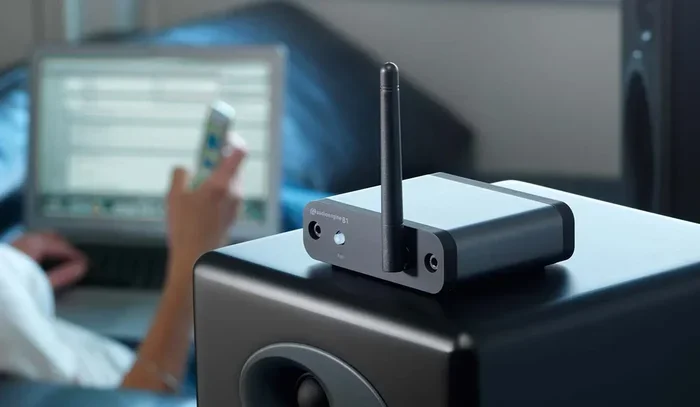
A Bluetooth transmitter for TV is a small device that takes audio from your television and sends it wirelessly to Bluetooth headphones or speakers. Think of it as a bridge between your TV and your wireless audio gear. Your TV does not need to have built-in Bluetooth for this to work.
Most TVs have a 3.5mm headphone jack, an optical audio output, or RCA ports. A transmitter plugs into one of these ports and broadcasts the audio signal over Bluetooth. Your headphones pick up the signal and play the sound. It is really that simple.
These devices are also called TV Bluetooth adapters or wireless audio transmitters. They come in different shapes and sizes. Some are tiny and plug directly into the TV. Others are larger and sit on a table with a cable running to the TV. Both styles work well. It just depends on your setup.
How Do Bluetooth Transmitters Send Audio?
Bluetooth transmitters use radio waves to send audio data from the TV to your headphones. The transmitter encodes the audio signal and broadcasts it. Your headphones decode the signal and play the sound. This all happens in milliseconds.
Most modern transmitters use Bluetooth 5.0 or newer. This means a stronger signal and a wider range. Older transmitters using Bluetooth 4.0 may have more lag or a shorter range. If you want the best experience, look for a Bluetooth 5.0 transmitter for TV.
How Do Bluetooth Transmitters Work With TVs?
The way a Bluetooth transmitter connects to your TV depends on the ports your TV has. Here are the most common connection types and how they work.
3.5mm Audio Jack Connection
This is the most common type. You plug the transmitter into the headphone jack on your TV. Almost every TV made in the last 30 years has one. The transmitter then sends the audio signal to your wireless headphones. This method is simple and works with most TVs.
One thing to watch out for: some TVs turn off the headphone jack when you plug in speakers. Check your TV settings to make sure the jack stays active. This is a common issue that trips people up.
Optical Audio Connection
Many modern TVs have an optical audio output. This looks like a small square port with a red or black flap. An optical transmitter plugs into this port and sends high-quality digital audio to your headphones. This method often gives better sound quality than a 3.5mm connection.
Optical connections do not carry stereo sound the same way as a headphone jack. Some transmitters handle this better than others. If sound quality matters to you, an optical setup is worth considering.
RCA or AUX Connections
Older TVs often have RCA ports (the red and white round plugs). Some transmitters come with RCA cables that plug right into these ports. This is a great option if your TV does not have a headphone jack or optical output.
You can also use a transmitter that connects through an AUX cable. This works the same way as the 3.5mm jack but uses a different plug size. Check what your TV has before buying a transmitter.
Types of Bluetooth Transmitters for TV
Not all transmitters are the same. Different types serve different needs. Here is a look at the main categories.
Basic Bluetooth Transmitters
These are the most affordable options. They plug into your TV and pair with any Bluetooth headphones. They work well for casual viewing. You get wireless audio without spending a lot of money. Basic models usually have a range of about 30 feet.
The downside is that basic transmitters often have more audio delay. This means the sound might not match the video perfectly. For movies and shows, this can be distracting. For music or news, it is usually fine.
Low Latency Bluetooth Transmitters
Low latency Bluetooth transmitters are designed to reduce audio delay. They use special codecs like aptX LL (low latency) to speed up the audio transfer. The result is sound that stays in sync with the video on your screen.
If you watch a lot of action movies or sports, a low latency model is a great choice. The audio will match the movement on screen much better. These transmitters cost a bit more, but the experience is noticeably smoother.
Transmitters with Built-In Receivers
Some transmitters also act as receivers. This means they can both send and receive Bluetooth audio. You can use them with your TV and also stream music from your phone. These are versatile devices that do double duty.
They are a bit bulkier than single-purpose transmitters. But if you want one device that handles multiple tasks, this is a solid option. Think of it as a Bluetooth audio transmitter that does more than just one thing.
USB Bluetooth Transmitters
Some smart TVs and computers have USB ports. USB Bluetooth transmitters plug right into these ports. They are very convenient because you do not need any extra cables. However, not all TVs support USB audio output. Check your TV manual before buying one of these.
Setting Up a Bluetooth Transmitter With Your TV
Setting up a Bluetooth transmitter for TV is usually very easy. Most devices follow the same basic steps. Here is a simple guide to get you started.
- Plug the transmitter into your TV. Use the right cable for your TV’s audio output. This might be a 3.5mm cable, an optical cable, or RCA cables.
- Turn on the transmitter. Most transmitters have a power button or will turn on automatically when plugged in.
- Put your headphones in pairing mode. Hold down the Bluetooth button on your headphones until the light starts flashing.
- Press the pairing button on the transmitter. The transmitter will search for nearby devices. Your headphones should appear on the list.
- Select your headphones from the transmitter. Once paired, audio will start streaming to your headphones automatically.
That is it. Most pairings take less than two minutes. If your headphones do not show up, move them closer to the transmitter. Bluetooth range is usually about 30 feet, but walls and furniture can reduce this distance.
Quick Tips for a Smooth Setup
- Keep your headphones close during the first pairing. You can move them farther away once connected.
- Check your TV volume. The transmitter sends whatever audio level your TV is outputting. Set the TV volume to about 70% for the best results.
- Update your transmitter firmware if it has an app. Updates often fix bugs and improve performance.
- Turn off other Bluetooth devices nearby during setup. Too many devices can cause interference.
- If you are using a Roku TV, you can also connect Bluetooth headphones directly through the Roku app. But a transmitter gives you more flexibility with different headphone brands.
If you have trouble getting your wireless headphones to connect to your TV, you are not alone. Many people face this issue. The good news is that most problems have simple fixes. Try resetting both the transmitter and your headphones. Then try pairing again from scratch.
Common Issues and How to Fix Them
Bluetooth transmitters for TV are great, but they are not perfect. Here are the most common issues people run into and how to solve them.
Audio Delay or Lag
This is the number one complaint about Bluetooth audio. You see lips move, but the sound comes a split second later. This is called latency. It happens because Bluetooth takes a tiny bit of time to process and send the audio signal.
The fix is simple. Buy a low latency Bluetooth transmitter. These devices are specifically designed to reduce delay. Look for models that support aptX LL or similar low-latency codecs. The difference is night and day.
Connection Keeps Dropping
If your headphones keep disconnecting from the transmitter, there are a few things to check. First, make sure you are within range. Walls and metal objects can weaken the Bluetooth signal. Second, check if other wireless devices are causing interference. Wi-Fi routers and microwaves can both disrupt Bluetooth signals.
Try moving the transmitter closer to where you sit. You can also try changing the USB charging port if the transmitter runs on USB power. Sometimes a simple repositioning solves the problem entirely.
Poor Sound Quality
If the audio sounds muffled or unclear, the codec might be the issue. Bluetooth supports different audio codecs. Some codecs produce better sound than others. SBC is the most common but lowest quality. aptX and aptX HD offer much better sound.
Check if your transmitter and headphones both support the same high-quality codec. If they do, make sure it is turned on in the settings. This one change can dramatically improve your wireless TV audio experience.
TV Does Not Recognize the Transmitter
Sometimes the TV and transmitter just will not work together. This often happens with older TVs that have limited audio output options. If your TV only has optical output, make sure you are using an optical-compatible transmitter.
Also check if your TV has a setting that disables the headphone jack when external speakers are connected. This is a common setting on many TVs. Go into your TV audio settings and look for an option to keep the headphone jack active.
Best Bluetooth Transmitters for TV With Headphones
There are many transmitters on the market. Here are some things to look for when choosing the best one for your setup.
What to Look For
- Bluetooth version: Go for 5.0 or newer for better range and stability.
- Connection options: Make sure it has the right port for your TV (3.5mm, optical, or RCA).
- Low latency support: If you watch a lot of video content, this is a must.
- Battery life: Some transmitters need to be plugged in at all times. Others have rechargeable batteries for portable use.
- Range: At least 30 feet is ideal for most living rooms.
- Codec support: aptX, aptX HD, and LDLC are all great codecs for better sound.
When choosing a Bluetooth transmitter for TV, think about how you will use it. If you just want to watch TV quietly at night, a basic model works fine. If you want theater-quality wireless sound, invest in a low latency model with high-quality codecs.
Many people also ask whether they can use a transmitter with their wireless headphones for TV on different streaming devices. The answer is yes. Whether you watch on a smart TV, a Roku, or a cable box, a Bluetooth transmitter works the same way. It pulls audio from the TV itself, not from the streaming service.
For those using hearing aids with Bluetooth capability, a transmitter can also be a helpful bridge between your TV and your hearing aids. Just make sure your hearing aids support the Bluetooth profile that the transmitter uses. This can make TV watching much more comfortable and enjoyable.
Can You Use a Bluetooth Transmitter With Any TV?
Most TVs made after 2005 will work with a Bluetooth transmitter. The key is having the right audio output port. Here is a quick look at TV compatibility.
| TV Type | Compatible Output | Works With Transmitter? |
|---|---|---|
| Older CRT TVs | 3.5mm or RCA | Yes |
| LED/LCD TVs (2010+) | 3.5mm, Optical, RCA | Yes |
| Smart TVs | 3.5mm, Optical, HDMI ARC | Yes |
| Very Old TVs (pre-2000) | RCA only | Yes, with RCA transmitter |
Almost every TV can work with a Bluetooth transmitter. You just need to match the transmitter to your TV’s available ports. If your TV has HDMI ARC, some advanced transmitters can connect through that too. But the 3.5mm and optical options cover the vast majority of setups.
If you have a TV that does not have any audio output at all, you may need an HDMI audio extractor. This device pulls audio from an HDMI signal and outputs it through a 3.5mm or optical port. Then you can connect your transmitter to that. It adds a step, but it makes almost any TV compatible with wireless headphones.
Benefits of Using a Bluetooth Transmitter for TV
There are many reasons to add a Bluetooth transmitter to your TV setup. Here are the biggest benefits.
- Watch TV quietly at night. No one else has to hear the sound while you enjoy your show with headphones.
- Better sound quality. Many Bluetooth headphones sound better than TV speakers. You can enjoy richer, clearer audio.
- No wires to trip over. Wireless audio means no cables running across the room.
- Work with any Bluetooth headphones. You are not locked into one brand or one pair of headphones.
- Easy to set up. Most transmitters work right out of the box. No technical skills needed.
- Great for hearing aids. If you use Bluetooth-enabled hearing aids, a transmitter can send TV audio directly to them.
Using a Bluetooth transmitter for TV is one of the simplest upgrades you can make to your home entertainment setup. It costs less than most people expect, and the difference in your viewing experience is huge. Whether you are watching alone late at night or sharing a room with someone who sleeps early, wireless TV audio makes a real difference.
If you are still wondering whether your specific TV will work with a transmitter, check out our guide on pairing Bluetooth headphones to your LG TV for brand-specific tips. You can also learn more about adding Bluetooth to any TV if you want a more permanent wireless solution.
For those using Roku devices, we also have a detailed guide on using Bluetooth headphones with Roku that covers both built-in options and transmitter setups.
Final Thoughts
Do Bluetooth transmitters work for TV with headphones? Absolutely. They are one of the easiest and most affordable ways to add wireless audio to any television. Whether you have an old CRT TV or a brand new smart TV, there is a transmitter that will work for you.
The key is choosing the right type of transmitter for your TV’s ports and your listening needs. A basic model works fine for casual viewers. A low latency model is better for movies and sports. And a transmitter with a rechargeable battery gives you flexibility to move around the room.
Setup takes just a few minutes. Most people are up and running in under five minutes. Once paired, your headphones connect automatically every time you turn on the TV. It is a seamless experience that makes watching TV more enjoyable for everyone in the household.
Give a Bluetooth transmitter a try. You might be surprised at how much better TV watching feels with wireless headphones. Once you go wireless, you will not want to go back to wired.
Frequently Asked Questions
Do Bluetooth transmitters work with all TV brands?
Yes, Bluetooth transmitters work with almost all TV brands. They connect through standard audio ports like 3.5mm, optical, or RCA, which are found on Samsung, LG, Sony, TCL, and most other brands. As long as your TV has one of these audio outputs, a transmitter will work with it.
Can I use any Bluetooth headphones with a TV transmitter?
Most Bluetooth headphones will work with a TV transmitter. They just need to support the standard Bluetooth audio profile (A2DP). However, for the best experience, look for headphones that support low-latency codecs like aptX. This reduces audio delay and keeps sound in sync with the video on your TV.
Is there a delay when using a Bluetooth transmitter with TV?
Basic Bluetooth transmitters do have some audio delay, usually around 100 to 200 milliseconds. This can cause sound to lag behind the video. Low latency transmitters that support aptX LL reduce this delay to under 40 milliseconds, making the audio and video much more in sync.
How far can a Bluetooth transmitter reach from the TV?
Most Bluetooth transmitters have a range of about 30 to 50 feet. This is usually enough to cover a typical living room. Walls and furniture can reduce the range, so keep the transmitter within a clear line of sight to your headphones for the best connection.
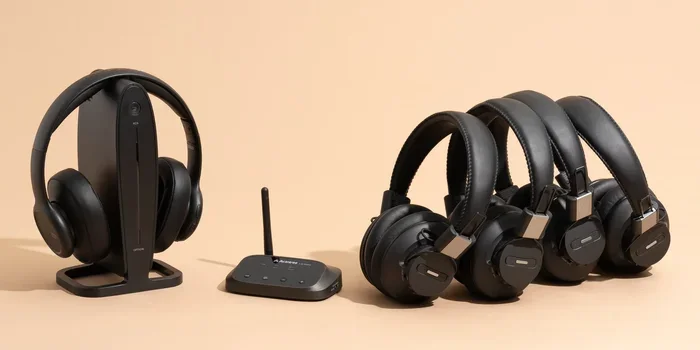
Can I connect two pairs of headphones to one Bluetooth transmitter?
Yes, many Bluetooth transmitters support dual pairing. This lets you connect two pairs of headphones to the same transmitter at the same time. Check the product description before buying if this feature matters to you. It is great for couples who want to watch TV together with wireless headphones.
Do I need Wi-Fi to use a Bluetooth transmitter with my TV?
No, Bluetooth transmitters do not need Wi-Fi. They use Bluetooth technology to send audio directly from the TV to your headphones. Wi-Fi is not involved in the audio streaming process. This means you can use a transmitter even if your home Wi-Fi is turned off or not working.