Can I Convert My Receiver To Bluetooth With These Tips
Can I Convert My Receiver To Bluetooth? Yes, you can! There are several easy methods to add wireless capability to your existing audio receiver. Whether you use a Bluetooth adapter, a transmitter, or upgrade to a new model, you can enjoy wireless audio streaming in no time. This guide walks you through each option with clear, practical steps. You will learn which method fits your setup and budget best.
You love your receiver. It has served you well for years. But now everything is going wireless. Your phone streams music. Your tablet plays videos. And your receiver just sits there with a tangle of cables. So the question hits you: can I convert my receiver to Bluetooth? The short answer is yes. You absolutely can. And it is easier than you think.
Adding Bluetooth to your receiver opens up a whole new world of convenience. You can stream music from any device in the room. You can play a podcast from your phone without plugging anything in. You can even share the speaker with friends at a gathering. Can I Convert My Receiver To Bluetooth is one of the most common questions audio lovers ask today. And the good news is there are multiple ways to make it happen.
In this guide, we will cover every method you can use. We will talk about Bluetooth adapters, transmitters, and even upgrading to a new receiver. We will share tips for the best audio quality. We will also warn you about common mistakes people make. By the end, you will know exactly which path to take. Let us get started.
Key Takeaways
- Bluetooth adapters are the easiest and most affordable way to add wireless streaming to any existing receiver.
- A Bluetooth transmitter sends audio wirelessly from your source device to the receiver’s input ports.
- Built-in Bluetooth receivers are available in newer models and offer the cleanest wireless setup.
- Audio quality depends on the codec you use, such as aptX or AAC, so choose wisely.
- Common mistakes include poor placement and ignoring firmware updates that can improve performance.
- Pairing your devices correctly ensures a stable and uninterrupted wireless connection.
- You do not need to replace your entire audio system to enjoy Bluetooth convenience.
📑 Table of Contents
- Why You Might Want Bluetooth on Your Receiver
- Understanding Your Current Receiver Setup
- Method 1: Using a Bluetooth Adapter
- Method 2: Using a Bluetooth Transmitter
- Method 3: Upgrading to a Bluetooth-Ready Receiver
- Tips for Best Audio Quality
- Common Mistakes to Avoid
- Comparing Your Options at a Glance
- Final Thoughts
Why You Might Want Bluetooth on Your Receiver
The Benefits of Wireless Audio
Wireless audio has changed the way we listen to music. You no longer need to sit next to your stereo system. You can move freely around the room. You can answer a phone call without unplugging anything. The convenience alone is a huge reason to add Bluetooth to your setup.
Here are some key benefits of adding Bluetooth to your receiver:
- Freedom of movement — Walk around your home while music plays.
- Multiple device support — Connect your phone, tablet, and laptop easily.
- No more cables — Eliminate the clutter of audio cables.
- Quick pairing — Most modern devices connect in seconds.
- Share with others — Let guests play music from their phones.
Another big benefit is future-proofing your system. Technology keeps moving toward wireless. Adding Bluetooth now means your receiver stays relevant. You do not have to buy a whole new system. A small add-on can keep you up to date for years.
Common Scenarios Where Bluetooth Helps
Think about your daily life. How do you listen to music? Do you pull out your phone and plug in a cable every time? That gets old fast. Here are some real situations where Bluetooth makes a difference:
- Morning routines. You want to play a playlist from your phone while you get ready. No cables, no hassle.
- Movie nights. You stream audio from your TV to the receiver for better sound. Bluetooth makes this seamless.
- Gaming sessions. You want wireless audio from your console or PC without lag.
- Hosting friends. Everyone wants to add a song. Bluetooth lets anyone jump in easily.
- Working out at home. You move around during exercise and still want to hear your music through your speakers.
In each of these cases, can I convert my receiver to Bluetooth becomes the solution. You get wireless freedom without spending a fortune on a new system.
Understanding Your Current Receiver Setup
Checking What Connections You Have
Before you buy anything, take a look at your receiver. What ports does it have? This matters a lot. Different methods work with different types of connections. You need to know what you are working with.
Most receivers have one or more of these common ports:
- AUX input (3.5mm jack) — A small round port, similar to what you find on headphones.
- RCA inputs (red and white) — Larger round ports used for analog audio.
- Optical input — A square port that uses light to carry digital audio.
- Coaxial input — Similar to optical but uses an electrical signal.
- USB port — Found on some newer receivers for digital connections.
Once you know which ports your receiver has, you can choose the right method. A 3.5mm AUX input gives you the most flexibility. If your receiver only has RCA ports, no problem. There are adapters for that too. The key is matching your receiver’s inputs with the right Bluetooth device.
Identifying Audio Output Options
It is not just about inputs. You also need to think about audio output. Some receivers have multiple output options. Others have limited ones. Check the back panel of your receiver carefully. Look for labels like “Output,” “Pre-Out,” or “Sub Out.”
If your receiver has a headphone-style output, you are in great shape. Most Bluetooth adapters plug right into that. If you only have RCA outputs, you can use an RCA-to-3.5mm cable. This connects to your Bluetooth adapter easily. Take a photo of the back of your receiver before you go shopping. It helps you remember what you have.
Method 1: Using a Bluetooth Adapter
Choosing the Right Bluetooth Adapter
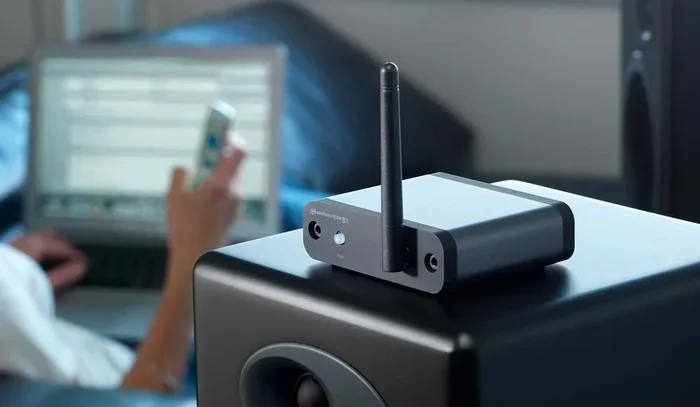
A Bluetooth adapter is the simplest way to add wireless capability. It is a small device that plugs into your receiver. It receives Bluetooth signals from your phone or tablet and sends the audio to your speakers. Can I Convert My Receiver To Bluetooth using an adapter? Absolutely. This is the most popular method for a reason.
Here is what to look for when picking an adapter:
- Bluetooth version — Look for version 5.0 or higher for better range and stability.
- Codec support — Check if it supports aptX, AAC, or LDAC for better audio quality.
- Input options — Make sure it has a 3.5mm jack or RCA inputs that match your receiver.
- Battery life — Some adapters run on batteries. Others plug into power. Choose what fits your setup.
- Brand reputation — Stick with trusted brands like Avantree, TaoTronics, or 1Mii.
Price ranges vary widely. Basic adapters cost around $15 to $30. Higher-end models with aptX support run $40 to $80. You do not need to spend a lot, but investing a little more often means better sound quality.
Step-by-Step Setup Process
Setting up a Bluetooth adapter is straightforward. Follow these steps and you will be streaming in minutes:
- Plug the adapter into your receiver’s AUX input or use an RCA cable to connect.
- Power on the adapter. Some plug into a USB port on the receiver. Others use a wall outlet.
- Put the adapter in pairing mode. Usually, you hold down a button until the LED light flashes.
- On your phone or tablet, go to Bluetooth settings. Turn Bluetooth on and look for the adapter’s name.
- Tap to pair. You should hear a confirmation tone or see a message on the adapter.
- Start playing music. The audio now streams wirelessly to your receiver and speakers.
That is it. No complicated software. No drivers to install. It works right out of the box. If you run into issues, try moving the adapter closer to your phone. Walls and furniture can weaken the Bluetooth signal.
Method 2: Using a Bluetooth Transmitter
How Bluetooth Transmitters Work
A Bluetooth transmitter works differently from an adapter. The adapter receives Bluetooth signals. The transmitter sends them. So what does that mean for your setup? It means you can use a transmitter to send audio from a source device to your receiver wirelessly.
For example, let us say your TV does not have Bluetooth. You want to hear the TV audio through your receiver and speakers. You connect the transmitter to your TV’s audio output. Then the transmitter sends the sound wirelessly to a Bluetooth receiver connected to your stereo system. It is a great solution for TVs, computers, and older devices.
Setting Up a Transmitter with Your Receiver
Setting up a Bluetooth transmitter takes a few extra steps. But it is still very manageable:
- Connect the transmitter to your source device using an audio cable or optical cable.
- Connect a Bluetooth receiver to your receiver’s AUX input or RCA ports.
- Power on both devices. The transmitter and receiver need power to work.
- Put the transmitter in pairing mode. The receiver should auto-connect or you may need to pair them manually.
- Play audio from your source device. The sound should travel wirelessly to your receiver.
This two-part setup gives you more flexibility. You can use it with devices that do not have built-in Bluetooth. Many people use this method for their TVs and gaming consoles. It is a reliable way to get wireless audio without replacing any equipment.
Method 3: Upgrading to a Bluetooth-Ready Receiver
What to Look for in a New Receiver
Sometimes the best option is to upgrade. If your receiver is old and has no useful ports, a new one might make more sense. Modern receivers come with Bluetooth built right in. You do not need any extra devices or cables.
When shopping for a Bluetooth-ready receiver, keep these things in mind:
- Built-in Bluetooth 5.0 or higher — This ensures a strong and stable connection.
- Multiple input options — Look for AUX, USB, optical, and HDMI inputs.
- Power output — Check the wattage to make sure it can drive your speakers well.
- Codec support — Receivers with aptX or aptX HD offer much better audio quality.
- Price range — Bluetooth-enabled receivers start around $100 and go up to $500 or more.
Popular brands that offer Bluetooth receivers include Yamaha, Denon, Marantz, and Sony. These brands are trusted and their products last a long time. You also get better customer support and warranty coverage.
When Upgrading Makes More Sense Than Adapting
Not every situation calls for an adapter. Sometimes upgrading is the smarter choice. Here are a few signs that a new receiver is the right move:
- Your current receiver is very old. It may not have any useful input ports left.
- You want better sound quality overall. A new receiver often sounds much better than an old one.
- You need more channels. Maybe you want to upgrade from stereo to a 5.1 home theater setup.
- You are tired of dealing with adapters. One clean device is better than multiple add-ons.
- Your receiver needs repairs. If it is already broken or unreliable, replacing it makes sense.
Think of it this way. An adapter is a quick fix. A new receiver is a long-term solution. Both have their place. It just depends on your situation and budget.
Tips for Best Audio Quality
Reducing Latency and Interference
One thing people notice with Bluetooth audio is a slight delay. This is called latency. It is the gap between when the audio plays on your device and when you hear it through your speakers. For music, this is usually not a problem. But for videos and gaming, it can be noticeable.
Here is how to reduce latency and interference:
- Use aptX or aptX Low Latency codecs. These are designed to minimize delay.
- Keep your phone close to the adapter. Bluetooth range is usually 30 feet or less.
- Stay away from Wi-Fi routers. They can interfere with Bluetooth signals.
- Avoid microwaves and cordless phones. These also operate on similar frequencies.
- Update your adapter firmware. Manufacturers often release updates that improve performance.
Signal interference is one of the most common reasons for poor audio quality. If your music keeps cutting out, check for nearby electronics. Moving the adapter even a few inches can make a big difference.
Maintaining Strong Bluetooth Range
Bluetooth range depends on several factors. The version of Bluetooth matters. The environment matters too. A clear line of sight between your phone and the adapter gives the best results. Walls, furniture, and metal objects can weaken the signal.
To get the best range, place your adapter in an open area. Do not hide it behind your receiver or inside a cabinet. If you have a large room, consider a Bluetooth adapter with an external antenna. These models offer stronger and more reliable connections over longer distances.
Common Mistakes to Avoid
Even with the best setup, people make mistakes. Here are some common ones to watch out for:
- Skipping the pairing process. Always follow the full pairing steps. Do not assume devices will connect automatically.
- Using a cheap adapter. Low-cost adapters often have poor audio quality and weak signals. Spend a little more for better results.
- Ignoring codec support. Not all Bluetooth audio is the same. Codecs like aptX make a real difference in sound quality.
- Placing the adapter too far away. Keep it within range of your source device for a stable connection.
- Forgetting to charge or power the adapter. A dead adapter means no music. Keep it powered at all times.
- Not updating firmware. Manufacturers fix bugs and improve performance through updates. Check regularly.
- Pairing too many devices at once. Most adapters handle one or two connections well. Too many can cause confusion and dropouts.
Avoiding these mistakes will save you frustration. It will also help you get the best possible sound from your wireless setup.
Comparing Your Options at a Glance
Not sure which method is right for you? Here is a quick comparison to help you decide.
| Method | Cost | Ease of Setup | Audio Quality | Best For |
|---|---|---|---|---|
| Bluetooth Adapter | $15 – $80 | Very Easy | Good to Great | Quick wireless upgrade |
| Bluetooth Transmitter + Receiver | $20 – $100 | Moderate | Good to Great | TVs and older devices |
| New Bluetooth Receiver | $100 – $500+ | Easy | Excellent | Long-term solution |
Each method has its strengths. The adapter is the fastest and cheapest option. The transmitter setup works well for TVs. A new receiver gives you the best overall experience. Think about what matters most to you. Budget? Sound quality? Convenience? Pick the method that fits your needs.
Final Thoughts
Can I Convert My Receiver To Bluetooth? Without a doubt, yes. You have several great options to choose from. A Bluetooth adapter gives you a quick and affordable upgrade. A transmitter works well for specific devices like TVs. And a brand-new Bluetooth receiver is the ultimate long-term solution.
The best part is that none of these methods require you to replace your entire audio system. Your speakers and receiver can keep working exactly as they are. You just add a small device to bring them into the wireless age. It is a smart and cost-effective way to modernize your setup.
Take a look at your receiver today. Check what ports it has. Decide which method fits your needs and budget. Then follow the steps in this guide. You will be streaming wireless audio before you know it. Enjoy the freedom and convenience of Bluetooth. Your ears will thank you.
Remember, the goal is simple. Make your audio system work the way you want it to. Whether that means streaming from your phone during breakfast or playing a movie without cables, Bluetooth makes it all possible. Start your conversion today and enjoy wireless audio for years to come.
Frequently Asked Questions
Do I need any special tools to convert my receiver to Bluetooth?
No special tools are needed. Most Bluetooth adapters plug directly into existing ports on your receiver. You may need a simple audio cable like an RCA-to-3.5mm cord if your receiver does not have an AUX input. Everything else comes included with the adapter.
Will adding Bluetooth reduce my audio quality?
It can, but usually only slightly. Using an adapter that supports codecs like aptX or AAC helps maintain high audio quality. Cheap adapters without codec support may reduce sound fidelity. Investing in a quality adapter ensures you get excellent wireless audio.
How far can I be from my receiver when using Bluetooth?
Most Bluetooth devices have a range of about 30 feet. Walls and obstacles can reduce this distance. Bluetooth 5.0 and newer versions offer better range and stronger signals. Keep your source device within a clear line of sight for the best results.
Can I connect multiple devices to my Bluetooth adapter at once?
Most adapters support one or two simultaneous connections. Some higher-end models allow multiple paired devices. You can usually switch between devices easily. Check the product specifications to see how many connections it supports.
Is it hard to pair a Bluetooth adapter with my phone?
Not at all. The pairing process is usually very simple. Turn on Bluetooth on your phone, put the adapter in pairing mode, and select the adapter from your phone’s Bluetooth list. Most devices connect within seconds with no extra steps needed.
Can I use Bluetooth with a home theater receiver?
Yes, you absolutely can. Home theater receivers benefit greatly from Bluetooth. You can stream music from your phone to your surround sound system. Use a Bluetooth adapter or a transmitter setup depending on your receiver’s available inputs. It works just as well with multi-channel systems as it does with stereo setups.
=== CONCLUSION ===
Can I Convert My Receiver To Bluetooth with these tips? Yes, you can. You now know three proven methods to bring wireless audio to your existing receiver. You have learned about Bluetooth adapters, transmitters, and full receiver upgrades. You also know how to pick the right one for your setup and budget.
The key is to start simple. A Bluetooth adapter is the easiest first step. If that works well for you, great. If you want something more permanent, consider upgrading to a new Bluetooth-ready receiver. Either way, you are making a smart move toward a more convenient and modern audio experience.
Take action today. Pick the method that fits your needs. Follow the steps in this guide. Soon you will be enjoying wireless music through your favorite speakers without a single cable in sight. Happy listening!