Do Access Points Need A Controller To Manage Networks
Do access points need a controller? The short answer is: it depends on your network size and needs. Access points can work independently or with a central access point controller that manages everything from one place. Whether you are setting up a wireless network for your home or a large office, understanding how network management works saves you time, money, and headaches.
Setting up a wireless network can feel overwhelming. You have routers, modems, cables, and then there are access points. One question that keeps coming up is whether these access points actually need a controller to work properly. The truth is, it is not a simple yes or no answer. It really depends on how big your network is, how many devices you need to connect, and how much control you want over your network infrastructure.
If you are a home user trying to get Wi-Fi in every room, a standalone access point might be all you need. But if you are running a business with dozens or hundreds of devices, a controller-based AP system can make your life much easier. This guide walks you through everything you need to know about access point controllers, how they work, and which setup is right for you.
Key Takeaways
- Standalone access points work without a controller and are great for small setups.
- Controller-based APs centralize management and are ideal for larger networks.
- Cloud-managed access points offer flexibility and remote control from anywhere.
- Network scalability is much easier when you use a central wireless controller.
- Choosing the right network infrastructure depends on your budget, size, and technical skills.
- Access point configuration is simpler with a controller but possible manually.
- Enterprise networking almost always relies on a dedicated Wi-Fi controller.
📑 Table of Contents
- What Is An Access Point And Why Does It Matter?
- Do Access Points Need A Controller? The Short Answer
- Types Of Access Point Controllers
- Standalone Vs Controller-Based: Which Should You Choose?
- Key Benefits Of Using An Access Point Controller
- Common Mistakes People Make With Access Point Setup
- How To Set Up An Access Point Controller
- Expert Insights On Access Point Management
- Final Thoughts
What Is An Access Point And Why Does It Matter?
An access point is a device that creates a wireless local area network, or WLAN. Think of it as a bridge between your wired network and your wireless devices. It takes the internet signal from your router and broadcasts it so laptops, phones, tablets, and smart home gadgets can connect without cables.
In simple terms, an access point extends your Wi-Fi coverage. Without one, your signal might only reach certain rooms. With multiple access points placed around a building, you get strong, reliable wireless connectivity everywhere. This is why access point deployment is such a big deal in both homes and businesses.
Access points come in different shapes and sizes. Some look like small ceiling tiles. Others are wall-mounted units that blend into your decor. The key thing to remember is that every access point needs some form of management. The question is whether that management happens locally on the device or through a central system.
Do Access Points Need A Controller? The Short Answer
Do access points need a controller to manage networks? Not always. Some access points are designed to work completely on their own. These are called standalone access points. They handle all their own settings, security, and connections without any outside help.
Other access points rely heavily on a centralized controller. This controller acts like a brain for your entire wireless network. It manages every access point, pushes updates, handles security policies, and makes sure everything runs smoothly. The controller can be a physical box sitting in your server room, or it can live in the cloud.
So the real answer is: access points do not always need a controller, but they can really benefit from one depending on your situation. Let us break down the two main approaches.
Standalone Access Points
A standalone access point works all by itself. You configure it once, and it runs independently. Each unit handles its own connections, security settings, and performance. This is a great option for small networks.
For example, if you have a small office with 15 employees, you might only need one or two standalone access points. You log into each unit through a web browser, set up the Wi-Fi password, choose your channel, and you are done. No controller needed.
The upside is simplicity. Standalone APs are easy to set up and cost less upfront. The downside is management. If you have 10 standalone access points, you need to log into each one individually to make changes. That takes time and can lead to network inconsistency across your wireless network.
Controller-Based Access Points
A controller-based AP system is completely different. All your access points connect back to one central wireless controller. This controller manages every aspect of your network from a single dashboard.
Imagine you are running a hotel with 50 rooms and a lobby area. Each area has an access point. Without a controller, you would need to configure all 15 units separately. With a controller-based system, you set everything once, and the controller pushes those settings to every access point instantly.
This is where network scalability becomes a huge advantage. When you add a new access point to the system, the controller automatically recognizes it and applies your existing policies. You do not have to reconfigure anything. This makes growing your network infrastructure much less painful.
Types Of Access Point Controllers
Not all controllers are the same. There are three main types you will encounter when setting up a wireless network. Understanding each one helps you make a smart choice for your setup.
Hardware Controllers
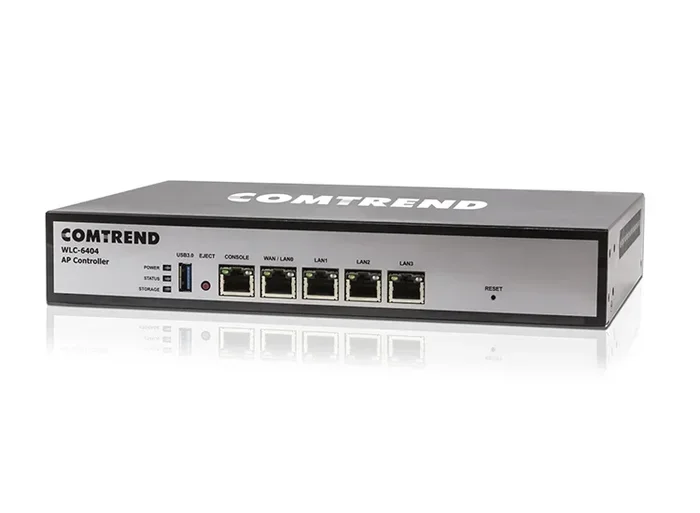
A hardware controller is a physical device. It looks like a small box that sits on your network rack. These controllers are built specifically for network management. They offer fast performance, low latency, and reliable operation.
Hardware controllers are common in enterprise networking environments. Companies that need tight control over their network security and performance often choose this option. The downside is cost. A good hardware controller can be expensive, and you need to maintain it physically.
Software Controllers
A software controller runs on a server or computer. Instead of buying a separate box, you install controller software on existing hardware. This is a more budget-friendly option for many organizations.
Software controllers offer a lot of flexibility. You can run them on a dedicated server or even on a virtual machine. The key is making sure the host machine has enough processing power and memory to handle access point configuration for all your wireless devices. Many IT teams prefer this approach because it integrates well with their existing network administration tools.
Cloud-Based Controllers
Cloud-managed access points are becoming incredibly popular. Instead of hosting a controller on-site, the management software lives in the cloud. You access everything through a web dashboard or mobile app from anywhere in the world.
This is a game-changer for businesses with multiple locations. A retail chain with stores in different cities can manage all its wireless access points from one cloud dashboard. No need for on-site IT staff at every location. The trade-off is that you need a stable internet connection. If your cloud controller goes offline, remote management becomes harder, though the access points usually continue working with their last known settings.
Standalone Vs Controller-Based: Which Should You Choose?
Choosing between a standalone setup and a controller-based AP setup comes down to your specific needs. Let us look at the key factors side by side.
| Factor | Standalone AP | Controller-Based AP |
|---|---|---|
| Setup Complexity | Simple, per-device | Centralized, one-time setup |
| Scalability | Difficult to scale | Easy to add new APs |
| Management | Manual per device | Central dashboard |
| Cost | Lower upfront | Higher initial investment |
| Best For | Small homes and offices | Large businesses and enterprises |
| Updates | Per-device updates | Pushed to all devices at once |
| Security Management | Set individually | Unified security policies |
If you are a home user or run a very small office, standalone access points are probably your best bet. They are affordable and easy to manage. But if you are dealing with a larger wireless network that needs consistent performance and centralized network monitoring, a controller-based system is the way to go.
One thing to keep in mind is that even standalone APs can benefit from good network cabling. Make sure your Ethernet cables and ports can handle the traffic. Sometimes people upgrade their access points but forget that the cables connecting them matter just as much. You can learn more about different connectivity options, like Can I Plug A USB Into A Thunderbolt 4 Port, to understand how modern connectivity standards work across devices.
Key Benefits Of Using An Access Point Controller
Even if your network is small, there are some compelling reasons to consider a controller-based approach. Here are the biggest advantages:
- Centralized Management: One dashboard controls all your access points. You do not need to log into each device separately. This saves a ton of time, especially when you need to push changes across multiple units.
- Consistent Configuration: A wireless controller ensures every access point uses the same settings. No more one AP on channel 1 and another on channel 13 causing interference.
- Faster Troubleshooting: When something goes wrong, a central controller shows you exactly which access point is affected and why. You can see signal strength, connected devices, and error logs all in one place.
- Seamless Roaming: Controller-based systems often support seamless handoff. This means your phone switches smoothly between access points as you move around a building without dropping your connection.
- Automated Updates: Firmware and security updates can be pushed to all access points at once. This keeps your network security tight and your devices running the latest software.
These benefits add up fast, especially as your network grows. What starts as a small setup can scale without the management nightmare that plagues standalone systems. For more on how connectivity works across different ports and standards, check out Can I Plug A USB C Cable Into A USB A Port to understand the basics of modern device connections.
Common Mistakes People Make With Access Point Setup
Setting up access points is not hard, but people do make mistakes that cause problems. Here are the most common ones to avoid.
- Skipping the site survey. Before placing any access point, you should check your space for signal interference. Walls, metal objects, and even microwaves can weaken your Wi-Fi signal. A quick site survey saves you from dead zones later.
- Overlapping channels. When multiple access points use the same channel, they interfere with each other. This causes slow speeds and dropped connections. A wireless controller helps you assign non-overlapping channels automatically.
- Underpowering your setup. Some people buy cheap switches that cannot power all their access points. This leads to inconsistent performance. Make sure your power infrastructure can handle every device on your network.
- Ignoring firmware updates. Outdated firmware creates security vulnerabilities. Always keep your access points and any controller up to date. Most modern systems handle this automatically, but it is worth checking.
- Not planning for growth. If you start with three access points, do not set them up in a way that makes adding more painful. Plan your network infrastructure with future expansion in mind.
Avoiding these mistakes puts you ahead of most network administration setups. Even experienced tech users sometimes overlook the basics when they are in a hurry. Taking a few extra minutes to plan pays off big time later.
How To Set Up An Access Point Controller
If you have decided a controller is right for your network, here is a quick overview of the setup process. Keep in mind that exact steps vary by brand and model, but the general flow is similar across most systems.
- Choose your controller type. Decide between hardware, software, or cloud-based. Your budget and technical comfort level should guide this choice.
- Connect your access points. Plug each access point into your network via Ethernet. Make sure the cables are properly seated and that your switch has enough ports.
- Install the controller software. If you are using a software or cloud controller, follow the vendor’s setup guide. This usually involves creating an account, downloading the management app, and connecting your access points to the cloud.
- Configure your network settings. Set your SSID, password, security type, and channel settings. With a controller, these settings apply to all access points at once.
- Test your coverage. Walk around your space with a phone or laptop. Check for dead zones and weak signal areas. Adjust access point placement if needed.
- Monitor and maintain. Once everything is running, check your controller dashboard regularly. Look for connected devices, performance metrics, and any alerts.
The process is straightforward once you get the hang of it. For those curious about how different connectivity standards interact, you might also find it helpful to read about Can I Plug A Thunderbolt Dock Into A Usb C Port to understand how modern docking and networking technologies work together.
Expert Insights On Access Point Management
Network professionals agree that the trend is moving toward cloud-managed controllers. The flexibility and remote access they offer are hard to beat. Even small businesses are making the switch because the cost of cloud management has dropped significantly in recent years.
One thing experts stress is the importance of choosing the right access point controller for your specific needs. Not every business needs an enterprise-grade system. A small café might do perfectly fine with a cloud-managed standalone setup. A hospital, on the other hand, needs the reliability and security of a dedicated hardware controller.
The bottom line is this: access points do not always need a controller, but the right controller can transform how you manage your wireless network. It all comes down to scale, budget, and how much control you want over your network infrastructure.
When you are evaluating your options, think about where your network will be in two or three years. If you plan to grow, invest in a system that makes that growth easy. A little planning now saves a lot of frustration later.
Final Thoughts
Do access points need a controller to manage networks? The answer really depends on your situation. For small, simple setups, standalone access points work great. They are affordable and easy to set up. But for larger networks that need centralized management, consistent security, and room to grow, a controller-based system is the smarter choice.
Take some time to evaluate your needs. Count your devices, measure your space, and think about your budget. Whether you go standalone or controller-based, the most important thing is that your wireless network delivers reliable, fast connectivity to everyone who needs it. With the right setup, you will have a network infrastructure that works hard for you and never gives you a reason to second-guess it.
Frequently Asked Questions
Can I manage access points without any controller at all?
Yes, standalone access points work without a controller. You configure each unit individually through its web interface or mobile app. This approach works well for small networks with just a few access points.
Is a cloud controller as good as a hardware controller?
For most users, yes. Cloud controllers offer remote management, easy scaling, and lower upfront costs. Hardware controllers provide faster local processing and work without an internet connection, making them better for environments that need maximum reliability.
How many access points can one controller manage?
This varies by brand and model. Some controllers handle as few as 10 access points, while enterprise-grade systems can manage hundreds. Check the specifications of your specific controller to know its capacity.
Do I need a controller for a home Wi-Fi network?
Usually not. Most home networks work fine with a single router or a couple of standalone access points. Controllers become valuable when you have many access points or need advanced features like seamless roaming and unified security policies.
Can I switch from standalone to controller-based later?
Yes, but it requires reconfiguring your access points. Some vendors make this transition smoother than others. Check with your access point manufacturer to see if your current units support controller-based management.
Are access point controllers expensive?
Costs vary widely. Cloud-managed solutions often have monthly fees per access point, which keeps upfront costs low. Hardware controllers can cost several hundred to several thousand dollars depending on features and capacity. Software controllers running on existing servers offer a middle-ground option.