Can You Use Blink Cameras As a Baby Monitor at Home
Yes, you can use Blink cameras as a baby monitor at home. Blink cameras offer wireless streaming, night vision, two-way audio, and motion alerts that make them a practical choice for monitoring your little one. In this guide, we cover everything you need to know about setting up your Blink camera for baby monitoring, including features, setup steps, and important safety tips.
Every new parent wants to keep a close eye on their baby. Whether you are in the next room or running errands outside, the need to check on your little one never really goes away. Baby monitors have been around for decades, but today’s smart home devices offer so much more than those old-fashioned audio-only options.
One question many parents ask is whether they can use a Blink camera as a baby monitor. The short answer is yes. Blink cameras are wireless, affordable, and packed with features that work well for monitoring a baby. But there are important things to know before you set one up in your nursery.
In this article, we will walk through everything you need to know. We will cover how Blink cameras work, what features matter most for baby monitoring, how to set one up, and the pros and cons compared to traditional baby monitors. By the end, you will have a clear picture of whether a Blink camera is the right choice for your family.
Key Takeaways
- Blink cameras work as baby monitors: They offer live video streaming, two-way audio, and night vision that cover the basics of baby monitoring.
- Setup is simple and affordable: You do not need expensive dedicated baby monitors. A Blink camera system costs less and does more.
- Battery and WiFi matter: Blink cameras need a strong WiFi signal and regular charging. Consider boosting your home WiFi for the best experience.
- Privacy is important: Any wireless camera can be vulnerable. Use strong passwords and secure your home network to protect your baby’s privacy.
- Motion alerts add extra safety: Blink cameras send instant notifications when they detect movement near your baby’s crib or room.
- Not a replacement for certified monitors: Blink cameras lack certified safety standards designed specifically for infant monitoring. Use them as a supplement.
📑 Table of Contents
- What Is a Blink Camera and How Does It Work?
- Can You Use Blink Cameras as a Baby Monitor?
- Setting Up Your Blink Camera for Baby Monitoring
- Blink Camera Features That Matter Most for Baby Monitoring
- Pros and Cons of Using Blink Cameras as a Baby Monitor
- Privacy and Security Considerations
- Common Mistakes Parents Make When Using Blink Cameras as Baby Monitors
- Frequently Asked Questions
- Final Thoughts
What Is a Blink Camera and How Does It Work?
A Blink camera is a wireless home security camera made by Amazon Blink. These cameras are designed to keep your home safe. They connect to your WiFi network and stream video to your phone or tablet through the Blink app. You can watch live footage from anywhere with an internet connection.
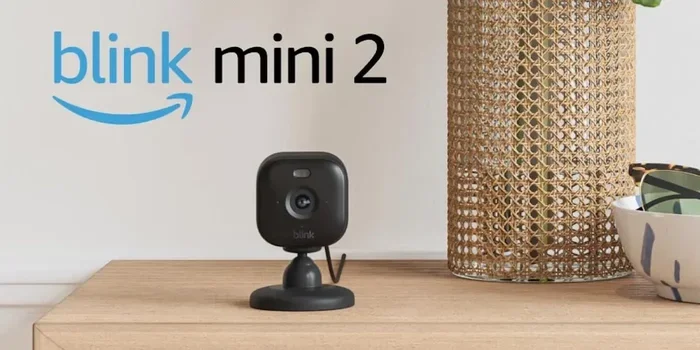
Blink cameras run on batteries, which means you do not need to plug them into a wall outlet. This makes them very flexible for placement. You can mount them almost anywhere in your home. The most popular models include the Blink Mini, Blink XT2, and Blink Indoor.
How the Blink System Works
The Blink system is simple to understand. You place a camera in the room you want to monitor. The camera connects to your home WiFi network. It sends video clips and live streams to the Blink cloud servers. You then access the footage through the Blink app on your phone.
Most Blink cameras use motion detection to trigger recording. When the camera senses movement, it starts recording a clip. You receive a notification on your phone. This is great for security, but it also works well for baby monitoring. You will know right away if your baby moves or makes noise.
Can You Use Blink Cameras as a Baby Monitor?
The short answer is absolutely yes. Many parents have successfully turned their Blink cameras into baby monitors. The features that make Blink cameras good for home security also make them useful for watching over a baby.
However, it is important to understand that Blink cameras are not specifically designed as baby monitors. They are home security cameras that happen to work well for this purpose. This means they may lack some features that dedicated baby monitors offer.
What Makes Blink Cameras Suitable for Baby Monitoring?
Several features make Blink cameras a solid option for baby monitoring:
- Live video streaming: You can watch your baby in real time from anywhere.
- Two-way audio: Some Blink models let you talk and listen through the camera. This helps soothe your baby from another room.
- Night vision: Blink cameras use infrared night vision. You can see your baby clearly even in a dark room.
- Motion detection: The camera alerts you when your baby moves, which is helpful for sleep monitoring.
- Mobile app access: You can check on your baby from your phone, tablet, or computer.
- Affordable pricing: Blink cameras cost less than many dedicated baby monitors.
Where to Place the Camera
Placement matters a lot when using a Blink camera as a baby monitor. You want the camera to have a clear view of the crib or bassinet. Here are some tips:
- Place the camera at least three feet away from the crib.
- Mount it on a shelf or use the included mounting bracket.
- Make sure the camera angle covers the entire sleeping area.
- Keep the camera out of your baby’s reach to avoid any hazards.
- Point it away from windows to reduce false motion alerts from sunlight or shadows.
Setting Up Your Blink Camera for Baby Monitoring
Setting up a Blink camera is straightforward. Most parents can have it running in less than 30 minutes. Here is a step-by-step guide to get you started.
Step 1: Choose the Right Blink Model
Not all Blink cameras are the same. For baby monitoring, you want a model with good video quality, two-way audio, and night vision. The Blink Mini is a popular choice because it is compact and affordable. The Blink Indoor offers a wider field of view, which is great for monitoring a larger nursery.
Make sure your chosen model supports the features you need. Check the product specifications before you buy. Some models also work with Alexa, which adds voice control convenience.
Step 2: Ensure a Strong WiFi Connection
Blink cameras depend on a stable WiFi connection. A weak signal means dropped streams and missed alerts. If your nursery is far from your router, you may need to improve your home network.
Consider boosting your WiFi signal with a mesh system or a WiFi extender. A strong connection ensures you get clear video and instant motion alerts without interruption.
Step 3: Install the Blink App and Create an Account
Download the Blink app from the App Store or Google Play Store. Create an account and follow the on-screen instructions to add your camera. The app walks you through the pairing process step by step.
Once your camera is connected, you can customize settings like motion sensitivity, clip length, and notification preferences. For baby monitoring, set motion sensitivity to medium or high so you do not miss any movement.
Step 4: Mount and Position the Camera
Use the included screws or adhesive mount to secure the camera. Position it so it has a clear, unobstructed view of the crib. Test the angle by checking the live feed on your phone before finalizing the placement.
Step 5: Test All Features
Before relying on the camera for overnight monitoring, test everything. Check the video quality, audio clarity, night vision, and motion alerts. Make sure two-way audio works if your model supports it. This testing phase helps you catch any issues early.
Blink Camera Features That Matter Most for Baby Monitoring
Not all features of a Blink camera are equally useful for baby monitoring. Here are the key features to focus on and why they matter.
Night Vision
Night vision is essential for any baby monitor. You need to see your baby clearly during nighttime feedings and checks. Blink cameras use infrared LEDs for night vision. The camera switches to night mode automatically when the room gets dark.
The quality of night vision varies by model. The Blink Mini offers decent night vision for the price. Higher-end models provide sharper nighttime images. Test the night vision in your nursery before committing to overnight use.
Two-Way Audio
Two-way audio lets you speak to your baby through the camera. This is incredibly helpful for soothing a fussy newborn without walking into the room. You can also listen to your baby’s sounds, like cooing or crying, in real time.
Not all Blink models have two-way audio. The Blink Mini does. The Blink XT2 also supports it. Check the specifications of your specific model before relying on this feature.
Motion Detection and Alerts
Motion detection is one of the standout features of Blink cameras. The camera uses a built-in sensor to detect movement in its field of view. When it detects motion, it starts recording and sends a push notification to your phone.
For baby monitoring, this means you get instant alerts when your baby moves. You can also review recorded clips to see what happened. The motion detection sensitivity is adjustable, which helps reduce false alerts from pets or passing shadows.
Video Quality and Field of View
Video quality determines how clearly you can see your baby. Blink cameras typically offer 1080p HD video, which is more than enough for baby monitoring. The field of view ranges from about 110 to 130 degrees depending on the model.
A wider field of view lets you see more of the room. However, too wide an angle can make the image seem distant. Find a balance that gives you a clear view of the crib without losing detail.
Battery Life and Power Options
Blink cameras run on AA lithium batteries. Battery life varies by usage but can last up to two years with normal motion-activated recording. For continuous baby monitoring, battery life will be shorter because the camera streams more frequently.
You can also power Blink cameras with a USB cable connected to a power outlet. This is often the better option for baby monitoring since you want the camera running 24/7. A continuous power connection means you never worry about the battery dying overnight.
Pros and Cons of Using Blink Cameras as a Baby Monitor
Like any solution, using a Blink camera as a baby monitor has advantages and disadvantages. Let us break them down so you can make an informed decision.
Pros
- Cost-effective: Blink cameras are cheaper than most dedicated baby monitors.
- Versatile: The same camera can monitor your baby and secure your home.
- High-quality video: 1080p HD video gives you a clear picture of your baby.
- Remote access: Check on your baby from anywhere with internet access.
- Night vision: See your baby clearly in the dark without disturbing their sleep.
- Motion alerts: Instant notifications keep you informed about your baby’s movements.
- Two-way audio: Soothe your baby from another room with your voice.
- Scalable system: Add more cameras to monitor other rooms as your family grows.
Cons
- Not certified as a baby monitor: Blink cameras do not meet the same safety standards as dedicated baby monitors.
- WiFi dependent: A weak or unstable WiFi connection can disrupt video streaming and alerts.
- Battery limitations: Battery-powered cameras need regular charging or a constant power source for overnight use.
- Potential privacy risks: Any wireless camera connected to the internet can be vulnerable to hacking if not properly secured. WiFi routers can track activity, so securing your network is critical.
- No dedicated baby monitor features: Features like temperature monitoring, breathing sensors, and lullaby playlists are not built into Blink cameras.
- Subscription costs: Blink offers cloud storage through a subscription plan. Free storage is limited, and you may need to pay for extended clip history.
Quick Comparison Table
| Feature | Blink Camera | Dedicated Baby Monitor |
|---|---|---|
| Price | $30 – $80 | $50 – $300+ |
| Video Quality | 1080p HD | 720p to 1080p |
| Night Vision | Yes (infrared) | Yes (most models) |
| Two-Way Audio | Yes (select models) | Yes (most models) |
| Motion Alerts | Yes | Limited or none |
| Temperature Monitoring | No | Yes (many models) |
| Breathing Detection | No | Yes (premium models) |
| WiFi Required | Yes | No (many are standalone) |
| Battery Life | Up to 2 years | Varies widely |
| Certification | No | Yes (safety standards) |
Privacy and Security Considerations
Using any wireless camera to monitor your baby comes with privacy considerations. You are placing a connected device in your most private space. Taking the right steps to secure your setup is essential.
Secure Your Home Network
Your Blink camera connects to your home WiFi network. If your network is not secure, others could potentially access your camera feed. Always use a strong, unique password for your WiFi network. Change the default router password and keep your router firmware updated.
Be mindful of who else is on your network. If you have a guest WiFi network, be aware that guests on your WiFi could potentially see your network activity. Keep your baby monitor on a separate, secure network whenever possible.
Use Strong Camera Passwords
Create a strong password for your Blink account. Use a mix of uppercase letters, lowercase letters, numbers, and symbols. Enable two-factor authentication if your Blink account supports it. This adds an extra layer of protection against unauthorized access.
Keep Firmware Updated
Blink regularly releases firmware updates that fix security vulnerabilities. Keep your camera firmware up to date through the Blink app. Outdated firmware can leave your camera exposed to known security risks.
Expert Insight on Home Camera Privacy
Security experts recommend treating your baby monitor camera like any other smart home device. Do not share your login credentials casually. Review access permissions regularly. If you ever suspect unauthorized access, change your password immediately and contact Blink support.
Common Mistakes Parents Make When Using Blink Cameras as Baby Monitors
To help you get the most out of your Blink camera setup, here are common mistakes to avoid:
- Placing the camera too far away: This reduces video quality and makes it hard to see details like facial expressions.
- Ignoring WiFi strength: A weak signal leads to lag, dropped connections, and missed alerts. Test your WiFi strength in the nursery before finalizing placement.
- Forgetting to charge the battery: If you use battery power, set reminders to recharge. A dead camera means no monitoring.
- Not adjusting motion sensitivity: Default settings may trigger too many false alerts. Adjust sensitivity to match your nursery environment.
- Relying solely on the camera: A Blink camera is a helpful tool but should not replace safe sleep practices or direct supervision.
- Skipping firmware updates: Outdated software can cause bugs and security vulnerabilities. Check for updates regularly.
Frequently Asked Questions
Can I use a Blink Mini as a baby monitor?
Yes, the Blink Mini is one of the best Blink models for baby monitoring. It offers 1080p HD video, two-way audio, night vision, and motion detection. It is compact, affordable, and easy to set up in a nursery. Just make sure you have a strong WiFi signal in the room where you plan to place it.
Do Blink cameras work without WiFi?
No, Blink cameras require a WiFi connection to stream video and send alerts. Without WiFi, the camera cannot connect to the Blink app or the cloud servers. If your WiFi goes down, you will not be able to monitor your baby through the camera until the connection is restored.
Is it safe to leave a Blink camera on all night?
Yes, it is safe to leave a Blink camera running overnight, especially if it is plugged in via USB. The camera does not emit harmful radiation. However, make sure the camera is placed securely out of your baby’s reach and that your home network is properly secured to protect your privacy.
Can I use a Blink camera without a subscription?
Yes, you can use a Blink camera without a subscription. You will still get live streaming, motion alerts, and two-way audio. However, cloud storage for recorded clips is limited without a subscription. For baby monitoring, live streaming and alerts are usually enough, so a subscription may not be necessary.
How far can I be from my Blink camera and still monitor my baby?
As long as you have an internet connection, you can be anywhere in the world and still monitor your baby through a Blink camera. The camera streams video over the internet to the Blink app. This makes Blink cameras excellent for parents who need to check on their baby while at work, running errands, or traveling.
Do Blink cameras have temperature sensors for the nursery?
Most standard Blink cameras do not include temperature or humidity sensors. Dedicated baby monitors often include these features. However, you can purchase a separate smart thermometer and place it near the crib. Some parents use both a Blink camera for video and a smart thermometer for climate monitoring.
Final Thoughts
Using a Blink camera as a baby monitor is a smart, affordable, and flexible solution for modern parents. These wireless cameras offer live video, night vision, two-way audio, and motion alerts that cover the essentials of baby monitoring. You get a lot of value for a relatively low price compared to dedicated baby monitors.
That said, Blink cameras are not specifically designed for infant monitoring. They lack some safety certifications and features like breathing detection and temperature alerts that dedicated baby monitors provide. Think of a Blink camera as a helpful supplement to your parenting toolkit, not a complete replacement for safe sleep practices.
Set up your camera carefully, secure your home network, and test all features before relying on it overnight. With the right setup, a Blink camera can give you peace of mind and help you stay connected to your baby no matter where you are in the house.
If you are still deciding on the best setup for your home, consider exploring how other smart devices can work together. For example, you might also look into using Alexa as a Bluetooth speaker for playing lullabies or white noise in the nursery. The more you explore smart home options, the better you can tailor your setup to your family’s needs.
A Blink camera can be a wonderful addition to your baby monitoring routine. It gives you the freedom to keep an eye on your little one with clear video, reliable alerts, and easy remote access. Give it a try, and you might find it becomes an essential part of your daily parenting workflow.