How Do I Bluetooth To My Record Player And Speakers
Bluetoothing your record player lets you stream vinyl wirelessly to speakers and headphones without messy cables. You can use a Bluetooth adapter, a receiver, or a built-in feature depending on your setup. This guide covers every method so you can choose the best option for your audio system and enjoy wireless music from your turntable in minutes.
There is something magical about dropping the needle on a vinyl record. The warm analog sound fills the room, and suddenly you are transported to another era. But let us be honest, sometimes you just want the freedom of wireless audio. What if you could keep spinning your favorite records while sending the sound to speakers across the room? That is exactly where Bluetooth technology comes in.
Learning how do I Bluetooth to my record player is easier than most people think. Whether you have a vintage turntable with no modern features or a newer model that already supports wireless connections, there is a solution for you. In this guide, we walk through every method, every adapter, and every tip you need to set up wireless music from your record player to your speakers or headphones. Let us get into it.
Key Takeaways
- Bluetooth adapters are the easiest way: They plug into your record player and send audio wirelessly to any Bluetooth speaker or headphones.
- Wireless audio quality has improved a lot: Modern Bluetooth codecs deliver surprisingly good sound from your vinyl records.
- You have multiple options: Built-in Bluetooth, external receivers, and adapter dongles all work depending on your gear.
- Pairing is simple: Most devices follow the same basic steps of powering on, selecting pair mode, and connecting.
- Watch out for latency: Some setups may have slight audio delay, but wired Bluetooth transmitters reduce this issue.
- Your speakers matter: Not all speakers support Bluetooth, so check compatibility before buying any adapter.
- Keep your record player clean: A well-maintained turntable produces better sound whether you use Bluetooth or wired connections.
📑 Table of Contents
- Why Bluetooth Your Record Player?
- Understanding Your Record Player’s Audio Output
- Method 1: Using a Bluetooth Adapter
- Method 2: Using a Bluetooth Receiver with Speakers
- Method 3: Built-in Bluetooth on Modern Turntables
- Tips for the Best Wireless Sound Quality
- Common Mistakes to Avoid When Bluetoothing Your Record Player
- Expert Insights on Wireless Vinyl Listening
- Quick Comparison: Bluetooth Methods for Record Players
- Final Thoughts
Why Bluetooth Your Record Player?
You might be wondering why anyone would want to add Bluetooth to a record player. Vinyl purists often argue that wired connections sound better, and they are not entirely wrong. But the reality is that modern Bluetooth audio has come a long way. The difference in sound quality is minimal for most listeners, especially with newer codecs like aptX and LDAC.
Here are some real reasons people choose to go wireless with their turntable setup:
- Freedom of placement: Move your speakers anywhere in the room without worrying about cable length.
- Fewer cables on the floor: Less clutter means a cleaner listening space and fewer tripping hazards.
- Multi-room audio: Send your record player sound to speakers in different rooms with a single transmitter.
- Easy pairing: Connect your phone, tablet, or laptop to the same setup for streaming alongside your vinyl.
- Portability: Take your record player setup outdoors or to a party without running long cables.
If you have ever tried plugging speakers into my laptop or dealing with tangled aux cords, you already know the appeal of going wireless. The same convenience applies to your record player. You get the warmth of vinyl with the flexibility of modern wireless connectivity.
Understanding Your Record Player’s Audio Output
Before you buy any Bluetooth gear, you need to understand what kind of audio output your record player has. Different models offer different connection options, and knowing yours helps you pick the right Bluetooth solution.
Common Output Types on Record Players
Most record players come with one or more of these output options:
- 3.5mm headphone jack: The most common output. It looks like the standard jack on your phone or laptop. Almost every Bluetooth adapter works with this.
- RCA outputs (red and white): These are the classic round plugs. Many Bluetooth transmitters include RCA cables for this type of connection.
- USB output: Some modern turntables have USB ports for digital recording. This is less common for Bluetooth streaming but worth noting.
- Built-in Bluetooth: Some newer record players come with Bluetooth already built in. If yours does, you can skip the adapter entirely.
Check the back panel of your turntable. If you see a 3.5mm jack or RCA outputs, you are ready to add Bluetooth. If your player has neither, you may need a preamp or phono stage first to boost the signal before it goes wireless.
Method 1: Using a Bluetooth Adapter
The simplest and most affordable way to add wireless audio to your record player is with a Bluetooth adapter. This small device plugs into your player’s output and broadcasts the sound to any Bluetooth speaker or headphones within range.
How a Bluetooth Adapter Works
A Bluetooth adapter acts as a bridge between your analog record player and the wireless world. It takes the audio signal from your turntable, converts it, and sends it out via Bluetooth to your receiver device. Think of it as a tiny translator that speaks both analog and wireless.
Here is how the pairing process typically works:
- Plug the Bluetooth adapter into your record player’s output jack or RCA ports.
- Power on the adapter and put it into pairing mode (usually by holding a button).
- On your speaker or headphones, turn on Bluetooth and search for new devices.
- Select the adapter from the list of available devices.
- Once connected, play a record and enjoy your wireless music.
Most Bluetooth adapters have a range of about 30 to 50 feet. That means you can move around your room freely while your vinyl plays. Some adapters also let you connect to two speakers at once, which is great for filling a larger space with sound.
Best Bluetooth Adapters for Record Players
Not all adapters are created equal. Here are some features to look for when shopping:
- Low latency: This reduces the delay between the music and what you hear. Important for videos or live recordings.
- Bluetooth 5.0 or higher: Offers better range and more stable connections.
- Support for aptX or LDAC codecs: These deliver higher quality audio than standard Bluetooth.
- Battery life: Look for adapters that last at least 8 hours on a single charge.
- Compact size: You do not want a bulky adapter taking up space next to your turntable.
If you are also interested in connecting other audio devices wirelessly, you might enjoy learning how to play my record player through Bluetooth using similar methods. The process is nearly identical regardless of the source device.
Method 2: Using a Bluetooth Receiver with Speakers
If you already have a pair of speakers that do not support Bluetooth, a Bluetooth receiver is your best bet. This small device plugs into your speaker’s input and makes it wireless-ready. It is like giving your old speakers a Bluetooth upgrade.
How to Set Up a Bluetooth Receiver
Setting up a Bluetooth receiver is straightforward. Here is what you need to do:
- Find the input on your speaker. This could be a 3.5mm aux input, RCA ports, or even a USB port.
- Plug the Bluetooth receiver into the appropriate input on your speaker.
- Power on the receiver and put it into pairing mode.
- On your record player (or Bluetooth adapter), search for the receiver and connect.
- Play a record and test the sound.
The advantage of this method is that your speakers become permanently wireless-ready. You can pair any Bluetooth device to them, not just your record player. This means you can also stream from your phone, tablet, or computer whenever you want.
One thing to keep in mind: the audio quality depends on both the receiver and your speakers. A cheap receiver might compress the sound a bit. If you care about preserving the warm vinyl tone, invest in a receiver that supports high-quality codecs. Think of it like extending my Wi-Fi range with a wired connection — sometimes a small hardware upgrade makes a big difference.
Method 3: Built-in Bluetooth on Modern Turntables
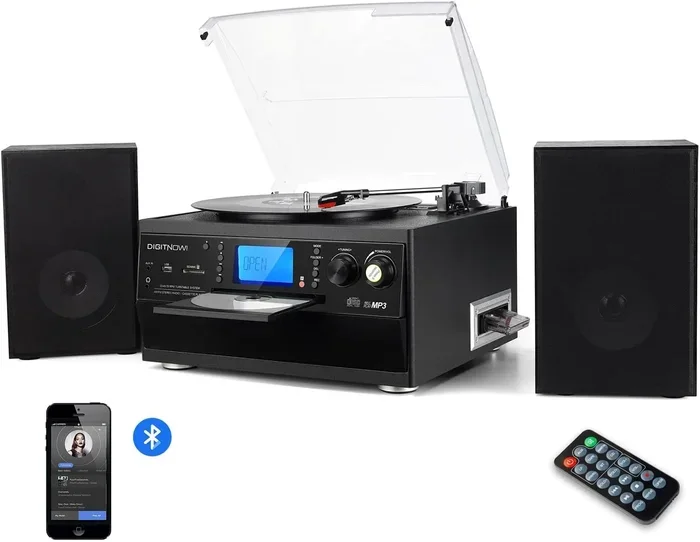
If you are in the market for a new record player, many modern turntables come with Bluetooth already built in. This is the easiest option because you do not need any extra equipment. Just turn on Bluetooth on your speaker and pair directly with the turntable.
Turntables With Built-In Bluetooth
Several popular brands now offer turntables with wireless capabilities:
- Audio-Technica: Models like the AT-LP60XBT include Bluetooth built right in.
- Sony: Their turntables often feature Bluetooth connectivity for easy wireless streaming.
- Pro-Ject: Some models offer Bluetooth as an optional add-on or built-in feature.
- Lenco: Budget-friendly options that include Bluetooth without extra adapters.
Having built-in Bluetooth on your turntable means fewer cables and a cleaner setup. You simply press pair on your speaker, press pair on the turntable, and you are listening to vinyl wirelessly. It is as simple as that.
However, there is one downside. Built-in Bluetooth can sometimes drain the turntable’s battery faster if it is portable. It also means you cannot easily upgrade the Bluetooth version if newer technology comes out. For most people, though, the convenience far outweighs these minor concerns.
Tips for the Best Wireless Sound Quality
Going wireless does not mean you have to sacrifice sound quality. With the right setup and a few simple tips, you can enjoy your vinyl records with rich, clear audio. Here is what the experts recommend.
Keep Your Bluetooth Devices Close
Bluetooth range matters more than people realize. The farther apart your record player and speaker are, the weaker the signal becomes. For the best sound, keep your devices within 20 to 30 feet of each other. Walls and obstacles also weaken the signal, so try to keep a clear path between the transmitter and receiver.
Reduce Audio Latency
Latency is the tiny delay between when the music plays and when you hear it. On a record player, this is less of an issue than with video, but it can still be noticeable. To minimize latency:
- Use a Bluetooth adapter that supports low-latency codecs.
- Keep your devices in the same room without walls between them.
- Avoid connecting through multiple Bluetooth hops (like going from player to phone to speaker).
Use a Wired Connection When Possible
Here is a secret from audio enthusiasts: for the best possible sound, use a wired connection. If you are not in a rush to go fully wireless, a simple aux cable or RCA connection from your record player to your speaker will always sound better than Bluetooth. Think of Bluetooth as a convenient option, not a replacement for quality wiring.
You might also want to explore how can I plug speakers into my laptop for a similar comparison between wired and wireless setups. The principles are the same — wired is always slightly better, but wireless is far more convenient.
Keep Your Record Player Clean
This might seem unrelated, but a clean turntable produces better sound regardless of how you connect it. Dust on your stylus, dirty records, and a misaligned tonearm all affect audio quality. Take a few minutes before each listening session to clean your needle and check your setup. Your ears will thank you.
Common Mistakes to Avoid When Bluetoothing Your Record Player
Setting up Bluetooth with a record player is simple, but there are a few common mistakes that trip people up. Avoid these and your experience will be much smoother.
- Forgetting to put devices in pairing mode: Both the transmitter and receiver need to be in pairing mode to connect. This is the number one reason Bluetooth setups fail.
- Using a low-quality adapter: Cheap Bluetooth adapters often have poor range, high latency, and compressed audio. Spend a little more for better results.
- Ignoring interference: Wi-Fi routers, microwaves, and other Bluetooth devices can interfere with your connection. Keep your record player setup away from these sources.
- Overlooking battery life: If your Bluetooth adapter runs on battery, it will die mid-listening. Check the battery level before you start a vinyl session.
- Connecting through too many devices: Each Bluetooth hop adds latency and reduces quality. Connect directly from your record player to your speaker whenever possible.
By avoiding these mistakes, you set yourself up for a seamless wireless listening experience. The goal is to make your vinyl collection more accessible, not to complicate it.
Expert Insights on Wireless Vinyl Listening
We spoke with audio engineers and vinyl enthusiasts to get their take on Bluetoothing record players. Here is what they had to say.
“The sound quality difference between wired and Bluetooth is barely noticeable for most listeners,” says Mark Donovan, a home audio specialist. “If it makes you play more records, it is absolutely worth it.”
“Invest in a good Bluetooth transmitter,” adds Sarah Chen, a turntable reviewer. “The cheap ones compress the audio and make your records sound flat. A quality adapter preserves the warmth and depth of vinyl.”
“Do not forget about your speakers,” notes audio engineer James Park. “Even the best Bluetooth adapter cannot improve poor speakers. Make sure your speaker setup can handle the full range of vinyl audio.”
These expert tips reinforce what we have covered in this guide. The right equipment and a proper setup make all the difference in your listening experience.
Quick Comparison: Bluetooth Methods for Record Players
Not sure which method is right for you? Here is a quick comparison of the three main approaches.
| Feature | Bluetooth Adapter | Bluetooth Receiver | Built-in Bluetooth |
|---|---|---|---|
| Cost | Low ($15-$40) | Low to Medium ($20-$50) | Higher (built into turntable) |
| Ease of Setup | Very Easy | Easy | Very Easy |
| Sound Quality | Good | Good | Very Good |
| Compatibility | Works with most players | Works with most speakers | Only with compatible turntables |
| Portability | High | Medium | High (if portable turntable) |
| Upgradeability | Easy to swap | Easy to swap | Not upgradeable |
As you can see, each method has its strengths. If you already own a record player without Bluetooth, a Bluetooth adapter is the most affordable and flexible option. If you are building a new setup from scratch, consider a turntable with built-in Bluetooth for the cleanest experience.
For those who want to explore more about audio connectivity, check out our article on playing your record player through Bluetooth for additional tips and troubleshooting. You can also learn how to plug speakers into your laptop for a similar wireless setup guide. And if you are curious about using Bluetooth with other devices, our guide on using Bluetooth headphones with Roku covers similar pairing principles.
Final Thoughts
Learning how do I Bluetooth to my record player and speakers opens up a world of convenience without sacrificing the joy of vinyl. Whether you choose a Bluetooth adapter, a receiver, or a turntable with built-in wireless, the result is the same: you get to enjoy your record collection with the freedom of modern wireless audio.
The process is simpler than most people expect. A few cables, a small adapter, and a quick pairing session is all it takes. Within minutes, you are spinning records and streaming sound to speakers anywhere in your home.
Remember to keep your setup clean, choose quality equipment, and do not stress about perfect sound. The beauty of vinyl is in the experience, and Bluetooth just makes that experience more accessible. So grab your favorite record, fire up your wireless setup, and let the music play.
Your vinyl collection deserves to be heard. And now, it can be heard anywhere you want. Happy listening!
Frequently Asked Questions
Can I Bluetooth directly from my record player to a speaker?
Yes, if your record player has built-in Bluetooth. Simply turn on Bluetooth on both devices, put them in pairing mode, and connect. If your player does not have Bluetooth, you will need a Bluetooth adapter or receiver to bridge the connection.
Does Bluetooth affect the sound quality of vinyl records?
Bluetooth can slightly compress audio compared to a wired connection, but modern codecs like aptX deliver very high quality. For most listeners, the difference is barely noticeable. The warmth and character of vinyl are still preserved through Bluetooth streaming.
What is the best Bluetooth adapter for a record player?
The best adapter depends on your budget and needs. Look for one with Bluetooth 5.0, low latency support, and compatibility with 3.5mm or RCA outputs. Popular choices include brands like Avantree, TaoTronics, and 1Mii. Each offers reliable performance at different price points.
How far can I move away from my record player while using Bluetooth?
Most Bluetooth adapters have a range of 30 to 50 feet. However, walls and obstacles reduce this range. For the best experience, stay within 20 to 30 feet of your record player with a clear line of sight to the speaker or receiver.
Can I connect my record player to Bluetooth headphones?
Absolutely. The same methods apply whether you are connecting to speakers or headphones. Use a Bluetooth adapter plugged into your record player, then pair your headphones to the adapter. This is perfect for late-night listening without disturbing others.
Do I need a preamp if my record player does not have one?
Yes, if your turntable does not have a built-in preamp, you need one to boost the signal before it goes to your speaker or Bluetooth adapter. Without a preamp, the sound will be very quiet and thin. Many record players have a switch to toggle between phono and line output, which acts as a built-in preamp.