Can I Get My Ps5 Serviced Here Is Everything You Need
Yes, you absolutely can get your PS5 serviced through Sony’s official support, authorized repair centers, or third-party professionals. This guide covers every option available, including warranty claims, repair costs, and troubleshooting tips to help you decide the best path for your console.
Key Takeaways
- Sony offers official repair services: You can contact Sony Support directly or visit an authorized service center for professional PS5 repair.
- Warranty coverage matters: Your PlayStation 5 may be covered under warranty for hardware defects, saving you from out-of-pocket costs.
- Third-party repairs are an option: Independent repair shops can handle PS5 issues, but always check reviews and expertise first.
- Common PS5 problems include disc drive errors and overheating: Knowing these issues helps you act quickly and get your console serviced on time.
- Preparation is key before servicing: Back up your data, deactivate your PSN account, and clean the exterior before sending in your console.
- Preventive maintenance extends console life: Regular cleaning, proper ventilation, and careful handling keep your PS5 running strong for years.
📑 Table of Contents
- Can I Get My PS5 Serviced? Here Is Everything You Need to Know
- What Does PS5 Servicing Actually Involve?
- When Should You Get Your PS5 Serviced?
- How to Get Your PS5 Serviced: Your Options
- Cost of PS5 Repair and Servicing
- How to Prepare Your PS5 Before Servicing
- Tips to Keep Your PS5 in Top Shape After Servicing
- Expert Insights on PS5 Servicing
- Key Takeaways
- Frequently Asked Questions
- Conclusion
Can I Get My PS5 Serviced? Here Is Everything You Need to Know
Your PlayStation 5 is more than just a gaming console. It is your portal to next-gen entertainment, immersive gameplay, and unforgettable experiences. So when something goes wrong, the panic is real. The good news? Can I get my PS5 serviced is a question with a very reassuring answer. Sony actively supports repair and maintenance for your console, and you have multiple paths to get it fixed.
In this comprehensive guide, we will walk you through every option available for PS5 repair and servicing. From understanding what triggers the need for service, to navigating Sony’s official channels, to estimating costs, we have you covered. Whether your console shows the infamous blue light of death or your disc drive refuses to spin, this article will point you in the right direction.
Let us dive in and make sure you are fully informed about keeping your beloved console in top shape.
What Does PS5 Servicing Actually Involve?
When we talk about getting your PlayStation 5 serviced, we mean any professional work done on your console to fix, maintain, or repair it. This ranges from simple software troubleshooting to full hardware replacements. Understanding what falls under servicing helps you set the right expectations.
Hardware Repairs
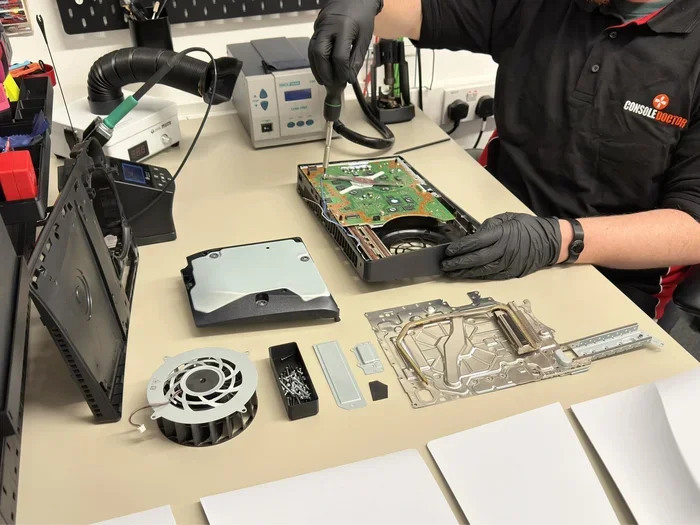
Hardware repairs address physical or mechanical problems inside your console. These are the big-ticket items that usually require opening the case. Some of the most common hardware issues PS5 owners face include:
- Disc drive failure: The Blu-ray drive stops reading discs or makes grinding noises. This is one of the most reported issues among PS5 users.
- Overheating problems: Your console shuts down unexpectedly or gets uncomfortably hot during regular use. Dust buildup and ventilation blockages often cause this.
- Power supply issues: The console will not turn on or keeps losing power mid-game. A faulty power supply unit can mimic other problems too.
- Motherboard defects: These are serious and often show up as the dreaded PS5 blue light warning. The system fails to boot properly and flashes a blue light instead of the usual white.
- Controller connection problems: Your DualSense controller disconnects randomly or stops responding altogether.
Software and System Repairs
Not every issue needs a screwdriver. Sometimes your console just needs a good software tune-up. This category includes:
- Fixing corrupted system files or update failures
- Resolving database errors that cause slow performance
- Reinstalling the system software
- Troubleshooting network and connectivity problems
- Fixing display output issues like no signal or resolution problems
Preventive Maintenance
You can also get your PS5 serviced proactively. This means cleaning dust from vents, checking internal temperatures, and replacing thermal paste. Think of it like an oil change for your car. It keeps things running smooth and prevents bigger problems down the road. Game console maintenance is often overlooked, but it makes a huge difference in longevity.
When Should You Get Your PS5 Serviced?
Knowing when to seek console servicing saves you time, money, and frustration. Ignoring small problems often leads to bigger, costlier repairs later. Here are clear signs your PS5 needs professional attention.
Warning Signs You Should Not Ignore
- The blue light of death: If your PS5 flashes a blue light and refuses to start, this signals a serious hardware fault. Stop using it immediately and seek service.
- Unexpected shutdowns: Your console keeps turning off during gameplay. This almost always points to overheating or a power issue.
- Disc drive problems: Discs get stuck, make scratching sounds, or simply will not load. Continuing to force disc use can damage the drive further.
- Audio and video glitches: Random crackling sounds, no audio output, or distorted visuals suggest internal connection issues.
- Slow loading and freezing: While sometimes software-related, persistent freezing can indicate a failing hard drive or corrupted system data.
- Physical damage: Drops, spills, or cracks definitely warrant professional inspection. Even if it still works, hidden damage can worsen over time.
Acting Fast Versus Waiting it Out
Here is honest advice. If your console shows minor glitches, try basic troubleshooting first. Restart it, update the software, clear the cache. But if the problem persists across multiple sessions, do not wait. Early intervention through PS5 hardware repair is almost always cheaper than replacing a completely fried console.
How to Get Your PS5 Serviced: Your Options
So you have decided your PS5 needs professional help. Great. Now the real question is, how do you actually get it serviced? You have several solid options, and each one has pros and cons. Let us break them down.
Option 1: Sony Official Support and Warranty Claims
This should be your first stop. Sony provides direct repair services and handles warranty claims for defective consoles. Here is how to get started:
- Visit the official Sony Support website for your region.
- Enter your PS5 serial number to check warranty status.
- Describe the problem and select a repair option.
- Sony will either mail you a repair kit, direct you to a service center, or arrange a pickup.
If your console is under warranty, Sony covers repair costs for manufacturing defects. The standard warranty lasts one year from purchase. Some regions offer extended coverage, so check your local Sony support page. PlayStation 5 repair through official channels ensures genuine parts and certified technicians handle your console.
Option 2: Authorized Service Centers
Sony partners with third-party service centers across the globe. These centers employ trained technicians who specialize in entertainment console repair. The advantage? They often have shorter wait times than shipping directly to Sony. You can find authorized centers through the Sony Support website by entering your postal code.
Option 3: Third-Party Repair Shops
Independent repair shops can fix your PS5 too. Many skilled technicians run local shops or online businesses dedicated to gaming console fixes. This route works well for out-of-warranty repairs or when Sony channels are backed up. However, always:
- Check reviews and ratings before handing over your console
- Ask about the parts they use (OEM versus aftermarket)
- Confirm whether they offer a warranty on their repairs
- Back up all your data before sending it in
Option 4: DIY Repairs
Some tech-savvy gamers handle repairs themselves. There are plenty of online guides, video tutorials, and replacement parts available. DIY gaming hardware fix works for issues like cleaning dust, replacing thermal paste, or swapping the hard drive. However, opening your PS5 voids the warranty, so proceed with caution. If you are not confident, leave it to the pros.
Cost of PS5 Repair and Servicing
Nobody likes surprise bills. Understanding potential PS5 repair cost upfront helps you plan and decide between repair and replacement. Costs vary widely depending on the issue and where you get it fixed.
Typical Repair Costs at a Glance
Let us look at approximate costs for common repairs. These figures can vary based on your location and service provider:
- Software troubleshooting and system restore: Often free if handled through Sony support. Some third-party shops may charge a small diagnostic fee.
- Disc drive replacement: Expect to pay between $80 and $150 at authorized centers. Independent shops may offer lower rates.
- Overheating and thermal paste replacement: Usually costs around $40 to $80, including cleaning and thermal paste application.
- Power supply repair: Typically ranges from $60 to $120 depending on the part needed.
- Motherboard repair: This is the priciest fix. Depending on damage extent, costs can reach $200 to $300 or more.
- Controller repair: Fixing a DualSense controller generally costs between $30 and $70.
Warranty Coverage and What It Saves You
If your PS5 is still under warranty, Sony covers the full cost of repairs for hardware defects. That means a disc drive replacement or motherboard fix that would otherwise cost hundreds of dollars becomes completely free. This alone is a strong reason to check your warranty status before spending a dime on third-party repairs.
Repair Versus Replace: Making the Smart Choice
A new PS5 currently retails for around $400 to $500 depending on the edition. If repair costs exceed half the price of a new console, consider replacement. But in most cases, professional servicing keeps your console running for a fraction of that cost.
How to Prepare Your PS5 Before Servicing
Once you have chosen your repair path, proper preparation protects your data, your console, and your sanity. Follow these steps before handing your PS5 over to anyone.
Back Up Your Data
This is the most important step. Servicing often involves resetting or replacing parts, which can erase your saved games, screenshots, and downloaded content. You can back up to:
- USB storage: Connect an external hard drive and copy your game saves through Settings, then System, then Backup and Restore.
- Cloud storage: If you have PlayStation Plus, your saves are automatically synced to the cloud.
- PSN account: Your purchased games and digital content remain tied to your account and can be re-downloaded anytime.
Deactivate Your PSN Account
Before sending your console for repair, deactivate your PlayStation Network account on that specific PS5. Go to Settings, then Account, then Security, and choose Deactivate PS5. This prevents anyone else from accessing your account on the repaired console and keeps your digital purchases safe.
Clean the Exterior
Give your console a quick wipe-down. Remove dust from vents using a soft cloth or compressed air. This does not replace internal cleaning, but it shows respect for the technician who will handle your system. It also prevents additional dirt from worsening during transport.
Document the Problem
Write down exactly what happens. When did the issue start? Does it happen every time or randomly? Any recent drops, power surges, or software updates? This information helps technicians diagnose faster and get your console back sooner.
Tips to Keep Your PS5 in Top Shape After Servicing
Getting your console repaired is only half the battle. Keeping it healthy afterward ensures you get the most out of your investment. Here are practical tips every PS5 owner should follow.
Keep It Ventilated
Your PS5 generates serious heat during gaming sessions. Place it in an open area with plenty of airflow. Never stuff it inside a closed cabinet or stack heavy objects on top of it. At least a few inches of space on every side makes a big difference in preventing overheating issues.
Clean Regularly
Dust is your console’s worst enemy. Use compressed air every few weeks to blow dust out of the vents. If you are comfortable, open the case every six months for a deeper clean. Keeping intake and exhaust vents clear maintains optimal airflow and internal temperatures.
Use a Surge Protector
Power surges can cause devastating damage to your console’s internal components. A quality surge protector provides a critical safety net. It is a small investment that protects a very expensive piece of equipment.
Keep Your Software Updated
Sony regularly releases system updates that fix bugs, patch security holes, and improve performance. Enable automatic updates so your console always runs the latest software. This simple habit prevents many common issues from ever occurring.
Handle with Care
This sounds obvious, but drops and impacts cause more console damage than people admit. When moving your PS5, hold it firmly and keep it level. Never yank cables out forcefully. Treat it like the valuable entertainment hub it is.
Monitor Performance Changes
Pay attention to subtle changes. Slower load times, louder fan noise, or occasional freezes are early warning signs. Addressing these quickly through console troubleshooting or professional service prevents catastrophic failure later.
Expert Insights on PS5 Servicing
We spoke with a certified PlayStation technician who shared some valuable perspective. Here is what they want every PS5 owner to know.
Most Repairs Are Preventable
“The majority of consoles we see need serious repair because of neglect,” the technician shared. “Simple habits like keeping vents clean and using a surge protector would prevent most problems we encounter daily.” This reinforces the idea that regular console maintenance saves significant money over the life of your console.
Do Not Ignore Software Issues
Many gamers treat software glitches as temporary. “A recurring software problem often points to failing hardware underneath,” the technician warned. “If a game consistently crashes or the system frequently freezes, get it checked before the problem escalates.”
Third-Party Repairs Can Be Reliable
Contrary to popular belief, independent repair shops often deliver excellent results. “As long as the technician uses quality parts and follows proper procedures, third-party repairs work just as well as official ones,” the expert noted. “The key is finding someone you trust.”
Key Takeaways
- Sony actively supports PS5 servicing: Whether through direct repair, warranty claims, or authorized centers, getting professional help is straightforward and accessible.
- Warranty protection is your safety net: Always check your warranty status first. Covered repairs cost nothing out of pocket for manufacturing defects.
- Repair costs are usually reasonable: Most common fixes fall well below the price of a brand-new console, making repair a smart financial choice.
- Preparation protects your data and privacy: Backing up saves and deactivating your PSN account before servicing prevents headaches later.
- Preventive maintenance extends console life: Regular cleaning, proper ventilation, and careful handling keep your PS5 running strong for years.
- Act early on warning signs: Quick action on overheating, disc drive issues, or blue light problems saves you from costlier repairs or total replacement.
Frequently Asked Questions
How long does PS5 repair usually take?
Most repairs take between one and three weeks depending on the issue and service provider. Sony’s official repair typically ships within three to five business days after they receive your console. Authorized centers often complete repairs faster since you drop off and pick up in person. Always ask for a timeline estimate before handing over your console.
Does Sony still repair PS5 consoles in 2024 and beyond?
Absolutely. Sony continues to provide full repair and support services for the PlayStation 5. Their commitment to the console includes hardware repairs, software troubleshooting, and warranty claims. As long as the PS5 remains their current-generation console, they will maintain support channels and authorized service centers to help owners.
Can I get my PS5 serviced if it is out of warranty?
Yes, you absolutely can. Out-of-warranty repairs are available through Sony directly, authorized service centers, and third-party repair shops. You will pay for parts and labor, but pricing is transparent. Sony provides repair quotes before proceeding, so you always know what you are paying for.
Is it safe to use a third-party repair shop for my PS5?
It can be safe if you choose a reputable shop with positive reviews and experience in gaming console repair. Check whether they use quality replacement parts, ask about warranties on their work, and confirm they handle Sony consoles regularly. Avoid random pop-up shops with no track record. A trusted independent technician can save you significant money compared to official channels.
What should I do if my PS5 shows the blue light of death?
Stop using the console immediately. The blue light of death typically indicates a serious hardware issue, often related to the motherboard or power supply. Try a full power cycle by unplugging the console, waiting at least 60 seconds, and plugging it back in. If the blue light persists, contact Sony Support or a repair professional. Do not attempt to open the console yourself, as this could worsen the damage.
How much does it cost to replace a PS5 disc drive?
A disc drive replacement generally costs between $80 and $150 at authorized service centers. Independent repair shops may offer slightly lower pricing. If your console is under warranty, Sony covers this repair at no cost to you since disc drive failure is a known hardware issue on some units. Always check warranty status before paying for this repair out of pocket.
Conclusion
So, can I get my PS5 serviced? The answer is a confident and resounding yes. Sony provides robust support through official repair channels, warranty claims, and authorized service centers. Independent shops offer reliable alternatives for out-of-warranty fixes. Whatever route you choose, the key is taking action early, preparing your console properly, and choosing trusted professionals.
Your PlayStation 5 represents a significant investment in entertainment and gaming. Treating it with care through regular maintenance, prompt attention to warning signs, and professional servicing when needed ensures years of reliable performance. Keep your data backed up, your vents clean, and your console updated. And when in doubt, reach out to Sony Support first.
We hope this guide gave you everything you need to confidently handle any PS5 issue. Bookmark it, share it with fellow gamers, and keep your console running at its best.