How Do Bluetooth Ceiling Speakers Get Power Easily
Bluetooth ceiling speakers get power through wired electrical connections, battery packs, or Power over Ethernet (PoE) systems. Understanding these power sources helps you choose the right setup for your home or office. This guide breaks down every method simply so you can install wireless audio with confidence.
Key Takeaways
- Wired Power: Most Bluetooth ceiling speakers plug directly into an electrical outlet or hardwire into your home’s electrical system.
- Battery-Powered Options: Some models run on rechargeable batteries, offering true wireless freedom without any cables.
- PoE Technology: Power over Ethernet delivers both data and electricity through a single cable, simplifying installation.
- Smart Integration: Many powered Bluetooth speakers work with smart home hubs for voice control and automation.
- Safety First: Always follow local electrical codes and consider professional installation for hardwired setups.
📑 Table of Contents
- How Bluetooth Ceiling Speakers Get Power
- Types of Power Sources for Bluetooth Ceiling Speakers
- How Bluetooth Connectivity Works with Powered Speakers
- Installing Power for Bluetooth Ceiling Speakers
- Common Power Issues and How to Fix Them
- Choosing the Right Power Option for Your Needs
- Expert Tips for Maximizing Speaker Power and Performance
- Final Thoughts
How Bluetooth Ceiling Speakers Get Power
Bluetooth ceiling speakers are everywhere now. You see them in restaurants, offices, and living rooms. But have you ever wondered how do Bluetooth ceiling speakers get power? It is a great question. Many people assume they run on magic. The truth is much simpler. These speakers need electricity to work, just like any other device. The difference is how they receive that power.
There are three main ways Bluetooth ceiling speakers get their energy. Some plug into wall outlets. Others use built-in batteries. A few clever models even pull power through Ethernet cables. Each method has its own benefits. Let us walk through them all so you can make the best choice for your space.
Bluetooth ceiling speakers combine wireless audio streaming with reliable power delivery. Whether you want music in your kitchen or background sound in a large office, knowing how they get power is the first step. This guide covers everything from basic wiring to advanced smart home setups. You will walk away with a clear picture of what works best for you.
Why Power Matters for Wireless Speakers
Bluetooth is a wireless technology. It sends audio signals through the air. But the speaker itself still needs power to play sound. Without electricity, a Bluetooth speaker is just a fancy paperweight. The power source determines where you can place the speaker. It also affects how long it plays and how easy it is to install.
Think of it this way. Your phone connects to Wi-Fi wirelessly. But it still needs a battery or a charger. Bluetooth ceiling speakers work the same way. The wireless connection handles audio. The power source handles everything else. Understanding this difference is key to a great setup.
Types of Power Sources for Bluetooth Ceiling Speakers
Not all Bluetooth ceiling speakers are created equal. Their power source shapes the entire experience. Here are the three main types you will encounter.
1. Hardwired Electrical Connection
This is the most common method. Many Bluetooth ceiling speakers connect directly to your home’s wiring. An electrician runs a dedicated circuit to the speaker location. The speaker then plugs into a junction box in the ceiling. This setup provides constant power. You never have to worry about the battery dying.
Hardwired speakers are ideal for whole-home audio systems. They work great in kitchens, living rooms, and home theaters. The trade-off is installation complexity. You will likely need a licensed electrician. And the speaker position is fixed once installed.
Most hardwired models run on standard 120V or 240V household current. Some use low-voltage wiring for added safety. Check your local building codes before starting any electrical work.
2. Battery-Powered Bluetooth Speakers
Battery-powered options are growing in popularity. These speakers contain rechargeable lithium-ion batteries inside the housing. They charge through a docking station or a USB cable. Once fully charged, they can play music for hours.
Battery-powered Bluetooth ceiling speakers offer true wireless freedom. You can place them anywhere without worrying about outlets. This makes them perfect for rentals or temporary setups. Many models last between 8 and 20 hours on a single charge.
The downside is maintenance. You must recharge the batteries regularly. Some models have removable batteries, which makes swapping easy. Others require pulling the speaker down for charging. Consider your lifestyle before choosing this option.
3. Power over Ethernet (PoE)
Power over Ethernet is a clever technology. It sends both data and electricity through a single Ethernet cable. PoE Bluetooth ceiling speakers are popular in commercial settings. They are also gaining traction in smart homes.
With PoE, you only need one cable run. That cable delivers internet connectivity and electrical power simultaneously. This dramatically simplifies installation. You do not need a nearby electrical outlet. The Ethernet switch or injector provides all the power the speaker needs.
PoE speakers are often used in offices, hotels, and large retail spaces. They are also great for multi-room audio systems. The main requirement is a PoE-compatible network switch or injector. These devices are affordable and widely available.
How Bluetooth Connectivity Works with Powered Speakers
Now that you know how speakers get power, let us talk about the Bluetooth side. The Bluetooth connection is what makes these speakers wireless for audio. But power and Bluetooth are two separate systems working together.
When you stream music from your phone, the audio travels as a digital signal. The Bluetooth chip inside the speaker receives this signal. The speaker’s amplifier then converts it into sound waves. All of this requires electricity. Without power, the Bluetooth chip cannot function.
Most modern Bluetooth ceiling speakers use Bluetooth 5.0 or newer. This version offers a longer range and stronger connection. You can stream music up to 30 feet or more without interruptions. The speaker still needs a steady power supply to maintain this connection.
Some speakers also support multipoint pairing. This means they can connect to two devices at once. Again, this feature demands consistent power. A weak or unstable power source can cause dropouts.
Does Bluetooth Drain Power Faster?
A common question is whether Bluetooth drains the battery faster. The short answer is yes. Bluetooth uses energy to maintain a wireless connection. However, modern chips are very efficient. The drain is minimal compared to the audio amplification process.
For hardwired speakers, this is not a concern. They draw power from the electrical grid. For battery-powered models, Bluetooth usage will reduce playtime. But most manufacturers account for this in their battery life estimates.
If you want to learn more about Bluetooth audio in general, check out Can I Play Radio Using Bluetooth for tips on getting the most from wireless audio.
Installing Power for Bluetooth Ceiling Speakers
Installation is where many people get stuck. The good news is that power setup does not have to be complicated. It depends entirely on the type of speaker you choose.
Hardwired Installation Steps
For hardwired Bluetooth ceiling speakers, the process goes like this:
- Plan your speaker locations. Mark the spots on the ceiling.
- Run electrical wiring from your breaker box to each location.
- Install an electrical junction box at each speaker location.
- Connect the speaker wiring to the junction box.
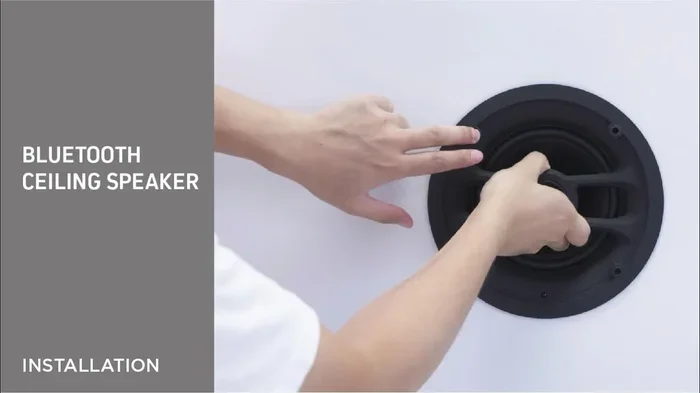
- Secure the speaker to the ceiling.
- Test the power connection and Bluetooth pairing.
This process works best during new construction or major renovations. Retrofitting an existing ceiling can be more challenging. You may need to fish wires through walls and ceilings.
Battery-Powered Installation Tips
Battery-powered speakers are much simpler. Here is what you need to do:
- Choose a mounting bracket that fits your ceiling type.
- Attach the bracket to the ceiling.
- Snap the speaker into the bracket.
- Charge the speaker fully before first use.
- Pair the speaker with your device via Bluetooth.
The entire process can take less than 30 minutes per speaker. No electrician is required. This is why battery-powered models are so popular for DIY projects.
PoE Installation Made Easy
PoE installation falls somewhere in between. You still need to run an Ethernet cable. But you do not need a separate power line. Here is the basic process:
- Run a Cat5e or Cat6 Ethernet cable from your router or switch.
- Connect the cable to the PoE switch or injector.
- Plug the other end into the speaker.
- The speaker powers on automatically.
- Pair the speaker with your Bluetooth source.
PoE is a clean and efficient solution. It reduces the number of cables you need to manage. For more on Ethernet and connectivity, you might also enjoy How Can I Connect My Computer to the Internet Without Cable.
Common Power Issues and How to Fix Them
Even with the best setup, power issues can happen. Here are the most common problems and their solutions.
Speaker Keeps Losing Power
If your Bluetooth ceiling speaker keeps turning off, check the power source first. For hardwired speakers, inspect the circuit breaker. A tripped breaker will cut power to the speaker. Reset it and see if the problem resolves.
For battery-powered models, the battery may be degrading. Rechargeable batteries lose capacity over time. If your speaker only lasts a few minutes, it is time for a new battery. Most manufacturers sell replacement batteries directly.
Bluetooth Keeps Cutting Out
Intermittent Bluetooth dropouts often point to a power issue. A weak power supply can cause the Bluetooth chip to malfunction. Check that the speaker is receiving stable voltage. If you are using a PoE setup, test the Ethernet cable for damage.
Distance also matters. If the speaker is too far from the source device, the signal weakens. Move closer and see if the connection improves.
Speaker Won’t Turn On At All
This is usually a power problem. For hardwired speakers, verify the junction box is live. Use a voltage tester to confirm power is reaching the speaker. For battery models, charge the speaker for at least two hours before trying again.
Still not working? The internal power supply may be faulty. Contact the manufacturer for warranty support. Most quality Bluetooth ceiling speakers come with at least a one-year warranty.
Choosing the Right Power Option for Your Needs
With so many options, how do you pick the right one? Consider these factors before you decide.
| Power Type | Best For | Installation Difficulty | Ongoing Maintenance |
|---|---|---|---|
| Hardwired | Permanent whole-home setups | Moderate to High | Very Low |
| Battery-Powered | Rentals, temporary setups, DIY | Low | Moderate (recharging) |
| PoE | Commercial spaces, multi-room systems | Moderate | Low |
Think about your long-term plans. If you are building a permanent home theater, hardwired is the way to go. If you rent an apartment, battery-powered speakers make more sense. For a smart office, PoE offers the cleanest solution.
Also consider the number of speakers. A multi-speaker setup is easier to manage with hardwired or PoE power. Battery-powered speakers require individual charging routines. This can become tedious with five or more units.
Can I Use Smart Home Integration with Powered Speakers?
Absolutely. Many Bluetooth ceiling speakers now support smart home ecosystems. You can pair them with Amazon Alexa, Google Assistant, or Apple HomeKit. Some models even replace your need for a separate smart speaker.
For example, you can use Alexa to control your ceiling speakers. Just ask Alexa to play music in a specific room. This works because the speakers have a constant power supply. They are always ready to receive commands. If you want to explore Bluetooth speaker options for your TV, check out Can I Use Alexa as a Bluetooth Speaker for My TV.
Expert Tips for Maximizing Speaker Power and Performance
Want to get the most out of your Bluetooth ceiling speakers? Follow these pro tips.
- Use a dedicated circuit. Hardwired speakers perform best on their own electrical circuit. This prevents power fluctuations from other appliances.
- Invest in a surge protector. Power surges can damage sensitive electronics. A surge protector adds a layer of defense.
- Keep firmware updated. Many Bluetooth speakers receive updates that improve power efficiency. Check the manufacturer’s app regularly.
- Place speakers strategically. Proper placement reduces the power needed to fill a room with sound. Avoid corners and tight spaces when possible.
- Charge batteries before they fully die. Lithium-ion batteries last longer when you top them off regularly. Avoid deep discharge cycles.
These small steps can extend the life of your speakers significantly. They also improve audio quality and connection stability.
Final Thoughts
Bluetooth ceiling speakers get power through three main methods: hardwired electrical connections, rechargeable batteries, and Power over Ethernet. Each option has clear advantages. Hardwired offers reliability and permanence. Battery-powered provides flexibility and easy installation. PoE delivers a clean, single-cable solution for modern spaces.
Your choice depends on your specific needs. Consider your budget, installation comfort level, and long-term plans. No matter which method you choose, understanding the power source is the foundation of a great audio experience. With the right setup, your Bluetooth ceiling speakers will deliver rich, wireless sound for years to come.
Take your time planning the power setup. Rushing through installation leads to problems later. Measure your spaces. Check your electrical capacity. And do not hesitate to hire a professional if the wiring feels beyond your skill level. A little effort upfront saves headaches down the road.
Frequently Asked Questions
Can Bluetooth ceiling speakers run without any wiring?
Yes, battery-powered Bluetooth ceiling speakers require no wiring at all. They run on rechargeable lithium-ion batteries that you charge using a USB cable or docking station. However, you will need to recharge them every several hours depending on usage and battery capacity.
How long do battery-powered Bluetooth ceiling speakers last on a single charge?
Most battery-powered models last between 8 and 20 hours on a full charge. The exact runtime depends on the speaker’s battery capacity and the volume level you use. Higher volumes drain the battery faster, while moderate listening extends playtime significantly.
Is it safe to install hardwired Bluetooth ceiling speakers myself?
If you have basic electrical knowledge, you can handle low-voltage installations safely. However, working with standard 120V household current requires a licensed electrician in most areas. Always check local building codes and prioritize safety above all else.
Can I use Power over Ethernet with any Bluetooth ceiling speaker?
No, not all Bluetooth ceiling speakers support PoE. You need to purchase a model specifically designed for Power over Ethernet. These speakers have a built-in PoE chip that draws power through the Ethernet cable. Check the product specifications before buying.
Do Bluetooth ceiling speakers use a lot of electricity?
Not at all. Most Bluetooth ceiling speakers are very energy efficient. A typical hardwired model uses between 10 and 30 watts. Battery-powered models are even more efficient since they are designed to maximize playtime per charge. Your electricity bill will barely notice them.
What should I do if my Bluetooth ceiling speaker won’t turn on?
Start by checking the power source. For hardwired speakers, test the junction box with a voltage tester. For battery models, charge the speaker for at least two hours. If neither works, the internal power supply may be defective. Contact the manufacturer for warranty support or replacement options.