How Can I Use Outdoor Camera Without Wifi Setup Guide
You can absolutely use an outdoor camera without wifi by choosing the right setup. Whether you opt for a battery-powered camera with SD card storage, a cellular-connected security camera, or a wired system that stores footage locally, there are proven methods to keep your property monitored. This guide walks you through every option step by step.
You want to protect your home, your garage, or your backyard. But your property is in a spot where wifi simply does not reach. Maybe you live in a rural area. Maybe the nearest router is too far away. Or maybe you just do not want to rely on an internet connection for your outdoor camera without wifi setup.
The good news is you have plenty of options. You do not need wifi to run a solid outdoor surveillance system. In fact, many homeowners and businesses use cameras that work entirely offline. This guide shows you exactly how to set up an outdoor camera without wifi and still get reliable security coverage.
Whether you are dealing with a detached garage, a remote shed, or a large backyard with no router nearby, there is a solution that fits. Let us break down every method so you can pick the best one for your situation.
Key Takeaways
- Battery-powered cameras with local storage let you monitor your property without any internet connection at all.
- Cellular trail cameras and 4G security cameras use mobile networks to send alerts and footage to your phone.
- Wired PoE and wired security camera systems store footage on a local NVR or SD card, completely bypassing wifi.
- Solar powered cameras offer long-term outdoor monitoring with zero need for electrical outlets or wifi.
- Offline security cameras still deliver motion detection, night vision, and real-time alerts through their own dedicated networks.
📑 Table of Contents
- Why You Might Need an Outdoor Camera Without Wifi
- Option 1: Battery-Powered Cameras with SD Card Storage
- Option 2: Cellular Security Cameras (4G LTE)
- Option 3: Wired PoE and Hardwired Camera Systems
- Option 4: Solar Powered Cameras for Off-Grid Monitoring
- How to Choose the Right Option for Your Needs
- Common Mistakes to Avoid
- Expert Tips for Maximizing Your Offline Camera Setup
- Final Thoughts
Why You Might Need an Outdoor Camera Without Wifi
Not every property has strong wireless security camera coverage. In fact, many homes struggle with dead zones in the backyard or far corners of the property. Here are the most common reasons people need a camera that works without wifi:
- Remote or rural properties where internet service is slow or unavailable.
- Detached structures like sheds, garages, or barns that are too far from the router.
- Privacy concerns — some homeowners prefer not to send footage to the cloud.
- Cost savings — avoiding a monthly internet plan just for security cameras.
- Unreliable internet — frequent outages make a wifi-dependent camera impractical.
No matter the reason, the goal is the same. You want local storage, reliable motion detection, and clear footage — even without an active internet connection. The right setup makes all of this possible.
Option 1: Battery-Powered Cameras with SD Card Storage
This is the simplest way to set up an outdoor camera without wifi. The camera runs on batteries and stores all footage directly onto an SD card. No internet required. No monthly fees. No router needed.
How It Works
These cameras detect motion using built-in sensors. When movement triggers the camera, it starts recording and saves the clip to the SD card right inside the device. You then remove the card, plug it into your computer, and review the footage. Some models even send alerts via Bluetooth to a nearby phone, though this range is limited.
Best Use Cases
- Backyard monitoring in areas with no router nearby.
- Vacation homes or rental properties where internet is not set up.
- Temporary setups like construction sites or event spaces.
- Trail cameras for wildlife or property boundary monitoring.
The biggest advantage is simplicity. You mount the camera, insert a battery and an SD card, and you are done. If you want to see how to manage your existing wifi setup around these cameras, you might find this guide on managing unwanted networks helpful for keeping your home network clean and organized.
Top Brands to Consider
- Reolink — Offers battery-powered models with excellent night vision.
- Blink — Known for easy setup and long battery life.
- NatureView — Great for trail camera applications.
- Eufy — Provides solid local storage without cloud dependence.
Quick Tip: Look for cameras that support microSD cards of 64GB or larger. This gives you several weeks of footage before you need to swap the card. Also, choose models with night vision and weather resistance rated IP65 or higher.
Option 2: Cellular Security Cameras (4G LTE)
If you want real-time alerts and remote viewing without wifi, a cellular security camera is your best bet. These cameras use a SIM card and a mobile data plan to connect to the internet through cell towers. You get the benefits of remote monitoring without needing a home wifi network.
How It Works
You insert a SIM card into the camera or into a hub connected to the camera. The camera connects to a 4G LTE network just like your phone does. When motion is detected, the camera sends a notification to your smartphone through the cellular network. You can then view live footage or recorded clips from anywhere with cell coverage.
What You Need
- A cellular-enabled outdoor camera (brands like Reolink Go, Blink Outdoor with cellular, or Arlo Go).
- A SIM card with a data plan (usually 1-5GB per month).
- A microSD card for local backup storage.
Cellular cameras are perfect for properties where wifi signals do not reach. They are also great for monitoring fences, gates, or remote areas of your yard. The trade-off is a small monthly data cost. But for many homeowners, the peace of mind is worth it.
If you are exploring ways to extend connectivity around your property, you might want to check how to boost your wifi signal outside as a complementary strategy for areas closer to your home.
Pros and Cons of Cellular Cameras
| Pros | Cons |
|---|---|
| Works anywhere with cell coverage | Requires a monthly data plan |
| Real-time alerts and remote viewing | Slightly higher upfront cost |
| No dependency on home wifi | Data usage adds up with frequent clips |
| Easy to install — no wiring needed | Signal strength varies by location |
Option 3: Wired PoE and Hardwired Camera Systems
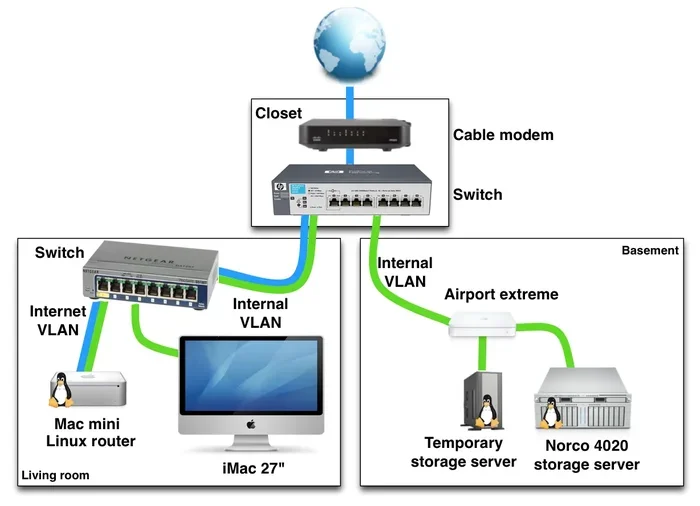
If you want the most reliable outdoor surveillance without wifi, consider a wired system. Power over Ethernet (PoE) cameras use a single cable for both power and data. They connect directly to a recorder or a local network switch — no wifi needed.
How It Works
A PoE camera connects to a PoE switch or NVR (Network Video Recorder) using an Ethernet cable. The NVR stores all footage on a hard drive right on your property. You can view live feeds on a connected monitor or access them through the NVR’s interface. The entire system operates on its own local network — completely offline.
Why Choose Wired Over Wireless
- More reliable connection — no signal drops or interference.
- Better video quality — wired connections support higher resolution streams.
- No wifi password to manage — the system runs independently.
- Longer range — Ethernet cables can run up to 300 feet with a repeater.
- More secure — a closed local network is harder to hack than a wifi stream.
One thing to keep in mind: you will need to run cables from your cameras to the NVR or switch. This means some planning and possibly drilling holes or using cable channels. But the result is a rock-solid wired security camera system that works 24/7 without any internet at all.
If you are thinking about connecting devices directly without a router, you can learn more about connecting devices straight to a modem for a similar direct-connection approach.
Setting Up a PoE System Step by Step
- Choose your PoE cameras based on the areas you want to cover.
- Install a PoE switch or NVR in a secure indoor location.
- Run Ethernet cables from each camera to the switch or NVR.
- Connect the NVR to a local monitor for live viewing.
- Configure motion detection zones and recording schedules.
- Insert storage drives into the NVR for local footage saving.
Expert Insight: Many homeowners assume they need an internet connection to view their camera footage remotely. With a PoE system and a local NVR, you can view live feeds on any device connected to the same local network. Some NVRs even offer remote viewing through a VPN, which keeps your footage secure and private without relying on cloud services.
Option 4: Solar Powered Cameras for Off-Grid Monitoring
For truly remote locations, a solar powered camera eliminates the need for any power outlet or wifi connection. These cameras combine battery power with a small solar panel, giving you continuous monitoring without manual battery swaps.
Who Benefits Most
- Farmers and ranchers monitoring large acreage.
- Property owners with cabins or remote lots.
- Wildlife watchers tracking animals on their land.
- Campers and RV owners securing their vehicles.
A solar powered camera charges its battery during the day and uses stored power at night. Most models come with infrared night vision and motion-activated recording. Footage is saved to an SD card on the device, so you can check it whenever you visit.
These cameras are especially useful when you want to extend monitoring to areas like a backyard shed or detached garage. If you are looking for ways to power other outdoor devices in similar locations, you might also explore adding connectivity to your garage door opener for a fully integrated outdoor setup.
How to Choose the Right Option for Your Needs
Not sure which outdoor camera without wifi solution fits your situation? Here is a quick comparison to help you decide:
| Factor | Battery + SD Card | Cellular (4G) | Wired PoE | Solar Powered |
|---|---|---|---|---|
| Internet Required | No | No (uses cell data) | No | No |
| Remote Viewing | No | Yes | Yes (local network) | No |
| Monthly Cost | None | Data plan ($5-15/mo) | None | None |
| Installation | Very easy | Easy | Moderate | Easy |
| Battery Maintenance | Recharge or replace | Recharge or replace | None (powered by cable) | Self-charging |
| Best For | Simple monitoring | Remote properties | Full-time coverage | Off-grid locations |
Think about your priorities. If you want zero ongoing costs, go with a battery-powered camera and SD card. If you need remote access from anywhere, a cellular camera is the way to go. If you want professional-grade reliability, invest in a wired PoE system.
Common Mistakes to Avoid
Setting up an outdoor camera without wifi is straightforward, but there are a few pitfalls to watch out for:
- Forgetting weatherproofing. Even cameras rated for outdoor use need proper mounting to avoid water damage. Make sure the installation point has some shelter.
- Using the wrong SD card. Not all SD cards handle continuous writing well. Look for high-endurance microSD cards rated for surveillance use.
- Placing the camera too high. If the camera is mounted too high, facial recognition becomes difficult. Aim for 7-9 feet above ground level.
- Ignoring battery life. Cold weather drains batteries faster. If you live in a northern climate, choose cold-weather rated models.
- Not testing motion zones. Take time to configure motion detection zones properly. Otherwise, you will get too many false alerts from passing cars or animals.
Quick Tip: Before you mount anything, walk the perimeter of your property at different times of day. Note where shadows fall, where foot traffic is heaviest, and where you need coverage most. This planning step saves time and frustration later.
Expert Tips for Maximizing Your Offline Camera Setup
Once your outdoor camera without wifi is installed, a few extra steps will help you get the most out of it:
- Label your SD cards. If you have multiple cameras, label each card with the camera location. This makes reviewing footage much faster.
- Set up a regular review schedule. Even if you are not getting alerts, check your footage weekly. This helps you spot patterns and catch issues early.
- Use a card reader. Plugging an SD card directly into your computer is faster and more reliable than removing the card from the camera and using a phone adapter.
- Combine methods for full coverage. Use a cellular camera at the gate and a battery-powered camera at the back door. This gives you layered home security without relying on any single technology.
- Keep spare batteries on hand. Nothing is worse than discovering your camera was off during an incident because the battery died.
If you are also interested in viewing your camera’s feed on a television for real-time monitoring, check out how to connect your Wi Fi directly to your TV — many of these techniques apply even in offline setups with the right adapters.
Final Thoughts
Setting up an outdoor camera without wifi is easier than most people think. You have battery-powered options with SD card storage, cellular cameras that use mobile networks, wired PoE systems for permanent installations, and solar powered cameras for off-grid locations. Each option gives you reliable outdoor surveillance without depending on a home internet connection.
The key is matching your setup to your needs. If you just want basic recording, a battery-powered camera with an SD card is all you need. If you want remote access, go cellular. If you want full-time professional coverage, invest in a wired system. And if you are off the grid entirely, solar power keeps everything running.
Whatever route you choose, you are taking an important step toward protecting your property. Outdoor security does not require wifi. It just requires the right camera, the right storage, and a solid installation plan. Start with one camera, test it out, and expand from there. You will be glad you did.
Frequently Asked Questions
Can I use a regular outdoor camera without wifi?
Yes, but only if the camera supports local storage like an SD card. Many modern cameras are designed to work with a router, but battery-powered models with SD card slots can record footage entirely offline. You just need to remove the card periodically to review your clips.
Do cellular security cameras work without any internet at home?
Yes. Cellular cameras use a mobile data network through a SIM card, not your home wifi. As long as there is cell tower coverage near your property, the camera can send alerts and stream footage to your phone. The camera itself does not need your home internet to function.
How long do battery-powered outdoor cameras last without wifi?
Most battery-powered cameras last between 2 and 6 months on a single charge, depending on how often motion triggers recordings. Models with solar panels can run indefinitely without needing a recharge. Cold weather and frequent alerts will drain the battery faster.
Can I view my offline camera footage on my phone?
It depends on the camera type. Battery and solar cameras usually require you to remove the SD card and view footage on a computer. Cellular cameras can send clips directly to your phone through the mobile network. Wired PoE systems allow local network viewing if your phone is connected to the same switch.
Are offline outdoor cameras less secure than wifi cameras?
Not necessarily. In fact, offline cameras can be more secure because they do not transmit data over the internet, which reduces the risk of hacking. A closed local network or SD card storage keeps your footage private and within your control.
What is the cheapest way to set up an outdoor camera without wifi?
A battery-powered trail camera or basic wireless security camera with an SD card is the most affordable option. These cameras cost between $30 and $80, require no monthly fees, and need no internet connection. They are perfect for simple backyard or property monitoring.