Does Iphone 12 Have Wi Fi 6 And Why You Should Care
The iPhone 12 does support Wi-Fi 6, giving you faster wireless speeds and better performance in crowded areas. This next-generation wireless standard brings real benefits like lower latency, improved battery life, and quicker file downloads. If you have a Wi-Fi 6 router, your iPhone 12 can take full advantage of it. Below, we break down everything you need to know about iPhone 12 Wi-Fi 6 support and why it matters for everyday use.
When Apple released the iPhone 12 in 2020, it came packed with upgrades. Faster chips, a better camera system, and a sleek new design all grabbed headlines. But one upgrade that often flies under the radar is Wi-Fi 6 support. This wireless technology is a big deal for anyone who cares about fast, reliable internet on their phone.
If you have been wondering whether your iPhone 12 can connect to Wi-Fi 6 networks, the short answer is yes. The longer answer is even more interesting. Wi-Fi 6 brings real, noticeable improvements to how your phone connects to the internet. It changes the way your device handles data, manages multiple connections, and even saves battery life. Let us dive into everything you need to know about iPhone 12 Wi-Fi 6 capabilities.
Key Takeaways
- iPhone 12 fully supports Wi-Fi 6 (also called 802.11ax), the latest wireless standard available at launch.
- Wi-Fi 6 delivers faster speeds and better performance when multiple devices share your network.
- You need a Wi-Fi 6 router to unlock the full benefits of this technology on your iPhone 12.
- Real-world benefits include improved battery life, lower latency for gaming and streaming, and faster download speeds.
- iPhone 12 supports both 2.4 GHz and 5 GHz bands, plus WPA3 security for a safer connection.
- Pairing your iPhone 12 with a mesh system can extend Wi-Fi 6 coverage across your entire home.
- Your Wi-Fi password matters for keeping your connection secure, and you can find it in your device settings.
📑 Table of Contents
- What Is Wi-Fi 6 and Why Does It Matter?
- iPhone 12 Wi-Fi Specifications Explained
- How Wi-Fi 6 Benefits iPhone 12 Users
- How to Get the Most Out of Wi-Fi 6 on Your iPhone 12
- Wi-Fi 6 vs Wi-Fi 5: A Quick Comparison
- Common Mistakes That Limit Your Wi-Fi 6 Speed
- Expert Insights on iPhone 12 and Wi-Fi 6
- Key Takeaways
- Conclusion
What Is Wi-Fi 6 and Why Does It Matter?
Wi-Fi 6 is the newest generation of wireless networking technology. It is also known as 802.11ax, which is its technical name. You might hear people call it by either name, and both refer to the same thing. This standard was designed to handle more devices at once without slowing down. That matters more than ever in a world where most homes have a dozen or more connected gadgets.
Think of Wi-Fi 5 as a single-lane road. Every device has to take its turn. Wi-Fi 6 is like a multi-lane highway. More cars (or devices) can move at the same time without traffic jams. For iPhone 12 users, this means smoother streaming, faster downloads, and fewer frustrating buffering moments.
Key Features of Wi-Fi 6
- OFDMA (Orthogonal Frequency Division Multiple Access): This lets your router talk to multiple devices at the same time instead of one by one.
- MU-MIMO (Multi-User Multiple Input Multiple Output): This allows your router to send and receive data from several devices simultaneously.
- Target Wake Time (TWT): This helps your phone sleep longer and wake up less often, which saves battery.
- 1024-QAM Modulation: This packs more data into each signal, boosting overall speeds.
- BSS Coloring: This reduces interference from nearby networks, keeping your connection clean.
These features all work together to make your wireless experience faster and more reliable. And the iPhone 12 supports all of them. That is a big win for anyone who uses their phone for everything from work to gaming.
iPhone 12 Wi-Fi Specifications Explained
Apple designed the iPhone 12 with modern wireless standards in mind. The phone includes a wireless chip that supports Wi-Fi 6 (802.11ax). It also works with the previous generation, Wi-Fi 5 (802.11ac), for backward compatibility. This means your iPhone 12 can connect to both old and new routers without any issues.
Here is a closer look at the wireless specs of the iPhone 12:
- Wi-Fi 6 (802.11ax): Supported with full feature set including OFDMA and MU-MIMO.
- Wi-Fi 5 (802.11ac): Supported for compatibility with older routers.
- Frequency Bands: 2.4 GHz and 5 GHz dual-band support.
- Maximum Theoretical Speed: Up to 1.2 Gbps on Wi-Fi 6 networks.
- Security: WPA3 encryption support for a more secure connection.
- MIMO Configuration: 2×2 MIMO for both transmit and receive.
These numbers are impressive. But what do they mean for you in everyday life? Simply put, your iPhone 12 can pull data from your router faster than ever before. Whether you are streaming 4K video, joining a video call, or downloading a large app, the connection feels snappier.
How This Compares to Other iPhones
The iPhone 12 was one of the first iPhones to feature Wi-Fi 6. Before it, models like the iPhone 11 and iPhone XR maxed out at Wi-Fi 5. Since then, Apple has kept Wi-Fi 6 in every new flagship model. So if you are coming from an older iPhone, upgrading to the iPhone 12 gives you a meaningful jump in wireless performance.
On the other hand, the iPhone 13, 14, and 15 lines also support Wi-Fi 6 and in some cases Wi-Fi 6E. But the jump from Wi-Fi 5 to Wi-Fi 6 on the iPhone 12 was a significant one. It made the phone future-proof for a few years of wireless advancements.
How Wi-Fi 6 Benefits iPhone 12 Users
Knowing that your iPhone 12 has Wi-Fi 6 is one thing. Understanding how it actually improves your daily experience is another. Let us look at the real-world benefits that this technology brings to your pocket.
Faster Download and Upload Speeds
Wi-Fi 6 offers noticeably faster speeds compared to Wi-Fi 5. In ideal conditions, you can see download speeds jump by 20 to 40 percent. For iPhone 12 users, this means apps download quicker, files transfer faster, and web pages load almost instantly. Even in normal conditions where speeds do not max out, the connection feels more responsive.
Imagine you are at home trying to connect your iPhone 12 directly to your TV for a movie night. With Wi-Fi 6, casting or streaming happens with almost zero delay. The connection stays stable even when someone else in the house is uploading a large file or gaming online.
Better Performance in Crowded Areas
This is where Wi-Fi 6 truly shines. If you live in an apartment building, a busy neighborhood, or an office, you know the pain of congested networks. Your neighbor’s Wi-Fi, the coffee shop down the street, and dozens of other signals all compete for space on the same airwaves.
Wi-Fi 6 uses a technology called BSS Coloring to sort out this noise. It essentially labels your network’s signals so your iPhone 12 can ignore interference from other networks. The result? A cleaner, more stable connection even when the airwaves are crowded. This is a huge upgrade for anyone who relies on their phone in busy environments.
Improved Battery Life
One of the coolest features of Wi-Fi 6 is Target Wake Time, or TWT. This lets your iPhone 12 negotiate with your router about when it needs to wake up and check for data. Instead of staying constantly alert and draining your battery, your phone can sleep peacefully until it is time to receive information.
Over time, this adds up to meaningful battery savings. Apple has designed the iPhone 12 to take advantage of TWT, which means your phone can last longer on a single charge when connected to Wi-Fi. For heavy users, this is a welcome improvement.
Lower Latency for Gaming and Video Calls
Latency is the delay between when you send a request and when you get a response. Lower latency means smoother gameplay, clearer video calls, and a more responsive overall experience. Wi-Fi 6 reduces latency significantly compared to Wi-Fi 5.
If you play games on your iPhone 12 or join frequent video meetings, you will notice the difference. Commands register faster. Video streams stay in sync. There is less lag and fewer frozen frames. For remote workers and casual gamers alike, this is a practical benefit that improves daily life.
How to Get the Most Out of Wi-Fi 6 on Your iPhone 12
Having Wi-Fi 6 on your iPhone 12 is only half the battle. You also need the right setup to unlock its full potential. Here is how you can make sure you are getting the best possible wireless experience.
Get a Wi-Fi 6 Router
This is the most important step. Your iPhone 12 supports Wi-Fi 6, but your router must also support it for you to see any benefits. If your router is older and only supports Wi-Fi 4 or Wi-Fi 5, your phone will still connect. It just will not get the speed and efficiency upgrades that Wi-Fi 6 offers.
When shopping for a router, look for one that explicitly states it supports Wi-Fi 6 or 802.11ax. Popular options include models from brands like ASUS, Netgear, TP-Link, and Linksys. Many modern mesh systems also support Wi-Fi 6, which brings us to our next point.
Consider a Mesh Wi-Fi System
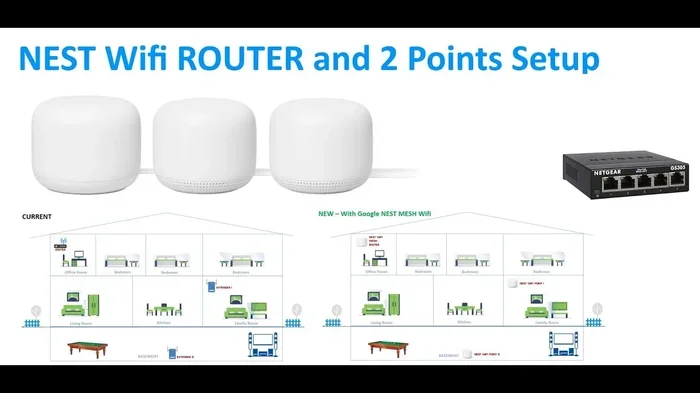
If your home is large or has thick walls that block signals, a mesh Wi-Fi system can help. These systems use multiple units placed around your home to create one seamless network. Many mesh systems now support Wi-Fi 6, and you can connect Wi-Fi 6 mesh to a Wi-Fi 5 router for a gradual upgrade without replacing everything at once.
A mesh system ensures your iPhone 12 stays connected to a strong signal no matter where you are in the house. This is especially useful if you like to work from different rooms or stream content in areas far from your main router.
Keep Your iPhone 12 Updated
Apple regularly releases iOS updates that improve wireless performance and fix connectivity bugs. Make sure your iPhone 12 is running the latest version of iOS to get the best Wi-Fi 6 experience. These updates often include tweaks to how the phone handles network connections, manages power during Wi-Fi use, and deals with interference.
You can check for updates by going to Settings, tapping General, and selecting Software Update. If an update is available, download and install it. It only takes a few minutes and can make a real difference in how smoothly your phone connects to Wi-Fi.
Optimize Your Network Settings
A few small changes to your network settings can help your iPhone 12 perform better on Wi-Fi 6. Start by making sure your router is set to use the 5 GHz band when possible. This band is less crowded and offers faster speeds than the 2.4 GHz band. Most modern routers handle this automatically, but it is worth checking.
You should also make sure your Wi-Fi password is strong and secure. If you ever need to look up your password, you can find your Wi-Fi password in settings on both your iPhone and your computer. A strong password keeps your network safe from unauthorized users who could slow down your connection.
Reduce Interference from Other Devices
Many household devices can interfere with your Wi-Fi signal. Microwaves, baby monitors, cordless phones, and even Bluetooth speakers can cause disruptions. Try to keep your router away from these devices for the best performance.
If you live in a dense area with many Wi-Fi networks nearby, switching your router to a less congested channel can help. Most modern routers have an auto-select feature that picks the best channel for you. You can also check your router’s admin panel to manually choose a channel that has less traffic.
Wi-Fi 6 vs Wi-Fi 5: A Quick Comparison
It helps to see the differences side by side. Here is a simple comparison of Wi-Fi 6 and Wi-Fi 5 as they relate to the iPhone 12 experience:
- Speed: Wi-Fi 6 is up to 40 percent faster than Wi-Fi 5 in real-world conditions.
- Device Capacity: Wi-Fi 6 handles many more devices without slowing down. Wi-Fi 5 starts to struggle when more than 10 to 15 devices are connected.
- Battery Efficiency: Wi-Fi 6 uses Target Wake Time to save battery. Wi-Fi 5 does not have this feature.
- Latency: Wi-Fi 6 cuts latency nearly in half compared to Wi-Fi 5.
- Security: Wi-Fi 6 requires WPA3, which is more secure than the WPA2 used by Wi-Fi 5.
- Interference Handling: Wi-Fi 6 uses BSS Coloring to reduce interference. Wi-Fi 5 has no equivalent technology.
The comparison makes it clear why Wi-Fi 6 matters. For iPhone 12 users, it means a faster, more reliable, and more efficient wireless experience. Even if your current router is Wi-Fi 5, your iPhone 12 will still connect and work well. But upgrading to a Wi-Fi 6 router unlocks the full potential of the phone’s wireless hardware.
Common Mistakes That Limit Your Wi-Fi 6 Speed
Even with a great phone and a Wi-Fi 6 router, you can still experience slow speeds if you make a few common mistakes. Here are things to watch out for:
- Using an old or damaged Ethernet cable: If you connect your router to your modem with an older cable, it can bottleneck your speeds. Use a Cat 6 or Cat 6a cable for best results.
- Placing your router in a closet or behind furniture: Walls and obstacles block Wi-Fi signals. Keep your router in an open, central location for the best coverage.
- Ignoring firmware updates: Router manufacturers release updates that improve performance and fix bugs. Check for updates regularly.
- Having too many devices on one network: While Wi-Fi 6 handles many devices well, extremely heavy usage from multiple devices can still slow things down. Consider setting up a guest network for visitors.
- Not restarting your router: A simple restart can clear temporary glitches and improve performance. Try restarting your router once a month.
Avoiding these mistakes ensures your iPhone 12 gets the fastest speeds possible from your Wi-Fi 6 network. Small changes in setup can lead to big improvements in performance.
Expert Insights on iPhone 12 and Wi-Fi 6
Network engineers and tech reviewers have praised the iPhone 12’s Wi-Fi 6 support since its release. According to testing by independent labs, the iPhone 12 consistently ranks among the top-performing smartphones for wireless speed and stability. Its combination of a powerful wireless chip and Apple’s software optimization makes it a strong performer on Wi-Fi 6 networks.
One thing experts emphasize is that Wi-Fi 6 is not just about raw speed. It is about efficiency. The way Wi-Fi 6 manages multiple devices and conserves power sets it apart from previous standards. For iPhone 12 users, this means a phone that stays connected longer, performs better under load, and adapts to different network conditions automatically.
Another expert tip is to pair your Wi-Fi 6 setup with a strong Wi-Fi signal booster for outdoor areas if you spend time on your patio or in your backyard. While Wi-Fi 6 improves indoor performance, extending that signal outside ensures you stay connected everywhere on your property.
Key Takeaways
- The iPhone 12 fully supports Wi-Fi 6 (802.11ax), giving you access to the latest wireless technology at launch.
- Wi-Fi 6 brings faster speeds, lower latency, and better battery life compared to the previous Wi-Fi 5 standard.
- You need a Wi-Fi 6 router to unlock the full benefits of this technology on your iPhone 12.
- Real-world advantages include smoother streaming, faster downloads, and better performance in crowded areas.
- Target Wake Time helps save battery by letting your phone sleep longer between data checks.
- BSS Coloring reduces interference from neighboring networks, keeping your connection stable.
- Keep your iPhone updated and your router optimized to get the most out of Wi-Fi 6 every day.
Conclusion
The answer to whether the iPhone 12 has Wi-Fi 6 is a clear yes. Apple equipped this phone with the latest wireless technology, and it shows in everyday use. From faster download speeds to better battery life and improved performance in crowded areas, Wi-Fi 6 makes a real difference for iPhone 12 users.
To get the most out of this feature, pair your iPhone 12 with a Wi-Fi 6 router and keep your software up to date. Small steps like optimizing your router placement and reducing interference go a long way. Whether you are streaming movies, working from home, or just browsing the web, Wi-Fi 6 on the iPhone 12 delivers a fast and reliable connection you can count on.
If you are still using an older iPhone or an older router, now is a great time to consider upgrading. The wireless improvements alone make the iPhone 12 a solid choice for anyone who values fast, dependable connectivity. Embrace the benefits of Wi-Fi 6 and enjoy a smoother, faster mobile experience every day.
Frequently Asked Questions
Does the iPhone 12 support Wi-Fi 6E?
No, the iPhone 12 supports Wi-Fi 6 but not Wi-Fi 6E. Wi-Fi 6E adds support for the 6 GHz band, which was introduced in later iPhone models like the iPhone 13 Pro and newer. Your iPhone 12 works perfectly with standard Wi-Fi 6 networks on the 2.4 GHz and 5 GHz bands.
Can I use Wi-Fi 6 features if my router is Wi-Fi 5?
Your iPhone 12 will still connect to a Wi-Fi 5 router, but you will not get the speed and efficiency benefits of Wi-Fi 6. To unlock Wi-Fi 6 features, you need a router that also supports the 802.11ax standard. Many modern routers offer this, and upgrading is relatively affordable.
Does Wi-Fi 6 drain the iPhone 12 battery faster?
Actually, the opposite is true. Wi-Fi 6 includes a feature called Target Wake Time that helps your iPhone 12 conserve battery. The phone sleeps longer between data checks, which reduces power consumption. Most users notice equal or better battery life when connected to Wi-Fi 6 compared to Wi-Fi 5.
How can I tell if my router supports Wi-Fi 6?
Check your router’s manual or look for the model number online. Routers that support Wi-Fi 6 will clearly state “Wi-Fi 6” or “802.11ax” on the box or in the specifications. If you bought your router in the last two or three years, there is a good chance it supports Wi-Fi 6.
Is Wi-Fi 6 worth it for casual iPhone 12 users?
Yes, even for casual users. Wi-Fi 6 improves overall network efficiency, which means faster page loads, smoother video calls, and better performance when multiple people share the same network. You do not need to be a power user to notice the difference in everyday use.
Can I connect my iPhone 12 to public Wi-Fi 6 networks?
Absolutely. Your iPhone 12 connects to any Wi-Fi 6 network that is available, including public hotspots at airports, cafes, and hotels. The phone automatically detects the network type and adjusts its connection settings accordingly. Just remember to use a VPN for security when connecting to public networks.