Is A Wifi Extender Or A Wifi Booster Better For You
Choosing between a wifi extender or a wifi booster depends on your home size, internet needs, and budget. A wifi extender rebroadcasts your existing signal to reach dead zones, while a wifi booster amplifies the original signal for stronger coverage. Both solve weak WiFi problems, but they work in different ways and suit different situations.
Do you have spots in your home where the WiFi signal just disappears? You try to watch a video, and it buffers endlessly. You hop on a video call, and your screen freezes mid-sentence. It is frustrating, and you are not alone. Millions of people deal with weak WiFi every single day.
The first thing most people search for is a fix. And two terms pop up again and again: wifi extender and wifi booster. They sound like the same thing, right? But they are not. Understanding the difference can save you money, time, and a lot of headaches.
This guide walks you through everything you need to know. We will compare both options, explain how they work, and help you decide which one fits your home best. By the end, you will know exactly what to buy and where to put it.
Key Takeaways
- WiFi extenders rebroadcast your existing signal: They create a second access point to fill coverage gaps.
- WiFi boosters amplify the original signal: They strengthen the signal before it reaches your devices.
- Your home size matters most: Small apartments may need neither, while large homes often benefit from one.
- Mesh networks are a modern alternative: They offer seamless coverage without the quirks of extenders or boosters.
- Placement is critical: Even the best device won’t help if you put it in the wrong spot.
- Budget plays a role: Extenders are usually cheaper, but boosters and mesh systems offer better performance.
- Test your signal first: Always check your WiFi strength before buying any device.
📑 Table of Contents
- What Is A WiFi Extender And How Does It Work?
- What Is A WiFi Booster And How Does It Work?
- WiFi Extender Vs WiFi Booster: Side-By-Side Comparison
- When Should You Choose A WiFi Extender?
- When Should You Choose A WiFi Booster?
- Common Mistakes People Make With WiFi Extenders And Boosters
- Expert Tips To Maximize Your WiFi Coverage
- Final Thoughts: Which One Is Right For You?
What Is A WiFi Extender And How Does It Work?
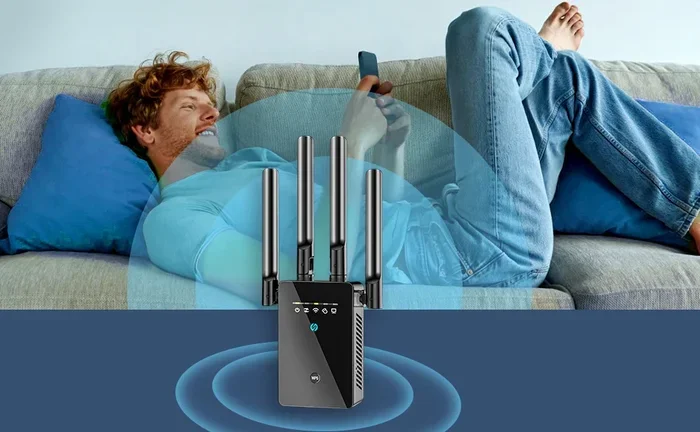
A wifi extender is a device that sits between your router and the areas of your home with weak signal. It receives the existing WiFi signal from your router and then rebroadcasts it. Think of it like a relay runner passing a baton. The extender picks up the signal and hands it off to a new coverage area.
Most extenders connect to your router wirelessly. You plug them into a wall outlet, usually halfway between your router and the dead zone. The device then creates a new network name, often with “_EXT” added to the original name.
How Extenders Handle Signal Strength
Here is how a typical setup works. Your router sends out a WiFi signal. The extender picks up that signal. Then it rebroadcasts it to the far corners of your house. The result is a wider coverage area.
But there is a catch. Because the extender has to receive and then retransmit the signal, it often cuts your bandwidth in half. This means your internet speed may drop. For basic browsing and email, this usually does not matter. But for heavy streaming or online gaming, you might notice a slowdown.
Types Of WiFi Extenders
Not all extenders are the same. Here are the most common types you will find on the market:
- Plug-in extenders: Small devices that plug directly into a wall outlet. They are compact and easy to move around.
- Desktop extenders: Larger units that sit on a desk or shelf. They often have better antennas and stronger signal range.
- PoE extenders: Power-over-Ethernet extenders that use a wired connection for more stable performance.
Each type has its strengths. Plug-in models are great for small spaces. Desktop models work well in larger homes. PoE extenders are ideal for serious setups where stability matters most.
What Is A WiFi Booster And How Does It Work?
A wifi booster takes a different approach. Instead of rebroadcasting an existing signal, it amplifies the signal your router already sends. It boosts the signal strength before it travels through your home. This means the signal reaches farther and maintains better quality.
The term “booster” is sometimes used loosely in marketing. Some companies use it to describe any device that improves WiFi. But a true booster works at the signal level. It strengthens the radio frequency output from your router or access point.
How Boosters Improve Coverage
A wifi booster connects to your router, either wirelessly or through a cable. It then amplifies the outgoing signal. This gives you a stronger, more reliable connection in areas that normally struggle.
Because the signal is boosted rather than rebroadcast, you typically experience less speed loss compared to an extender. The data does not need to be received and retransmitted. It simply gets amplified on its way out.
Boosters also tend to maintain a single network name. Your devices do not need to switch between networks as you move around the house. This creates a smoother experience overall.
Booster vs. Repeater: What People Confuse Them With
Many people use the words booster, repeater, and extender interchangeably. But they are different. A repeater receives and retransmits the signal, much like an extender. A booster strengthens the original signal. Understanding this distinction helps you choose the right device for your needs.
If you want minimal speed loss, look for a booster or a modern mesh system. If you just need basic coverage in a small area, a repeater or extender may be enough.
WiFi Extender Vs WiFi Booster: Side-By-Side Comparison
So how do you choose between a wifi extender or a wifi booster? Let us break it down with a direct comparison.
| Feature | WiFi Extender | WiFi Booster |
|---|---|---|
| How It Works | Rebroadcasts existing signal | Amplifies original signal |
| Speed Impact | Moderate to high speed loss | Minimal speed loss |
| Network Name | Usually creates a new network | Maintains original network name |
| Setup Difficulty | Easy, plug-and-play | Moderate, may need configuration |
| Best For | Filling small dead zones | Larger homes with weak signal |
| Price Range | $20 – $80 | $50 – $200 |
| Device Handoff | Devices may switch networks | Seamless single network |
| Bandwidth Usage | Uses more bandwidth | Uses less bandwidth |
As you can see, each option has clear advantages. The right choice depends on your specific situation. Let us look at when each one makes the most sense.
When Should You Choose A WiFi Extender?
A wifi extender works best in certain scenarios. If any of these sound familiar, an extender might be your best bet.
You Have Small Dead Zones
Maybe your bedroom gets a weak signal, but the rest of your house is fine. An extender placed halfway between your router and the bedroom can solve this quickly. It is a simple, affordable fix for a common problem.
You Are On A Tight Budget
Extenders are generally cheaper than boosters or mesh systems. If you do not want to spend a lot of money, a basic plug-in extender can do the job. You will find solid options for under $50 at most retailers.
You Only Need Basic Coverage
If your main goal is checking email, browsing the web, or light streaming, an extender handles these tasks well. You do not need top-tier performance for everyday tasks. A budget extender gets the job done.
Your Home Has Simple Layout
Single-story homes with open floor plans are ideal for extenders. The signal travels easily, and the extender can reach the far end without too much interference. Multi-story homes with thick walls may need a stronger solution.
When Should You Choose A WiFi Booster?
A wifi booster shines in different situations. Consider a booster if any of these apply to you.
You Have a Large Home
Big houses with multiple rooms and walls need stronger signal coverage. A booster amplifies the signal so it can travel farther without losing quality. This is especially helpful for homes over 2,000 square feet.
You Need Fast, Reliable Speeds
If you stream 4K videos, play competitive online games, or work from home on video calls, speed matters. A booster maintains better speeds than an extender because it does not cut the bandwidth in half. You get a smoother, more dependable connection.
You Want Seamless Connectivity
Boosters usually keep your original network name. Your phone, laptop, and smart home devices stay connected without switching networks. This is a huge advantage for households with many devices.
You Have Multiple Floors
Signal struggles to travel through floors and ceilings. A booster placed on the main floor can push stronger signals upstairs and downstairs. This solves one of the most common WiFi problems in multi-story homes.
Common Mistakes People Make With WiFi Extenders And Boosters
Even the best device will fail if you make basic setup mistakes. Here are the most common errors people make when using a wifi extender or wifi booster.
Placing the Device Too Far From the Router
This is the number one mistake. If you place your extender or booster too far from the router, it cannot get a strong enough signal to rebroadcast or amplify. The result is weak coverage in the areas you wanted to fix. Place your device where it still gets a strong signal from the router.
Ignoring Your Router’s Position
Sometimes the problem is not the extender or booster. It is the router itself. If your router sits in a closet, behind a TV, or on the floor, the signal starts weak. Move your router to a central, elevated location first. Then decide if you need an extender or booster.
Not Checking Your Internet Speed
Before buying any device, test your internet speed. If your base speed is already slow, no extender or booster will fix that. You might need to upgrade your internet plan or check for other issues with your provider.
Buying the Wrong Device for Your Needs
Not all extenders and boosters are created equal. Some only support 2.4GHz bands. Others are dual-band or tri-band. Check your device specifications before purchasing. Make sure the extender or booster matches your router’s capabilities.
Forgetting to Update Firmware
Like any tech device, extenders and boosters need updates. Manufacturers release firmware that improves performance and fixes bugs. Check the manufacturer’s app or website periodically to keep your device running smoothly.
Expert Tips To Maximize Your WiFi Coverage
Whether you choose an extender or a booster, these tips will help you get the best results from your home network.
Tip 1: Use a WiFi analyzer app. These free apps show you where your signal is strong and weak. They help you find the best spot for your extender or booster.
Tip 2: Avoid interference from other devices. Microwaves, baby monitors, and cordless phones can disrupt WiFi signals. Keep your extender or booster away from these devices.
Tip 3: Consider a mesh network. If your home is large or has a tricky layout, a mesh WiFi system might be better than either an extender or booster. Mesh systems use multiple nodes to create seamless coverage throughout your home. They are more expensive but offer the best performance.
Tip 4: Upgrade your router if needed. Older routers may not support modern WiFi standards like WiFi 6. A new router might solve your coverage issues without needing an extender or booster at all.
Tip 5: Secure your network. Too many unauthorized users on your network slow down your speeds. Use a strong password and keep your network private.
Tip 6: Restart your devices regularly. A simple reboot of your router, extender, or booster can fix many connection issues. Make it a habit to restart your equipment once a month.
Final Thoughts: Which One Is Right For You?
So, is a wifi extender or wifi booster better for you? The answer depends on your home, your budget, and your internet habits.
If you have a small apartment or a single dead zone, a wifi extender is a simple, affordable solution. It is easy to set up and gets the job done for basic internet use.
If you live in a larger home, need faster speeds, or want seamless connectivity, a wifi booster is the smarter choice. It delivers stronger signals with less speed loss and keeps your network name consistent.
And if your needs go beyond what either device offers, consider a mesh WiFi system. It is the most advanced option and works well for homes of all sizes.
Whatever you choose, make sure you place your device correctly and test your signal afterward. A little planning goes a long way toward better WiFi coverage throughout your home.
Take action today. Check your weak spots, pick the right device, and enjoy a stronger, more reliable internet connection in every room. Your streaming, gaming, and video calls will thank you.
Frequently Asked Questions
Can I use both a WiFi extender and a WiFi booster together?
Yes, you can use both devices in the same home. An extender can fill a dead zone on one floor, while a booster strengthens the signal on another floor. Just make sure they do not interfere with each other by placing them too close together.
Will a WiFi extender slow down my internet speed?
Most extenders reduce your speed by 30 to 50 percent because they rebroadcast the signal. Modern dual-band extenders slow things down less. If speed is critical, a booster or mesh system is a better choice.
How do I know if I need an extender or a booster?
Test your WiFi signal in the areas with weak coverage. If the signal is present but weak, a booster works well. If there is no signal at all, an extender can reach those spots by rebroadcasting from a closer location.
Are WiFi boosters the same as mesh WiFi systems?
No, they are different. A booster amplifies your existing router’s signal. A mesh system replaces your router with multiple nodes that work together. Mesh systems offer better performance but cost more.
Can I plug a WiFi extender into a power strip?
Yes, you can, but it is not ideal. Power strips can cause electrical interference that weakens the signal. Plugging the extender directly into a wall outlet gives the best performance.
Do WiFi extenders work with all routers?
Most extenders work with any standard router. However, for the best results, make sure your extender supports the same WiFi standard as your router, such as WiFi 5 or WiFi 6.
=== CONCLUSION ===
Dealing with weak WiFi is annoying, but it is a problem you can fix. A wifi extender or wifi booster can transform your home network and eliminate those frustrating dead zones. The key is understanding what each device does and choosing the one that fits your needs.
Start by identifying your weak spots. Consider your home size, budget, and internet usage. Then pick the device that matches your situation. Place it correctly, test your signal, and enjoy better coverage.
With the right setup, you will stream without buffering, game without lag, and video call without interruptions. Take the steps today to improve your WiFi and make your home smarter and more connected.