Do You Need Two Cameras For Your Baby Monitor Setup
Whether you need two cameras for your baby monitor setup depends on your home layout, your baby’s room size, and how much coverage you want. A single camera works great for most nurseries, but a dual-camera system gives you flexibility to watch multiple rooms or angles. This guide walks you through everything you need to know about baby monitor cameras and finding the right setup for your family.
Setting up a baby monitor setup can feel overwhelming when you’re a new parent. One of the first questions many families ask is whether they need one camera or two. The answer isn’t always straightforward. It depends on your space, your budget, and what kind of parental monitoring you want.
In this guide, we’ll walk through everything you need to know about baby monitor cameras. We’ll cover when a single camera works, when you should go dual, and how to get the most out of your infant safety camera setup. By the end, you’ll know exactly what’s best for your nursery.
Key Takeaways
- One camera is enough for most nurseries: A single high-quality video baby monitor covers a standard room well.
- Two cameras shine in larger spaces: If your nursery connects to a living area or you want a wider view, dual cameras help.
- Consider your budget and needs: Adding a second camera means extra cost, so weigh the benefits carefully.
- Placement matters more than quantity: A well-placed single camera beats a poorly positioned dual setup every time.
- Wireless baby monitors offer flexibility: You can add cameras later without rewiring your home.
- Privacy and security matter: Always secure your wifi baby monitor with strong passwords and updated firmware.
📑 Table of Contents
What Is a Baby Monitor Camera Setup?
A baby monitoring system is a device or set of devices that lets you watch and listen to your baby from another room. Most modern systems use wifi baby monitor technology. This means they connect to your home wireless network and stream video to your phone or tablet.
A basic setup includes one camera and a parent unit. The camera sits in the nursery. The parent unit lets you check in from the kitchen, the living room, or anywhere else in the house. Some systems also include features like night vision baby camera capabilities, two-way audio, and motion alerts.
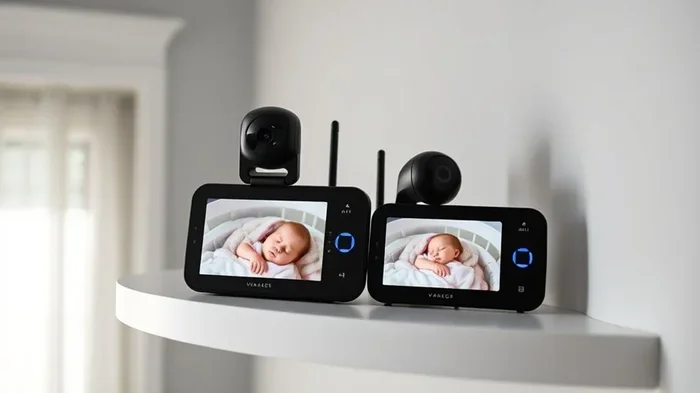
A dual setup uses two cameras connected to the same parent unit or app. This gives you the ability to monitor two rooms or two angles at once. But do you really need it? Let’s dig deeper.
When One Camera Is Enough
For many families, a single nursery camera does the job perfectly. Here are some situations where one camera is all you need.
Small to Medium Nurseries
If your baby’s room is a standard-sized nursery, one camera covers it well. A wide-angle lens can capture the crib, the changing table, and most of the room. You don’t need a second camera just to watch your baby sleep.
Most video baby monitor brands offer lenses that span 130 to 155 degrees. That’s plenty for a typical room. You get full coverage without cluttering your space with extra devices.
Simple Monitoring Needs
If your main goal is to check that your baby is safe and sleeping peacefully, one camera handles this easily. You don’t need to track movement in multiple rooms. You just need to know your little one is okay.
Baby sleep monitoring is the core function of most monitors. A good single camera with night vision baby camera quality gives you clear video day and night. You can hear breathing sounds, see movement, and get alerts if something seems off.
Budget-Friendly Options
Let’s be real. Adding a second camera means spending more money. If you’re working with a tight budget, a single high-quality monitor is the smarter choice. You can always add a second camera later when your needs change.
Many parents start with one camera and expand their baby monitor setup over time. This approach lets you test what works before committing to a bigger investment.
When You Need Two Cameras
There are definitely times when a two camera setup makes a lot of sense. Here are the scenarios where going dual is worth it.
Large or Open-Plan Nurseries
Some nurseries are big. Others open up into a living room or play area. In these cases, one camera might not capture everything. A second camera gives you a different angle or covers a separate zone.
For example, if your baby sleeps in a crib near the window but plays in a playpen near the door, two cameras let you watch both areas. This is especially helpful during awake time when your baby moves around a lot.
Monitoring Multiple Children
If you have twins, or if you have a toddler and a newborn, two cameras are almost essential. Each child gets their own nursery camera. You can switch between feeds or view both at the same time on your parent unit.
This is one of the strongest cases for a multi-camera baby monitor system. It saves you from running between rooms and gives you a complete picture of what’s happening.
Keeping an Eye on the Nursery From Different Rooms
Some parents want to watch the nursery from multiple vantage points. Maybe you want to see the crib from the doorway and also from across the room. Two cameras positioned at different angles give you that flexibility.
A wireless baby monitor system with dual cameras usually lets you switch between feeds or split the screen. This is a big plus for parents who move around a lot during the day.
Nanny or Caregiver Monitoring
If someone else watches your baby during the day, a second camera can give you extra peace of mind. You can check in on the nursery from work or while you’re running errands. Just make sure you follow proper privacy guidelines and communicate openly with your caregiver.
Single vs Dual Camera: A Comparison
Still not sure which setup is right for you? Here’s a side-by-side look at how they compare.
| Feature | Single Camera | Dual Camera |
|---|---|---|
| Cost | Lower upfront cost | Higher upfront cost |
| Coverage | One room or one angle | Two rooms or two angles |
| Setup Complexity | Simple, quick setup | More setup required |
| Flexibility | Limited to one view | Switch or split between feeds |
| Best For | Small nurseries, single baby | Large spaces, multiple kids |
| Privacy Concerns | Less exposure | More devices to secure |
| Scalability | Easy to add later | Built for expansion |
As you can see, both options have real strengths. Your choice comes down to your specific situation. A single vs dual camera decision isn’t about which is better overall. It’s about which is better for your home.
How to Choose the Right Baby Monitor Camera
Whether you pick one camera or two, the quality of your baby monitor setup matters. Here’s what to look for when choosing your infant safety camera.
Video Quality and Resolution
Look for at least 1080p resolution. This gives you clear, detailed video day and night. Lower resolution cameras make it hard to see small details like your baby’s face or whether their blanket is covering their face.
Baby monitor resolution is one of the most important specs. Don’t settle for anything below 720p if you can avoid it. The extra cost for 1080p or higher is worth the peace of mind.
Night Vision Capability
Your baby sleeps most of the day and night. A night vision baby camera uses infrared technology to give you a clear picture even in complete darkness. Make sure the night vision is automatic and doesn’t produce a bright glow that could disturb your baby.
Some cameras use a dim red or green glow for night vision. Others use no light at all. The no-glow option is usually better for light sleepers.
Wifi Connectivity and Range
A wireless baby monitor relies on your home wifi signal. Make sure your router covers the nursery well. If the signal is weak, your video will lag or drop out.
If you have trouble with wifi in the nursery, consider a plug in wifi extender or a mesh network booster. This ensures your baby monitor cameras stay connected no matter where you are in the house.
Two-Way Audio
This feature lets you talk to your baby through the camera. It’s incredibly useful for soothing a fussy infant without walking into the room. Look for monitors with clear audio and minimal delay.
Mobile App and Alerts
Most modern monitors connect to a smartphone app. You should be able to check the live feed, get motion alerts, and talk to your baby from your phone. Make sure the app is easy to use and works reliably.
Common Mistakes Parents Make With Baby Monitor Cameras
Avoid these common pitfalls when setting up your baby monitoring system.
Placing the Camera Too Far Away
A camera placed at the far end of the nursery may not capture enough detail. Position it close enough to see your baby’s face clearly. About three to four feet from the crib is a good starting point.
Ignoring Wifi Security
Your wifi baby monitor connects to your home network. If your network isn’t secure, strangers could potentially access the camera feed. Always use a strong password on your wifi network and on your monitor app.
Many parents don’t realize that can people see what you do on guest wifi is a real concern. If your monitor connects to a guest network, make sure it’s properly isolated and password-protected.
Overlooking Firmware Updates
Just like your phone or laptop, baby monitor cameras need software updates. These updates fix security holes and improve performance. Check for updates regularly in the manufacturer’s app.
Buying More Than You Need
Two cameras sound impressive, but they’re not always necessary. Don’t spend extra money on features you won’t use. Start simple and add on later if you find you need more coverage.
Expert Tips for Getting the Most Out of Your Setup
Test Your Setup Before Your Baby Arrives
Set up your baby monitor cameras a few weeks before your due date. This gives you time to find the best placement, test the range, and make sure everything works smoothly. You don’t want to be scrambling with a newborn and a half-set-up monitor.
Use Both Cameras in a Dual Setup
If you go with two cameras, use them strategically. Put one in the nursery and one in the living room or play area. This gives you full coverage of your baby’s main spaces without overlapping angles.
Secure Your Network
Your baby monitor setup is only as secure as your home network. Use WPA3 encryption if your router supports it. Change default passwords on both your router and your monitor. These simple steps go a long way in protecting your family’s privacy.
Consider a Hybrid Approach
Not all monitoring needs to be digital. A simple audio-only monitor in the nursery plus a video camera in the living room can work well. This gives you sound monitoring around the clock and visual checks when you need them.
Final Thoughts
So, do you need two cameras for your baby monitor setup? For most families with a standard nursery and one baby, a single high-quality camera is more than enough. It covers the essentials, costs less, and keeps things simple.
However, if you have a large space, multiple children, or specific monitoring needs, a dual camera setup is a smart investment. It gives you flexibility, broader coverage, and extra peace of mind.
The most important thing is to choose a monitor that fits your lifestyle. Don’t get caught up in what other families are doing. Focus on what works for you and your baby. A well-chosen baby monitor setup is one of the best tools new parents can have. It lets you stay connected to your little one no matter where you are in the house.
Take your time, do your research, and pick the setup that brings you confidence and comfort. Your baby is worth it.
Frequently Asked Questions
Can I add a second camera to my existing baby monitor later?
Yes, many modern wireless baby monitors support adding a second camera after purchase. Check your monitor’s compatibility before buying. Most manufacturers sell extra cameras separately that work with their parent units or apps.
Do I need a special router for two baby monitor cameras?
Not necessarily. Most home routers handle two cameras without any issues. However, if your wifi signal is weak in the nursery, consider boosting your connection with a plug in wifi extender or mesh system for reliable streaming.
Are dual camera baby monitors more expensive?
Yes, dual camera systems typically cost more than single-camera setups. You’re paying for the extra camera and often for a more advanced parent unit or app. That said, prices have come down a lot in recent years.
How do I secure my baby monitor cameras from hacking?
Use a strong, unique password for your wifi network and your monitor app. Enable two-factor authentication if available. Keep your camera’s firmware updated. Avoid using default login credentials. These steps make it much harder for anyone to access your feed.
Can my baby monitor cameras work without wifi?
Some baby monitors use dedicated radio frequencies instead of wifi. These don’t need an internet connection. However, most modern wifi baby monitors require wifi for video streaming and app connectivity. Check the specs before you buy if wifi access is a concern.
What’s the best position for a baby monitor camera in the nursery?
Place the camera at least three feet from the crib, angled to see the entire sleeping area. Mount it on a shelf or dresser at your baby’s eye level or slightly above. Avoid placing it too close to curtains or blinds, as they can block the view and create false motion alerts.