Do You Need Wi Fi To Connect To Your Bluetooth Speaker
Do You Need Wi Fi To Connect To Your Bluetooth Speaker? The short answer is no. Bluetooth speakers create a direct wireless link to your device using radio waves, so you never need a home internet connection. You can play offline music, take calls, and enjoy audio anywhere without touching a router.
You want to take your favorite music to the backyard pool, but your phone is loaded with offline playlists. You grab your Bluetooth speaker, press the power button, and wait. Does it need a Wi-Fi network to work? The answer might surprise you. Do You Need Wi Fi To Connect To Your Bluetooth Speaker? In most cases, the answer is a simple no. Bluetooth creates its own short-range wireless link that bypasses your home internet entirely. You can stream music from your phone, play games, or take calls without ever touching a router.
However, not all Bluetooth speakers are created equal. Some smart speakers blend Bluetooth with Wi-Fi to unlock voice assistants and cloud streaming. Understanding when Wi-Fi helps and when it stays out of the way is key to getting the best experience. This guide breaks down everything you need to know about Bluetooth speakers, Wi-Fi connections, and how they interact. You will learn exactly when you can go offline and when you might need that internet signal.
We will cover how Bluetooth works, compare it to Wi-Fi speakers, and give you step-by-step pairing tips. You will also discover common mistakes that trip people up and expert tricks to maximize range and battery life. By the end, you will feel confident using your speaker anywhere, with or without a Wi-Fi network.
Key Takeaways
- Bluetooth works without Wi-Fi: A Bluetooth speaker connects directly to your phone or laptop, so an internet connection is never required for basic audio.
- Wi-Fi is only needed for smart features: Voice assistants, cloud streaming, and multi-room audio depend on Wi-Fi, not the Bluetooth link itself.
- Pairing is simple and fast: You can connect a Bluetooth speaker in seconds by enabling Bluetooth on your device and selecting the speaker name.
- Range is limited but practical: Bluetooth typically reaches about 30 feet indoors, making it ideal for rooms, patios, and small gatherings.
- Offline playback is fully supported: You can play saved music, downloaded playlists, and local files without any internet access whatsoever.
- Check your speaker type: Portable Bluetooth speakers are built for Wi-Fi-free use, while smart speakers rely on Wi-Fi for their core intelligent features.
📑 Table of Contents
- How Bluetooth Speakers Work Without Wi-Fi
- Do You Need Wi-Fi To Connect To Your Bluetooth Speaker?
- When Wi-Fi Does Matter for Bluetooth Speakers
- Bluetooth Speaker vs Wi-Fi Speaker: A Side-by-Side Comparison
- How To Connect a Bluetooth Speaker Without Wi-Fi
- Expert Tips for Getting the Best Bluetooth Experience
- Conclusion
How Bluetooth Speakers Work Without Wi-Fi
A Bluetooth speaker is a portable wireless device that receives audio signals directly from your phone, tablet, or laptop. It does not ask your router for permission. Instead, it uses short-range radio waves in the 2.4 GHz band to create a private point-to-point connection. Think of it like a walkie-talkie for music. Your device sends the audio data straight to the speaker, and no internet is involved.
This is why you can pair a Bluetooth speaker with a phone in airplane mode. As long as both devices have Bluetooth turned on, they will find each other. You do not need a Wi-Fi network to establish the link. The speaker simply acts as a wireless output device, much like a wireless headphone. Even older devices that lack modern Wi-Fi chips can use Bluetooth, which makes these speakers incredibly versatile for travel, camping, or any situation where internet access is limited.
Many people confuse Bluetooth with Wi-Fi because both use radio frequencies. But they serve different purposes. Wi-Fi is designed for high-speed internet access over longer distances. Bluetooth is designed for low-power, short-range device-to-device communication. When you stream music from a downloaded playlist on your phone, the data travels via Bluetooth, not through your home network. This direct connection means your Bluetooth speaker can operate fully offline.
The Basics of Bluetooth Technology
Bluetooth uses a technique called frequency-hopping spread spectrum. It rapidly switches between 79 different channels within the 2.4 GHz band. This reduces interference from other devices like microwaves or baby monitors. The connection is encrypted, so your audio stays private between the two devices.
Bluetooth versions have improved over the years. Bluetooth 5.0 and later offer longer range and lower power consumption. A modern Bluetooth speaker can reach up to 30 feet indoors. Some high-end models claim up to 100 feet in open space. Even at shorter ranges, the connection remains stable and does not drop because of a missing Wi-Fi signal. The audio codec also matters. Codecs like SBC, AAC, and aptX compress audio data for wireless transmission. A better codec means higher quality sound over the Bluetooth link. None of these codecs require a Wi-Fi connection. They work entirely over the Bluetooth radio.
You might wonder about latency, the slight delay between pressing play and hearing sound. Bluetooth does introduce a small amount of latency, but for music listening, it is barely noticeable. For video watching, some speakers with low-latency codecs can sync well. If you notice a delay, it is usually due to the Bluetooth connection itself, not a lack of Wi-Fi.
Bluetooth vs Wi-Fi: What’s the Difference?
Both Bluetooth and Wi-Fi are wireless technologies, but they operate differently. Wi-Fi connects your device to a router, which then connects to the internet. It handles large data transfers, like streaming high-definition video from Spotify or Netflix. Bluetooth connects two devices directly. It handles smaller data packets, like audio streams.
Here is a quick comparison of the two technologies for audio use:
- Range: Bluetooth reaches about 30 feet indoors. Wi-Fi can cover an entire house, up to 150 feet or more.
- Power Use: Bluetooth uses very little power, which is why Bluetooth speakers can run for hours on a single charge. Wi-Fi uses more battery.
- Internet Requirement: Bluetooth does not need the internet. Wi-Fi needs a router and an active internet plan to provide online content.
- Device Pairing: Bluetooth pairs one device to one speaker at a time (mostly). Wi-Fi allows multiple devices to connect to a speaker network simultaneously.
- Use Case: Bluetooth is ideal for personal or small-group listening. Wi-Fi is ideal for whole-home audio and smart home integration.
Because of these differences, a Bluetooth speaker can function perfectly in a Wi-Fi dead zone. You do not need to set up a mobile hotspot just to use your speaker. That saves battery on your phone and keeps things simple. Similar to how a Bluetooth printer works without Wi-Fi, your speaker creates its own direct link and ignores the router entirely.
Do You Need Wi-Fi To Connect To Your Bluetooth Speaker?
The direct answer is no. To connect a Bluetooth speaker to your phone, you only need Bluetooth enabled on both devices. You do not need a Wi-Fi network, an internet service provider, or even a SIM card with data. The pairing process happens over the air using radio frequencies, completely separate from your home network.
Many people assume that because their speaker is wireless, it must connect to Wi-Fi. This is a common misconception. The word “wireless” in Bluetooth simply means no cables. It does not mean it needs the internet. When you open your phone’s Bluetooth settings and see your speaker listed, that is a direct device-to-device link. You can test this yourself. Turn on airplane mode on your phone, which disables all wireless connections including Wi-Fi and cellular data. Then turn Bluetooth back on. If your Bluetooth speaker still appears and plays music, you have proven that Wi-Fi is not required. This works for playing stored music, podcasts, and even offline games with sound.
There are a few exceptions, which we will cover next. But for the vast majority of portable Bluetooth speakers, the connection is entirely independent of any Wi-Fi connection. This is a huge advantage for travel, outdoor events, and areas with poor internet coverage. You can take your speaker to a cabin in the woods, a beach without Wi-Fi, or a busy airport lounge, and it will work exactly the same way.
When Wi-Fi Is Not Required
Here are common scenarios where you can use a Bluetooth speaker without ever turning on your Wi-Fi:
- Playing downloaded music: If you have MP3 files or offline playlists saved on your phone, Bluetooth streams them directly to the speaker.
- Taking phone calls: Many Bluetooth speakers double as speakerphones. They use the Bluetooth link to route your call audio, no internet needed.
- Gaming on the go: You can connect a speaker to a handheld gaming device or a laptop for offline game audio.
- Outdoor adventures: At a campsite or beach without Wi-Fi, your speaker can still play music from your phone’s storage.
- Using a mobile hotspot as a fallback: Even if you have a hotspot, you do not need to connect to it for Bluetooth audio. The speaker ignores the hotspot and connects directly to your phone.
Notice that none of these require a Wi-Fi network. They rely solely on the Bluetooth pairing between your device and the speaker. This is the same principle as using a Bluetooth headphone with your LG TV. The TV and headphone establish a direct wireless link, and no internet is involved in the audio transfer.
When Wi-Fi Does Matter for Bluetooth Speakers
While basic Bluetooth audio never needs Wi-Fi, some advanced features do. If your speaker has smart capabilities, then a Wi-Fi connection becomes important. Understanding these scenarios helps you decide whether you need both technologies in one device.
Smart Speaker Features and Voice Assistants
Speakers like Amazon Echo, Google Nest, or Apple HomePod use Wi-Fi as their primary connection. They also include Bluetooth, but the core functions depend on the internet. When you ask Alexa to play a song, the request goes to the cloud, not to your phone directly. The speaker then streams the audio over Wi-Fi.
However, you can still use these smart speakers as a Bluetooth speaker without Wi-Fi. If you pair your phone via Bluetooth, you can play local music. The voice assistant will not work because it needs an internet connection to understand your commands. So the speaker works, but it loses its smart features.
This is similar to using Alexa as a Bluetooth speaker for your TV. The Bluetooth link carries the audio, but Alexa itself needs Wi-Fi to respond to your voice. Without Wi-Fi, it is just a Bluetooth output device. The same logic applies to any smart speaker you might own.
Multi-Room Audio and Streaming Services
If you want to sync multiple speakers around your house for whole-home audio, Wi-Fi is usually required. Protocols like Sonos, Chromecast, or AirPlay rely on your local network to coordinate the speakers. They do not use Bluetooth for this because Bluetooth cannot handle multiple device connections reliably.
Streaming services like Spotify, Apple Music, or Tidal also require Wi-Fi for high-quality streaming. If you want to listen to a song you have never downloaded, the speaker needs Wi-Fi to fetch the data. A Bluetooth speaker that supports Wi-Fi can stream directly from these services without your phone being the middleman.
But here is the key point: if you are using the speaker in Bluetooth mode only, your phone is the middleman. Your phone downloads the music (if online) and sends it to the speaker via Bluetooth. In that case, your phone needs Wi-Fi, but the speaker itself does not. The speaker just receives the audio over Bluetooth and plays it. So the question “Do You Need Wi-Fi To Connect To Your Bluetooth Speaker” has a nuanced answer. The connection does not need Wi-Fi. The content might need Wi-Fi, but that is on the source device, not the speaker.
Bluetooth Speaker vs Wi-Fi Speaker: A Side-by-Side Comparison
To make the right choice, it helps to compare the two types of wireless speakers directly. The table below highlights the key differences.
| Feature | Bluetooth Speaker | Wi-Fi Speaker (Smart Speaker) |
|---|---|---|
| Internet Required for Connection | No | Yes |
| Connection Method | Direct device-to-device | Via router and network |
| Range | Up to 30 feet indoors | Depends on Wi-Fi coverage |
| Battery Life | Longer (low power) | Shorter (higher power) |
| Portability | Highly portable | Usually stationary |
| Offline Playback | Yes, from paired device | Limited (requires local storage) |
| Voice Assistant | Usually not included | Built-in (Alexa, Google, Siri) |
| Multi-Room Audio | Not supported | Yes, via network |
| Setup Complexity | Simple pairing | Requires app and network setup |
| Price Range | Budget to mid-range | Mid-range to premium |
As you can see, a Bluetooth speaker wins on simplicity and portability. A Wi-Fi speaker wins on smart features and whole-home audio. If your main goal is to play music anywhere without worrying about a router, a Bluetooth speaker is the clear choice. Some modern speakers offer both Bluetooth and Wi-Fi. They give you the flexibility to use them offline or connect to your smart home network. When shopping, check the product description to see if it supports both modes. That way, you get the best of both worlds.
How To Connect a Bluetooth Speaker Without Wi-Fi
Connecting a Bluetooth speaker without Wi-Fi is straightforward. You do not need any special apps or network settings. Just follow these simple steps.
Step-by-Step Pairing Guide
- Turn on your speaker. Press the power button and wait for the indicator light to show it is ready. Many speakers flash blue or red when in pairing mode.
- Enable Bluetooth on your phone. Open your phone’s settings, find the Bluetooth option, and toggle it on. Make sure you are not connected to a Wi-Fi network if you want to test offline mode.
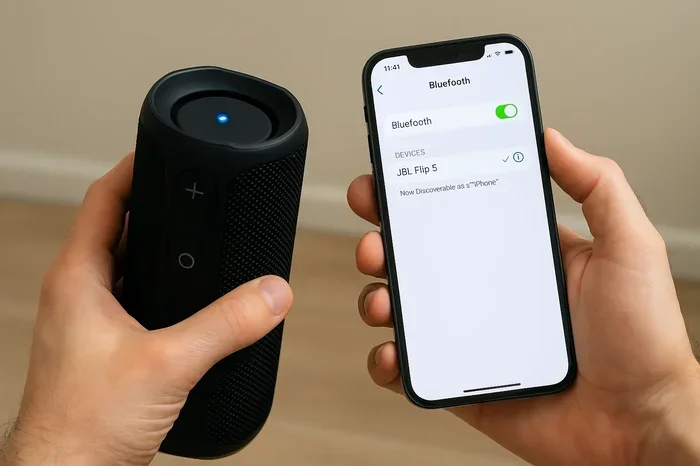
- Scan for devices. Your phone will search for nearby Bluetooth devices. Your speaker should appear in the list with its model name.
- Tap to pair. Select the speaker from the list. You may hear a confirmation tone on the speaker, and the phone will show “Connected.”
- Start playing music. Open your music app and press play. The audio will stream directly to the speaker via Bluetooth.
That is it. No Wi-Fi password, no router, no internet plan. The connection is instant and private. If you want to connect another device, like a laptop, simply put the speaker back in pairing mode and repeat the steps. You can even pair a Bluetooth speaker with a tablet or an MP3 player the same way. Some speakers also support NFC pairing. If your phone has NFC, you can simply tap it against the speaker to connect. This works without Wi-Fi as well. It is a quick shortcut for devices that support it.
Troubleshooting Common Connection Issues
Sometimes the speaker does not show up in the Bluetooth list. Before you assume you need Wi-Fi, try these quick fixes:
- Restart both devices. Turn off the speaker and your phone, then turn them back on. This refreshes the Bluetooth radios.
- Check the distance. Move your phone closer to the speaker. Bluetooth range is limited, and walls can block the signal.
- Remove old pairings. Go to your phone’s Bluetooth settings and forget the speaker. Then re-pair it from scratch.
- Check for interference. Other wireless devices, USB 3.0 ports, and microwaves can interfere with Bluetooth. Move away from these sources.
- Update firmware. Some speakers have a companion app that updates the Bluetooth firmware. This can fix connection bugs.
None of these steps involve Wi-Fi. The speaker connects directly to your phone, so any issue is likely a Bluetooth problem, not a Wi-Fi problem.
Expert Tips for Getting the Best Bluetooth Experience
Even though you do not need Wi-Fi, you can still optimize your Bluetooth setup for better sound and reliability. Here are some practical tips from audio experts.
Maximizing Range and Battery Life
Bluetooth signals weaken through walls and over distance. To get the best range, keep your phone and speaker in the same room or in open sight. Avoid placing the speaker in a closed cabinet or behind a large metal object. Battery life also depends on the Bluetooth connection. A stable connection uses less power than a constantly dropping one. If your speaker battery drains fast, check if it is too far from your phone. Bringing them closer can extend playtime significantly.
Some speakers have a dedicated Bluetooth antenna that improves range. Look for models that advertise Bluetooth 5.0 or later. These versions are much more efficient than older Bluetooth 4.2 or earlier. The improved range means you can move around your home without losing the connection, even if your Wi-Fi router is in another room. Keeping your speaker fully charged also ensures a strong Bluetooth signal, because low battery can reduce transmission power.
Avoiding Common Mistakes
One common mistake is trying to use a Bluetooth speaker as a Wi-Fi speaker. People expect to control the speaker with a voice assistant from across the house, but without Wi-Fi, it simply will not work. If you want smart features, make sure your speaker supports Wi-Fi and set it up properly. Another mistake is leaving Bluetooth on when not in use. This drains your phone battery and can cause random connections to nearby speakers. Turn off Bluetooth when you are not actively using the speaker. You can always turn it back on in seconds.
Some users try to connect multiple Bluetooth devices at once, which can cause audio stuttering. Most speakers only maintain a stable connection with one device at a time. If you want to switch devices, pause the current source and connect the new one. Finally, do not assume that a Wi-Fi connection will improve Bluetooth audio quality. The audio is sent over Bluetooth, not Wi-Fi. A stronger Wi-Fi signal does not make your Bluetooth speaker sound better. The quality depends on the Bluetooth codec and the speaker’s hardware.
For a deeper dive into Bluetooth connectivity, you might also enjoy reading about how you can pair Bluetooth headphones with your LG TV without Wi-Fi. The principles are the same, and the tips can help you troubleshoot any Bluetooth device.
Quick Tips for Bluetooth Speaker Users
- Keep your speaker and phone close during pairing. Distance can cause the initial connection to fail.
- Use a dedicated Bluetooth playlist. Create a playlist of offline songs so you never need to pause to buffer.
- Clean the charging ports. Dust in the port can cause intermittent connection drops that look like a Wi-Fi issue.
- Reset the speaker if it won’t pair. Most speakers have a small reset button or a specific button combination. Refer to the manual.
- Turn off other Bluetooth devices. If you have multiple headphones or keyboards nearby, they can interfere with the speaker pairing.
Conclusion
So, do you need Wi-Fi to connect to your Bluetooth speaker? The short answer is no. A Bluetooth speaker connects directly to your phone or laptop using radio waves, completely bypassing your home network. You can enjoy music, podcasts, and calls offline, anywhere, anytime. This makes Bluetooth speakers incredibly convenient for travel, outdoor activities, and simple wireless audio.
However, if you want smart features like voice assistants, multi-room sync, or streaming from cloud services, then Wi-Fi becomes important. The speaker will still work in Bluetooth mode, but you will miss out on the advanced features. Understanding this distinction helps you choose the right speaker for your needs and use it correctly.
Remember, the connection itself never needs Wi-Fi. The content might, but that is handled by your source device. Keep your speaker charged, keep Bluetooth on, and you are ready to go. With the tips in this guide, you can confidently use your Bluetooth speaker without ever worrying about a Wi-Fi password. Next time someone asks, “Do You Need Wi Fi To Connect To Your Bluetooth Speaker?” you can give them a clear, confident answer. Bluetooth is a standalone wireless technology that puts music in your hands, no internet required.
Frequently Asked Questions
Frequently Asked Questions
Can I use a Bluetooth speaker in airplane mode?
Yes, absolutely. Airplane mode turns off Wi-Fi and cellular data, but you can manually re-enable Bluetooth. Your speaker will connect directly to your phone without any internet. This is perfect for listening to offline playlists during flights or in areas with no signal.
Do Bluetooth speakers need Wi-Fi to update their firmware?
Some speakers require Wi-Fi for firmware updates, especially smart speakers with companion apps. However, many portable Bluetooth speakers use a Bluetooth connection or a USB cable for updates. The basic Bluetooth audio connection itself never needs Wi-Fi.
Can I connect multiple Bluetooth speakers to one phone without Wi-Fi?
Most standard Bluetooth speakers only connect to one phone at a time. Some newer models support multi-point pairing, which lets you connect two phones, but not multiple speakers. For multi-room audio, you typically need Wi-Fi speakers that use a mesh network. Bluetooth alone cannot handle a group of speakers.
Is Bluetooth audio quality affected by not having Wi-Fi?
No, Bluetooth audio quality depends on the Bluetooth version and codec, not on Wi-Fi. A Bluetooth speaker will sound the same with or without a Wi-Fi network. The absence of Wi-Fi does not compress the audio or add latency beyond what Bluetooth itself introduces.
Can I use a Bluetooth speaker as a speakerphone without Wi-Fi?
Yes, you can. Bluetooth speakers with a microphone can route phone calls through the speaker. The call audio travels over the Bluetooth link, and your phone handles the cellular connection. No Wi-Fi is needed for voice calls over Bluetooth, as long as your phone has cellular signal.
Do I need Wi-Fi to connect a Bluetooth speaker to a smart TV?
No, you can pair a Bluetooth speaker to a smart TV using Bluetooth alone. The TV sends audio over Bluetooth, and the speaker plays it. The TV’s smart features and streaming apps use Wi-Fi, but the Bluetooth audio output works independently. So you can enjoy TV sound on your speaker even if the TV is not connected to Wi-Fi.