Do I Need A Bluetooth Receiver Or Transmitter Explained
A Bluetooth receiver pulls wireless signals into your device, while a Bluetooth transmitter sends audio out wirelessly. You need a receiver if your device lacks Bluetooth and a transmitter if you want to stream audio from a non-Bluetooth source. Choosing the right one depends on your setup, devices, and what you want to achieve wirelessly.
Have you ever wanted to stream music or audio wirelessly but found that your device doesn’t support Bluetooth connectivity? Maybe your TV lacks wireless capabilities, or your favorite headphones only work with a cable. This is exactly where a Bluetooth receiver or Bluetooth transmitter comes in handy.
These small devices solve a big problem. They fill the gap between old tech and modern wireless expectations. But here’s the thing — people often confuse the two. A receiver and a transmitter do opposite jobs, and picking the wrong one means wasted money and frustration.
In this guide, we’ll break down everything you need to know. We’ll explain what each device does, when you need one, and how to choose the right option for your setup. By the end, you’ll know exactly whether you need a Bluetooth receiver, a Bluetooth transmitter, or neither.
The world of wireless audio has grown fast. From Bluetooth headphones to smart speakers, going wireless feels like the natural choice. But not all devices play nice with wireless signals out of the box. That’s where these adapters step in and make life easier.
Key Takeaways
- A Bluetooth receiver adds wireless capability to devices that don’t have built-in Bluetooth.
- A Bluetooth transmitter sends audio wirelessly from a source device to Bluetooth headphones or speakers.
- The right choice depends on your use case — streaming music, watching TV, or connecting hearing aids.
- Look for features like aptX, low latency, and range when buying either device.
- Setting up either device is simple and usually takes just a few minutes.
- Common mistakes include buying the wrong type or ignoring compatibility issues.
- Both devices are affordable and can transform your old gear into wireless-ready equipment.
📑 Table of Contents
What Is a Bluetooth Receiver?
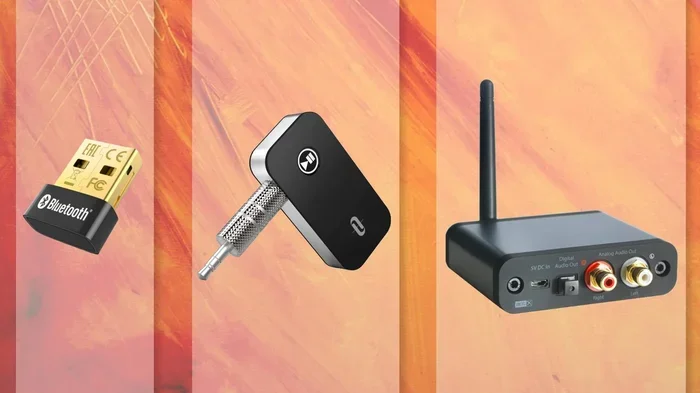
A Bluetooth receiver is a small device that accepts wireless signals and feeds them into your audio equipment. Think of it as a bridge between a wireless source and your non-Bluetooth gear. It pulls in the Bluetooth signal and converts it into something your device can use.
How a Bluetooth Receiver Works
When you pair your phone with a receiver, the receiver grabs the audio signal. It then sends that signal through a cable — usually a 3.5mm jack or RCA — into your speakers, headphones, or sound system. Your device doesn’t need any built-in Bluetooth capability to work.
The receiver handles all the heavy lifting. It manages the Bluetooth pairing process, decodes the audio codec, and delivers clean sound. Most modern receivers support Bluetooth 5.0 or higher, which means better range and stronger connections.
You’ll often see receivers marketed for cars, home stereo systems, and older speakers. They’re small, plug-and-play, and don’t require any software installation. Just pair your phone and start streaming.
Common Uses for a Bluetooth Receiver
- Upgrading old car audio systems to stream music from your phone wirelessly.
- Adding wireless capability to desktop speakers that only have a wired input.
- Connecting wireless headphones to a TV or home theater system that lacks Bluetooth.
- Using a Bluetooth hearing aid with older audio equipment that doesn’t support wireless connections.
- Streaming audio from a laptop to external speakers without using a cable.
If your device has a headphone jack or an audio input but no Bluetooth, a receiver is your best friend. It opens up a world of wireless freedom without replacing your existing gear.
What Is a Bluetooth Transmitter?
A Bluetooth transmitter does the opposite of a receiver. It takes a wired audio signal and sends it out wirelessly to Bluetooth headphones, speakers, or other receivers. If you want to go from a non-Bluetooth source to a wireless output, you need a transmitter.
How a Bluetooth Transmitter Works
The transmitter connects to your source device — like a TV, PC, or music player — through a cable. It then captures the audio output and broadcasts it over Bluetooth to your wireless headphones or speakers. Your headphones receive the signal and play the audio without any wires.
Transmitters are especially popular for late-night TV watching. You can connect one to your TV and stream the sound directly to your Bluetooth headphones. No one else gets disturbed, and you can move freely around the room.
Most transmitters also handle audio codecs like aptX and aptX Low Latency. These codecs reduce audio delay and improve sound quality. If you’re watching video, low latency is crucial — you don’t want the audio lagging behind the picture.
Common Uses for a Bluetooth Transmitter
- Streaming TV audio to wireless headphones for private listening at night.
- Sending music from a non-Bluetooth MP3 player to wireless speakers.
- Connecting a gaming console to Bluetooth headphones for immersive sound.
- Pairing a wired microphone with a JBL speaker wirelessly for presentations or karaoke.
- Streaming audio from a desktop computer to wireless headphones during work calls.
Transmitters are compact and easy to set up. You plug them into an audio output, pair your headphones, and you’re good to go. They’re a simple way to make almost any audio source wirelessly compatible.
Bluetooth Receiver vs Transmitter: Key Differences
Understanding the difference between these two devices is essential. They serve opposite purposes, and using the wrong one will not work. Here’s a clear comparison to help you decide.
| Feature | Bluetooth Receiver | Bluetooth Transmitter |
|---|---|---|
| Primary Function | Receives wireless signals | Sends wireless signals |
| Connection Direction | Inward (to your device) | Outward (from your device) |
| Typical Input | Bluetooth signal from phone | Wired audio from TV or PC |
| Typical Output | Wired audio to speakers | Wireless audio to headphones |
| Best For | Adding Bluetooth to old gear | Going wireless from wired sources |
| Common Devices | Cars, old speakers, stereos | TVs, PCs, music players |
| Pairs With | Your phone or tablet | Your headphones or speakers |
The simplest way to remember the difference is this: a receiver receives Bluetooth into your device, while a transmitter transmits Bluetooth out of your device. If you want to add wireless to something, you need a receiver. If you want to send audio wirelessly somewhere, you need a transmitter.
Some combo devices offer both functions. These are handy if you need flexibility. But for most people, sticking with one or the other keeps things simple and affordable.
How to Decide Which One You Need
Choosing between a Bluetooth receiver and a Bluetooth transmitter comes down to what you want to achieve. Let’s walk through the decision process step by step.
Ask Yourself: What Do You Want to Connect?
Think about your current setup. What device do you want to make wireless? What are you trying to connect it to?
If you have a pair of wired headphones and want to use them wirelessly with your TV, you need a transmitter. The transmitter connects to your TV’s audio output and sends the signal to your headphones.
If you have an old stereo system or car radio and want to stream music from your phone, you need a receiver. The receiver plugs into your stereo or car and pairs with your phone.
Check Your Device’s Ports and Capabilities
Look at your device carefully. Does it have a headphone jack, RCA input, or optical output? These are all potential connection points for either a receiver or transmitter.
Does your device already have Bluetooth built in? If yes, you might not need either device. Many modern TVs, phones, and laptops include wireless support out of the box. You can pair Bluetooth headphones directly without any extra hardware.
For example, if you already know how to pair Bluetooth headphones to your LG TV, you don’t need a transmitter. But if your TV has no Bluetooth and you want wireless headphones, a transmitter is the answer.
Consider Your Audio Quality Needs
Not all transmitters and receivers are created equal. Some support advanced audio codecs like aptX HD or LDAC, which deliver higher quality sound. Others only support basic SBC, which is fine for casual listening but not ideal for audiophiles.
If you care about sound quality, look for devices that support low-latency codecs. These reduce the delay between video and audio, which matters a lot when watching movies or playing games. Check the product specs before buying.
Think About Range and Battery Life
Most Bluetooth transmitters and receivers have a range of about 30 to 50 feet. That’s plenty for most home setups. But if you need more distance, look for devices with extended range capabilities.
Transmitters usually need power, either through a USB cable or batteries. Receivers typically draw power from the device they’re connected to. Consider your setup and whether you need a rechargeable model or a plug-in design.
Setting Up Your Bluetooth Device: Step-by-Step
Setting up either a receiver or transmitter is straightforward. You don’t need any technical skills. Here’s how to do it for both types.
Setting Up a Bluetooth Receiver
- Plug the receiver into your audio device’s input jack.
- Power it on if it has a separate power source.
- Put it in pairing mode — usually by holding a button until a light flashes.
- On your phone or tablet, go to Bluetooth settings and find the receiver.
- Tap to pair and wait for the connection to establish.
- Play music on your phone and enjoy wireless audio through your speakers.
Setting Up a Bluetooth Transmitter
- Connect the transmitter to your TV, PC, or audio source using the appropriate cable.
- Plug in power if the transmitter requires it.
- Put it in pairing mode.
- On your headphones or speaker, go to Bluetooth settings and find the transmitter.
- Tap to pair and wait for the connection.
- Play audio on your source device and listen wirelessly.
If you’ve ever paired Bluetooth headphones with a Roku or used a Bluetooth speaker for your TV, the process is very similar. The key is making sure both devices are in pairing mode at the same time.
Common Mistakes to Avoid
Even though these devices are simple, people still make mistakes. Here are the most common ones and how to avoid them.
- Buying the wrong type. This is the #1 mistake. A receiver won’t send audio out wirelessly, and a transmitter won’t bring Bluetooth into your device. Always double-check which one you need before purchasing.
- Ignoring codec support. Not all devices support the same audio codecs. If you buy a transmitter without aptX and your headphones use aptX, you might experience lower quality or latency issues.
- Overlooking compatibility. Some transmitters don’t work well with certain TV models. Before buying, check if your TV has a compatible audio output. Some older TVs only have optical out, which not all transmitters support.
- Placing the device too far away. Bluetooth has a limited range. If you put your transmitter in one room and walk to another, the connection might drop. Keep your devices within range for the best experience.
- Forgetting to update firmware. Some Bluetooth devices receive firmware updates that improve performance. Check the manufacturer’s app or website for updates after setup.
One mistake people make is assuming all Bluetooth adapters work the same way. They don’t. Some are designed for audio only, while others support data transfer. Make sure you’re buying an audio-focused device for the best results.
Expert Insights: Who Benefits Most From These Devices?
Bluetooth receivers and transmitters aren’t just for tech enthusiasts. They serve a wide range of people in everyday situations.
Home entertainment users benefit greatly. If you love watching movies but share your living space with family members who sleep early, a transmitter lets you enjoy audio privately through wireless headphones. No volume disputes, no complaints.
Car enthusiasts with older vehicles can add wireless music streaming without replacing the entire stereo system. A simple receiver plugged into the auxiliary port transforms your driving experience. You can stream podcasts, music, and calls hands-free.
Gamers who want to use wireless headphones with their PC or console will find transmitters invaluable. Low-latency codecs ensure that game audio stays perfectly in sync with the action on screen.
Professionals who attend meetings or give presentations can use a transmitter to connect wired microphones wirelessly to speakers. This is especially useful for karaoke setups or classroom presentations where mobility matters.
Even people who already know how to make their TV have Bluetooth using built-in settings sometimes find that a dedicated transmitter delivers better, more reliable performance than built-in wireless features.
Key Takeaways
- A Bluetooth receiver adds wireless capability to devices that don’t have built-in Bluetooth.
- A Bluetooth transmitter sends audio wirelessly from a source device to Bluetooth headphones or speakers.
- The right choice depends on your use case — streaming music, watching TV, or connecting hearing aids.
- Look for features like aptX, low latency, and range when buying either device.
- Setting up either device is simple and usually takes just a few minutes.
- Common mistakes include buying the wrong type or ignoring compatibility issues.
- Both devices are affordable and can transform your old gear into wireless-ready equipment.
Conclusion
So, do you need a Bluetooth receiver or transmitter? The answer depends entirely on your setup and what you want to accomplish. If your device lacks wireless support and you want to stream audio into it, a receiver is the right choice. If you want to send audio out wirelessly to headphones or speakers, a transmitter is what you need.
Both devices are affordable, easy to set up, and incredibly useful. They breathe new life into old equipment and give you the freedom to go wireless without replacing your favorite gear. Whether you’re streaming music in your car, watching TV late at night, or giving a presentation, there’s a simple solution waiting for you.
Take a look at your current setup, figure out which direction you need the audio to flow, and pick the right device. You’ll be enjoying wireless audio in no time.
Frequently Asked Questions
Can I use a Bluetooth transmitter with any TV?
Most Bluetooth transmitters work with any TV that has a 3.5mm headphone jack, RCA output, or optical audio out. Check your TV’s audio outputs before buying a transmitter to ensure compatibility. Some older TVs may only have one type of output, so match your transmitter to that port.
Is a Bluetooth receiver the same as a Bluetooth adapter?
Yes, the terms are often used interchangeably. A Bluetooth adapter typically refers to a small USB dongle for computers, while a receiver can come in many forms. Both serve the same purpose — adding Bluetooth capability to a device that lacks it.
Can I use both a receiver and transmitter at the same time?
Yes, you can. For example, you could use a transmitter to send audio from your TV to wireless headphones and a receiver to stream music from your phone to your car stereo. They work independently and don’t interfere with each other.
Do Bluetooth receivers and transmitters affect audio quality?
They can, but usually not in a bad way. High-quality devices support advanced codecs like aptX, which preserve sound quality. Cheap devices may compress audio more, leading to slight quality loss. Investing in a reputable brand makes a noticeable difference.
How far can a Bluetooth transmitter reach?
Most transmitters have a range of 30 to 50 feet in open space. Walls and obstacles reduce this distance. For best results, keep the transmitter within the same room as your wireless headphones or speakers.
Can I connect a Bluetooth transmitter to a speaker without built-in Bluetooth?
Yes, but you’d need a Bluetooth receiver on the speaker end. The transmitter sends the signal, and the receiver picks it up and plays it through the speaker. This combo works great for making any wired speaker wireless.