Do Bluetooth Adapters Work Well With Modern Devices
Bluetooth adapters make it simple to add wireless audio to almost any device. They work well with smart TVs, older speakers, record players, and streaming boxes when you pick the right one. This guide covers how they perform, what to look for, and common mistakes to avoid.
Bluetooth adapters have become one of the easiest ways to add wireless audio to almost any device. Whether you want to connect wireless headphones to your TV or stream music from an old speaker, a small Bluetooth adapter can change everything. But do Bluetooth adapters work well with modern devices? The short answer is yes, but there are important details you should know.
In this guide, we will walk through everything you need to know about Bluetooth adapters. We will cover how they work, which devices they pair with best, and what to look for when buying one. You will also learn about common issues and how to fix them. By the end, you will feel confident choosing the right adapter for your setup.
Key Takeaways
- Bluetooth adapters work well with most modern devices, including smart TVs, laptops, and streaming boxes.
- Bluetooth 5.0 and 5.3 adapters offer the best range, speed, and audio quality for wireless connections.
- Pairing is usually simple and takes less than two minutes with most devices.
- Latency can be a concern for video watching, but low-latency adapters fix this problem.
- Older devices benefit greatly from Bluetooth adapters, giving them wireless capability without replacing them.
- Choosing the right adapter depends on your device, use case, and budget.
📑 Table of Contents
- What Is a Bluetooth Adapter and How Does It Work?
- Do Bluetooth Adapters Work Well With Smart TVs?
- How Well Do Bluetooth Adapters Work With Streaming Devices?
- Using Bluetooth Adapters With Older Devices
- What to Look for When Buying a Bluetooth Adapter
- Common Bluetooth Adapter Problems and How to Fix Them
- Quick Tips for Getting the Best Performance From Your Bluetooth Adapter
- Frequently Asked Questions
- Final Thoughts
What Is a Bluetooth Adapter and How Does It Work?
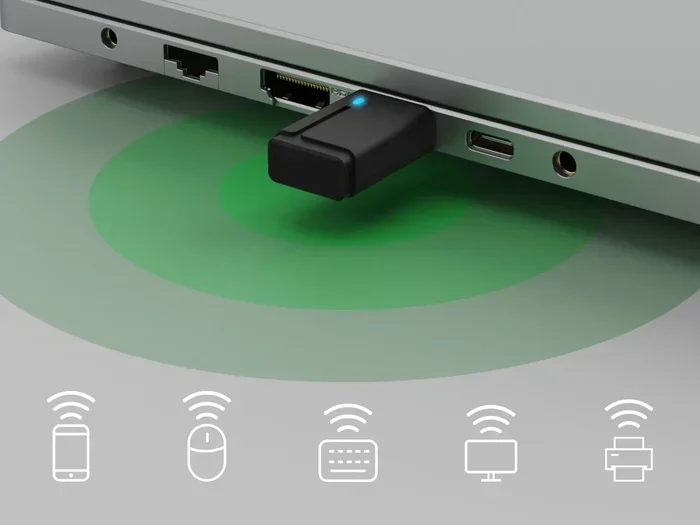
A Bluetooth adapter is a small device that adds wireless connectivity to your equipment. It can be a USB dongle, a small receiver, or even a built-in chip inside your device. The adapter sends and receives Bluetooth signals, allowing two devices to connect without wires.
Most Bluetooth adapters use one of the latest Bluetooth versions. Bluetooth 5.0 and 5.3 are the most common in modern adapters. These versions offer better range, faster data transfer, and improved power efficiency. Older adapters using Bluetooth 4.0 or 4.2 still work but may have shorter range and slower speeds.
How Bluetooth Pairing Works
When you connect a Bluetooth adapter, the process is called pairing. Both devices search for each other and create a secure connection. Once paired, they remember each other and reconnect automatically in most cases. This makes daily use very convenient.
The adapter handles the wireless audio transfer using something called a Bluetooth codec. Think of a codec as a language that devices use to send audio. Modern codecs like aptX and LDAC deliver high-quality sound with very little loss. Cheaper adapters may only support basic codecs, which can affect audio quality.
Do Bluetooth Adapters Work Well With Smart TVs?
Smart TVs are one of the most common reasons people buy Bluetooth adapters. Many modern smart TVs already have built-in Bluetooth. However, older TVs or certain brands may not include this feature. That is where an external adapter comes in handy.
A Bluetooth adapter can turn any TV with an audio output into a wireless streaming machine. You can connect wireless headphones, wireless speakers, or even a soundbar through the adapter. This is especially helpful late at night when you do not want to disturb others.
Making Your TV Bluetooth-Ready
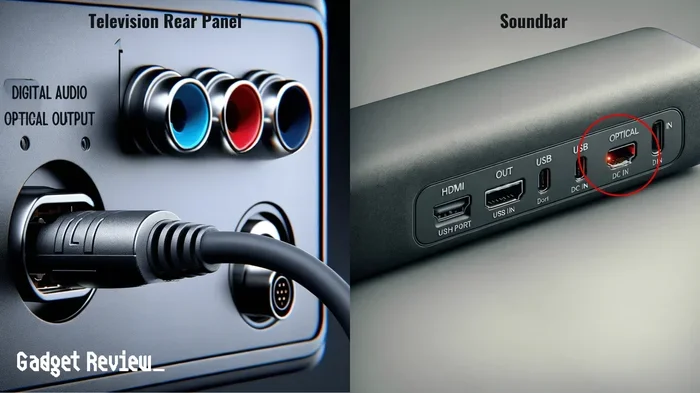
If your TV does not have Bluetooth built in, adding a Bluetooth adapter is very simple. You plug the adapter into the TV’s audio output, such as a 3.5mm jack or optical port. Then you pair your wireless headphones or speakers to the adapter. The whole process usually takes less than two minutes.
Some people also use adapters to make their TV have Bluetooth when the TV only has basic audio ports. This is a cost-effective solution compared to buying a new TV. The adapter sits between your TV and your audio device, bridging the wireless gap.
Bluetooth Adapter Performance With TVs
Bluetooth adapters work very well with TVs for most everyday uses. You will notice great sound quality when watching shows or listening to music. However, there is one thing to watch out for: latency. Latency is a slight delay between the video and audio. For casual viewing, most people do not notice it. But for fast-action movies or gaming, it can be distracting.
To avoid this issue, look for adapters that advertise low-latency technology. These adapters use special codecs to sync audio with video more closely. The difference is noticeable and makes a big improvement in your viewing experience.
How Well Do Bluetooth Adapters Work With Streaming Devices?
Streaming devices like Roku, Apple TV, and Amazon Fire Stick are popular in many homes. These devices often lack built-in Bluetooth for audio output. A Bluetooth adapter can solve this problem easily.
For example, Roku users often want to use wireless headphones while watching TV. Roku itself does not support direct Bluetooth headphone connections in most cases. A Bluetooth adapter plugged into the Roku’s audio output solves this perfectly. You can listen privately without affecting the TV speakers.
Similarly, streaming boxes and sticks work well with adapters. The adapter connects to the device’s audio port, and your wireless headphones or speakers connect to the adapter. It creates a simple wireless audio chain that works reliably.
Many users also pair their streaming devices with Bluetooth speakers for louder sound in bigger rooms. The adapter handles this connection smoothly, and the audio quality remains clear and consistent.
Using Bluetooth Adapters With Older Devices
One of the best things about Bluetooth adapters is that they bring wireless capability to older devices. You do not need to replace your favorite old speaker or audio equipment. A simple adapter can make it Bluetooth-ready.
Giving Old Speakers New Life
Do you have a great speaker that only has a wired input? A Bluetooth adapter can change that. You plug the adapter into the speaker’s aux input or RCA ports. Now you can stream music wirelessly from your phone or tablet. It is an easy and affordable upgrade.
Some people use adapters to make their old Bose Wave Radio Bluetooth so they can stream from their phone. This works with many older audio systems, including vintage stereos and shelf systems. The adapter adds modern wireless convenience to classic equipment.
Connecting Record Players Wirelessly
Vinyl record players are making a big comeback. But many people want to listen without wires connecting the player to their speakers. A Bluetooth adapter makes this possible. You connect the adapter to the record player’s output, and your wireless speakers receive the signal.
Playing your record player through Bluetooth is a great way to enjoy vinyl without the clutter of cables. The adapter preserves the warm analog sound while adding the convenience of wireless listening. Just make sure to use a quality adapter to avoid any loss in audio fidelity.
What to Look for When Buying a Bluetooth Adapter
Not all Bluetooth adapters are the same. Choosing the right one depends on what you plan to use it for. Here are the key factors to consider before making a purchase.
Bluetooth Version
Always check the Bluetooth version of the adapter. Bluetooth 5.0 or newer is the best choice for most users. These versions offer:
- Longer range up to 40 feet or more
- Faster data transfer for better audio quality
- Lower power consumption for longer battery life in rechargeable models
- Better stability with fewer connection drops
Bluetooth 4.0 adapters still work fine for basic tasks. But if you want the best performance, go with 5.0 or higher.
Codec Support
Codecs determine how your audio is compressed and sent wirelessly. High-quality codecs like aptX, aptX HD, and LDAC deliver near-lossless sound. Basic adapters may only support SBC, which is the standard codec and works fine for most uses.
If audio quality matters to you, look for an adapter that supports advanced codecs. This is especially important for music listening and audiophile setups.
Range and Stability
Bluetooth range varies by adapter and version. Most adapters work well within 30 to 40 feet. Walls and obstacles can reduce this range. For best results, keep your devices in the same room or within a clear line of sight.
Stability is just as important as range. A good adapter should maintain a steady connection without frequent drops. Reading user reviews can help you identify which adapters perform best in real-world conditions.
Latency for Video and Gaming
If you plan to use the adapter for watching videos or gaming, latency is a key factor. Low-latency adapters sync audio with video more accurately. Look for adapters specifically marketed as low-latency or designed for video use.
Some adapters also work well for using Bluetooth headphones with Roku and similar streaming devices. These adapters prioritize fast audio transmission to reduce any delay between what you see and what you hear.
Common Bluetooth Adapter Problems and How to Fix Them
While Bluetooth adapters work well in most cases, you may run into some issues. Here are the most common problems and simple solutions.
Connection Drops
If your adapter keeps disconnecting, try moving closer to the paired device. Walls, furniture, and other electronics can interfere with the Bluetooth signal. Also, make sure your adapter’s firmware is up to date if the manufacturer provides updates.
Poor Audio Quality
Distorted or low-quality audio often comes from using a cheap adapter or one that does not support a good codec. Upgrading to a better adapter usually fixes this. Also, check that your audio source is not set to a low-quality output setting.
Pairing Failures
If your adapter will not pair, try resetting both devices. Turn off Bluetooth on both sides, wait a few seconds, and turn them back on. Make sure the adapter is in pairing mode before searching. Most pairing issues resolve with a simple restart.
Latency With Video
Audio delay when watching video is a common complaint. This happens because Bluetooth takes a tiny bit of time to process audio. Using a low-latency adapter or one with a dedicated video mode can fix this problem. Some adapters even have a switch to toggle between music and video modes.
Quick Tips for Getting the Best Performance From Your Bluetooth Adapter
Follow these simple tips to get the most out of your Bluetooth adapter:
- Keep your adapter updated with the latest firmware from the manufacturer.
- Place the adapter in a central location away from thick walls and metal objects.
- Use a high-quality audio cable to connect the adapter to your source device.
- Avoid stacking the adapter near other wireless devices like routers or microwaves.
- Charge rechargeable adapters regularly to maintain consistent performance.
- Check codec compatibility between your adapter and your audio device for the best sound.
These small steps make a big difference in your daily experience. A well-setup adapter feels seamless and effortless to use.
Frequently Asked Questions
Do Bluetooth adapters work with all TVs?
Most Bluetooth adapters work with any TV that has an audio output port. This includes 3.5mm jacks, RCA ports, or optical outputs. If your TV has an audio out, you can use an adapter to add Bluetooth capability. Check your TV’s manual if you are unsure which ports are available.
Is a Bluetooth adapter better than a Bluetooth speaker?
It depends on what you need. An adapter adds wireless capability to existing speakers or headphones. A Bluetooth speaker is a standalone device with its own battery and speaker built in. Both serve different purposes and work well for their intended use cases.
Can I use a Bluetooth adapter for gaming?
Yes, you can use a Bluetooth adapter for gaming. However, look for low-latency adapters designed for gaming to avoid audio delay. Standard adapters may introduce a slight delay that can be noticeable during fast-paced games. Wireless gaming headsets often connect directly, but adapters work well for TVs and computers.
How far can a Bluetooth adapter reach?
Most modern Bluetooth adapters work within 30 to 40 feet. Bluetooth 5.0 adapters can reach further, sometimes up to 80 feet in open spaces. Walls and obstacles reduce the range. Keep your adapter and connected device in the same room for the best performance.
Do Bluetooth adapters affect audio quality?
Good Bluetooth adapters have minimal impact on audio quality. High-end adapters with advanced codecs like aptX deliver near-lossless sound. Cheaper adapters may compress audio more, which can slightly reduce quality. For most users, the difference is barely noticeable in everyday listening.
Can I connect multiple devices to one Bluetooth adapter?
Most Bluetooth adapters connect to one device at a time. Some newer models support multi-point pairing, which allows two devices to connect simultaneously. Check the product specifications if you need this feature. Multi-point adapters are convenient for switching between your phone and TV.
Final Thoughts
Bluetooth adapters work well with modern devices and are one of the simplest ways to add wireless audio to your setup. Whether you want to connect wireless headphones to your TV, stream music from an old speaker, or add Bluetooth to your streaming box, the right adapter makes it easy. The key is choosing an adapter that matches your needs in terms of Bluetooth version, codec support, and latency performance.
Most users find that a quality Bluetooth adapter solves their wireless audio problems quickly and affordably. The setup is simple, the performance is reliable, and the results are satisfying. You do not need expensive equipment to enjoy wireless audio in your home.
Take your time choosing the right adapter for your specific devices. Consider what you will use it for, how far you need the range to be, and what audio quality you expect. With the right Bluetooth adapter, you can upgrade your listening experience without replacing any of your favorite devices.