Do I Need Wi Fi To Use Bluetooth Speakers Without Internet
No, you do not need Wi-Fi to use Bluetooth speakers. Bluetooth speakers connect directly to your device using short-range wireless technology, completely independent of your internet connection. Whether you are at a park, in a car, or at home without a router, your Bluetooth speakers will still play music, podcasts, and audio from your phone, laptop, or tablet.
This is a comprehensive guide about Do I Need Wi Fi To Use Bluetooth Speakers.
Key Takeaways
- Bluetooth works without Wi-Fi: Bluetooth is a separate wireless technology that does not need an internet connection to function.
- Direct device pairing: Bluetooth speakers connect directly to your phone, laptop, or tablet through a short-range radio signal.
- Offline playback is fully supported: You can play downloaded music, stored files, and offline content without any internet access.
- Range matters: Most Bluetooth speakers work within 30 feet, though newer versions can reach further.
- Multiple uses beyond music: Bluetooth speakers work for calls, podcasts, audiobooks, and even as a speakerphone for calls.
- No router needed: You can set up and use Bluetooth speakers anywhere, even in areas with no internet at all.
[FEATURED_IMAGE_PLACEHOLDER]
Do I Need Wi-Fi to Use Bluetooth Speakers?
Here is the short answer: no, you absolutely do not need Wi-Fi to use Bluetooth speakers. Bluetooth and Wi-Fi are two completely different technologies that happen to use the same radio frequency space. Think of them as two different languages spoken in the same neighborhood. Your Bluetooth speaker does not need to “talk” to the internet. It only needs to “talk” to your device.
When you pair a Bluetooth speaker with your phone, the connection happens directly between the two devices. No router, no internet service, no password. The speaker receives an audio signal from your phone through a short-range wireless connection. This is the same reason you can use a Bluetooth printer without Wi-Fi and why many wireless devices work perfectly offline.
This is great news for people who love outdoor activities, travel frequently, or simply want to use speakers in areas with poor internet coverage. Your Bluetooth speaker is a self-contained audio device that just needs a charged battery and a paired source device.
How Bluetooth Speakers Work Without Internet
The Bluetooth Connection Explained
Bluetooth uses short-range radio waves to transmit data between devices. When you pair your phone with a Bluetooth speaker, your phone sends audio data directly to the speaker through these radio waves. The signal typically reaches up to 30 feet, though newer Bluetooth versions can go further. This process has nothing to do with your internet connection.
Think of it like throwing a ball from one person to another. The ball (audio signal) travels directly between the two people (your phone and the speaker). You do not need a mail carrier (Wi-Fi router) or the postal service (internet) to complete the delivery.
What You Need for Bluetooth Without Wi-Fi
To use a Bluetooth speaker without Wi-Fi, you need just a few things:
- A charged Bluetooth speaker with enough battery life
- A source device like a phone, tablet, or laptop with Bluetooth enabled
- Audio content stored locally on your device, such as downloaded songs or saved playlists
- No internet connection required for the actual Bluetooth pairing or playback
Once paired, the speaker will play whatever audio is coming from your device. This includes downloaded music, saved podcasts, offline audiobooks, and even stored recordings. The Bluetooth connection handles all the audio transfer on its own.
Common Uses for Bluetooth Speakers Without Wi-Fi
Outdoor Gatherings and Picnics
One of the most popular uses for Bluetooth speakers is outdoor events. At a park, beach, or backyard barbecue, you likely do not have Wi-Fi access anyway. But your Bluetooth speaker works perfectly in these settings. Simply pair it with your phone and play your downloaded music library.
Pro tip: Download your favorite playlists before you leave home. Most music apps let you save songs for offline listening. Once downloaded, they play through your Bluetooth speaker without any internet needed.
Road Trips and Car Use
Many people use Bluetooth speakers during road trips. You can plug speakers into your laptop or pair them directly with your phone for a great audio experience on the road. Whether you are listening to downloaded audiobooks or saved music, the Bluetooth connection works regardless of cell signal strength.
Some drivers also use Bluetooth speakers as a hands-free option for phone calls. The speaker connects directly to your phone, so even in areas with weak data coverage, your calls still work through the Bluetooth link.
Travel and International Trips
When traveling abroad, Wi-Fi can be unreliable or expensive. Bluetooth speakers still work perfectly because they do not depend on internet access. Pack your speaker, pair it with your phone, and enjoy your downloaded content anywhere in the world.
Emergency Situations
During power outages or natural disasters, internet services may go down. But if your phone has battery and your Bluetooth speaker is charged, you can still listen to important audio alerts, emergency broadcasts, or simply keep morale up with your saved music. This is one reason why having a Bluetooth speaker as part of your emergency kit is a smart move.
Bluetooth vs. Wi-Fi Speakers: What Is the Difference?
Bluetooth Speakers
Bluetooth speakers connect directly to your device. They do not need a router or internet. The audio signal travels through a short-range radio connection. Bluetooth speakers are portable, easy to set up, and work almost anywhere.
Here are the key advantages of Bluetooth speakers:
- No internet needed for pairing or playback
- Simple setup — just turn on and pair
- Portable and battery-powered
- Works with any Bluetooth-enabled device
- Low latency for synchronized audio
Wi-Fi Speakers
Wi-Fi speakers, on the other hand, connect to your home network. They often stream music from cloud services like Spotify, Apple Music, or Amazon Music. Without Wi-Fi, many Wi-Fi speakers cannot play music because they rely on streaming from the internet.
Some Wi-Fi speakers do offer offline modes, but this is less common. They also tend to be less portable since they need to stay connected to your router.
Comparison Table
| Feature | Bluetooth Speakers | Wi-Fi Speakers |
|---|---|---|
| Needs Internet? | No | Usually Yes |
| Portability | High | Low to Medium |
| Setup | Simple pairing | Network configuration |
| Range | Up to 30 feet | Depends on Wi-Fi range |
| Offline Playback | Fully supported | Limited or none |
| Audio Source | Device storage or offline files | Streaming services |
| Battery Required | Yes | Usually plugged in |
How to Pair Bluetooth Speakers Without Wi-Fi
Pairing a Bluetooth speaker without Wi-Fi is straightforward. Here is a step-by-step guide:
- Turn on your Bluetooth speaker and put it in pairing mode. Most speakers have a dedicated button or flashing light that indicates pairing mode is active.
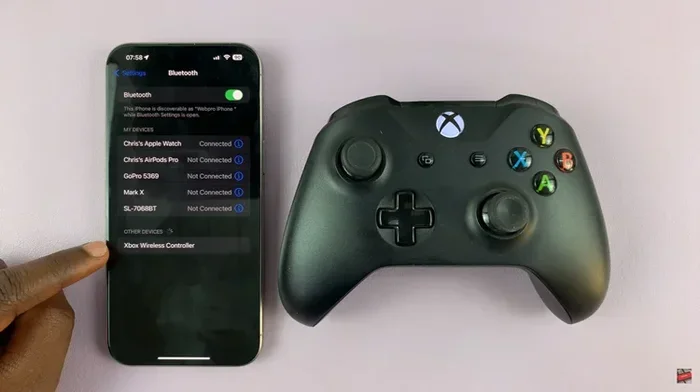
- Open Bluetooth settings on your phone, tablet, or laptop. You do not need to turn on Wi-Fi for this step.
- Search for available devices. Your speaker should appear in the list of available Bluetooth devices.
- Tap on the speaker name to initiate pairing. You may hear a confirmation tone from the speaker.
- Start playing audio. Once paired, any audio from your device will play through the speaker.
That is it. No Wi-Fi password, no router, no internet connection. The pairing process happens entirely through Bluetooth radio signals.
Quick Tips for Better Bluetooth Performance
- Keep your devices within 30 feet of each other for the best connection
- Remove obstacles like walls between your phone and speaker
- Turn off other Bluetooth devices nearby that might cause interference
- Make sure your speaker firmware is up to date for optimal performance
- Restart both devices if you experience connection issues
Can You Use Bluetooth Speakers for More Than Just Music?
Hands-Free Calling
Yes, Bluetooth speakers work great for phone calls. When you receive a call, the audio routes through your Bluetooth speaker just like it would with a wired speaker. You do not need Wi-Fi for this either, as long as your phone has cellular service. This is similar to how you can answer calls without Wi-Fi using your cellular connection.
Podcasts and Audiobooks
If you have downloaded podcasts or audiobooks to your device, your Bluetooth speaker will play them perfectly offline. This makes Bluetooth speakers excellent companions for long commutes, flights, or camping trips where you want to listen to content without using any data.
Gaming and Media
Bluetooth speakers also enhance your gaming experience. Whether you are playing games on your phone or watching downloaded videos, the audio comes through the speaker via Bluetooth. You do not need an internet connection for locally stored content.
Presentations and Meetings
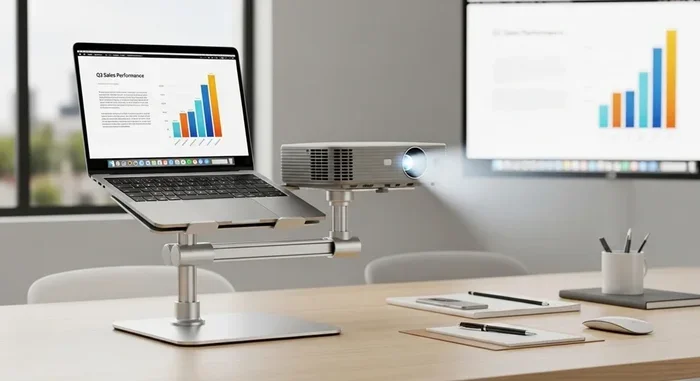
Professionals often use Bluetooth speakers for presentations. You can connect your laptop to a Bluetooth speaker and play audio or voice recordings without needing to set up a Wi-Fi network. This makes Bluetooth speakers incredibly versatile for business settings too.
Do Bluetooth Speakers Need Internet to Stream Music?
This is where things get a little nuanced. If you want to stream music from an online service like Spotify, Apple Music, or YouTube Music, then yes, you need an internet connection. The Bluetooth speaker itself does not need Wi-Fi, but the device it is paired with does need internet to fetch the streaming content.
However, if you download music first and store it on your device, you can play that music through your Bluetooth speaker without any internet at all. The Bluetooth speaker simply receives the audio data from your device. It does not care whether that data came from the internet or from your phone’s local storage.
Think of it this way: the Bluetooth speaker is like a pair of ears. It listens to whatever your phone tells it to play. If your phone has the music stored locally, the speaker plays it. If your phone needs the internet to get the music, then yes, you need Wi-Fi or cellular data. But the speaker itself is never the one asking for the internet.
Common Mistakes People Make With Bluetooth Speakers
Assuming No Sound Means No Wi-Fi
Many people blame their Wi-Fi connection when a Bluetooth speaker is not working. In reality, the issue is usually with the Bluetooth connection, not the internet. Before troubleshooting, check that both devices have Bluetooth turned on and are properly paired.
Forgetting to Download Content Offline
If you plan to use your speaker somewhere without Wi-Fi, make sure to download your music or podcasts beforehand. Streaming without a data connection will result in silence or buffering.
Ignoring Bluetooth Range Limits
Bluetooth has a limited range, typically around 30 feet. Walls, furniture, and other electronic devices can reduce this range. If your speaker keeps cutting out, try moving closer to your source device.
Leaving Bluetooth Paired Devices Unattended
Multiple paired devices can cause confusion. Your speaker might try to connect to a device that is out of range, causing audio to route incorrectly. Disconnect unused devices to keep things running smoothly.
Expert Insights on Bluetooth Speaker Connectivity
Bluetooth technology has come a long way since its early days. Modern Bluetooth versions like 5.0 and 5.3 offer improved range, better battery efficiency, and stronger connections. These advancements mean your Bluetooth speaker works more reliably than ever, even without Wi-Fi.
Experts recommend keeping your devices updated for the best Bluetooth performance. Firmware updates for both your speaker and your source device can fix connectivity issues and improve audio quality. Also, newer Bluetooth versions support multi-point connections, allowing your speaker to stay paired with two devices simultaneously.
The beauty of Bluetooth is its simplicity and independence from internet infrastructure. This is why Bluetooth speakers remain one of the most popular portable audio solutions worldwide. Whether you are at a campsite, a beach house, or a remote cabin, your Bluetooth speaker will deliver quality sound as long as it is paired with a source device that has audio content ready to play.
Conclusion
To answer the question directly: you do not need Wi-Fi to use Bluetooth speakers. Bluetooth is a standalone wireless technology that connects your speaker directly to your device. No router, no internet, no password. As long as you have a charged speaker and a paired device with audio content, you are good to go.
Whether you are enjoying offline music at a picnic, taking calls on a road trip, or listening to downloaded audiobooks in a remote location, your Bluetooth speaker delivers reliable performance without ever touching a Wi-Fi network. The technology is designed to be simple, portable, and independent. So go ahead, take your Bluetooth speaker anywhere, and enjoy your audio without worrying about internet connections.
The next time someone asks you if Bluetooth speakers need Wi-Fi, you can confidently say no. Share this knowledge and help others enjoy the freedom of wireless audio wherever they go.
Frequently Asked Questions
Can I use a Bluetooth speaker if I have no internet connection at all?
Yes, you can. Bluetooth speakers do not need internet to function. They connect directly to your device through Bluetooth radio signals. As long as you have downloaded music or other audio content on your device, your Bluetooth speaker will play it without any internet connection.
Do Bluetooth speakers work in areas with no Wi-Fi or cell service?
Absolutely. Bluetooth speakers work independently of both Wi-Fi and cellular service. They only need a paired Bluetooth device with stored audio content. This makes them perfect for camping trips, remote locations, and areas with poor connectivity.
How far can a Bluetooth speaker be from my phone without Wi-Fi?
Most Bluetooth speakers work within 30 feet of the paired device. Newer Bluetooth versions can extend this range further. The connection does not depend on Wi-Fi at all. Keep in mind that physical obstacles like walls can reduce the effective range.
Can I connect multiple Bluetooth speakers without Wi-Fi?
Yes, many modern Bluetooth speakers support multi-speaker pairing. You can connect two or more speakers directly to your device without Wi-Fi. Each speaker pairs individually with your source device through its own Bluetooth connection.
Does streaming music through Bluetooth use my data plan?
If you are streaming music from an online service, yes, it uses your data plan. However, the Bluetooth connection itself does not use any data. To avoid using mobile data, download your music for offline listening first, then play it through your Bluetooth speaker.
Why does my Bluetooth speaker keep disconnecting even though I have no Wi-Fi?
Bluetooth disconnections are usually caused by distance, interference, or low battery. Since Bluetooth does not use Wi-Fi, a lack of internet is not the problem. Try moving closer to your speaker, reducing nearby electronic interference, and ensuring both devices have sufficient battery charge.