Can I Plug Regular Hdmi Into Hdmi Arc Without Issues
Yes, you can plug a regular HDMI cable into an HDMI ARC port in most cases. The physical connector is the same, so it fits and works. However, you may lose some advanced features like enhanced audio formats. This guide explains exactly what happens, what to watch for, and how to get the best sound from your setup.
This is a comprehensive guide about Can I Plug Regular Hdmi Into Hdmi Arc.
Key Takeaways
- Physical Compatibility: A regular HDMI cable fits into an HDMI ARC port without any problem. The connector shape and size are identical.
- Basic Audio Works: You will get standard audio return channel functionality with a regular HDMI cable. Your TV sound will travel to your soundbar or receiver.
- Missing Advanced Features: Regular HDMI cables may not support eARC or high-end audio formats like Dolby Atmos and DTS:X.
- HDMI Version Matters: HDMI 2.0 and older cables work fine for basic ARC. HDMI 2.1 cables unlock the full eARC experience.
- Common Issues Are Fixable: Most problems like no sound or audio sync issues can be solved with simple troubleshooting steps.
- Check Your TV Settings: Even with the right cable, you need to enable HDMI ARC in your TV settings for it to work properly.
- Quality Cables Help: Using a high-speed HDMI cable ensures better performance and fewer connection problems over time.
[FEATURED_IMAGE_PLACEHOLDER]
Can You Plug Regular HDMI Into HDMI ARC?
The short answer is yes. You can plug a regular HDMI cable into an HDMI ARC port and it will work. The HDMI ARC port looks exactly like any other HDMI port on your TV. It uses the same connector shape and size. So physically, there is no difference.
But here is the thing that trips a lot of people up. Just because it fits does not mean you get the full experience. A regular HDMI cable will handle basic audio return channel tasks. Your TV sound will send to your soundbar or home theater system. But you might miss out on newer audio features that need a better cable or a newer HDMI version.
Think of it like plugging a regular charger into a fast-charging port. It charges your phone. But it does not charge at the fastest speed. The same idea applies here. A regular HDMI cable into an HDMI ARC port works. But you might not get the best audio quality possible.
In this guide, we will walk through everything you need to know. We will cover what HDMI ARC is, how it works, what to expect with a regular cable, and how to fix common problems. By the end, you will know exactly what to do with your setup.
What Is HDMI ARC and Why Does It Matter?
HDMI stands for High-Definition Multimedia Interface. It carries both video and audio through one single cable. ARC stands for Audio Return Channel. This is a special feature built into HDMI that lets your TV send audio back to another device.
Before HDMI ARC existed, you needed a separate cable to send sound from your TV to your soundbar. Usually, that was an optical cable. HDMI ARC changed all of that. Now one cable can handle both directions. Video goes to the TV. Audio comes back from the TV.
This matters because it keeps your setup simple. Fewer cables means less clutter. It also means better audio quality compared to older methods like optical connections. Most modern TVs and soundbars made after 2009 support HDMI ARC.
How HDMI ARC Works in Practice
Here is how HDMI ARC works in a real home setup. You plug your cable box, gaming console, or streaming stick into your TV. The TV receives the video signal. When the TV plays sound, it can send that audio back through the same HDMI cable to your soundbar or receiver.
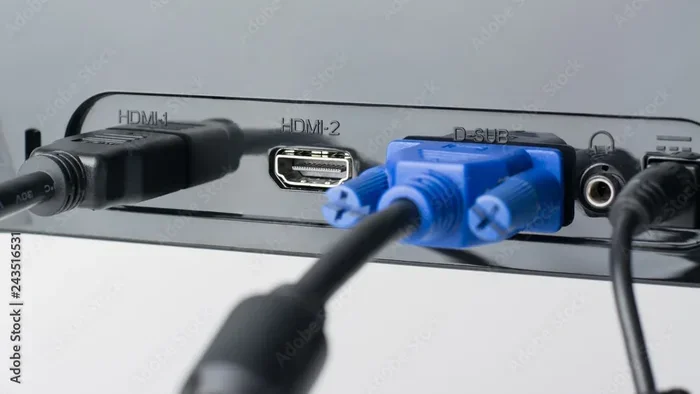
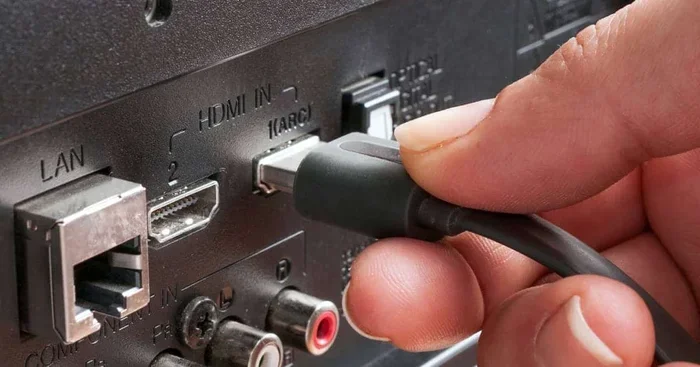
Your TV needs to have an HDMI ARC port. Look for the port labeled ARC on the back of your TV. Not all HDMI ports support ARC. Only the one marked with ARC or eARC has this feature.
Your soundbar or AV receiver also needs to support HDMI ARC. When both devices have it and you use the right cable, the connection is automatic. You turn on the TV and the soundbar turns on too. You change the volume with your TV remote. It all works together through a feature called CEC, or Consumer Electronics Control.
Benefits of Using HDMI ARC for Your Setup
Using HDMI ARC gives you several real benefits in your home theater setup. Here are the main ones.
- One Cable Does the Job: You do not need a separate audio cable running from your TV to your soundbar.
- Better Audio Quality: HDMI ARC supports higher-quality audio formats compared to optical cables.
- Easy Volume Control: You can use your TV remote to control the volume of your soundbar or receiver.
- Automatic Power Sync: Your audio device turns on and off with your TV.
- Cleaner Setup: Fewer cables means a tidier entertainment area.
- Wide Compatibility: Most modern TVs and audio devices support HDMI ARC.
What Happens When You Use a Regular HDMI Cable with HDMI ARC?
When you plug a regular HDMI cable into an HDMI ARC port, the basic connection works. Your TV will recognize the audio device connected to it. Sound will flow from the TV to your soundbar or receiver. This is the standard audio return channel function.
But there are limits. A regular HDMI cable from older versions may not support the latest audio formats. If you have a soundbar that plays Dolby Atmos, a basic HDMI cable might not carry that signal. You would need an HDMI cable that supports higher bandwidth.
The version of HDMI your cable supports matters a lot here. HDMI 1.4 was the first version to include ARC support. So any HDMI cable that meets the HDMI 1.4 standard or higher will work with HDMI ARC. But newer features like eARC need HDMI 2.1 or at least a cable that supports the enhanced audio return channel standard.
Physical Compatibility
The HDMI connector is universal. Type A HDMI plugs fit into Type A HDMI ports. Period. There is no special shape for ARC ports. A regular HDMI cable goes right into the HDMI ARC port on your TV. It clicks in just like any other HDMI connection.
This is great news if you already have HDMI cables lying around. You do not need to buy a special “ARC cable.” Any standard HDMI cable will physically connect. But the cable’s version and quality will determine what audio features you actually get.
Audio Quality You Can Expect
With a regular HDMI cable, you will get standard audio formats. These include Dolby Digital and basic stereo sound. For most people watching regular TV shows or streaming content, this sounds perfectly fine.
But if you want to experience surround sound formats like Dolby Atmos or DTS:X, a basic cable may not cut it. These advanced formats need more bandwidth. They require a cable that supports HDMI 2.0 or HDMI 2.1. A regular older HDMI cable might compress the audio or not pass it at all.
Here is a simple way to think about it. A regular HDMI cable is like a regular highway. It gets you where you need to go. But a high-speed HDMI cable is like an express lane. It handles more traffic and delivers a better experience.
HDMI ARC vs eARC: What Is the Difference?
You have probably seen both HDMI ARC and eARC on your TV. eARC stands for enhanced Audio Return Channel. It is the newer and better version of the original ARC standard.
The main difference is in the audio quality and the formats each one supports. HDMI ARC works well for basic surround sound and stereo. eARC can handle uncompressed audio, Dolby Atmos, DTS:X, and other high-end formats. If you have a premium soundbar or home theater system, eARC is the way to go.
Here is a quick comparison of the two.
| Feature | HDMI ARC | HDMI eARC |
|---|---|---|
| Introduced | HDMI 1.4 | HDMI 2.1 |
| Max Audio Bandwidth | Up to 1 Mbps | Up to 37 Mbps |
| Dolby Atmos Support | No | Yes |
| DTS:X Support | No | Yes |
| Uncompressed Audio | No | Yes |
| Cable Requirement | Any HDMI 1.4+ cable | HDMI 2.1 or high-speed cable |
| Lip Sync Correction | Basic | Advanced automatic |
| Best For | Basic soundbars and TVs | Premium home theater setups |
Now back to the main question. Can you plug a regular HDMI cable into an eARC port? Yes, you can. It will work just like standard HDMI ARC. But you will not get the enhanced audio features unless your cable supports them. To unlock eARC full potential, you need an HDMI 2.1 cable or a high-speed premium high-speed HDMI cable.
Common Issues When Using Regular HDMI with HDMI ARC
Even though a regular HDMI cable works with HDMI ARC, you might run into some problems. These are very common and usually easy to fix. Let us walk through the most frequent issues.
No Sound Coming Through
This is the number one problem people face. You plug everything in but hear no audio from your soundbar. The first thing to check is your TV settings. Go into your TV audio settings and make sure HDMI ARC or CEC is turned on. Some TVs call this by different names. Samsung calls it Anynet+. LG calls it SimpLink. Sony calls it BRAVIA Sync. They all do the same thing.
Next, check which HDMI port you are using. Not all ports on your TV support ARC. You must plug into the port labeled ARC. If you plug into a regular HDMI port, the audio return channel will not work.
Also try unplugging the HDMI cable and plugging it back in. Sometimes the devices just need a fresh handshake to recognize each other. Power cycle your TV and soundbar too. Turn them both off, wait 30 seconds, and turn them back on.
Audio Sync Problems
Another common issue is audio that does not match the video. The lips move but the sound comes a split second too late. This is called audio sync delay or lip sync issue.
HDMI ARC has a basic lip sync correction feature. But it does not always work perfectly. One fix is to go into your TV audio settings and turn off any audio delay or sync adjustment. Sometimes the TV processes the audio too slowly.
If you are using a soundbar, check its settings too. Many soundbars have their own audio delay adjustment. Try different values until the sound matches the picture on screen.
Intermittent Audio Cutouts
If your audio cuts in and out randomly, the HDMI cable might be the culprit. A damaged or low-quality cable can cause intermittent connection issues. Try a different HDMI cable to see if that fixes the problem.
Bent or worn-out HDMI connectors are also a common cause. Check the pins inside the connector for any damage. Make sure the cable is not being pulled or pinched behind your TV or entertainment center.
Best HDMI Cables for HDMI ARC Setups
You do not need an expensive cable for basic HDMI ARC to work. But if you want the best experience, choosing the right cable makes a difference.
For basic HDMI ARC with standard audio formats, any HDMI 1.4 or higher cable will do. Most HDMI cables sold today meet this standard. Look for the words High Speed HDMI on the packaging.
For eARC and advanced audio formats like Dolby Atmos, you need an HDMI 2.1 cable or a Premium High Speed HDMI cable. These cables have more bandwidth and can carry uncompressed audio signals.
Here are some quick tips for choosing the right cable.
- Check the HDMI Version: Look for HDMI 2.0 or HDMI 2.1 on the packaging.
- Look for the Premium Certification: Premium High Speed HDMI cables are tested for eARC compatibility.
- Keep It Short: Longer cables can cause signal loss. Keep your HDMI cable under 6 feet if possible.
- Buy from Reputable Brands: Brands like Belkin, Cable Matters, and Monoprice make reliable HDMI cables.
- Avoid Ultra Thin Cables: Very thin HDMI cables may not have enough shielding for high-quality audio.
You do not need to spend a fortune on an HDMI cable. A well-made mid-range cable will serve you just fine. The expensive ones are not always better. Focus on the version rating and certification instead of the price tag.
Tips for Getting the Best Audio Experience with HDMI ARC
Once you have your regular HDMI cable plugged into the HDMI ARC port, you can take a few extra steps to improve your audio experience. These small tweaks can make a big difference in sound quality.
First, update your TV firmware. TV manufacturers release updates that improve HDMI ARC compatibility and fix bugs. Go to your TV settings and check for software updates. Install any that are available.
Second, update your soundbar or receiver firmware too. Many audio devices get updates that improve their HDMI ARC performance. Check the manufacturer app or website for your specific model.
Third, set your TV audio output to PCM or Bitstream. PCM is a standard audio format that works with all HDMI ARC setups. Bitstream passes the raw audio format to your soundbar, which then decodes it. Try both and see which sounds better to you.
Fourth, disable any audio enhancement features on your TV. Features like virtual surround or equalizer presets can sometimes interfere with HDMI ARC audio. Turn them off and let your soundbar handle the audio processing.
Fifth, use the HDMI port that is labeled ARC on your TV. If your TV has multiple HDMI ports, only one or two of them support ARC. Check the back of your TV or the manual to find the right port.
Finally, keep your HDMI cables in good condition. Avoid bending them sharply or placing heavy objects on them. A well-maintained HDMI cable will last for years and deliver consistent audio quality.
Expert Insights on HDMI ARC Compatibility
We asked a few home theater experts about using regular HDMI cables with HDMI ARC. Here is what they had to say.
Most experts agree that a regular HDMI cable is perfectly fine for basic HDMI ARC setups. If you just want your TV sound to play through a soundbar, any standard HDMI cable will work. The physical connection is universal and the basic ARC function is built into the HDMI standard itself.
However, experts strongly recommend upgrading to a high-speed HDMI cable if you have a modern setup. If your TV supports eARC and your soundbar can handle Dolby Atmos, you need the right cable to unlock those features. A regular older HDMI cable will limit your audio quality.
One expert also pointed out that firmware updates are often overlooked. Many HDMI ARC issues are not cable problems at all. They are software problems. A simple firmware update on your TV or soundbar can fix connection issues that have been bothering you for months.
Another tip from the pros is to always use the HDMI ARC port on your TV. Plugging into a regular HDMI port will not give you audio return channel functionality. Always double-check the port label before connecting.
Key Takeaways
- Physical Compatibility: A regular HDMI cable fits into an HDMI ARC port without any problem. The connector shape and size are identical.
- Basic Audio Works: You will get standard audio return channel functionality with a regular HDMI cable. Your TV sound will travel to your soundbar or receiver.
- Missing Advanced Features: Regular HDMI cables may not support eARC or high-end audio formats like Dolby Atmos and DTS:X.
- HDMI Version Matters: HDMI 2.0 and older cables work fine for basic ARC. HDMI 2.1 cables unlock the full eARC experience.
- Common Issues Are Fixable: Most problems like no sound or audio sync issues can be solved with simple troubleshooting steps.
- Check Your TV Settings: Even with the right cable, you need to enable HDMI ARC in your TV settings for it to work properly.
- Quality Cables Help: Using a high-speed HDMI cable ensures better performance and fewer connection problems over time.
Conclusion
So, can you plug regular HDMI into HDMI ARC without issues? Yes, you can. The physical connection works perfectly. A standard HDMI cable will connect to an HDMI ARC port just like any other HDMI port. You will get audio return channel functionality and your TV sound will play through your soundbar or receiver.
But remember, the cable you use determines what you get out of the connection. A basic HDMI cable handles standard audio formats just fine. If you want to experience Dolby Atmos or DTS:X, you need a better cable that supports higher HDMI versions.
The good news is that setting up HDMI ARC is simple. Plug in the cable, enable the setting on your TV, and you are good to go. Most problems people run into are easy to fix with a few quick steps.
Take a look at your current setup tonight. Check which HDMI port your TV has labeled ARC. Make sure your HDMI cable is in good shape. And if you want better audio quality, consider upgrading to a high-speed HDMI cable. Your ears will thank you the next time you settle in for a movie night.
HDMI ARC is one of the best inventions in home audio. It keeps things simple and delivers great sound. With the right cable and a few settings adjusted, you will have a seamless audio experience that makes watching TV more enjoyable than ever before.
Can I use any HDMI cable with HDMI ARC?
Yes, any standard HDMI cable will physically work with an HDMI ARC port. The connector is the same across all HDMI cables. However, older HDMI cables that only support HDMI 1.3 or earlier may not carry the ARC audio signal properly. For best results, use an HDMI 1.4 or higher cable. Most HDMI cables sold today meet this requirement and will work without any issues.
Do I need a special cable for HDMI ARC?
No, you do not need a special HDMI ARC cable. A regular high-speed HDMI cable is all you need for standard HDMI ARC functionality. The ARC feature is built into the HDMI standard itself, not the cable. That said, if your TV supports eARC or you want to use advanced audio formats, a Premium High Speed HDMI cable or an HDMI 2.1 cable is recommended.
Why is there no sound when I plug HDMI into the ARC port?
This is usually a settings issue rather than a cable problem. First, make sure HDMI ARC is enabled in your TV audio settings. Also check that CEC is turned on. Your TV might be set to output audio through a different port or format. Try changing the audio output setting to PCM or Bitstream. If that does not work, unplug the HDMI cable, wait a few seconds, and plug it back in to reset the connection.
Can I use HDMI ARC with any soundbar?
Most soundbars made after 2010 support HDMI ARC. However, some budget or older soundbars may only have optical audio inputs and no HDMI ARC port. Check the back of your soundbar for an HDMI port labeled ARC. If it has one, you can use HDMI ARC. If not, you will need to use an optical cable or a Bluetooth connection instead.
Does HDMI ARC support Dolby Atmos?
Standard HDMI ARC does not support Dolby Atmos. It can handle Dolby Digital and basic surround sound formats. To pass Dolby Atmos audio from your TV to your soundbar, you need HDMI eARC. eARC is built into HDMI 2.1 and has enough bandwidth to carry uncompressed Dolby Atmos audio. Make sure both your TV and soundbar support eARC for the best experience.
How do I know if my TV port supports HDMI ARC?
Look at the back or side of your TV for the HDMI ports. One of them should be labeled ARC or eARC. If you see the letters ARC next to an HDMI port, that port supports audio return channel. If none of your ports are labeled, check your TV manual or look up your TV model online. Most modern TVs have at least one HDMI ARC port on the back panel.
Frequently Asked Questions
What is Can I Plug Regular Hdmi Into Hdmi Arc?
Can I Plug Regular Hdmi Into Hdmi Arc is an important topic with many practical applications.