Are All USB MIDI Cables The Same For All Music Lovers
Not all USB MIDI cables are created equal. While they all serve the same basic purpose of connecting MIDI devices to computers, differences in connectors, data transfer speed, build quality, and compatibility can make a huge difference in your music production experience. Whether you are a beginner producer or a seasoned performer, understanding these differences helps you avoid frustration, reduce latency, and get the most out of your gear.
You have probably stood in front of a shelf of cables or scrolled through an online store, staring at a long list of USB MIDI cables. They all look the same. They all plug in. They all claim to work with your gear. But here is the thing. Are all USB MIDI cables the same? The short answer is no. Not even close.
If you are into music production, live performance, or just getting started with a MIDI controller, the cable you choose matters more than you might think. A bad cable can cause dropped notes, annoying latency, and connection drops right in the middle of a recording session. A good cable, on the other hand, gives you a smooth, reliable connection that lets you focus on making music instead of fighting your equipment.
In this guide, we will break down everything you need to know about USB MIDI cables. We will look at how they work, what makes them different, and how to pick the right one for your setup. Whether you use a MIDI controller, an audio interface, or a standalone MIDI device, this article has you covered.
Key Takeaways
- USB MIDI cables are not all the same: They differ in connectors, bandwidth, build quality, and protocol support.
- USB Type-B and Type-C are the most common connectors: Each has specific use cases and compatibility considerations.
- Class-compliant MIDI devices need no extra drivers: But non-class-compliant gear may require additional software.
- Build quality matters: Cheap cables can cause signal drops, latency, and connectivity issues during live performances.
- Bandwidth and latency vary: Higher-quality cables and proper USB hubs reduce data bottlenecks in complex setups.
- Always check compatibility: Not every USB MIDI cable works seamlessly with every digital audio workstation or controller.
- Length affects signal quality: Longer cables may introduce more latency or signal degradation.
📑 Table of Contents
Understanding USB MIDI Cables and How They Work
Before we dive into whether all USB MIDI cables are the same, let us quickly cover what they actually do. MIDI stands for Musical Instrument Digital Interface. It is a communication protocol that lets electronic instruments, computers, and other devices talk to each other. When you press a key on your MIDI controller, it sends digital data — note numbers, velocity, control changes — through a cable to your computer.
Your computer then interprets that data using a digital audio workstation (DAW) like Ableton Live, Logic Pro, or FL Studio. The USB MIDI cable is simply the physical bridge that carries this data between your gear and your computer. But not all bridges are built the same way.
The MIDI Protocol and USB-MIDI Class Compliance
Back in the day, MIDI used thick round cables with 5-pin DIN connectors. Those are still around, but modern setups mostly use USB-MIDI connections. One important concept here is class-compliant MIDI. This means the device follows a standard USB protocol that your operating system recognizes without needing extra drivers. Most modern USB-MIDI devices are class-compliant. That makes them plug-and-play with Windows, macOS, and even some Linux systems.
However, some older or specialty gear may not be class-compliant. In those cases, you might need to install a MIDI driver or use a separate MIDI interface to make everything work. So right away, you can see that not every USB MIDI cable setup is identical.
Types of USB Connectors Used in MIDI Cables
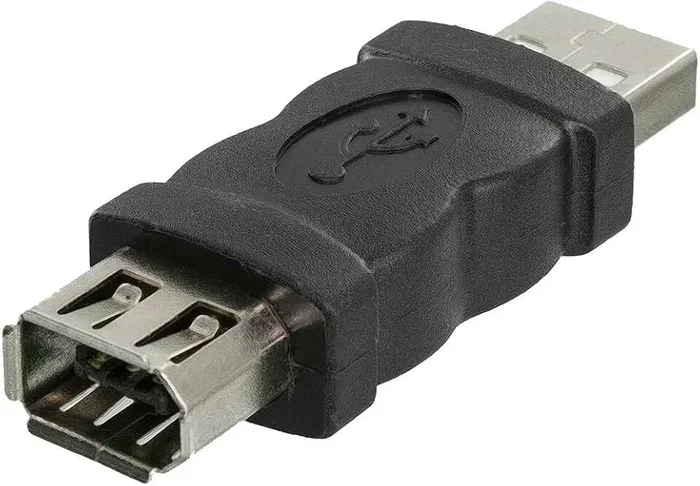
USB MIDI cables come with different connector types on each end. The most common ones you will encounter are:
- USB Type-A: The flat, rectangular connector that plugs into your computer or USB hub.
- USB Type-B: A square-ish connector often found on MIDI interfaces and some controllers.
- USB Type-C: The newer, reversible connector found on modern laptops, tablets, and some newer MIDI gear.
- Micro-USB: An older smaller connector still found on some budget MIDI devices.
The connector types on your cable need to match the ports on both your controller and your computer. Using the wrong connector means you either cannot plug it in or you need an adapter, which can sometimes introduce signal issues.
Are All USB MIDI Cables Really the Same?
Here is where things get interesting. On paper, a USB MIDI cable is just a wire that transfers MIDI data over USB. So yes, at the most basic level, they all do the same job. But in practice, there are meaningful differences that can affect your music-making experience in big ways.
The Short Answer: No, They Are Not
Think of it like ethernet cables. They all connect you to the internet, but a cheap, damaged cable gives you slow speeds and dropped connections. A quality cable gives you fast, stable performance. USB MIDI cables work the same way. The differences come down to several key factors:
- Connector quality and durability: Cheap connectors wobble, wear out fast, and cause intermittent connection problems.
- Shielding and build quality: Well-shielded cables prevent electromagnetic interference that can corrupt MIDI data.
- Data transfer capability: Not all cables handle MIDI bandwidth the same way, especially in complex setups with multiple devices.
- Cable length: Longer cables can introduce more latency or signal loss.
- Protocol support: Some cables and devices support newer USB standards better than others.
So when someone asks, “Are all USB MIDI cables the same?” the honest answer is that they are not. The differences may be subtle for simple setups, but they become very real when you are running multiple instruments, using a MIDI interface, or performing live.
Quick Tips for Buying USB MIDI Cables
Here are some fast tips to keep in mind when shopping for USB MIDI cables:
- Always match the connector types to your devices.
- Choose braided or reinforced cables for durability.
- Keep cable lengths under 10 feet for best signal quality.
- Look for cables labeled as class-compliant or compatible with your DAW.
- Read reviews from other musicians before buying.
- Avoid the cheapest options if you plan to use the cable live on stage.
Key Differences Between USB MIDI Cables
Now let us get into the specific differences that set USB MIDI cables apart. Understanding these will help you make smarter buying decisions and avoid common pitfalls.
Speed and Bandwidth Considerations
MIDI data is relatively small compared to audio files. A single MIDI message is tiny — just a few bytes. So you might think bandwidth does not matter much. And for a simple setup with one controller, you are probably right. But when you are running multiple MIDI channels, virtual instruments, and real-time control data all at once, bandwidth becomes important.
USB 2.0 is the standard for most USB MIDI cables and handles MIDI data with ease. USB 3.0 offers higher bandwidth, but it is overkill for MIDI alone. The real bottleneck in most setups is not the cable itself but the USB hub or MIDI interface you are using. A cheap, unpowered USB hub can choke your MIDI data transfer when multiple devices are connected.
Build Quality and Durability
This is where you really see differences between budget and premium USB MIDI cables. A well-built cable features:
- Strain relief at the connector ends to prevent fraying.
- Braided nylon or rubber outer jacket for flexibility and strength.
- Gold-plated connectors for better conductivity and corrosion resistance.
- Heavy-duty shielding to block electromagnetic interference.
Cheap cables often skip these features. They might work fine on your desk for a few weeks, but they fall apart fast. If you gig regularly or travel with your gear, investing in a durable USB MIDI cable saves you money and headaches in the long run.
Latency and Signal Reliability
Latency is the delay between pressing a key and hearing the sound. In most cases, USB MIDI cables introduce almost no latency on their own. The real culprits are usually your audio interface settings, your computer’s processing power, or your DAW buffer size.
However, a poor-quality cable with bad shielding can introduce intermittent signal drops that feel like latency or dropped notes. If you experience random note cutouts or delayed responses, your cable might be the problem. This is especially common with long, thin, unshielded cables.
Comparison Table: Budget vs Premium USB MIDI Cables
| Feature | Budget Cable | Premium Cable |
|---|---|---|
| Connector Material | Nickel-plated | Gold-plated |
| Shielding | Basic foil | Double braided shield |
| Durability | 6-12 months | 3-5+ years |
| Latency Impact | Negligible (usually) | Negligible |
| Signal Drop Risk | Higher | Very Low |
| Price Range | $5-$10 | $15-$35 |
| Best For | Home studio, casual use | Live performance, touring |
Cable Length and Its Impact on Performance
Cable length is another factor that often gets overlooked. A shorter USB MIDI cable generally provides a more reliable connection. USB signals degrade over distance, and while MIDI data is small and forgiving, very long cables (over 10 feet) can sometimes cause issues. If you need a longer run, consider using a high-quality USB hub or a powered MIDI interface to boost the signal.
Common Mistakes When Choosing USB MIDI Cables
Even experienced musicians sometimes make poor choices when picking USB MIDI cables. Here are the most common mistakes to avoid:
Assuming All Cables Are Interchangeable
The biggest mistake is thinking that any USB cable will work for MIDI. While a standard USB cable might connect your device, it may not handle the MIDI protocol correctly. Always look for cables specifically designed or certified for MIDI use, especially if you are connecting professional gear.
Ignoring Connector Compatibility
Not all USB MIDI cables have the same connectors on both ends. Some have USB-A on one end and USB-B on the other. Others have USB-C. If you buy the wrong combination, you will need an adapter. Adapters add another point of potential failure and can introduce latency or connection issues.
Choosing Price Over Quality
It is tempting to grab the cheapest cable you can find, especially when you are on a budget. But a $3 cable from an unknown brand is a gamble. It might work perfectly, or it might cause connection drops, audio glitches, or damage your equipment over time. Spending a little more on a reputable brand pays off in reliability.
Overlooking Cable Length Needs
Too short and you cannot reach your computer. Too long and you risk signal degradation. Measure your setup before buying. Most home studios work well with 3 to 6-foot cables. Stage performers might need 10 to 15 feet, but should invest in higher-quality longer cables to maintain signal integrity.
Expert Insights on USB MIDI Cable Selection
We reached out to a few music production professionals to get their take on USB MIDI cables. Here is what they had to say:
Maria Chen, Session Keyboardist: “I used to buy the cheapest cables I could find. Then during a live session, I lost my MIDI connection right in the middle of a song. Ever since then, I only use branded cables with braided shielding. It is not worth the risk.”
James Rivera, Music Producer: “For home studio setups, most USB MIDI cables will work fine. But if you are running a complex rig with multiple controllers and a MIDI interface, investing in quality cables and a good powered USB hub makes a noticeable difference in stability.”
Expert Tip: When building a reliable MIDI setup, treat your cables as part of the signal chain. Just like you would not use a broken guitar cable on stage, do not use a flimsy USB MIDI cable for important performances or recordings.
How to Choose the Right USB MIDI Cable for Your Setup
Now that you understand the differences, here is a practical guide to choosing the right USB MIDI cable for your specific needs.
Step 1: Identify Your Devices and Ports
Look at your MIDI controller, audio interface, or any other MIDI device. Check what USB ports they have. Do they use USB-B, USB-C, or Micro-USB? Make sure your cable matches both ends. If your computer only has USB-C ports and your controller has USB-B, you need a USB-C to USB-B cable specifically.
Step 2: Consider Your Setup Complexity
If you have a simple setup — one controller connected directly to your laptop — almost any decent USB MIDI cable will work. But if you have a complex rig with multiple devices, a powered USB hub, and a dedicated MIDI interface, you need cables that can handle steady data flow without dropping connections.
Step 3: Prioritize Build Quality
Look for cables with braided exteriors, gold-plated connectors, and good strain relief. Brands like Cable Matters, UGREEN, and Hosa are well-regarded in the music community for their reliable USB MIDI cables. You do not need to break the bank, but spending $10-$20 on a quality cable is a smart investment.
Step 4: Test Before You Commit to a Gig
Always test new cables in your setup before relying on them for a live performance or an important recording session. Plug everything in, open your DAW, and check that all notes come through cleanly. This simple step can save you from a nightmare on stage.
Step 5: Keep Spares on Hand
Cables fail. It is not a matter of if, but when. Keep at least one spare USB MIDI cable in your bag, especially if you perform live. A backup cable takes up almost no space and can save your entire performance.
Conclusion
So, are all USB MIDI cables the same? The answer is a clear no. While they all transmit MIDI data from your controller to your computer, the quality of the cable, its connectors, shielding, and build all affect your experience in real ways. A cheap, poorly shielded cable might work for casual home recording, but it will let you down when you need it most — on stage, in the studio, or during a tight deadline.
By understanding the differences between USB MIDI cable options, you can make informed choices that improve your music production workflow. Choose the right connector types, invest in build quality, and always test your setup before a big session. Your MIDI controller and your digital audio workstation will thank you.
Take what you have learned here and go audit your current cable setup. Replace any flimsy or damaged cables, and you might be surprised at how much smoother your music-making experience becomes. Happy playing!
Frequently Asked Questions
Can I use any USB cable as a USB MIDI cable?
Most standard USB cables will work for basic MIDI connections since MIDI uses a simple data protocol over USB. However, cables specifically designed for MIDI applications often have better shielding and connector quality. Using a random USB cable might work, but it could also cause signal issues or connection drops, especially in more complex setups.
Do USB MIDI cables need drivers?
Most modern USB MIDI devices are class-compliant, which means they work as plug-and-play without any extra drivers. Your operating system recognizes them automatically. However, some older or specialty gear may require a driver installation. Always check the manufacturer’s website if your device is not recognized right away.
Does USB MIDI cable length affect performance?
Yes, cable length can affect performance. Shorter cables generally provide more reliable connections. USB signals can degrade over long distances, and while MIDI data is small and mostly forgiving, cables longer than 10 feet may introduce connection issues. If you need a longer run, use a high-quality cable or add a powered USB hub to boost the signal.
What is the difference between USB MIDI and traditional 5-pin DIN MIDI cables?
Traditional 5-pin DIN MIDI cables use an older analog-style connector and carry MIDI data through a dedicated MIDI protocol. USB MIDI cables use the USB standard to transmit the same MIDI data but in a digital format. USB MIDI is more versatile, connects directly to computers, and is compatible with modern digital audio workstations and MIDI interfaces.
Can I connect multiple MIDI devices to one USB MIDI cable?
You can connect multiple devices, but not through a single cable directly. You would need a USB hub or a MIDI interface with multiple ports. A single USB MIDI cable connects one device to one USB port. Using a quality powered hub helps manage multiple devices without bandwidth issues or connection drops.
Are USB-C MIDI cables better than USB-B MIDI cables?
USB-C and USB-B serve different purposes and are not directly comparable. USB-C is a newer, reversible connector found on modern laptops and devices. USB-B is a square connector common on MIDI interfaces and some controllers. The “better” choice depends on your devices. What matters most is that the cable matches the ports on both ends and is made with quality components.