Does Nest Work With Google Wifi Everything You Need To Know
Yes, Nest devices work seamlessly with Google Wifi, making it easy to build a connected smart home. You can pair Nest thermostats, cameras, and smart speakers with your Google Wifi mesh network for full home automation. This guide walks you through setup, troubleshooting, and pro tips to get the most out of your Nest and Google Wifi combo.
Nest and Google Wifi are two of the most popular smart home products on the market today. If you own a Nest thermostat, Nest camera, or any other Nest device, you might be asking yourself, does Nest work with Google Wifi? The short answer is yes. But there is a lot more to know about how these devices talk to each other, how to set them up, and how to get the best performance.
Google Wifi is a mesh wifi system that blankets your home in strong wireless coverage. Nest devices are smart home gadgets made by Google that help you control things like temperature, security, and audio. When you put them together, you get a powerful smart home setup that is easy to manage and fun to use.
In this guide, we will cover everything you need to know about using Nest with Google Wifi. We will walk through compatibility, setup, common issues, and expert tips. Whether you are just starting your smart home journey or looking to improve your current setup, this article has you covered.
Key Takeaways
- Full Compatibility: Nest devices and Google Wifi work together out of the box with no special hardware needed.
- Easy Setup: You can connect Nest products through the Google Home app in just a few simple steps.
- Strong Signal: Google Wifi’s mesh system provides reliable coverage for all Nest smart home devices.
- Voice Control: Pairing Nest with Google Wifi lets you use Google Assistant for hands-free smart home control.
- Common Issues Are Fixable: Most connection problems can be solved with a quick router restart or firmware update.
- Expand Your Network: You can extend your Google Wifi coverage to support more Nest devices in larger homes.
📑 Table of Contents
- What Is Google Wifi and How Does It Work?
- Does Nest Work With Google Wifi
- How to Set Up Nest Devices With Google Wifi
- Benefits of Using Nest With Google Wifi
- Common Problems and How to Fix Them
- Expert Tips for Getting the Most Out of Nest and Google Wifi
- How Nest and Google Wifi Compare to Other Smart Home Setups
- Final Thoughts
What Is Google Wifi and How Does It Work?
Google Wifi is a mesh wifi system designed to give your whole home strong internet coverage. Instead of one router in a corner, Google Wifi uses multiple points that talk to each other. This creates a single, seamless network throughout your house.
Each Google Wifi point acts as a mini router. They all share the same network name and password. So when you walk from your living room to your bedroom, your devices stay connected without dropping the signal. This is especially helpful for smart home devices like Nest products that need a stable connection at all times.
Why Mesh Wifi Matters for Smart Home Devices
Traditional routers have a limited range. Walls, floors, and furniture can block the signal. Smart home devices like Nest thermostats and cameras need a strong and steady connection. A weak signal can cause your Nest devices to lag, disconnect, or not respond to commands.
Mesh wifi systems like Google Wifi solve this problem. They send the signal from one point to the next, filling in dead zones. This means your Nest smart home devices stay online and responsive no matter where they are in your home.
For example, if your Nest camera is in the backyard and your main router is in the living room, a Google Wifi point placed near the back door can extend the signal. This keeps your camera connected without any interruptions.
Does Nest Work With Google Wifi
The big question is, does Nest work with Google Wifi? The answer is a clear yes. All Nest devices are designed to work with Google Wifi networks. This includes Nest thermostats, Nest cameras, Nest doorbells, Nest audio speakers, and Nest hubs.
Google made sure that Nest products and Google Wifi work hand in hand. Both are part of the Google ecosystem, so they share the same app, the same assistant, and the same setup process. You do not need any extra equipment or special adapters to make them work together.
Compatible Nest Devices
Here is a list of Nest devices that work well with Google Wifi:
- Nest Thermostat: Controls your home heating and cooling through wifi.
- Nest Camera: Indoor and outdoor security cameras that stream video over wifi.
- Nest Doorbell: A video doorbell that sends alerts to your phone.
- Nest Audio: A smart speaker powered by Google Assistant.
- Nest Hub: A smart display that shows information and controls other devices.
- Nest Protect: A smoke and carbon monoxide detector with wifi alerts.
All of these devices connect to your Google Wifi network just like any other smart device. They use the 2.4GHz band, which is standard on all Google Wifi points. Some newer Nest devices also support the 5GHz band for faster speeds.
How Nest and Google Wifi Communicate
Nest devices use your home wifi network to send and receive data. When you change the temperature on your Nest thermostat, the signal goes from the thermostat to your Google Wifi point, then to the internet, and back to the Nest app on your phone.
This process happens in milliseconds. But it depends on having a strong and stable wifi connection. That is where Google Wifi shines. The mesh system ensures that every Nest device gets a strong signal, no matter how far it is from your main router.
One thing to keep in mind is that Nest devices use the Google Home app for setup and management. Google Wifi is managed through the Google Home app or the Google Wifi app. Both apps work together, so you can control your wifi network and your Nest devices from one place.
How to Set Up Nest Devices With Google Wifi
Setting up Nest devices with Google Wifi is straightforward. You do not need to be a tech expert to get everything working. Here is a step-by-step guide to help you through the process.
Step 1: Set Up Your Google Wifi Network
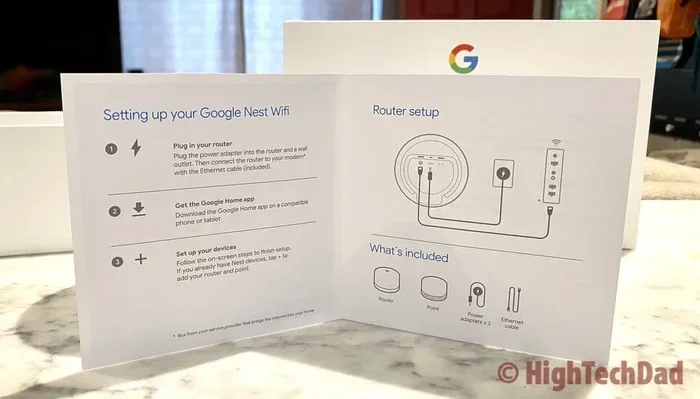
Before you add any Nest devices, make sure your Google Wifi system is up and running. Plug in your Google Wifi router and points. Download the Google Home app on your phone. Follow the on-screen instructions to create your network and connect your devices.
Make sure your phone is connected to your new Google Wifi network during setup. This is important because the app needs to be on the same network to communicate with your Nest devices.
Step 2: Add Your Nest Device
Once your Google Wifi network is ready, open the Google Home app. Tap the plus sign in the top left corner. Select “Set up device” and choose “New device.” The app will scan for nearby Nest devices.
Follow the on-screen prompts to complete the setup. You will need to name your device and assign it to a room. This helps you organize your smart home and makes it easier to control things with voice commands.
Step 3: Test Your Connection
After setup, test your Nest device to make sure it is working properly. Try adjusting the temperature on your Nest thermostat or viewing a live feed from your Nest camera. If everything responds quickly, you are all set.
If you notice any lag or disconnection, try moving your Google Wifi point closer to the Nest device. This can improve the signal strength and stability.
Quick Tips for a Smooth Setup
- Keep your Google Wifi firmware updated for the best performance.
- Place Google Wifi points in central locations for maximum coverage.
- Use the 2.4GHz band for Nest devices, as most Nest products only support this frequency.
- Restart your Google Wifi router if a Nest device does not connect on the first try.
- Make sure your internet plan has enough speed to support multiple smart devices at once.
If you are looking to expand your network coverage to support more Nest devices in areas like a garage or workshop, you might want to check out this guide on extending your wifi to a shed for helpful tips.
Benefits of Using Nest With Google Wifi
Pairing Nest devices with Google Wifi gives you several advantages that make your smart home experience better. Let us look at the key benefits.
Seamless Integration
Because both Nest and Google Wifi are Google products, they work together perfectly. You do not need to juggle multiple apps or deal with confusing setup processes. Everything is managed from one place through the Google Home app.
You can also use Google Assistant to control your Nest devices. Just say, “Hey Google, set the thermostat to 72 degrees,” and it happens instantly. This kind of integration makes your home feel truly smart and connected.
Reliable Connectivity
Google Wifi’s mesh system means no dead zones. Your Nest devices stay connected even if you have a large home or thick walls. This reliability is crucial for security cameras and doorbells that need to be online 24/7.
Easy Expansion
Need to add more Nest devices later? No problem. Google Wifi can handle many connected devices at once. You can add Nest cameras, thermostats, and speakers without worrying about overloading your network.
If you want to build a bigger mesh network, you might also consider connecting Wi-Fi 6 mesh to your existing Wi-Fi 5 router for even better performance and coverage.
Voice Control and Automation
Google Assistant makes it easy to control your Nest devices with your voice. You can set up routines that automate multiple devices at once. For example, you can create a “Goodnight” routine that turns off your Nest thermostat, arms your Nest cameras, and dims your lights.
This level of automation is one of the biggest reasons people invest in smart home technology. It saves time, adds convenience, and can even help you save on energy bills.
Common Problems and How to Fix Them
Even though Nest and Google Wifi work well together, you might run into occasional issues. Here are the most common problems and how to solve them.
Nest Device Not Connecting to Google Wifi
If a Nest device will not connect, the first thing to do is check your wifi signal. Make sure the Nest device is within range of a Google Wifi point. Walls and distance can weaken the signal.
Next, try restarting your Google Wifi router. Unplug it, wait 30 seconds, and plug it back in. This often fixes temporary connection issues. You should also make sure your Nest device firmware is up to date through the Google Home app.
Slow Response Times
If your Nest thermostat or camera responds slowly, it might be a bandwidth issue. Too many devices on the same network can slow things down. Try disconnecting devices you are not using or moving your Google Wifi point closer to the Nest device.
Also, check if any other devices in your home are using a lot of bandwidth, like streaming video or large downloads. These can temporarily slow down your Nest devices.
Google Home App Not Detecting Nest Device
Sometimes the Google Home app will not find your Nest device during setup. Make sure your phone is connected to the same Google Wifi network. Also, check that Bluetooth is turned on, as the app uses Bluetooth for initial device discovery.
If the problem persists, try resetting your Nest device. Most Nest products have a small reset button or a specific reset procedure in the app. After resetting, try adding the device again.
Wifi Signal Drops in Certain Rooms
If your Nest device loses connection in certain areas of your home, you may need to add another Google Wifi point. Mesh systems are designed to be expanded. You can buy additional Google Wifi points and place them in areas with weak coverage.
This ensures that every Nest device in your home has a strong and reliable connection. Proper placement of Google Wifi points is key to getting the best performance.
Expert Tips for Getting the Most Out of Nest and Google Wifi
Want to take your Nest and Google Wifi setup to the next level? Here are some expert tips that can help.
Optimize Your Network Channels
Google Wifi automatically selects the best channel for your network. But if you live in a dense area with many wifi networks nearby, you might experience interference. The Google Home app lets you check your wifi performance and suggests improvements.
Use a Separate Network for Smart Devices
Some advanced users like to create a separate network for their smart home devices. This keeps your Nest devices isolated from your main network, which can improve security and performance. Google Wifi supports guest networks that you can use for this purpose.
Keep Your Devices Updated
Regular updates are important for both Nest devices and Google Wifi. Updates fix bugs, improve security, and sometimes add new features. Make sure automatic updates are turned on in the Google Home app.
For more information on keeping your Google Wifi system running cool and safely, check out this article on whether Google Wifi can overheat and learn about proper placement and ventilation.
Group Your Nest Devices for Easier Control
In the Google Home app, you can group multiple Nest devices by room or type. This makes it easy to control all your lights, speakers, or thermostats with a single command. For example, you can say, “Hey Google, turn off all the lights,” and every connected device will respond.
Use Nest Device Routines
Nest routines let you automate tasks based on time, location, or device status. You can set your Nest thermostat to lower the temperature when you leave for work, or have your Nest camera start recording at sunset. These routines make your home smarter and more efficient.
How Nest and Google Wifi Compare to Other Smart Home Setups
There are many smart home options available today. Let us see how Nest and Google Wifi stack up against other popular choices.
| Feature | Nest + Google Wifi | Amazon Alexa + Echo | Apple HomeKit + Router |
|---|---|---|---|
| Ecosystem | Amazon | Apple | |
| Wifi System | Google Wifi mesh | No built-in mesh | No built-in mesh |
| Voice Assistant | Google Assistant | Alexa | Siri |
| Smart Home App | Google Home | Alexa app | Home app |
| Device Compatibility | Wide range | Very wide range | Limited to Apple-certified |
| Mesh Coverage | Excellent | Requires third-party | Requires third-party |
| Ease of Setup | Very easy | Easy | Moderate |
Nest and Google Wifi offer a balanced and user-friendly smart home experience. The mesh wifi system gives you reliable coverage, and the Google ecosystem provides smooth integration across all your devices.
One thing to note is that if you want to use a Deco mesh wifi system instead of Google Wifi, you can still use Nest devices. Deco can be used as a wifi extender and works with most smart home devices. You can read more about this in this guide on using Deco as a wifi extender for additional insights.
Final Thoughts
So, does Nest work with Google Wifi? Absolutely. The two products are designed to work together, and they do so beautifully. Whether you are using a Nest thermostat to manage your home temperature, a Nest camera to keep an eye on things, or a Nest speaker for music and voice control, Google Wifi provides the reliable and strong network connection you need.
Setting up your Nest devices with Google Wifi is simple, and the benefits are real. You get seamless integration, reliable connectivity, easy expansion, and powerful voice control. With a few simple tips and some regular maintenance, your smart home will run smoothly for years to come.
If you are thinking about building or upgrading your smart home, the Nest and Google Wifi combination is one of the best choices you can make. It is reliable, user-friendly, and backed by Google’s support and regular updates.
Start by setting up your Google Wifi system, then add your Nest devices one by one. Test each connection, optimize your network placement, and enjoy the convenience of a fully connected smart home. The future of home automation is here, and it works.
Frequently Asked Questions
Can I use Nest devices with any Google Wifi point?
Yes, all Nest devices work with every Google Wifi point in your mesh network. Nest products connect to whichever Google Wifi point has the strongest signal in their area. This ensures reliable connectivity throughout your home.
Do I need a Google Nest router to use Nest devices?
No, you do not need a Google Nest router. Any Google Wifi point or router works with Nest devices. The Google Wifi mesh system includes a router and additional points that all support Nest connectivity.
Can I control Nest devices when my internet is down?
Most Nest devices need an internet connection to work fully. However, some basic functions like manual thermostat adjustments can still work offline. For full remote control and voice commands, you need an active internet connection through your Google Wifi network.
How many Nest devices can I connect to Google Wifi?
Google Wifi can support up to 150 connected devices across the network. In a typical home, you can connect multiple Nest thermostats, cameras, speakers, and other devices without any performance issues.
Why does my Nest device keep disconnecting from Google Wifi?
Frequent disconnections are usually caused by a weak signal or outdated firmware. Try moving your Google Wifi point closer to the Nest device, restarting your router, or updating the device firmware through the Google Home app.
Can I use Nest with a mesh network other than Google Wifi?
Yes, Nest devices work with most mesh wifi systems, not just Google Wifi. As long as your mesh network provides a standard wifi connection, your Nest devices should connect and work normally.