Do I Need A Router If I Have Orbi For My Home Network
Do I need a router if I have Orbi? The short answer is no. An Orbi mesh system acts as both a router and a Wi-Fi hub, replacing your traditional router entirely. You can connect Orbi directly to your modem and enjoy whole-home coverage without any extra hardware. However, some users add a secondary router for specific needs like extra ports or advanced parental controls.
If you have ever stared at a blinking router and wondered why your Wi-Fi signal drops in the bedroom, you are not alone. Millions of households struggle with weak Wi-Fi, dead zones, and slow internet speeds. That is where mesh systems like Orbi come in. But here is the question that keeps popping up: do I need a router if I have Orbi?
The answer might surprise you. Orbi is not just a Wi-Fi extender. It is a full mesh system that replaces your traditional router. You do not need a separate router sitting alongside it. In fact, adding an extra router can sometimes cause more problems than it solves. Let us walk through everything you need to know about setting up your home network with Orbi.
Key Takeaways
- Orbi replaces your router: The Orbi system handles routing, switching, and Wi-Fi broadcasting all in one unit.
- No extra router needed for most setups: A standard Orbi kit provides everything a typical home network requires.
- You may still need a modem: Orbi connects to your modem, not the other way around. The modem brings the internet signal into your home.
- Mesh technology eliminates dead zones: Orbi uses satellite nodes to spread Wi-Fi evenly across large homes.
- Advanced users may want a second router: Some power users add a router for extra Ethernet ports or specialized features.
- Setup is simple and fast: Connecting Orbi to your modem takes just a few minutes with no technical expertise needed.
- Network performance stays strong: Orbi’s dedicated backhaul channel keeps speeds fast even with many connected devices.
📑 Table of Contents
What Is an Orbi System and How Does It Work?
Before we dive into whether you need a router, let us understand what Orbi actually is. Orbi is a mesh Wi-Fi system made by Netgear. It was designed to solve one big problem: covering an entire home with strong, reliable Wi-Fi.
A standard Orbi kit comes with two main pieces. There is the main Orbi unit, which connects to your modem. Then there is a satellite node, which you place in another room. Together, these two devices create a single, seamless wireless network across your home.
What makes Orbi special is its use of a dedicated backhaul channel. This is a private connection between the main unit and the satellite. Most mesh systems share their Wi-Fi bandwidth between sending data to devices and communicating between units. Orbi does not. It uses a separate band just for internal communication, which keeps your speeds fast.
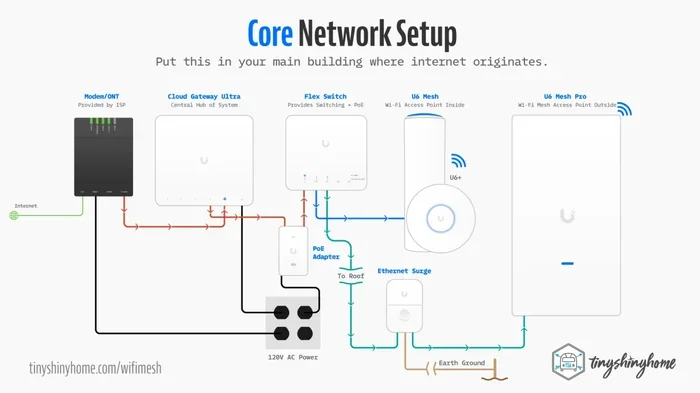
The system works like this:
- Your internet service provider sends a signal through the modem.
- The Orbi main unit connects directly to the modem.
- The satellite node receives the signal and broadcasts it to another part of the home.
- All devices on the network share a single SSID, or network name.
- Your phone or laptop automatically switches between the main unit and the satellite as you move around the house.
This is very different from a traditional router and extender setup. With an extender, you often get two different network names. Your device might stubbornly stick to a weak signal instead of switching over. Orbi eliminates that frustration entirely.
Do You Need a Router If You Already Have Orbi?
Here is the core question: do I need a router if I have Orbi? The definitive answer is no. Orbi functions as a router. It performs all the tasks that a standard wireless router handles.
Think about what a router does. It connects to your modem and receives the internet signal. It then routes that signal to your devices, whether they are phones, laptops, smart TVs, or game consoles. It also acts as a switch, letting you connect devices with cables. And it broadcasts the Wi-Fi signal throughout your home.
Orbi does all of this. The main Orbi unit is a router, a switch, and a Wi-Fi access point rolled into one. The satellite nodes add extra coverage. You do not need anything else to run a solid home network.
Here is why adding a second router is usually unnecessary:
- Orbi already handles routing duties: It manages IP addresses, directs traffic, and secures your network with a firewall.
- Two routers can create conflicts: When two routing devices sit on the same network, they can clash over DHCP settings. This leads to connection problems.
- Mesh systems are designed to work alone: Orbi is built to be a complete solution. It was not meant to be paired with another router.
- Simplicity is a huge advantage: One system means one setup, one app, one network name, and one password.
Now, there are rare exceptions where someone might want to keep an old router. We will cover those in a later section. But for 95 percent of households, Orbi stands perfectly on its own.
Understanding the Difference Between a Modem and a Router
Many people confuse modems and routers. This confusion is partly why the question “do I need a router if I have Orbi” exists in the first place. Let us clear it up quickly.
A modem is the device that brings the internet into your home. It connects to your internet service provider through a cable, phone line, or fiber connection. A modem does not create a Wi-Fi network. It just passes the internet signal along.
A router takes that signal and distributes it to your devices. It creates the local network, assigns IP addresses, and broadcasts Wi-Fi.
In a traditional setup, you have a modem connected to a router. Sometimes these two devices are combined into one unit by your internet provider. Orbi replaces the router part. You still need the modem. Orbi connects to the modem, not the other way around.
Orbi vs Traditional Router Setup
To really understand why you do not need a router with Orbi, let us compare the two approaches side by side. This will help you see the real-world differences in performance, setup, and daily use.
| Feature | Orbi Mesh System | Traditional Router |
|---|---|---|
| Wi-Fi Coverage | Whole-home coverage with satellite nodes | Limited to one device range |
| Dead Zones | Minimal to none | Common in larger homes |
| Speed Consistency | Dedicated backhaul maintains fast speeds | Speed drops with distance |
| Setup Process | Simple app-based setup | Manual configuration through browser |
| Number of Devices Supported | Handles dozens of devices easily | Can struggle with many devices |
| Network Management | Single network name, seamless roaming | May require manual switching |
| Parental Controls | Built-in with Orbi app | Varies by router model |
| Price Range | Higher upfront cost | Lower upfront cost |
As you can see from the table, Orbi beats a traditional router in almost every category that matters for a modern home. The only area where a traditional router might win is price. A basic wireless router costs less than a mesh system. But if you care about coverage and speed, Orbi is the clear winner.
Many people start with a basic router and then buy a Wi-Fi extender when they notice dead zones. This creates a patchwork network with inconsistent performance. Orbi was built specifically to replace that entire workflow.
When Does a Separate Router Make Sense?
Even though Orbi replaces your router, there are a few situations where you might want to keep or add a separate router. These are not the norm, but they are worth knowing about.
You Have Many Wired Devices
Orbi does have Ethernet ports. The main unit typically offers three LAN ports for wired connections. But what if you have a home office with a desktop PC, a network printer, a NAS drive, and a smart switch? That is four wired devices right there. If you run out of ports, a small switch or a second router in bridge mode can help.
You Want Advanced Network Features
Some power users run their own DNS servers, set up VPN servers, or use advanced Quality of Service settings. While Orbi offers solid built-in controls, it may not match the depth of configuration available on a dedicated high-end router. If you are a networking enthusiast, you might keep a router for these specialized tasks.
You Are Renting a Modem-Router Combo
Some internet providers rent out a modem and router in one box. If you use Orbi, you should put that combo unit into bridge mode. This turns off its routing functions and lets it act as a simple modem. Then Orbi takes over as your main router. This is not adding a second router. It is just repurposing your existing equipment.
Quick Tip: If you are unsure whether your ISP device needs to be in bridge mode, call their support team. They can walk you through it in just a few minutes.
You Live in a Very Large Home
Orbi systems scale well. You can add more satellite nodes to extend coverage. But in very large homes of 4,000 square feet or more, some users add a second Orbi system or a compatible router in the far part of the house. This is more of an advanced setup and not something most people need.
How to Set Up Your Orbi Without a Router
Setting up Orbi without a separate router is straightforward. Here is a step-by-step guide to get you online quickly.
- Place your modem in a central location. This is where your internet signal enters the home. Keep it near where you plan to put the main Orbi unit.
- Connect the modem to the Orbi main unit. Use an Ethernet cable. Plug one end into the modem and the other into the Orbi WAN port.
- Power on both devices. Wait for the Orbi unit to fully boot up. The LED ring will guide you through the process.
- Download the Orbi app. It is available for both iOS and Android. Follow the on-screen prompts to set up your network name and password.
- Place the satellite node. Put it in a room where the Wi-Fi signal starts to weaken. The Orbi app will help you find the best spot.
- Sync the satellite. Press the sync button on both the main unit and the satellite. Wait for the LED ring to turn solid blue.
- Connect your devices. Use the new network name and password. You should now have strong Wi-Fi throughout your home.
That is it. No router configuration. No extra cables running through the house. Just plug, sync, and go. The whole process usually takes less than 15 minutes.
Expert Insight: Placement of the satellite node matters a lot. Do not hide it in a closet or behind a TV. For the best signal, place it in an open area within range of the main unit. A good rule of thumb is to place it halfway between the main unit and the area with the weakest signal.
Common Mistakes People Make with Orbi
Even though Orbi is designed to be simple, people still make mistakes that hurt their network performance. Here are a few to avoid.
Placing the Satellite Too Far Away
The satellite node needs a strong connection to the main unit. If you place it too far away, it will struggle to relay data. This slows down the network for everyone. The Orbi app shows signal strength for each satellite. Use it to find the sweet spot.
Forgetting to Update Firmware
Netgear regularly releases firmware updates for Orbi. These updates fix bugs, improve security, and sometimes boost performance. Check the Orbi app for updates every few weeks. It only takes a minute.
Using the Wrong Ethernet Cable
If you are connecting the Orbi main unit to the modem with a cable, make sure it is at least a Cat5e or Cat6 cable. Older cables can limit your speeds and cause bottlenecks.
Ignoring the Backhaul Band
Orbi’s dedicated backhaul is one of its biggest advantages. Some users accidentally configure their system in a way that shares the backhaul band. Always let Orbi manage the backhaul automatically. The system is designed to handle it.
Not Restarting After Major Changes
If you move the satellite, change your password, or add new devices, restart the system. A quick reboot clears out cached data and helps the network run smoothly.
Key Takeaways
- Orbi replaces your router entirely: It handles routing, switching, and Wi-Fi broadcasting all in one system.
- You still need a modem: Orbi connects to your modem to get the internet signal into your home.
- No extra router is needed for most setups: Orbi’s mesh design covers homes of all sizes without additional routing hardware.
- Mesh technology eliminates dead zones: Satellite nodes spread Wi-Fi evenly, so every room gets a strong signal.
- Advanced users may have exceptions: Power users with many wired devices or specialized needs might keep a second router in bridge mode.
- Setup is fast and simple: The Orbi app walks you through everything in under 15 minutes.
- Avoid common setup mistakes: Proper satellite placement and regular firmware updates keep your network running at its best.
Conclusion
So, do I need a router if I have Orbi? The answer is clear. Orbi is a complete mesh system that replaces your router. You do not need to buy, set up, or manage a separate wireless router. Just connect Orbi to your modem, place the satellite nodes around your home, and enjoy strong, reliable Wi-Fi coverage everywhere.
Orbi was built for people who want a simple, powerful home network without the hassle. It handles everything from routing traffic to securing your connection to broadcasting fast Wi-Fi to every room. For the vast majority of households, it is all you need.
If you are still using an old router and dealing with slow speeds and dead zones, it is time to make the switch. A mesh system like Orbi transforms your home network. You will wonder how you ever lived without it. Set up your Orbi today and experience what a truly seamless home network feels like.
Remember, the key to a great network is not just the equipment you choose. It is how you set it up. Place your devices wisely, keep your firmware updated, and let Orbi do what it does best. Your home network will thank you for it.
Frequently Asked Questions
Can I use Orbi as just a Wi-Fi extender?
No, Orbi is not designed to work as a simple extender. It is a full mesh system that replaces your router entirely. While it does extend Wi-Fi coverage through its satellite nodes, it does so much more than just boosting a signal. Orbi manages your entire home network, including routing, security, and device management.
Will adding a router to my Orbi system improve performance?
In most cases, adding a router will not improve performance. It can actually cause problems by creating conflicts between two routing devices. Orbi is engineered to work as a standalone system. If you are experiencing slow speeds, the better solution is to adjust satellite placement or update your Orbi firmware.
Do I need a modem if I have Orbi?
Yes, you still need a modem. Orbi connects to your modem to receive the internet signal from your provider. The modem brings the internet into your home, and Orbi distributes it to your devices via Wi-Fi and Ethernet. Without a modem, Orbi has no internet source to share.
Can I use my old router in bridge mode with Orbi?
Yes, you can put an old router into bridge mode and connect it to Orbi. This disables the old router’s routing functions and turns it into a simple switch or access point. This setup can be useful if you need extra Ethernet ports or want to extend wired connections in your home.
How many satellite nodes do I need for my home?
One Orbi kit includes one main unit and one satellite node. This covers most homes up to 2,500 square feet. For larger homes, you can add more Orbi satellites. A good rule of thumb is to add one satellite for every 1,000 to 1,500 square feet of coverage you need. The Orbi app helps you find the best placement for each node.
Is Orbi better than a traditional router for gaming?
Yes, Orbi is generally better for gaming than a traditional router. Its dedicated backhaul channel keeps your connection stable and fast, even when multiple devices are using the network. The wired Ethernet ports on Orbi also allow you to connect gaming consoles directly for the lowest possible latency. Combined with consistent speeds across your home, Orbi provides a superior gaming experience compared to most standard routers.