Can Someone Ddos My Wifi And How To Stop It
Can someone ddos my wifi? Yes, it is possible, and it can seriously disrupt your internet connection. A wifi ddos attack overwhelms your network with traffic, causing slow speeds, disconnections, and frustration. This guide explains the warning signs, how attackers work, and the most effective ddos prevention steps you can take right now to protect your home network.
Have you ever been in the middle of something important online, and then — boom — your wifi just dies? Pages won’t load. Videos buffer endlessly. And nothing seems to fix it. You might wonder, can someone ddos my wifi? The short answer is yes. And it happens more often than most people realize.
A wifi ddos attack is not something that only big companies need to worry about. Home networks are targets too. Whether it is a neighbor with a grudge, a gamer looking to ruin your night, or someone with more malicious intent, your wireless network is vulnerable. But here is the good news. You can take real steps to protect yourself.
This article breaks down everything you need to know. We will cover what a ddos attack actually is, how to tell if your wifi has been targeted, and most importantly, how to stop it and prevent it from happening again. Let us get into it.
Key Takeaways
- Yes, someone can ddos your wifi: A wifi ddos attack floods your network with fake traffic, making your internet unusable.
- Common signs include: sudden slow speeds, constant disconnections, and unresponsive router lights.
- Changing your IP address and router settings: are the first steps to stop an ongoing attack.
- Long-term protection involves: updating firmware, using a firewall, and enabling network encryption.
- Contact your ISP: if the attack persists, as they can help with ddos mitigation at the network level.
- VPN services: add a strong extra layer of network security that hides your real IP address.
- Stay proactive: regular monitoring and smart habits prevent most wifi network attack attempts.
📑 Table of Contents
What Is a DDOS Attack on WiFi?
A ddos attack stands for Distributed Denial of Service. It is a type of network attack where someone floods your connection with so much traffic that your network cannot handle it. Think of it like a highway where thousands of fake cars suddenly appear. The real traffic gets stuck, and nothing moves.
When someone targets your wifi network, they are trying to overwhelm your router. The goal is to make your internet connection slow or completely unusable. Unlike a regular hack where someone steals your data, a ddos attack is about disruption. The attacker does not necessarily want your passwords or personal files. They just want to cause trouble.
How Does a DDOS Attack Work?
Here is a simple way to understand it. Your router has a limited amount of bandwidth. That is the amount of data it can handle at one time. During a bandwidth attack, the attacker sends massive amounts of data to your router. Your router tries to process all of it, but it gets overwhelmed.
Sometimes attackers use a network of infected devices called a botnet. These are computers, phones, and even smart home devices that have been taken over without the owners knowing. The attacker sends requests from all these devices to your wifi network at the same time. The flood of requests is too much for your router to handle.
There are different types of ddos attack methods too. Some target your IP address directly. Others attack specific ports on your router. And some flood your network with useless data packets that clog everything up. Regardless of the method, the result is the same. Your internet stops working properly.
Can Someone Actually DDOS Your WiFi?
This is the question most people want answered. And the honest truth is that yes, someone can ddos your wifi. It is not as hard as you might think. You do not need to be a tech genius to launch a basic wifi ddos attack. There are tools online that make it surprisingly easy for anyone with bad intentions.
But before you panic, let us put this in perspective. Most home ddos attacks are relatively simple. They are often carried out by someone who knows your network name or your IP address. They are not usually sophisticated state-sponsored attacks. They are more like digital bullying or petty revenge.
That said, even a basic attack can cause real problems. If you work from home, a network disruption can cost you productivity. If you are streaming or gaming, it can ruin your experience entirely. Understanding the risk is the first step toward protecting yourself.
Who Would DDOS Your WiFi?
You might be wondering who would want to attack your home network. Here are some common reasons:
- Neighbors with a grudge: Maybe you two do not get along. A wifi network attack is a petty but effective way to cause frustration.
- Online gaming rivals: Competitive gamers sometimes use ip flooding to knock opponents offline during matches.
- Jealous or curious individuals: Someone who wants to see what happens when they disrupt your connection.
- Hacktivists or trolls: People who enjoy causing chaos for fun or as a form of protest.
- Scammers: In some cases, attackers pretend to have already ddos’d you, then offer to “fix it” for money.
Understanding the motive does not make the attack less annoying. But it helps you realize that most home wifi attacks come from people in your immediate circle or online communities you are part of.
Signs Your WiFi Is Being DDOS’d
Detecting a ddos attack early can save you a lot of frustration. The tricky part is that many of the symptoms look like normal internet problems. Your connection might slow down for all kinds of reasons. So how do you know it is an attack?
Here are the most common wifi ddos symptoms to watch for:
- Sudden and unexplained slowdowns: Your internet was fine, and then it became painfully slow without any clear reason.
- Frequent disconnections: Your devices keep dropping from the network, even when no one else is using it.
- Router lights behaving strangely: The activity lights on your router are flashing intensely or not at all.
- Unable to access any websites: Pages fail to load across all your devices, not just one.
- High network traffic at odd hours: You notice unusual activity when you are not actively using the internet.
- Specific devices getting targeted: Only one device loses connection while others work fine.
If you notice these signs happening repeatedly, there is a good chance you are dealing with a network flooding issue. It is worth investigating further rather than just assuming your internet service is acting up.
How to Confirm a DDOS Attack
You can take a few simple steps to check whether your network is under attack. First, try accessing the internet on different devices. If all devices are affected at the same time, that is a strong indicator of a wifi attack. If only one device is affected, the problem might be device-specific.
Next, log into your router’s admin panel. Most routers let you view connected devices and traffic statistics. Look for unfamiliar devices or unusual spikes in data usage. Many modern routers also have built-in ddos detection features that can alert you to suspicious activity.
You can also run a speed test during an outage. If your speeds drop dramatically and then recover in waves, that pattern often points to a ddos attack rather than a general service issue.
How to Stop a DDOS Attack on Your WiFi
If you are currently experiencing an attack, the most important thing is to act quickly. The longer an attack continues, the more disruption it causes. Here are the most effective steps to stop a wifi ddos attack in its tracks.
Step 1: Restart Your Router
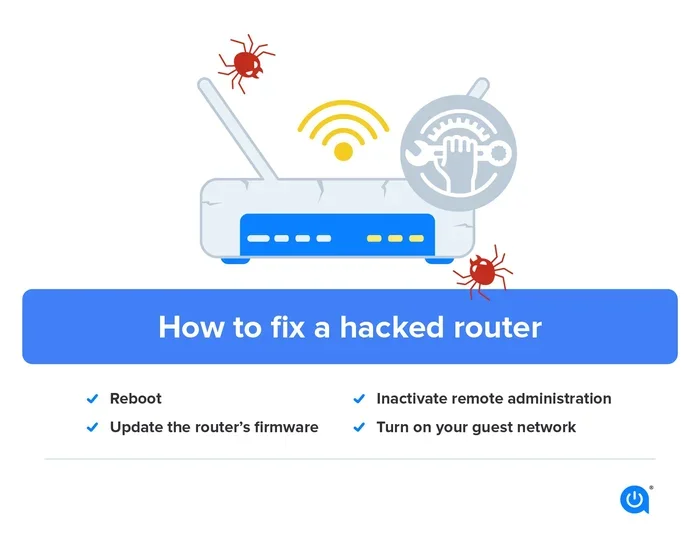
This is the simplest and often the quickest fix. Unplug your router, wait about 30 seconds, and plug it back in. A fresh restart clears your router’s current connection state and may drop the ongoing network flood. It is not a permanent solution, but it can restore your connection fast.
Quick tip: If restarting does not help, try unplugging the router for a full minute. This gives the connection more time to fully reset and can sometimes break the attacker’s connection to your network.
Step 2: Change Your IP Address
Attackers target your ip address to direct the flood of traffic. If you change your IP address, the attack loses its target. The easiest way to do this is to restart your modem. Most ISPs assign a new dynamic IP address each time your modem reconnects.
You can also contact your internet provider and ask them to change your IP manually. Some ISPs can assign a new static IP if you request one. This is especially helpful if you are dealing with a persistent attacker who keeps finding your new address.
Step 3: Update Your Router Firmware
Outdated router firmware often has security vulnerabilities that attackers can exploit. Check your router manufacturer’s website for the latest firmware updates. Installing these updates patches known weaknesses and strengthens your router security.
Many modern routers have an auto-update feature. If yours does, make sure it is turned on. If not, set a reminder to check for updates every few months. This small habit goes a long way in keeping your network safe.
Step 4: Enable Your Firewall
Most routers come with a built-in firewall. Make sure it is turned on. A firewall monitors incoming and outgoing traffic and blocks suspicious data packets. It acts as a first line of defense against ddos attacks and other network threats.
Go into your router settings and look for the firewall section. Enable it if it is not already active. Some routers also offer advanced firewall settings that let you block specific types of traffic. These can be very effective against network flooding attempts.
Step 5: Use a VPN
A virtual private network is one of the best tools for ddos protection. A VPN hides your real IP address and routes your traffic through secure servers. Even if an attacker knows your original IP, they cannot target you because your traffic is encrypted and redirected.
There are many VPN services available, both free and paid. For the best ddos mitigation, look for a VPN that offers dedicated IP addresses and strong encryption. While a VPN will not stop every type of attack, it makes you a much harder target.
DDOS Prevention and Long-Term Protection
Stopping an attack is important, but preventing future attacks is even better. Building strong network security habits now can save you from repeated disruptions down the road.
Change Your WiFi Password Regularly
Your wifi password is the first gatekeeper for your network. If it is weak or easy to guess, anyone nearby can connect and potentially launch an attack. Use a strong, unique password with a mix of letters, numbers, and symbols.
Change your password every few months. And never share it with people you do not trust completely. A strong password is one of the simplest yet most effective wifi security measures you can take.
Hide Your WiFi Network Name
Most routers let you hide your SSID, which is your network name. When your network is hidden, it does not appear in the list of available wifi networks. This does not make you invisible, but it does reduce the chances of someone targeting you randomly.
To hide your SSID, go into your router settings and look for the wireless settings section. There should be an option to disable SSID broadcast. Keep in mind that you will need to manually connect new devices to the hidden network.
Use WPA3 Encryption
If your router supports it, switch to WPA3 encryption. This is the latest and most secure wifi encryption standard. It provides much stronger protection against unauthorized access compared to older standards like WPA2 or WEP.
If WPA3 is not available, use WPA2 at minimum. Avoid WEP encryption entirely, as it is outdated and easily broken. Strong encryption makes it much harder for attackers to get into your network in the first place.
Limit Connected Devices
Every device connected to your network is a potential entry point. Review the list of connected devices in your router settings regularly. Remove any devices you do not recognize or no longer use.
You can also set up a guest network for visitors. This keeps your main network isolated and secure. If a guest device is compromised, it cannot access your primary network or sensitive data.
Monitor Your Network Traffic
Make it a habit to check your router’s traffic logs regularly. Most routers allow you to see which devices are using the most bandwidth and when activity spikes. Unusual patterns can be an early warning sign of a network vulnerability.
Some routers come with companion apps that make monitoring easier. These apps send alerts to your phone when they detect suspicious activity. Using these tools gives you real-time visibility into your network’s health.
When to Call a Professional
Most wifi ddos attacks can be handled with the steps above. But sometimes, the attack is too persistent or too sophisticated for a home user to handle alone. Knowing when to seek help is important.
Call your internet service provider if your connection keeps going down and none of the fixes work. Your ISP has access to tools and network-level protections that can help with ddos mitigation. They may also be able to trace the source of the attack and take action.
You should also consider calling a professional if you suspect your network has been compromised in other ways. A cybersecurity expert can audit your entire setup, identify weaknesses, and recommend tailored solutions. This is especially important if you run a home business or handle sensitive data over your network.
Do not feel embarrassed about reaching out for help. Network security is complex, and even experienced users sometimes need expert support. The important thing is that you take action rather than ignoring the problem.
Common Mistakes People Make
When dealing with wifi network attacks, people often make avoidable mistakes. Here are some pitfalls to steer clear of:
- Ignoring the problem: Hoping the attack will stop on its own rarely works. Take action immediately.
- Using the same password forever: This makes it easy for attackers to maintain access to your network.
- Not updating your router: Outdated firmware leaves known security holes open for attackers to exploit.
- Sharing your IP address publicly: Posting your IP online or to strangers gives attackers exactly what they need.
- Relying only on one defense: A single layer of protection is not enough. Use multiple strategies together for real ddos prevention.
Avoiding these mistakes strengthens your overall network security and reduces the chances of future attacks significantly.
Final Thoughts
The question can someone ddos my wifi has a clear answer. Yes, it can happen, and it does happen to regular people every day. But you are not helpless. With the right knowledge and tools, you can protect your network and keep your internet running smoothly.
Start with the basics. Change your passwords. Update your firmware. Enable your firewall. Consider using a VPN for an extra layer of protection. These steps do not take much time, but they make a huge difference.
Stay alert and monitor your network regularly. If something feels off, investigate it right away. Early detection is one of the most powerful tools you have against wifi ddos attacks. And remember, you are never alone in this. Your ISP, cybersecurity professionals, and online communities are all resources you can lean on.
Take control of your network security today. A few small changes now can save you from a lot of headaches tomorrow. Your wifi connection is important. Protect it.
Frequently Asked Questions
What happens when someone DDOSes your wifi?
When someone ddos your wifi, your network gets flooded with fake traffic. This causes your internet to slow down dramatically or stop working entirely. You may experience constant disconnections, inability to load websites, and unresponsive devices across your network.
Can a neighbor DDOS your wifi?
Yes, a neighbor can ddos your wifi if they know your network name or ip address. They can use simple tools to flood your connection with traffic. This is why securing your network with strong passwords and encryption is so important.
How do I know if my wifi is being DDOS’d?
Common signs include sudden and repeated slowdowns, frequent disconnections, and router lights flashing unusually. If multiple devices lose connection at the same time without explanation, it could be a ddos attack rather than a regular service issue.
Can a VPN protect me from a wifi DDOS attack?
A VPN can significantly help with ddos protection by hiding your real ip address. When your ip is hidden, attackers cannot easily target your network. While a VPN does not stop every type of attack, it is one of the most effective preventative tools available.
Is DDOSing someone’s wifi illegal?
Yes, ddos attacks are illegal in most countries. Launching a ddos attack against any network is a cybercrime that can result in serious legal consequences. If you are being targeted, you should report the attack to your isp and local authorities.
How long does a wifi DDOS attack last?
The duration varies widely. Some attacks last only a few minutes, while others can persist for hours or even days. The length depends on the attacker’s resources and how quickly you take steps to stop it. Restarting your router and changing your ip address can often end an attack quickly.
=== CONCLUSION ===
Can someone ddos my wifi is a real concern, but it is one you can address with confidence. Understanding how wifi ddos attacks work, recognizing the warning signs, and taking proactive steps to protect your network puts you in a strong position. Use the strategies in this guide to build ddos prevention into your daily routine. Keep your firmware updated, your passwords strong, and your network monitored. And never hesitate to reach out to your ISP or a professional when you need extra help. Your wifi connection deserves solid protection, and now you have the knowledge to give it exactly that.