Do Any Wireless Headsets Work With Xbox Gaming Setup
Not every wireless headset works with Xbox, and choosing the wrong one can be frustrating. This guide covers which wireless headsets are compatible with Xbox consoles, how to pair them, and what to avoid. You will learn about Xbox wireless protocols, Bluetooth limitations, and the best gaming headsets for Xbox in 2024.
Setting up your Xbox gaming setup feels exciting. You plug everything in, grab your controller, and you are ready to jump into your favorite games. But then you realize something is missing. Great audio makes a huge difference when you are playing online. You want a wireless headset that lets you move freely without tangled cords. The problem is that not every wireless headset works with Xbox.
Many gamers run into this exact issue. They buy a headset they love, bring it home, and find out it does not connect. The confusion comes from the way Xbox handles wireless audio. Unlike other devices, Xbox does not support standard Bluetooth connections. This means your phone or laptop headset may not work. It can feel overwhelming when you are trying to find the right one.
The good news is that plenty of options exist. Whether you want an official Xbox headset or a third-party option, there is a solution for you. In this guide, we will walk through everything you need to know. You will learn what works, what does not, and how to make the right choice for your gaming setup. Let us get into it.
Key Takeaways
- Xbox has specific wireless requirements: Not all wireless headsets connect to Xbox. The console uses a proprietary wireless protocol that limits your options.
- Bluetooth is not supported directly: Xbox consoles do not support standard Bluetooth audio, which rules out many popular wireless headsets.
- Official Xbox headsets work best: Devices like the Xbox Wireless Headset are designed specifically for Xbox and offer the smoothest experience.
- USB adapters can help: Many third-party wireless headsets can work with Xbox when you use a compatible USB audio adapter.
- Wired headsets are the most reliable: A simple 3.5mm cable connection still works with every Xbox controller and console.
- Check compatibility before buying: Always verify that a headset is Xbox-compatible to avoid wasting money.
📑 Table of Contents
How Xbox Wireless Headset Compatibility Works
Understanding how Xbox handles wireless audio is the first step. The console uses a specific system that is different from what you may be used to. Once you understand this, choosing the right headset becomes much easier.
The Xbox Wireless Protocol
Xbox uses its own wireless protocol for connecting accessories. This is not the same as standard Bluetooth. The protocol is designed to work seamlessly with Xbox consoles. It offers low latency, stable connections, and good battery life. When a headset is built for Xbox, it uses this special protocol to communicate with the console.
Headsets that use the Xbox Wireless protocol connect directly to the console. You do not need a separate adapter in most cases. They pair through the Xbox interface, just like a controller does. This makes the setup process simple and reliable. The connection stays strong even when you are moving around the room.
Why Bluetooth Headsets Do Not Work Directly
Here is the big limitation. Xbox consoles do not have built-in Bluetooth audio support. This surprises a lot of people. Bluetooth is everywhere in the tech world. You use it for your phone, your speaker, and your laptop. But Xbox chose a different path for wireless audio.
The reason is performance. Bluetooth adds a small delay to audio. For music or calls, this does not matter much. For competitive gaming, even a tiny delay can hurt your experience. Xbox wanted to make sure players get the best possible audio timing. That is why they built their own wireless system instead of relying on Bluetooth.
This means you cannot just pair any Bluetooth headset with your Xbox. If you try, it simply will not work. This is the most important thing to know before you buy any wireless headset for Xbox.
Types of Wireless Headsets That Work With Xbox
Not all hope is lost if you want wireless audio on Xbox. There are several types of headsets that work well. Let us break them down so you know exactly what to look for.
Official Xbox Wireless Headsets
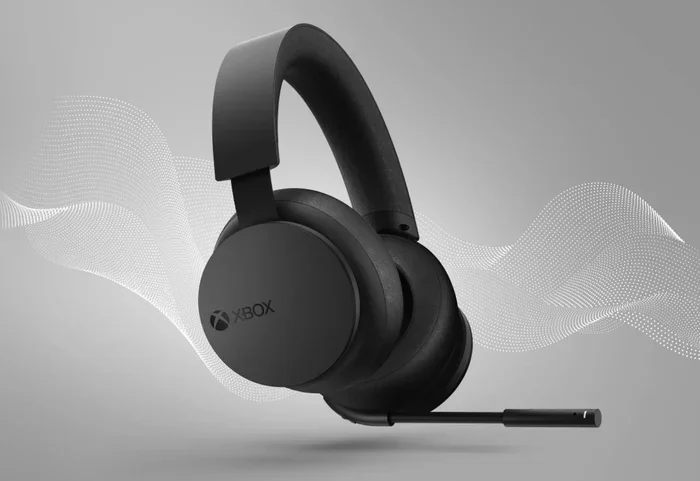
The easiest and most reliable option is the official Xbox Wireless Headset. This headset was made by Microsoft specifically for Xbox. It uses the Xbox Wireless protocol, so it connects directly to your console. Setup is simple. You just go to your Xbox settings, find the device section, and pair the headset.
The official headset offers solid sound quality. It supports spatial audio, which makes your games feel more immersive. The microphone is clear and works well for voice chat. Battery life is good too. You can easily get a full day of gaming on a single charge. If you want something that just works, this is the safest bet.
The price is reasonable compared to some premium options. It strikes a good balance between quality and value. For most Xbox players, this headset covers all their needs. It is especially great for players who want a no-hassle experience.
Third-Party Wireless Headsets With Xbox Support
You are not limited to official Xbox gear. Several third-party manufacturers make headsets that work with Xbox. These headsets use the Xbox Wireless protocol or come with a special USB adapter. They often offer extra features like custom EQ settings, RGB lighting, or premium sound drivers.
Brands like SteelSeries, HyperX, and Turtle Beach have models that work with Xbox. Some use a USB dongle that plugs into the console or controller. Others use the Xbox Wireless protocol directly. The key is to check the product description before you buy. Look for the words “Xbox compatible” or “works with Xbox.”
Third-party headsets can sometimes offer better sound than the official option. They may have more customization features. Some players prefer the feel or design of a third-party headset. Just make sure the model you choose specifically supports Xbox.
Bluetooth Headsets and Xbox Workarounds
What if you already own a Bluetooth headset you love? Can you still use it with Xbox? The short answer is no, not directly. Xbox does not support Bluetooth audio out of the box.
However, there is a workaround. You can use a Bluetooth transmitter that connects to the Xbox controller or console. This device takes the Xbox audio signal and sends it to your Bluetooth headset. It adds a small adapter between your Xbox and your headset. This solution works, but it can introduce some latency. For casual gaming, it is fine. For competitive play, it might not be ideal.
Some players also use a 3.5mm cable from the Xbox controller to a Bluetooth receiver. This is another way to make a Bluetooth headset work. It is not perfect, but it gets the job done. If you are curious about how Bluetooth headsets work with other devices, you can check out this guide on can I use any Bluetooth headphones with PS5 for more context on wireless headset compatibility across consoles.
How to Connect a Wireless Headset to Xbox
Once you have the right headset, connecting it is straightforward. The process depends on the type of headset you own. Here is how to do it for the most common options.
Connecting an Xbox Wireless Headset
Connecting the official Xbox Wireless Headset is simple. Follow these steps:
- Turn on your Xbox console.
- Press the Xbox button on your controller to open the guide.
- Go to Profile and system, then select Settings.
- Choose Devices and connections, then click Accessories.
- Select Add Bluetooth or other device.
- Choose the Xbox Wireless option.
- Put your headset in pairing mode.
- Select your headset from the list.
Your headset should connect within seconds. Once paired, it will automatically reconnect when you turn on the console. This makes the process smooth and hassle-free.
Using a USB Adapter for Third-Party Headsets
Many third-party wireless headsets come with a USB adapter. This adapter plugs directly into your Xbox console. It acts as a bridge between the headset and the console. The setup process is similar to the official headset, but you use the USB port instead of the wireless protocol.
Plug the adapter into an available USB port on your Xbox. Turn on your headset and put it in pairing mode. The Xbox should detect the adapter and guide you through the rest. Some adapters connect directly to the controller as well. This gives you more flexibility in where you place the adapter.
If you also like to connect your Xbox to other devices, you might find our article on can I connect Xbox to laptop with HDMI helpful for understanding Xbox connectivity options across devices.
Using a 3.5mm Cable as a Backup
Every Xbox controller has a 3.5mm jack. You can plug any wired headset directly into the controller. This works with every Xbox model. It is the most reliable option because there is no pairing or setup involved.
Simply plug the cable into the bottom of your controller. Go to your Xbox audio settings and make sure the headset is selected. You are good to go. This method works even if your wireless headset dies or you forget to charge it.
While this is not wireless, it is a great backup option. Many gamers keep a wired headset in their drawer just in case. It is simple, dependable, and always works.
Common Problems and How to Fix Them
Even with the right headset, you might run into issues. Wireless connections can be tricky sometimes. Here are the most common problems and how to solve them.
Audio Delay and Latency Issues
Audio delay is when the sound comes a split second after the action on screen. This is also called latency. It can make games feel off, especially in fast-paced shooters. You hear the footstep after you see the movement.
If you experience delay, try these fixes:
- Move closer to the Xbox console or USB adapter.
- Remove other wireless devices that might interfere.
- Check for firmware updates on your headset.
- Restart your Xbox console and the headset.
- Make sure no other Bluetooth devices are active.
Most of the time, these simple steps solve the problem. If the delay persists, the headset might not be fully compatible with Xbox. Consider switching to a headset that uses the Xbox Wireless protocol.
Connection Drops and Interference
Wireless connections can drop occasionally. This is frustrating during an intense gaming session. Walls, other electronics, and distance can all cause interference. The signal between your headset and Xbox gets weak or disrupted.
To reduce connection drops:
- Keep your Xbox console in the same room as your headset.
- Avoid placing the console near microwaves or other wireless devices.
- Make sure the headset firmware is up to date.
- Reduce the distance between the headset and the console.
- Try a different USB port if you are using an adapter.
Most wireless headsets have a range of about 30 feet. Staying within that range helps keep the connection stable. If you have a large gaming room, consider moving the console closer to your play area.
Choosing the Right Wireless Headset for Your Xbox Setup
With so many options on the market, choosing the right headset can feel overwhelming. Here are some factors to consider before you buy.
Sound Quality
Sound quality is the most important factor for most gamers. You want clear dialogue, punchy bass, and crisp highs. Good audio helps you hear enemies sneaking up behind you. It also makes the game world feel more alive and immersive.
Look for headsets that support surround sound. Xbox has built-in spatial audio that works with compatible headsets. This feature helps you pinpoint where sounds are coming from in the game. It is a huge advantage in competitive multiplayer games.
Comfort and Build Quality
You might wear your headset for hours at a time. Comfort matters a lot. Look for headsets with soft ear cushions and a lightweight design. Adjustable headbands help too. If the headset presses too hard on your head, it becomes uncomfortable fast.
Build quality is also important. A headset that feels cheap will not last long. Look for sturdy materials and solid construction. A good headset should survive daily use for years.
Microphone Quality
Voice chat is a big part of online gaming. Your teammates need to hear you clearly. A good microphone makes a big difference. Look for headsets with noise-canceling microphones. These block out background noise so your voice comes through clearly.
Some headsets have retractable microphones. These are nice because you can flip them up when you are not using them. Others have boom microphones that offer the best sound quality. Choose based on how much you value clear communication.
Battery Life
Battery life matters if you game for long sessions. A headset that dies after two hours is not practical. Look for headsets that offer at least 15 hours of battery life. Many modern wireless headsets last 20 hours or more on a single charge.
Fast charging is also a nice feature. Some headsets give you several hours of playtime with just 15 minutes of charging. This is helpful if you forget to charge your headset overnight.
If you are also interested in playing Xbox games on other devices, check out our guide on can I play my Xbox on my laptop through HDMI for useful connectivity tips.
Do Any Wireless Headsets Work With Xbox? The Final Answer
So, do any wireless headsets work with Xbox? The answer is yes, but with some important conditions. You need a headset that uses the Xbox Wireless protocol or one that comes with a compatible USB adapter. Standard Bluetooth headsets will not work directly with Xbox consoles.
The best experience comes from headsets designed specifically for Xbox. The official Xbox Wireless Headset is a great starting point. It works flawlessly, sounds good, and is easy to set up. Third-party options from trusted brands also work well and often offer extra features.
If you already own a Bluetooth headset, you can still use it with Xbox through a transmitter. This workaround adds a bit of complexity but gets the job done. For the best results, though, invest in a headset built for Xbox.
The bottom line is that you have plenty of choices. Do your research before buying. Check compatibility, read reviews, and consider your gaming needs. The right headset will make your Xbox experience much more enjoyable.
Wireless gaming audio has come a long way. The technology keeps getting better. Headsets sound clearer, connections are more stable, and battery life keeps improving. If you have not made the switch to wireless yet, now is a great time. Just make sure you pick a headset that actually works with your Xbox console.
For readers who want to explore more about Xbox connectivity and accessories, understanding how different devices connect can be very helpful. We also recommend checking out our guide on do I need an iPad if I have an iPhone for broader device compatibility insights that apply across the gaming ecosystem.
Frequently Asked Questions
Can I use any Bluetooth headset with Xbox?
No, Xbox consoles do not support Bluetooth audio directly. You cannot pair a standard Bluetooth headset with Xbox without using a workaround like a Bluetooth transmitter. The best option is to use a headset that supports the Xbox Wireless protocol or connects via USB adapter.
What is the best wireless headset for Xbox?
The official Xbox Wireless Headset is the best overall choice for most players. It offers great sound, clear microphone quality, and easy setup. If you want more features, third-party options from SteelSeries, HyperX, and Turtle Beach also work well with Xbox.
Do wireless headsets work with Xbox Series S and Series X?
Yes, wireless headsets that use the Xbox Wireless protocol work with both Xbox Series S and Xbox Series X. The connection process is the same on both consoles. Always check that the headset is listed as Xbox-compatible before purchasing.
Can I use a wireless headset with Xbox through the controller?
Yes, you can connect a wireless headset using the Xbox controller. The controller has a 3.5mm jack for wired headsets. For wireless headsets, you can use the controller’s USB port to connect a wireless adapter. Some headsets also pair directly through the Xbox Wireless protocol.
Why does my wireless headset keep disconnecting from Xbox?
Connection drops usually happen due to interference or distance. Keep your headset within 30 feet of the console. Update the headset firmware and remove other wireless devices that might cause interference. If the problem continues, the headset may not be fully compatible with Xbox.
Do I need a special adapter to use a wireless headset with Xbox?
It depends on the headset. Official Xbox Wireless Headsets do not need an adapter. Many third-party headsets come with a USB adapter that plugs into the console or controller. Bluetooth headsets require a Bluetooth transmitter to work with Xbox.
=== CONCLUSION ===
Finding the right wireless headset for Xbox does not have to be confusing. The key is understanding how Xbox handles wireless audio. Xbox uses its own wireless protocol instead of standard Bluetooth. This means you need a headset built for Xbox or one that comes with a compatible adapter.
The official Xbox Wireless Headset remains the easiest and most reliable choice. It works perfectly, sounds great, and sets up in minutes. Third-party options give you more features and customization. Just always verify Xbox compatibility before you buy.
Remember the common issues we covered. Audio delay, connection drops, and interference can all be fixed with simple troubleshooting. Keep your headset updated, stay within range, and minimize wireless interference.
With the right wireless headset, your gaming experience will level up. You will hear every footstep, every explosion, and every whisper from your teammates. Take your time, pick the right headset, and enjoy your Xbox gaming setup to the fullest.