Do I Really Need An Ipad If I Already Have An Iphone
Many people wonder if buying an iPad is worth it when they already have an iPhone. The truth is, an iPad gives you a bigger screen, better multitasking, and more productivity power. However, if you mainly use your phone for calls, texts, and quick tasks, you might not need one at all. This guide breaks down everything you need to know to make the right choice for your lifestyle and budget.
Key Takeaways
- Bigger screen means more productivity: An iPad makes reading, writing, and multitasking much easier than on a small iPhone screen.
- Your iPhone might be enough: If you only use your phone for basic tasks like calls, social media, and quick browsing, you may not need a tablet at all.
- The Apple ecosystem makes both devices work together: AirDrop, Handoff, and iCloud sync make using an iPhone and iPad a seamless experience.
- Consider your daily habits: Think about what you actually do on your phone before deciding if a tablet would add real value.
- iPad models vary widely in price and features: From the budget iPad to the powerful iPad Pro, there is an option for every need and wallet.
- An iPad excels in media consumption, creative work, and travel: These are the areas where a tablet truly shines over a phone.
📑 Table of Contents
- Do I Really Need an iPad If I Already Have an iPhone?
- What Does an iPad Offer That an iPhone Does Not?
- When Is an iPhone Enough on Its Own?
- When You Actually Need an iPad
- iPad vs iPhone: Head-to-Head Comparison
- The Apple Ecosystem Connection
- Common Mistakes People Make When Deciding
- Quick Tips to Help You Decide
- Expert Insights: What Professionals Say
- Final Verdict: Should You Buy an iPad?
Do I Really Need an iPad If I Already Have an iPhone?
Here is a question a lot of people ask themselves. You just bought a shiny new iPhone. It fits in your pocket. It handles everything you throw at it. So why would you even think about buying an iPad?
The answer is simpler than you might think. An iPad and an iPhone serve different purposes, even though they come from the same company. Your phone is a pocket-sized powerhouse for communication and quick tasks. A tablet offers a larger canvas for work, creativity, and entertainment. But does everyone need both?
Not necessarily. Some people live perfectly fine with just their phone. Others feel lost without a bigger screen. This article will help you figure out which group you belong to. We will walk through real-world scenarios, compare features side by side, and give you honest advice. By the end, you will know exactly whether an iPad makes sense for you.
Let us dive in and explore this question from every angle.
What Does an iPad Offer That an iPhone Does Not?
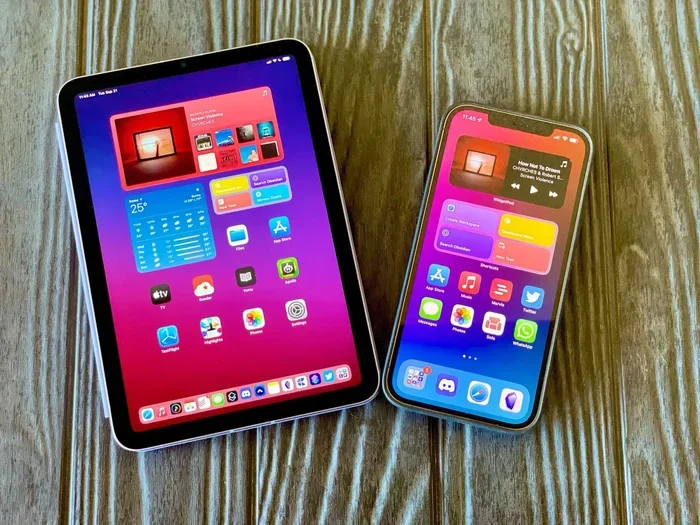
The most obvious difference between these two devices is screen size. An iPhone screen typically ranges from 6 to 7 inches. An iPad starts at around 10 inches and goes up to 12.9 inches for the Pro models. That extra space changes everything about how you interact with content.
Screen Size and Visual Comfort
Think about reading a long article or a PDF on your phone. You have to scroll constantly. Your eyes get tired. Now imagine spreading that same document across a 10-inch or 12-inch display. You can see more content at once. You do not have to pinch and zoom as much. This alone is a huge reason many people buy a tablet.
For media consumption, the difference is even more noticeable. Watching videos, browsing photos, or reading ebooks on a bigger screen feels completely different. It is more immersive and more comfortable, especially during long sessions.
Multitasking and Productivity
iPads support split-screen multitasking, which lets you run two apps side by side. You can have a document open on one half of the screen and take notes on the other. On an iPhone, switching between apps takes more taps and more time.
The Apple Pencil adds another layer of productivity. You can annotate PDFs, sketch designs, sign documents, and take handwritten notes. No other phone on the market offers this level of precision input.
For people who work remotely or attend classes, an iPad can replace a laptop for many tasks. You can type emails, edit spreadsheets, create presentations, and join video calls with ease. The portable device becomes a real workstation when you pair it with a keyboard.
Battery Life
iPads generally have much larger batteries than iPhones. This means longer usage times for battery life. You can watch a movie, browse the web, or work on a project for hours without reaching for a charger. iPhones, by contrast, often need a top-up by midday for heavy users.
When Is an iPhone Enough on Its Own?
Not everyone needs a tablet. In fact, millions of people get by perfectly well with just their smartphone. Here are some situations where an iPhone might be all you need.
You Use Your Phone for Basics
If your daily routine involves calling, texting, checking social media, and light web browsing, your iPhone handles all of that. You do not need a bigger screen for these tasks. A phone is designed to be quick and convenient. You can do everything from your couch, your bed, or even while walking.
You Already Have a Computer
If you own a laptop or desktop computer, your iPad might feel redundant. Your computer handles heavy work like coding, video editing, and document management. Your phone handles quick tasks on the go. In this case, what does a tablet add? For some people, the answer is nothing.
You Want to Save Money
iPads are not cheap. Even the base model costs several hundred dollars. If you are on a tight budget, putting that money toward other needs might make more sense. A good smartphone with a solid data plan and a protective case can cover most of your digital needs.
You Prefer a Minimal Setup
Some people simply do not want more gadgets to manage. More devices mean more charging cables, more apps to update, and more things to carry. If you value simplicity, sticking with your iPhone and maybe a smartwatch could be the best choice.
When You Actually Need an iPad
Now let us look at the other side of the coin. There are clear situations where having an iPad makes a real difference in your daily life.
You Consume a Lot of Media
Do you watch hours of Netflix or YouTube every day? Do you read books, magazines, or comics on your device? If so, an iPad transforms the experience. The larger display makes everything more enjoyable. You do not have to squint at small text or hold your phone at awkward angles for long periods.
For entertainment on long flights or road trips, an iPad is a game-changer. You can watch movies, play games, or read for hours without straining your eyes or your arms.
You Work or Study on the Go
Students and professionals who take notes, read textbooks, or review presentations benefit greatly from a tablet. An iPad with an Apple Pencil turns handwritten notes into digital files you can search and organize. You can highlight PDFs, sketch diagrams, and collaborate with classmates or coworkers in real time.
Video calls also feel much better on a tablet. Seeing faces on a larger screen makes meetings and family calls more personal and engaging. You can prop the iPad up on a table or stand and join calls hands-free.
You Do Creative Work
If you draw, design, edit photos, or make music, an iPad opens up creative possibilities that a phone simply cannot match. Apps like Procreate, Adobe Fresco, and GarageBand shine on the bigger screen with touch and Apple Pencil support.
The digital drawing experience on an iPad is genuinely professional-grade. Artists use it for concept art, illustration, and even client work. The large display and pressure-sensitive stylus make a world of difference compared to drawing on a tiny phone screen.
You Want Better File Management
iPads run iPadOS, which is closer to macOS than to iOS. This means better file management through the Files app. You can connect external drives, organize folders, and work with documents more efficiently. The split screen feature lets you drag files between apps easily.
iPad vs iPhone: Head-to-Head Comparison
Let us put the two devices side by side so you can see the differences clearly.
| Feature | iPhone | iPad |
|---|---|---|
| Screen Size | 6 to 7 inches | 10 to 12.9 inches |
| Portability | Fits in pocket | Needs a bag or case |
| Cellular Calling | Yes | Wi-Fi + Cellular models only |
| Multitasking | Limited app switching | Split screen, slide over |
| Apple Pencil Support | No | Yes |
| Battery Life | All day (average) | 10+ hours of active use |
| Price Range | $399 to $1,599 | $329 to $1,599 |
| Best For | Communication and quick tasks | Productivity, creativity, and media |
As you can see, each device has its strengths. The iPhone wins on portability and always-available connectivity. The iPad wins on screen real estate, multitasking, and creative tools. Your choice depends on what you value most in a portable device.
The Apple Ecosystem Connection
One of the biggest advantages of owning both an iPhone and an iPad is how well they work together. Apple has built an ecosystem that makes switching between devices feel effortless.
Handoff and Continuity
With Handoff, you can start writing an email on your iPhone and finish it on your iPad. You can copy text on one device and paste it on another. This seamless integration makes both devices more useful together than apart.
AirDrop and iCloud
AirDrop lets you share files, photos, and links instantly between your iPhone and iPad. No email attachments, no cloud uploads. It just works. iCloud keeps all your photos, documents, and notes synced across every device you own.
Universal Clipboard
This feature is a small but powerful part of the ecosystem. Copy something on your iPhone, and it appears on your iPad’s clipboard. It is one of those features that you do not think about until you do not have it.
If you are already deep in the Apple ecosystem, adding an iPad enhances the experience significantly. If you use Android or Windows devices, the benefits are less pronounced.
Common Mistakes People Make When Deciding
Before you make your decision, let us point out some mistakes that trip people up.
Buying an iPad Because It Looks Cool
A shiny new tablet is exciting. But excitement fades fast if you do not have a real use for it. Do not buy an iPad just because you want one. Buy it because you need one for specific tasks that your phone cannot handle well.
Overestimating How Often You Will Use It
Many people buy a tablet and use it for a week before it ends up in a drawer. Be honest with yourself about how often you will actually use it. If the answer is “rarely,” you probably do not need one.
Ignoring Storage Needs
iPads come in storage options from 64GB to 1TB. If you plan to store movies, photos, and large files on your tablet, you need enough space. Running out of storage is frustrating and limits what you can do with the device.
Forgetting About Cellular Connectivity
If you want to use your iPad without Wi-Fi, you need a cellular model. These cost more upfront and require a data plan. Make sure you actually need on-the-go connectivity before paying extra for this feature.
Quick Tips to Help You Decide
- Track your screen time: Check how many hours you spend on your iPhone daily. If it is already high, a tablet might add unnecessary screen time.
- List your pain points: Write down what frustrates you about using your phone for certain tasks. If a bigger screen would solve those problems, an iPad is worth considering.
- Try before you buy: Visit an Apple Store and spend 30 minutes using an iPad. See how it feels for your typical tasks.
- Consider the iPad mini: If portability is your main concern, the iPad mini offers a tablet experience in a smaller, more phone-like form factor.
- Think about the future: Will your needs change in the next year? If you are starting a new course or taking on more creative projects, a tablet could be a smart investment now.
Expert Insights: What Professionals Say
Many digital artists, students, and remote workers swear by their iPads. They say the larger screen and Apple Pencil support have transformed how they work and create. Teachers use iPads to present lessons, annotate student work, and run interactive apps in the classroom.
On the other hand, some professionals find that their iPhone and laptop cover 95% of their needs. The remaining 5% does not justify the cost of a third device. It really comes down to your personal workflow and what tools help you do your best work.
The key is to match the device to your actual habits, not to someone else’s setup. What works for a graphic designer might not make sense for a busy parent. What helps a college student might be overkill for a retiree who just wants to stay in touch with family.
Final Verdict: Should You Buy an iPad?
So, do you really need an iPad if you already have an iPhone? The honest answer is: it depends on your life and your habits.
If you use your phone for basic tasks, already own a computer, and value simplicity, you can probably skip the iPad. Your iPhone and laptop cover your needs just fine.
If you consume a lot of media, work or study on the go, do creative projects, or want a better productivity setup, an iPad adds real value to your tech lineup. The bigger screen, multitasking features, and Apple Pencil support make a noticeable difference in daily use.
There is no wrong answer here. Both choices are valid. The best decision is the one that fits your budget, your needs, and your lifestyle. Take your time, think honestly about how you use your devices, and you will make the right call.
Whatever you decide, you will be making a smart, informed choice. That is what matters most.
Frequently Asked Questions
Can I use an iPad as my only device if I have an iPhone?
Yes, many people use an iPad as their primary device and rely on their iPhone for calls and quick tasks on the go. However, you will miss the convenience of having a phone always in your pocket. If you can live without a phone in your pocket, an iPad with a cellular plan can handle most of your daily needs.
Is the iPad mini a good compromise between iPhone and full-size iPad?
Absolutely. The iPad mini offers a tablet experience in a compact form factor that is easy to carry. It is great for reading, light productivity, and media consumption. If you want a bigger screen than your iPhone but do not want a full-size tablet, the mini is worth considering.
Does an iPad work without an iPhone?
Yes, an iPad works perfectly fine on its own. You do not need an iPhone to set up or use an iPad. You can download apps, browse the web, send emails, and stream content all without ever owning an iPhone. The two devices are complementary but not dependent on each other.
Which iPad model is best for someone who already has an iPhone?
The standard iPad offers great value for most users. If you want a smaller, more portable option, the iPad mini is excellent. The iPad Air strikes a nice balance between performance and price. The iPad Pro is best for professionals who need maximum power and screen quality. Choose based on your budget and what you plan to do with it.
Will an iPad replace my laptop for work?
For many people, yes. If your work involves emails, documents, web research, and video calls, an iPad with a keyboard can replace a laptop. However, if your work requires specialized software like advanced video editing or programming tools, a laptop is still necessary. It depends on the type of work you do.
How much should I spend on an iPad if I already have an iPhone?
You do not need to spend a lot. The base iPad starts at around $329 and handles most everyday tasks well. Only spend more if you need specific features like Apple Pencil support, a larger display, or faster performance. There is no need to buy the most expensive model unless your work demands it.
=== CONCLUSION ===
The question “Do I really need an iPad if I already have an iPhone” does not have a one-size-fits-all answer. It comes down to your daily habits, your workflow, and your budget. An iPad offers a bigger screen, better multitasking, and creative tools that an iPhone simply cannot match. But for many people, their phone is all they need.
Take stock of what you do on your devices every day. Identify the gaps. If a tablet fills those gaps, go for it. If your iPhone already covers everything you need, there is no shame in skipping the extra device. The best tech setup is the one that genuinely makes your life easier, not the one with the most gadgets.
We hope this guide has given you the clarity you need to make a confident decision. Whatever you choose, you are making the right call for you.