Do All Canon Printers Print Photos Or Just Documents
Not all Canon printers are built the same way. Some Canon models are designed specifically for stunning photo prints, while others focus purely on everyday documents. This guide helps you understand which Canon printers handle photos and which ones don’t, so you can buy with confidence.
Have you ever looked at your Canon printer and wondered, “Can this thing actually print photos?” It is a really common question, and honestly, the answer is not as simple as yes or no. Do all Canon printers print photos or just documents is something a lot of people search for, and for good reason. You buy a printer, you expect it to do everything, right? But here is the truth not every Canon model is designed to produce beautiful photo prints. Some are built for speed and document output, while others are true photo printers that deliver stunning results straight from your home.
In this article, we are going to break it all down for you. We will look at the different Canon printer lines, explain which ones handle photos well, and tell you what features to look for. Whether you are a casual user who wants to print birthday party snapshots or a hobbyist who needs gallery-quality prints, this guide has you covered. By the end, you will know exactly what kind of Canon printer you need and how to get the best results from it.
Key Takeaways
- Not every Canon printer prints photos: Some models are document-only machines, while others excel at high-quality photo printing.
- Canon PIXMA series is your go-to for photos: These inkjet printers are specifically designed for home photo printing and vibrant color output.
- Canon imagePROGRAF handles large-format photo prints: These professional-grade printers deliver stunning results for posters and large photos.
- Laser printers usually skip photo printing: Most Canon laser models focus on fast document output and lack the color depth needed for photos.
- Check print resolution and ink type: Higher DPI and dye-based inks are key indicators that a Canon printer can produce quality photos.
- Borderless printing matters for photos: Not all Canon models support edge-to-edge printing, which is essential for professional-looking prints.
- Photo paper settings improve results: Even the best Canon printer needs the right paper and settings to deliver beautiful photo prints.
📑 Table of Contents
- Understanding Canon Printer Categories
- Which Canon Printers Print Photos Well?
- Features That Make a Canon Printer Good for Photos
- Do All Canon Printers Print Photos
- How to Get the Best Photo Prints from Your Canon Printer
- Common Mistakes People Make When Printing Photos
- Expert Insights on Canon Photo Printing
- Key Takeaways
- Conclusion
Understanding Canon Printer Categories
Canon makes a wide range of printers, and they are not all created equal. The brand divides its lineup into several categories, each designed for a specific purpose. Understanding these categories is the first step in answering whether your Canon printer can handle photos.
Inkjet Printers
Inkjet printers use tiny droplets of liquid ink to create images on paper. This technology is the foundation of most Canon photo printers. The ink blends smoothly on the page, which gives you smooth gradients, rich colors, and fine detail. Canon inkjet printers are the most popular choice for home users who want to print photos regularly.
Canon’s inkjet lineup includes models for every budget. Some are affordable all-in-one devices that handle printing, scanning, and copying. Others are dedicated photo printers that focus on one thing doing amazing prints. The key thing to remember is that inkjet is the technology that makes photo printing possible on a Canon machine.
Laser Printers
Laser printers use toner powder and heat to fuse images onto paper. They are incredibly fast and great for high-volume document printing. But here is the catch most Canon laser printers are not designed for photo printing. The toner technology simply does not produce the same smooth color transitions that inkjet printers do.
You can print color documents on a Canon laser printer, and they look fine. But when it comes to photographs, the results are usually flat and lack the depth you would get from an inkjet model. If photo printing is important to you, a laser printer is probably not the right choice.
Large-Format Printers
Canon also makes large-format printers under the imagePROGRAF line. These are professional-grade machines used by photographers, designers, and architects. They can print on very large sheets of paper, sometimes up to 44 inches wide. These printers deliver exceptional photo quality and are perfect for people who need large posters or fine art prints.
Large-format Canon printers are expensive, but they offer the best photo print quality available from the brand. If you are a professional photographer or someone who needs large prints regularly, this is the category to look at.
Which Canon Printers Print Photos Well?
Now that you understand the different categories, let us talk about which Canon printers actually deliver great photo prints. Not every model in the Canon lineup is a photo printer, so it helps to know exactly what to look for.
Canon PIXMA Series
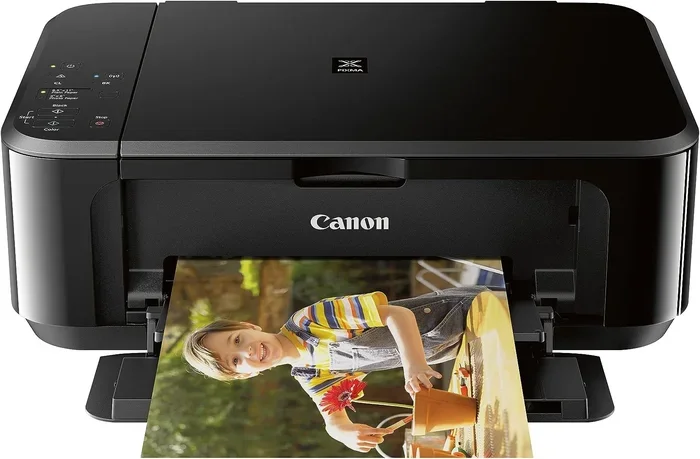
The Canon PIXMA series is the heart of Canon’s photo printing lineup. These inkjet printers are specifically designed for home use and excel at printing photos. Models like the PIXMA TR8620, PIXMA TS9521C, and PIXMA iP8720 are popular choices for people who want to print beautiful photos at home.
PIXMA printers use multiple ink cartridges, often with separate tanks for different shades of each color. This gives you more precise color control and smoother photo gradients. Many PIXMA models also support borderless printing, which means you can print photos right up to the edge of the paper with no white borders.
Here are some features that make PIXMA printers great for photos:
- High print resolution: Many PIXMA models offer resolutions of 4800 x 1200 DPI or higher, which captures fine details in photos.
- Multiple ink colors: Separate cartridges for different shades give you richer, more accurate colors.
- Borderless printing: Print edge-to-edge for a professional look on your favorite photos.
- Wireless connectivity: Print photos directly from your phone or tablet using the Canon PRINT app.
- Photo paper compatibility: PIXMA printers work well with glossy, matte, and specialty photo papers.
Canon MAXIFY Series
The Canon MAXIFY series is designed more for home offices and small businesses. These printers are built for speed, efficiency, and high-volume printing. While some MAXIFY models can print color photos, they are not optimized for photo printing the way PIXMA models are.
If you need a printer that handles both documents and occasional photos, a MAXIFY model can work. But do not expect the same level of photo quality you would get from a dedicated PIXMA photo printer. The color accuracy and fine detail will not be as strong.
Canon SELPHY Series
The Canon SELPHY series is a unique line of compact photo printers. These are standalone devices that print wallet-sized or 4×6 photos directly from your camera memory card, phone, or USB drive. SELPHY printers use dye-sublimation technology, which produces vibrant, smudge-proof photos.
These are perfect for parties, events, or anyone who wants to print photos quickly without using a full-size printer. SELPHY printers are not meant to replace a document printer, but they are fantastic for photo printing on the go.
Features That Make a Canon Printer Good for Photos
Not all printers are equal when it comes to photo printing. Some Canon models have features specifically designed to improve photo quality. Here are the key things to look for when choosing a Canon printer for photos.
Print Resolution
Print resolution, measured in dots per inch (DPI), is one of the most important factors in photo quality. The higher the resolution, the more detail the printer can capture. For good photo prints, look for a Canon printer with a resolution of at least 4800 x 1200 DPI. Higher resolutions like 9600 x 2400 DPI produce even sharper images with smoother gradients.
Keep in mind that resolution alone does not determine photo quality. The type of ink, the paper you use, and the print head technology all play a role. But resolution is a great starting point when comparing Canon printer models.
Ink System
The ink system in your Canon printer has a huge impact on photo quality. Canon PIXMA printers typically use a multi-ink system with separate cartridges for each color. Some models use a 5-color system, while others go up to 10 or more ink tanks.
More ink colors mean better color accuracy and smoother transitions between shades. For example, having separate light cyan and light magenta cartridges helps create softer skin tones and more realistic sky gradients in your photos. This is why Canon photo printers with multiple ink tanks always outperform basic 4-color printers when it comes to image quality.
Borderless Printing
Borderless printing means your photo prints edge to edge with no white border around the image. This feature is essential for anyone who wants professional-looking photo prints at home. Most Canon PIXMA models support borderless printing, and many can print up to 8.5 x 11 inches without any borders.
Not all Canon printers offer this feature, though. If borderless printing matters to you, check the specifications before buying. It is a simple feature that makes a big difference in how your photos look.
Photo Paper Settings
Even the best Canon printer needs the right settings to produce great photos. Most Canon printers come with built-in photo paper presets that automatically adjust ink density, drying time, and color settings based on the type of paper you are using.
Using glossy photo paper with the right settings can dramatically improve your print quality. The paper absorbs ink differently than regular paper, and the printer adjusts accordingly. This is why investing in good photo paper is just as important as choosing the right printer.
Do All Canon Printers Print Photos
The short answer is no. Not all Canon printers print photos well, and some are not designed for photo printing at all. The question “Do all Canon printers print photos” has a nuanced answer because it depends on the printer type, the ink system, and the features available.
If you have a Canon PIXMA inkjet printer, there is a very good chance it can print photos. These printers are built with photo printing in mind. But if you have a Canon laser printer, your photo printing options will be limited. Laser printers are excellent for documents, but they fall short when it comes to producing vibrant, detailed photographs.
Here is a quick comparison to help you understand the difference:
| Feature | Canon PIXMA (Inkjet) | Canon Laser |
|---|---|---|
| Photo Quality | Excellent | Fair to Poor |
| Color Accuracy | High | Moderate |
| Print Resolution | Up to 9600 x 2400 DPI | Up to 2400 x 600 DPI |
| Borderless Printing | Yes (on most models) | No |
| Ink Type | Dye-based liquid ink | Toner powder |
| Best For | Photos and documents | Documents only |
As you can see from the comparison, Canon PIXMA printers are the clear winner for photo printing. They offer the resolution, ink quality, and features needed to produce beautiful photos at home. Laser printers, on the other hand, are built for speed and document output, not for photo quality.
How to Get the Best Photo Prints from Your Canon Printer
Even if you have a Canon printer that supports photo printing, getting the best results takes a little know-how. Here are some practical tips to help you print amazing photos every time.
Use the Right Paper
The paper you use matters just as much as the printer itself. Regular copy paper will give you flat, dull prints that do not do your photos justice. For the best results, use Canon-branded glossy or matte photo paper. These papers are designed to work with Canon ink systems and produce vibrant, long-lasting prints.
If you want to experiment, try different paper types. Glossy paper gives your photos a shiny, professional look. Matte paper reduces glare and gives a more artistic feel. Luster paper offers a middle ground with a subtle sheen that looks great for portraits and landscapes.
Select the Right Print Settings
When you send a photo to your Canon printer, take a moment to check the print settings. Most Canon printers offer options like “Fast,” “Standard,” and “High Quality.” For photos, always choose the highest quality setting. It takes a little longer, but the difference in detail and color accuracy is worth it.
Also, make sure you select the correct paper type in the print settings. If your printer thinks you are printing on plain paper but you are actually using glossy photo paper, the results will not be as good. The printer adjusts ink flow based on the paper type, so matching the setting to your actual paper is important.
Keep Your Printer Maintained
A well-maintained printer produces better photos. Run the print head cleaning cycle regularly, especially if you have not printed in a while. Clogged nozzles can cause streaks, banding, and dull colors in your prints. Most Canon printers have a maintenance utility built into the software that makes this easy.
You should also replace ink cartridges when they run low. Printing with low ink can result in faded colors and uneven coverage. Keeping fresh ink in your printer ensures consistent, high-quality photo prints every time.
Edit Your Photos Before Printing
Not every photo looks great straight from your camera. Before you print, take a few minutes to edit your photo. Adjust the brightness, contrast, and saturation to make the image pop. You can use free tools like Canon PRINT or even your phone’s built-in photo editor.
Cropping your photo to the right aspect ratio also helps. If your printer supports borderless 4×6 printing, crop your photo to a 3:2 ratio. This ensures your print fills the entire page without any awkward cropping or white borders.
Common Mistakes People Make When Printing Photos
Printing photos at home is easy, but there are some common mistakes that can ruin your prints. Avoiding these pitfalls will help you get better results from your Canon printer.
Using the wrong paper: This is the number one mistake people make. Regular paper simply cannot handle the amount of ink that photo printing requires. Always use photo paper for best results.
Ignoring color management: The colors you see on your screen may not match what comes out of your printer. Calibrate your monitor and use Canon’s color management tools to get more accurate colors.
Printing at low quality to save ink: It might seem like a good idea, but low-quality settings sacrifice detail and color accuracy. For photos, always print at the highest quality your printer offers.
Not updating printer drivers: Old drivers can cause color shifts and printing errors. Keep your Canon printer software up to date for the best photo printing experience.
Overloading the printer with too many prints at once: Printing a large batch of photos without a break can cause the printer to overheat, which affects print quality. Give your printer time to cool down between large print jobs.
Expert Insights on Canon Photo Printing
According to photography experts, the best home photo printers are those that use dye-based ink systems with multiple color cartridges. Canon PIXMA printers fit this description perfectly. The separate ink tanks for different shades of each color allow for smoother gradients and more accurate skin tones, which are essential for portrait photos.
Experts also emphasize the importance of using original Canon ink cartridges. Third-party inks may be cheaper, but they often produce inconsistent results and can even damage your printer over time. For the best photo quality and longevity, stick with genuine Canon inks.
Another expert tip is to always print a test copy before committing to a full print run. This lets you check the colors and composition on a small scale and make adjustments before using up expensive photo paper.
Key Takeaways
- Not every Canon printer prints photos well: Inkjet models like the PIXMA series are designed for photo printing, while laser printers focus on documents.
- Canon PIXMA printers are the best for photos: They offer high resolution, multiple ink colors, and borderless printing for stunning results.
- Check print resolution and ink type before buying: Higher DPI and dye-based inks are essential for quality photo prints.
- Use the right paper and settings: Glossy photo paper and high-quality print settings make a huge difference in your output.
- Maintenance matters: Regular cleaning and timely cartridge replacements keep your printer producing its best photos.
- Avoid common mistakes: Using the wrong paper, ignoring color management, and printing at low quality can all hurt your results.
- When in doubt, choose PIXMA: If photo printing is important to you, the Canon PIXMA line is your safest and best bet.
Conclusion
So, do all Canon printers print photos? The answer is no, but the good news is that many Canon printers do, and they do it beautifully. The Canon PIXMA series stands out as the best option for anyone who wants to print photos at home. These inkjet printers are packed with features like high resolution, multiple ink colors, borderless printing, and wireless connectivity that make photo printing easy and enjoyable.
If you are shopping for a new Canon printer and photo quality matters to you, focus on the PIXMA line. Check the specifications for print resolution, ink system, and borderless printing support. These features will tell you whether a Canon printer is truly a photo printer or just a document machine in disguise.
Remember, getting great photo prints is not just about the printer. It is also about using the right paper, the right settings, and keeping your printer well-maintained. With the right Canon printer and a little care, you can produce photo prints that rival what you would get from a professional lab, right from the comfort of your home.
Now that you know the difference between Canon printers that handle photos and those that do not, you can make a confident choice. Whether you are printing family photos, vacation snapshots, or artistic projects, there is a Canon printer out there that will meet your needs. Just pick the right one, and start printing.
Frequently Asked Questions
Can a Canon laser printer print photos?
Canon laser printers can print color documents, but they are not designed for photo printing. The toner-based technology does not produce the same smooth color gradients and fine detail that inkjet printers do. If you need to print photos regularly, an inkjet Canon printer is a much better choice.
What is the best Canon printer for printing photos at home?
The Canon PIXMA series is widely considered the best choice for home photo printing. Models like the PIXMA TR8620 and PIXMA TS9521C offer high resolution, multiple ink colors, and borderless printing. These features work together to produce vibrant, detailed photo prints that look professional.
Do I need special paper to print photos on a Canon printer?
Yes, using photo paper makes a big difference. Regular copy paper absorbs ink differently and produces flat, dull prints. Canon glossy or matte photo paper is designed to work with Canon ink systems and delivers much better color, sharpness, and durability for your photo prints.
Can I print 4×6 photos from my phone using a Canon printer?
Absolutely. Most Canon PIXMA printers support wireless printing through the Canon PRINT app. You can send 4×6 photos directly from your phone to your printer. Just make sure your printer supports borderless printing for the best results on small photo sizes.
Why are my Canon photo prints coming out faded?
Faded prints can be caused by several factors. Low ink levels, the wrong paper type setting, or clogged print heads are the most common culprits. Try replacing your ink cartridges, selecting the correct paper type in your print settings, and running a print head cleaning cycle to improve your results.
How long do Canon photo prints last?
With genuine Canon inks and photo paper, prints can last for decades without significant fading or discoloration. The dye-based inks used in Canon PIXMA printers are designed for long-lasting color stability. Storing your prints out of direct sunlight also helps preserve them for years to come.