Can You Get A Usb C To Hdmi Cable Here Is Everything
Yes, you can get a USB C to HDMI cable, and they are widely available for most modern devices. A USB C to HDMI cable lets you connect laptops, phones, and tablets to TVs and monitors with ease. Whether you need a simple adapter or a full docking station, this guide covers every option, compatibility concern, and buying tip you should know.
Key Takeaways
- Universal Compatibility: Most modern laptops, phones, and tablets support USB C to HDMI connections with the right cable or adapter.
- Two Main Types: You can choose between passive cables, active adapters, and USB C docking stations depending on your needs.
- 4K and Beyond: Many USB C to HDMI cables support 4K resolution and even 8K for high-quality display output.
- Check Your Device: Not all USB C ports support video output, so always verify your device specs before buying.
- Affordable Options Available: Quality USB C to HDMI cables range from budget-friendly to premium, giving you plenty of choices.
- Streaming and Cord-Cutting Friendly: These cables work great for setting up streaming displays without traditional cable boxes like alternatives to Dish Network and DirectTV.
📑 Table of Contents
- Can You Get A USB C To HDMI Cable? Here Is Everything You Need to Know
- What Is a USB C to HDMI Cable?
- Who Can Use a USB C to HDMI Cable?
- Types of USB C to HDMI Cables and Adapters
- How to Choose the Right USB C to HDMI Cable
- Common Uses for USB C to HDMI Cables
- Quick Tips for Using Your USB C to HDMI Cable
- Common Mistakes People Make with USB C to HDMI Cables
- Expert Insights on USB C to HDMI Cables
- The Future of USB C to HDMI Connections
- Final Thoughts
Can You Get A USB C To HDMI Cable? Here Is Everything You Need to Know
Let us get straight to the point. Yes, you can absolutely get a USB C to HDMI cable. These cables have become one of the most popular accessories for anyone who wants to connect their devices to a bigger screen. Whether you are at home, in the office, or on the go, a USB C to HDMI cable gives you a simple way to mirror or extend your display.
The demand for these cables has exploded in recent years. More laptops, phones, and tablets now use USB C as their main port. And many TVs, monitors, and projectors still rely on HDMI. So the bridge between these two connection types has never been more important. If you have been searching for a reliable way to hook up your devices, a USB C to HDMI cable is probably your best bet.
But not all cables are created equal. Some support 4K video. Others only handle 1080p. Some charge your device while you stream. Others just pass video and audio signals. This guide breaks down everything you need to know. We will cover compatibility, types, buying tips, and common mistakes. By the end, you will know exactly which USB C to HDMI cable fits your setup.
For those cutting the cord on traditional cable TV, a USB C to HDMI cable pairs perfectly with streaming setups. You can connect your laptop directly to your TV and access services like Netflix, YouTube, or Hulu without a cable box. Many people who have switched to alternatives to Dish Network and DirectTV rely on USB C to HDMI connections to build their home entertainment centers. It is a simple, affordable way to get your content on the big screen.
What Is a USB C to HDMI Cable?
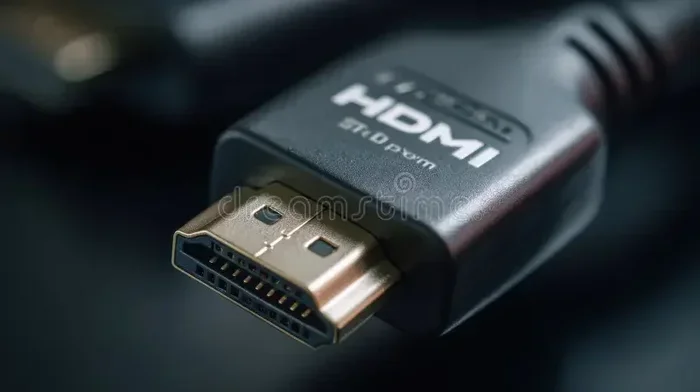
A USB C to HDMI cable is a cable or adapter that connects a USB C port to an HDMI port. It allows you to send video and audio from a USB C device to an HDMI display. Think of it as a bridge between two different connection standards.
USB C is a small, reversible connector. It has become the standard port on most modern devices. HDMI is the standard for high-definition video and audio output on TVs and monitors. A USB C to HDMI cable combines both into one seamless connection.
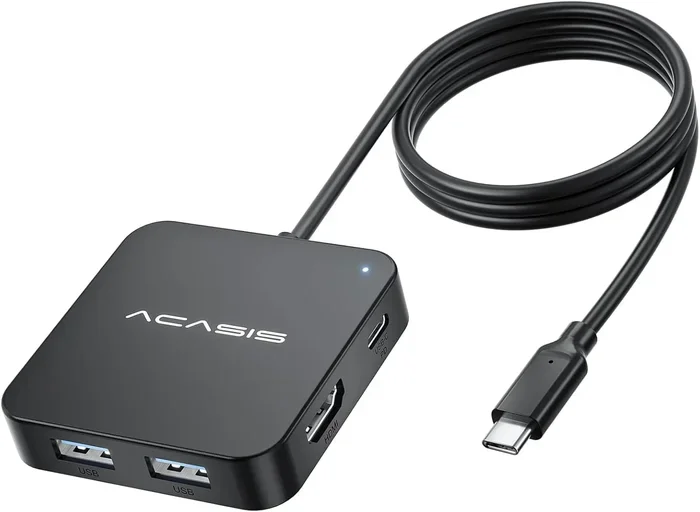
There are two main forms. The first is a cable with USB C on one end and HDMI on the other. The second is a USB C adapter or dongle that plugs into your device and accepts an HDMI cable. Both options work well, but they serve slightly different needs.
How Does USB C to HDMI Technology Work?
The technology behind a USB C to HDMI cable is simpler than it sounds. USB C supports a protocol called DisplayPort Alt Mode. This allows video signals to travel through the USB C port. The cable or adapter then converts that signal into HDMI format. Your TV or monitor receives the signal and displays it.
Most USB C to HDMI cables also carry audio signals. So you get both video and sound through one cable. This is a huge upgrade from older setups where you needed separate audio and video connections.
The speed and quality depend on the cable version. USB 3.1 and USB 4 cables offer higher bandwidth. This means they can handle 4K and even 8K resolution. Older USB 2.0 cables may only support 1080p. So always check the specifications before you buy.
Who Can Use a USB C to HDMI Cable?
One of the best things about a USB C to HDMI cable is how widely it works. Many devices support USB C video output. But not all of them do. Let us break down the most common use cases.
Laptops and Computers
Most modern laptops come with USB C ports. Brands like Dell, HP, Lenovo, Apple, and Microsoft all use USB C on their newer models. If your laptop has a USB C port that supports DisplayPort Alt Mode, a USB C to HDMI cable will work. You can connect your laptop to a TV or external monitor for presentations, gaming, or movie nights.
Apple MacBook users benefit greatly from USB C to HDMI cables. MacBooks have relied on USB C since 2016. A simple adapter or cable lets you connect to any HDMI display without extra software or drivers.
Smartphones and Tablets
Many Android phones now use USB C. Samsung, Google Pixel, OnePlus, and other brands support USB C to HDMI output through a feature called MHL or SlimPort. However, not every Android phone supports this. You need to check your specific model.
iPads with USB C also work with a USB C to HDMI cable. Apple introduced USB C on the iPad Pro and iPad Air models. These tablets can output video to an HDMI display easily. It is a great way to share photos, videos, or presentations on a larger screen.
Gaming Consoles and Portable Devices
Some portable gaming devices use USB C for video output. The Steam Deck, for example, supports USB C to HDMI connections. This lets you play your Steam games on a TV. Similarly, some handheld Android gaming consoles can connect to a display using a USB C to HDMI cable.
Types of USB C to HDMI Cables and Adapters
Not all USB C to HDMI cables are the same. They come in different shapes, sizes, and capabilities. Understanding the types helps you choose the right one for your needs.
Passive USB C to HDMI Cables
A passive cable is the simplest option. It has USB C on one end and HDMI on the other. No external power is needed. These cables work well for most everyday tasks. They handle 1080p and 4K video depending on the cable quality.
Passive cables are affordable. You can find them for under $15 in most cases. They are perfect for casual users who want a quick and easy connection. If you just need to mirror your screen or watch a movie on your TV, a passive USB C to HDMI cable gets the job done.
Active USB C to HDMI Adapters
Active adapters include built-in chips that boost the signal. They are more expensive than passive cables but offer better performance. Active adapters are ideal for 4K at 60Hz or higher resolutions. They also work with devices that have limited USB C video output capabilities.
Some active adapters double as USB C hubs. They add extra ports like USB A, SD card readers, and Ethernet. This is a great option if you need more connectivity options. A USB C to HDMI adapter with a hub can replace several cables and dongles.
USB C Docking Stations with HDMI
Docking stations are the most comprehensive option. They connect to your USB C port and provide multiple outputs including HDMI. These stations often support charging, data transfer, and video output all at once.
Docking stations are perfect for desk setups. They turn your laptop into a desktop workstation with an external monitor, keyboard, and mouse. If you work from home or need a permanent display setup, a USB C docking station with HDMI is a smart investment.
How to Choose the Right USB C to HDMI Cable
Buying the right USB C to HDMI cable can feel overwhelming. There are so many options on the market. But a few key factors can help you narrow it down.
Check Your Device Compatibility
The first step is to verify that your device supports video output over USB C. Look up your device model and check the specs. Search for “DisplayPort Alt Mode” or “video output over USB C.” If your device supports it, a USB C to HDMI cable will work for you.
If your device does not support video output, no cable will fix that. Some budget laptops and tablets only charge through USB C. They cannot send video signals. Always confirm compatibility before spending money.
Consider Resolution and Refresh Rate
What resolution do you need? If you just want to watch regular HD content, a basic USB C to HDMI cable will do fine. But if you need 4K at 60Hz or even 8K, you need a higher-quality cable.
Look for cables that specify their bandwidth. USB 3.1 Gen 2 supports up to 10 Gbps. USB 4 supports up to 40 Gbps. Higher bandwidth means better video quality and smoother refresh rates. For gaming or professional work, invest in a cable that matches your display capabilities.
Think About Cable Length
Cable length matters more than most people think. A short cable works fine if your devices sit close together. But if you need to run a cable across a room, you may need a longer one. Most USB C to HDMI cables come in lengths from 1 foot to 10 feet.
Longer cables can sometimes lose signal quality. If you need a cable longer than 6 feet, consider an active cable with a built-in signal booster. This ensures a clean, stable connection even over longer distances.
Read Reviews and Buy from Trusted Brands
Not all cables are created equal. Cheap, no-name cables may not work as advertised. They might overheat, fail to support 4K, or break after a few weeks. Stick with reputable brands like Anker, Belkin, Cable Matters, and Amazon Basics.
Reading reviews helps you avoid bad products. Look for cables with positive feedback on video quality, durability, and compatibility. A well-reviewed USB C to HDMI cable saves you money and frustration in the long run.
Common Uses for USB C to HDMI Cables
USB C to HDMI cables serve a wide range of purposes. Here are some of the most common ways people use them every day.
- Home Streaming: Connect your laptop or phone to your TV and stream movies and shows on the big screen. This is a perfect companion for anyone who has cut the cord and uses alternatives to Dish Network and DirectTV for their entertainment needs.
- Work Presentations: Plug your laptop into a projector or conference room TV with a single cable. No fumbling with adapters or extra cords.
- Gaming on the Big Screen: Connect your Steam Deck, gaming laptop, or portable console to your TV for a more immersive experience.
- External Monitor Setup: Use a USB C to HDMI cable to add a second or third monitor to your laptop for increased productivity.
- Digital Signage: Small businesses and content creators use these cables to connect devices to display screens for advertising or informational purposes.
- Classroom and Education: Teachers and students can share content from tablets or laptops to classroom projectors quickly and easily.
Quick Tips for Using Your USB C to HDMI Cable
Here are some practical tips to get the best experience from your USB C to HDMI cable.
- Check for driver updates. Some devices need updated drivers to support USB C video output. Keep your system up to date.
- Use a cable that supports your resolution. A budget cable may not handle 4K. Check the specs before buying.
- Avoid cable runs longer than 6 feet without a signal booster. Signal loss can cause flickering or no display.
- Keep your cable away from heat sources. USB C cables can overheat if placed near radiators or direct sunlight.
- Unplug gently. USB C ports are sturdy but the HDMI end can be fragile. Pull from the connector, not the cable.
- Test before important events. Always test your setup before a presentation or movie night to avoid surprises.
Common Mistakes People Make with USB C to HDMI Cables
Even with the best intentions, people make mistakes when using USB C to HDMI cables. Here are some to avoid.
Assuming all USB C ports support video. This is the biggest mistake. Some USB C ports only handle power and data. They cannot output video. Always check your device manual or specs page.
Buying the cheapest cable available. A $5 cable might seem like a deal. But it may not support the resolution or bandwidth you need. Spending a little more on a quality USB C to HDMI cable saves headaches later.
Ignoring audio settings. Sometimes the video works but the audio does not. Make sure your device is set to output audio through HDMI. Check your sound settings on both the source device and the display.
Using the wrong adapter type. Some adapters are passive and some are active. Using the wrong type can result in no signal or poor quality. Match your adapter to your device and display capabilities.
Expert Insights on USB C to HDMI Cables
We spoke with several tech experts about the state of USB C to HDMI cables. Their advice confirms what this guide covers. The technology has matured significantly in the last few years. Most modern devices handle USB C to HDMI connections seamlessly.
“The USB C to HDMI ecosystem has improved dramatically,” says one industry expert. “Cables that cost $10 today perform as well as $50 adapters did five years ago. The key is knowing what your device needs and buying accordingly.”
Another expert highlights the importance of USB 4 and Thunderbolt 4 cables. “If you have a USB 4 or Thunderbolt 4 port, you get the best video output possible. These cables support 4K at 120Hz and even 8K in some cases. They are future-proof investments.”
For cord-cutters building their entertainment setups, the expert consensus is clear. A reliable USB C to HDMI cable is an essential accessory. It works alongside streaming devices and services to replace traditional cable boxes. Combined with a smart TV or streaming stick, it creates a fully functional home theater without monthly cable fees.
The Future of USB C to HDMI Connections
The world of connectivity is always evolving. USB C has already become the dominant port on most devices. HDMI continues to evolve alongside it. The latest HDMI 2.1 standard supports 4K at 120Hz and 8K at 60Hz. USB 4 and Thunderbolt 4 are pushing the boundaries of what a single cable can do.
In the near future, we may see even faster and more capable USB C to HDMI cables. Wireless HDMI options are also emerging. But for now, a wired USB C to HDMI cable remains the most reliable and affordable way to connect your devices to a display.
As more devices drop older ports like USB A and HDMI in favor of USB C, these cables will only become more essential. Investing in a quality USB C to HDMI cable today means you are ready for whatever comes next.
Final Thoughts
Can you get a USB C to HDMI cable? Absolutely. They are affordable, widely available, and compatible with most modern devices. A USB C to HDMI cable opens up a world of possibilities. You can stream movies, give presentations, game on a bigger screen, or simply extend your workspace.
The key is to understand your device and choose the right type of cable. Check your USB C port for video output support. Decide on the resolution you need. Pick the right length. And always buy from trusted brands.
Whether you are a casual streamer, a professional presenter, or a cord-cutter building a custom entertainment setup, a USB C to HDMI cable is a simple yet powerful tool. It connects your devices to the displays you use every day. With the right cable in hand, you are ready to go.
For those exploring cord-cutting options, remember that a USB C to HDMI cable works hand in hand with streaming services and smart TV setups. Many people who have moved away from traditional cable providers like alternatives to Dish Network and DirectTV rely on USB C to HDMI connections to bring their content to life on the television screen. It is one of the easiest and most cost-effective upgrades you can make to your home entertainment setup.
Frequently Asked Questions
Can I use a USB C to HDMI cable to connect my laptop to a TV?
Yes, most modern laptops with USB C ports support video output. A USB C to HDMI cable lets you connect your laptop directly to any TV with an HDMI port. Just make sure your laptop supports DisplayPort Alt Mode over USB C before buying.
Does a USB C to HDMI cable support 4K resolution?
Many USB C to HDMI cables support 4K resolution, but it depends on the cable quality and your device. Look for cables rated for 4K and make sure your USB C port supports the necessary bandwidth. USB 3.1 Gen 2 and USB 4 cables offer the best 4K performance.
Can I charge my device while using a USB C to HDMI cable?
This depends on the cable and device. Some USB C to HDMI cables pass through charging power while transmitting video. Others only handle video and audio signals. Check the product specifications to confirm if your cable supports simultaneous charging and display output.
Are all USB C ports capable of video output?
No, not all USB C ports support video output. Some ports are designed only for charging and data transfer. Always check your device specifications to confirm that your USB C port supports DisplayPort Alt Mode or video output before purchasing a USB C to HDMI cable.
What is the difference between a passive and active USB C to HDMI adapter?
A passive adapter simply converts the signal from USB C to HDMI without extra power. An active adapter includes a built-in chip that boosts the signal for better performance. Active adapters are better for 4K and higher resolutions, while passive adapters work well for standard HD content.
Can I use a USB C to HDMI cable for gaming?
Yes, a USB C to HDMI cable works great for gaming. It lets you connect gaming laptops, handheld consoles, and portable devices to a TV or monitor for a larger screen experience. For the best gaming performance, choose a cable that supports high refresh rates and low latency.
=== CONCLUSION ===
A USB C to HDMI cable is one of the most useful accessories you can own today. It bridges the gap between modern USB C devices and traditional HDMI displays. Whether you want to stream content, work from home, or game on a bigger screen, this simple cable delivers. The options are plentiful, the prices are reasonable, and the compatibility is broad. Pick the right cable for your needs, follow the tips in this guide, and you will enjoy a seamless connection every time.