3 Types Of Printers And How To Choose The Right One
This guide covers the 3 types of printers—inkjet, laser, and all-in-one—so you can pick the perfect fit. You’ll learn how each printer works, its pros and cons, and which one suits your budget and needs. By the end, you’ll know exactly which 3 Types Of Printers to buy.
Choosing a printer can feel overwhelming. There are so many brands, models, and features. But if you understand the 3 Types Of Printers, the decision becomes much simpler. Whether you need to print school projects, business documents, or stunning photos, the right printer makes all the difference.
Printers are no longer just boxes that spit out paper. They are smart devices that connect to your phone, scan contracts, and copy pages in seconds. In this guide, I will walk you through the three main printer categories. You will learn how each one works, what it does best, and how to avoid costly mistakes. By the time you finish reading, you will know exactly which 3 Types Of Printers fits your life.
Let us dive in and break down the options so you can shop with confidence.
Key Takeaways
- Inkjet printers excel at photo printing and low-cost upfront purchases, making them ideal for home users.
- Laser printers deliver fast, crisp text and low cost per page, perfect for high-volume offices.
- All-in-one printers combine print, scan, copy, and fax in one device, saving space and money.
- Consider print volume, cost per page, and connectivity before buying any printer.
- Avoid common traps like ignoring duty cycle or underestimating ink cartridge costs.
- Wireless and mobile printing features add convenience for modern households.
📑 Table of Contents
- Understanding the 3 Types Of Printers
- Inkjet Printers – The Versatile Choice for Home and Photos
- Laser Printers – The Speed and Efficiency King
- All-in-One Printers – Multifunction Powerhouses
- How to Choose the Right Printer for Your Needs
- Common Mistakes to Avoid When Buying a Printer
- Expert Insights and Final Thoughts
Understanding the 3 Types Of Printers
The printer market boils down to three core technologies. Each one uses a different method to put ink or toner on paper. Let us look at them side by side.
Inkjet printers spray tiny droplets of liquid ink onto paper. They are great for photos and color documents. Laser printers use heat to fuse powder toner onto paper. They shine at fast, sharp text. All-in-one printers combine printing with scanning, copying, and sometimes faxing. They save space and reduce clutter.
Below is a quick comparison table to give you a bird’s-eye view.
| Feature | Inkjet | Laser | All-in-One |
|---|---|---|---|
| Best For | Photos, color docs | Text, high volume | Space-saving multitasking |
| Print Speed | Slower | Faster | Varies |
| Upfront Cost | Lower | Higher | Medium to High |
| Cost Per Page | Higher (ink) | Lower (toner) | Varies |
| Connectivity | Wi-Fi, Bluetooth | Wi-Fi, Ethernet | Wi-Fi, USB, Mobile |
Inkjet Printers – The Versatile Choice for Home and Photos
If you love printing vacation photos or your child’s art project, an inkjet printer is likely your best friend. These machines use liquid ink stored in small cartridges. The printhead moves back and forth, spraying microscopic dots of ink onto paper. The result is vibrant color and smooth gradients.
How Inkjet Printers Work
Inside an inkjet printer, tiny resistors heat the ink and create bubbles. These bubbles push ink droplets through the nozzles. The droplets land precisely on the paper. This process is called thermal inkjet technology. Some high-end models use piezoelectric crystals that vibrate to push ink. Both methods produce sharp, detailed images.
Pros and Cons of Inkjet Printers
Let us weigh the good and the bad.
- Pros: Lower upfront cost. Excellent photo quality. Handles glossy and matte paper. Prints on many media types.
- Cons: Ink can dry out if you print rarely. Cost per page is higher than laser. Print speed is slower for large documents.
Best Use Cases for Inkjet Printers
Inkjet printers shine in home environments. They are perfect for parents printing school projects. Hobbyists love them for scrapbooking and photo printing. Small businesses that need occasional color flyers also benefit. If you print fewer than 50 pages a week, an inkjet saves you money upfront.
Quick Tip: Print a test page once a week to keep ink flowing. This prevents clogged nozzles and wasted ink.
Laser Printers – The Speed and Efficiency King
Laser printers are the workhorses of the office world. They use a laser beam to draw an image onto a drum. The drum picks up toner powder and transfers it to paper. Heat then fuses the toner permanently. The result is crisp, smudge-proof text that handles high volumes with ease.
How Laser Printers Work
The process starts with a laser beam sweeping across a rotating drum. The light creates an electrostatic charge. Toner particles stick to the charged areas. The drum rolls over a sheet of paper, transferring the toner. A fuser unit applies heat and pressure to bond the toner. The whole cycle takes seconds. This is why laser printers are so fast.
Pros and Cons of Laser Printers
- Pros: Very fast print speeds. Low cost per page. Toner does not dry out. Sharp text quality. Ideal for high-volume printing.
- Cons: Higher upfront cost. Color laser printers are expensive. They are larger and heavier. Not ideal for photo printing.
When to Choose a Laser Printer
If you print more than 100 pages a week, a laser printer pays for itself. Home offices that handle contracts, invoices, and reports love them. Schools and libraries also rely on laser technology. If you need print speed and low running costs, this is your winner.
Common Mistake: Do not buy a laser printer if you need frequent photo prints. The quality will not match inkjet.
All-in-One Printers – Multifunction Powerhouses
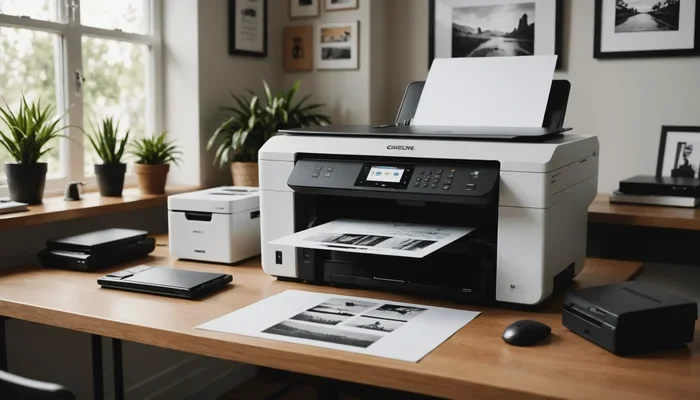
An all-in-one printer (also called a multifunction printer) does it all. It prints, scans, copies, and sometimes faxes. Instead of buying four separate devices, you get one compact machine. This saves desk space and simplifies your workflow.
What Can an All-in-One Do?
Most all-in-one models include a flatbed scanner and an automatic document feeder. You can scan multi-page documents quickly. Copying is just a button press. Some advanced units even have fax capabilities. Many also support mobile printing and wireless connectivity. You can print directly from your phone or tablet.
Inkjet vs Laser All-in-One
All-in-one printers come in both inkjet and laser versions. Inkjet all-in-ones are great for home offices that print photos and documents. Laser all-in-ones suit busy offices that need speed and volume. Consider your print volume and print quality needs when choosing.
Ideal All-in-One Scenarios
Small businesses love all-in-ones because they reduce equipment costs. Home offices benefit from the space savings. Students can scan homework and print reports in one spot. If you want a single device to handle everything, an all-in-one is the way to go.
Expert Insight: Look for models with separate ink tanks or high-yield toner cartridges. This lowers the cost per page significantly.
How to Choose the Right Printer for Your Needs
Now that you know the three types, how do you pick the right one? I will walk you through the key factors. Use this guide to match a printer to your life.
Consider Your Print Volume
How many pages do you print each month? If it is under 100 pages, an inkjet or a small laser works fine. If you print 500+ pages, a laser printer with a high duty cycle is essential. The duty cycle tells you the maximum pages the printer can handle per month without breaking down.
Think About Print Quality
Do you need sharp text or vibrant photos? For text documents, laser is unbeatable. For photos and color graphics, inkjet wins. All-in-one printers offer both, but you must choose between inkjet and laser technology.
Evaluate Connectivity Options
Modern printers offer Wi-Fi, Bluetooth, and USB. Many support mobile printing apps like Apple AirPrint and Google Cloud Print. If you want to print from your couch, pick a wireless printer. Ethernet ports are great for stable office connections.
Check the Cost Per Page
The sticker price of the printer is not the whole story. Ink cartridges and toner can cost more than the printer itself over time. Look for high-yield cartridges or models with refillable ink tanks. This keeps your printing costs low.
Compare the 3 Types of Printers at a Glance
Use this table to decide faster.
| Factor | Inkjet | Laser | All-in-One |
|---|---|---|---|
| Upfront Cost | $50 – $200 | $150 – $500 | $100 – $400 |
| Cost Per Page (B/W) | 5-10 cents | 1-3 cents | Varies |
| Print Speed (ppm) | 5-15 | 20-50 | Varies |
| Best For | Photos, low volume | Text, high volume | Multifunction needs |
| Connectivity | Wi-Fi, Bluetooth | Wi-Fi, Ethernet | Wi-Fi, USB, Mobile |
Quick Tip: Write down your top three needs before shopping. Stick to your list to avoid impulse buys.
Common Mistakes to Avoid When Buying a Printer
Many buyers make the same errors. Avoid these pitfalls to save money and frustration.
Mistake 1: Ignoring the Cost of Consumables
A cheap printer often means expensive ink. Before you buy, check the price of replacement cartridges. Some printers use two black cartridges (one for text, one for photos). This can double your costs. Choose models with high-yield options.
Mistake 2: Overlooking the Duty Cycle
The duty cycle is the maximum number of pages the printer can handle per month. If you exceed it, the printer will wear out fast. Home users need a duty cycle of 1,000-5,000 pages. Offices should look for 10,000+ pages.
Mistake 3: Forgetting About Connectivity
Do not buy a printer without Wi-Fi if you have multiple devices. You will hate plugging in a USB cable every time. Wireless printing and mobile printing make life so much easier.
Mistake 4: Choosing Based on Brand Alone
Brand loyalty is nice, but it should not drive your decision. A lesser-known brand might offer better print quality and lower running costs. Read reviews and compare specs.
Common Mistake Recap: Always check consumable costs, duty cycle, and connectivity before you click “Buy.”
Expert Insights and Final Thoughts
I asked a few printing professionals what they look for when recommending a printer. Their advice aligns with what I have shared here.
What the Pros Look For
Experts emphasize total cost of ownership. They say the printer price is only 20% of the equation. The other 80% is ink or toner, paper, and maintenance. They also stress the importance of matching the printer to your actual needs. Do not buy a heavy-duty laser if you only print five pages a week.
Final Thoughts on 3 Types Of Printers
The three types of printers each serve a distinct purpose. Inkjet printers deliver beautiful photos and low upfront costs. Laser printers offer blazing speed and low cost per page. All-in-one printers combine functions and save space. By understanding these 3 Types Of Printers, you can make a confident choice.
Take a moment to assess your needs. Think about print volume, quality, and budget. Then pick the printer that fits your life. A good printer should work hard for you for years. Choose wisely, and you will enjoy hassle-free printing every day.
In the end, there is no single best printer. The right printer is the one that matches your daily routine. Whether you need the vibrant colors of an inkjet, the speed of a laser, or the versatility of an all-in-one, the 3 Types Of Printers guide has you covered. Use the tips in this article to shop smart. You will find the perfect printer without the stress.
Frequently Asked Questions
Which type of printer is best for home use?
For most homes, an inkjet printer is the top choice. It handles photos and school projects well and costs less upfront. If you rarely print, a laser printer can also work because the toner does not dry out. Consider an all-in-one if you need scanning and copying too.
How much should I spend on a printer?
Budget printers start around $50 for basic inkjets. A good all-in-one or laser printer ranges from $150 to $400. Remember to factor in the cost of ink or toner. A slightly pricier printer with high-yield cartridges often saves money in the long run.
What is the difference between inkjet and laser print quality?
Inkjet printers produce smoother gradients and richer colors, making them ideal for photos. Laser printers excel at sharp, crisp text and are smudge-proof. For everyday documents, both look great, but inkjet wins for vivid images.
Can I print from my phone with any printer?
Most modern printers support mobile printing. Look for models with Wi-Fi and apps like Apple AirPrint or Google Cloud Print. Some printers also offer Bluetooth or NFC pairing for quick connections. Check the specs before you buy.
How often should I replace ink cartridges?
It depends on how much you print. A standard cartridge lasts for 200 to 500 pages. High-yield cartridges can print 1,000 or more. To save money, buy high-yield versions or consider printers with refillable ink tanks.
What is duty cycle and why does it matter?
The duty cycle is the maximum number of pages a printer can handle per month. Exceeding it can cause breakdowns and shorten the printer’s life. Home users should aim for a duty cycle of at least 1,000 pages. Offices need 10,000 or more for reliable performance.