Can You Turn A Non Bluetooth Tv Into A Bluetooth Tv
Yes, you can turn a non Bluetooth TV into a Bluetooth TV with the right adapter or transmitter. This guide walks you through every method, from Bluetooth audio transmitters to smart home integrations. You will learn how to add wireless audio streaming to any television, avoid common mistakes, and choose the best Bluetooth adapter for your setup.
Have you ever wanted to watch your favorite show with wireless headphones but discovered your TV does not support Bluetooth? You are not alone. Many people own older televisions or budget models that lack Bluetooth capability. The good news is that you can easily turn a non Bluetooth TV into a Bluetooth TV without buying a whole new television. This guide covers every method, product, and tip you need to know.
Whether you want to connect wireless headphones, stream audio to a speaker, or just enjoy cord-free sound, adding Bluetooth to your TV is simpler than you think. In this article, we will walk you through each option step by step. You will learn about Bluetooth transmitters, smart home workarounds, and how to pick the right solution for your setup.
The process is straightforward and affordable. Most solutions cost under $50 and take just a few minutes to set up. Let us dive in and explore how you can make your TV Bluetooth ready today.
Key Takeaways
- It is absolutely possible: You can add Bluetooth to any non Bluetooth TV using a transmitter, adapter, or smart device workaround.
- Bluetooth transmitters are the easiest solution: They plug into your TV audio output and pair with headphones or speakers wirelessly.
- You have multiple options: From budget-friendly adapters to smart home integrations, there is a solution for every TV and budget.
- Avoid common pitfalls: Latency, compatibility issues, and wrong port connections are the top mistakes people make.
- Expert tips make a big difference: Small setup adjustments can dramatically improve your Bluetooth TV experience.
📑 Table of Contents
What Is a Non-Bluetooth TV?
A non-Bluetooth TV is any television that does not have built-in Bluetooth wireless technology. This means it cannot connect directly to wireless headphones, speakers, or other audio devices without extra hardware. Many older TV models fall into this category, but even some newer budget TVs skip Bluetooth to cut costs.
Here are some common signs your TV is non-Bluetooth:
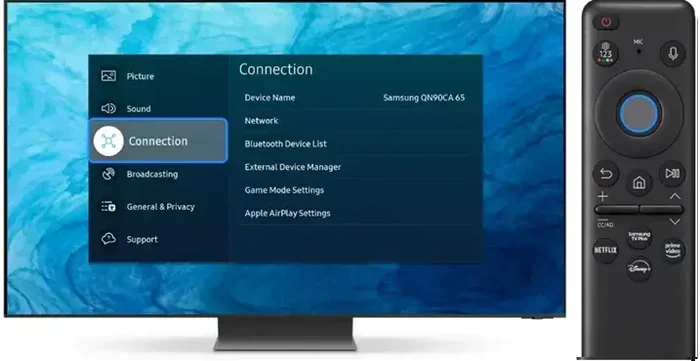
- You do not see a Bluetooth option in your TV settings menu.
- Your TV has no way to connect wireless headphones directly.
- You can only use wired audio outputs like a 3.5mm jack or optical port.
- Your TV manual does not mention Bluetooth anywhere.
Do not worry if your TV falls into this group. Plenty of reliable solutions exist to add wireless audio functionality. You do not need to be tech-savvy either. Most methods work with a simple plug-and-play setup.
Why Add Bluetooth to Your TV?
Adding Bluetooth to your TV opens up a world of convenience. Here is why so many people choose to upgrade their non-Bluetooth setup:
Watch Late-Night Without Disturbing Others
Wireless headphones let you watch TV at any hour without waking up family members. This is one of the biggest reasons people search for ways to add Bluetooth to their TV. You can enjoy immersive sound while everyone else sleeps peacefully.
Improve Accessibility
Bluetooth audio is a game-changer for people with hearing difficulties. Instead of turning the TV volume way up, you can listen at a comfortable level through wireless headphones or hearing aids. This makes television watching much more enjoyable for everyone.
Upgrade Your Sound Quality
Many built-in TV speakers sound flat and tinny. By going Bluetooth, you can connect to a better soundbar, wireless speaker, or home audio system. The result is richer, clearer sound that makes movies and shows more engaging.
Cut the Cord Mess
Wired connections create cable clutter behind your TV stand. A Bluetooth connection eliminates all that. Your living room stays clean, and you can move around freely while listening to your TV.
How to Turn a Non Bluetooth TV Into a Bluetooth TV
Now for the part you have been waiting for. There are several proven methods to add Bluetooth to your TV. Each method has its own advantages depending on your TV model and what you want to achieve.
Method 1: Use a Bluetooth Transmitter
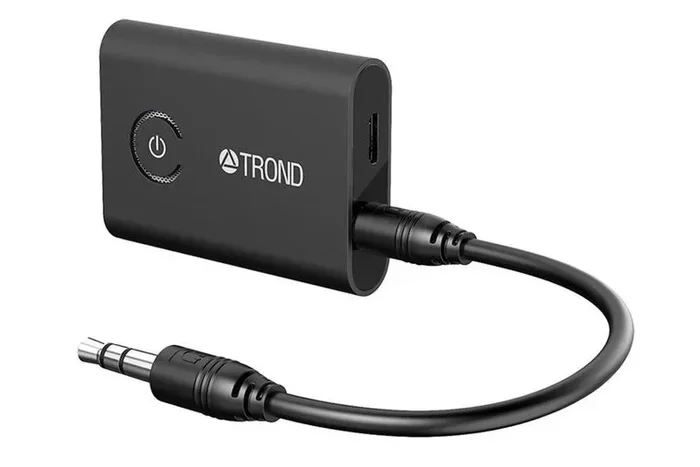
A Bluetooth transmitter is the most popular and easiest way to turn a non Bluetooth TV into a Bluetooth TV. This small device plugs into your TV audio output and sends audio wirelessly to your Bluetooth headphones or speakers.
Here is how it works:
- Plug the transmitter into your TV audio output (3.5mm jack, optical, or RCA).
- Turn on the transmitter and put it in pairing mode.
- Go to your Bluetooth device and search for new connections.
- Select the transmitter and wait for the pairing to complete.
- Enjoy wireless audio from your TV.
Most Bluetooth transmitters support a range of 30 to 100 feet. They work with virtually any Bluetooth-enabled headphones or speakers. Some models also support aptX Low Latency, which reduces the annoying audio-video delay you sometimes get with wireless connections.
If you are wondering whether this works with specific TV brands, the answer is yes. For example, if you own an LG TV, you can also pair Bluetooth headphones to your LG TV using a transmitter or built-in features. The same principle applies across all major brands.
Method 2: Use a Smart Speaker or Alexa
Another clever way to add Bluetooth functionality is through a smart speaker. Devices like Amazon Echo or Google Nest can act as a Bluetooth bridge between your TV and wireless audio devices.
Here is the basic setup:
- Connect your smart speaker to your TV using a cable or HDMI ARC.
- Use the speaker as a middleman to send audio to Bluetooth headphones.
- Some smart speakers can also receive TV audio and stream it to other rooms.
Many people already have a smart speaker at home and do not realize it can serve this purpose. You can also use Alexa as a Bluetooth speaker for your TV to create a seamless wireless audio setup. This method works especially well if you are already in the Amazon or Google smart home ecosystem.
Method 3: Use a Streaming Device with Bluetooth Support
Streaming devices like Roku, Amazon Fire TV Stick, or Apple TV can sometimes help you add Bluetooth audio capabilities. Some of these devices support direct Bluetooth headphone connections.
For example, Roku users can use Bluetooth headphones with Roku through the Roku app or certain supported models. This is a great option if you already own a streaming device and do not want to buy extra hardware.
Method 4: Upgrade Your TV
If your TV is very old and lacks modern features, you might consider upgrading to a Bluetooth enabled TV. Many modern smart TVs come with built-in Bluetooth as a standard feature. This is the most permanent solution but also the most expensive one.
Before spending hundreds of dollars, try one of the adapter methods above. They cost a fraction of a new TV and work just as well for most users.
Best Bluetooth Adapters for TVs
Not all Bluetooth transmitters are created equal. Here are some things to look for when shopping for the right adapter:
| Feature | Why It Matters |
|---|---|
| Bluetooth Version | Bluetooth 5.0 offers better range and stability than older versions. |
| Latency Support | aptX Low Latency reduces audio delay for a better viewing experience. |
| Connection Range | Longer range means more freedom to move around your room. |
| Audio Output Options | Multiple ports (3.5mm, optical, RCA) ensure compatibility with your TV. |
| Battery Life | Rechargeable transmitters save you from constantly replacing batteries. |
| Multipoint Pairing | Allows connecting to two devices at once for flexible use. |
Some popular and reliable Bluetooth transmitters include brands like TaoTronics, Avantree, and 1Mii. These options offer great value and work with most TV models. Look for one that supports the audio output ports on your specific TV.
Quick tip: Before buying, check what audio outputs your TV has. Most TVs have at least a 3.5mm headphone jack or an optical audio port. Choose a transmitter that matches your TV’s available ports.
Common Mistakes to Avoid
Setting up Bluetooth on your TV is usually smooth, but people do run into problems. Here are the most common mistakes and how to avoid them:
Skipping the Audio Output Check
Not all TVs send audio through the same port. Some TVs only output sound through HDMI ARC, while others use optical or a headphone jack. If you buy a transmitter that does not match your TV output, it simply will not work. Always check your TV manual or settings before purchasing any adapter.
Ignoring Latency Issues
Audio delay, also known as latency, is the biggest complaint people have with Bluetooth TV setups. You hear the dialogue a second or two after seeing the lips move. This happens because Bluetooth transmits data in small packets, which takes a tiny bit of time. To fix this, look for transmitters that support aptX Low Latency or buy one specifically designed for TV use.
Pairing Too Many Devices
Some Bluetooth transmitters can only hold one paired device at a time. If your spouse wants to use the same headphones, you will need to unpair and re-pair. Look for a transmitter with multipoint support if multiple people will share the setup.
Placing the Transmitter Too Far Away
Bluetooth has a limited range. If you place the transmitter behind your TV and sit far across the room, the signal may drop. Keep the transmitter close to your listening position for the best results.
Forgetting to Update Firmware
Some Bluetooth adapters have firmware updates that improve performance and fix bugs. Check the manufacturer’s website or app after setup to make sure you are running the latest version.
Expert Tips for the Best Bluetooth TV Experience
Once you have your Bluetooth setup running, a few expert tips can take your experience to the next level:
- Use a dedicated Bluetooth transmitter: These are designed specifically for TV audio and handle latency better than generic adapters.
- Place the transmitter at ear level: This improves the Bluetooth signal strength between the transmitter and your headphones.
- Keep your TV software updated: Firmware updates sometimes add Bluetooth features or improve existing ones.
- Test with different codecs: If your transmitter supports multiple audio codecs, try each one to find the best balance of quality and latency.
- Consider a Bluetooth receiver too: A receiver lets you send TV audio to external speakers, giving you more flexibility than a transmitter alone.
If you are also exploring other ways to enhance your TV setup, you might be interested in learning how to make your TV have Bluetooth through different methods. This can give you even more options depending on your specific TV model and needs.
Another great option is to check if your current TV can work with a plug-in speaker setup as a wired alternative when Bluetooth is not available. Having both wireless and wired options gives you the most flexibility.
One more thing worth noting: if you use a soundbar or external speaker system, some of these devices now come with built-in Bluetooth. You can connect your TV to the soundbar with a cable and then use Bluetooth from the soundbar to connect wireless headphones. This is a smart two-step approach that many people overlook.
Conclusion
So, can you turn a non Bluetooth TV into a Bluetooth TV? The answer is a resounding yes. Whether you choose a Bluetooth transmitter, a smart speaker workaround, a streaming device, or a full TV upgrade, there is a solution that fits every budget and skill level.
Turning a non Bluetooth TV into a Bluetooth TV is one of the simplest and most rewarding upgrades you can make. You gain the freedom of wireless audio, better accessibility, and a cleaner living space. Most setups take less than 15 minutes and cost under $50.
Start with a Bluetooth transmitter if you want the quickest and most reliable solution. Avoid the common mistakes we covered, and you will be enjoying wireless TV audio in no time. Your ears will thank you, and your family will appreciate the quiet.
Take action today. Pick the method that works best for your TV, grab the right adapter, and start enjoying wireless sound. The world of Bluetooth TV is waiting for you.
Frequently Asked Questions
Do I need any special equipment to add Bluetooth to my TV?
You need a Bluetooth transmitter or adapter, which is the main piece of equipment. These devices plug into your TV’s audio output and create a wireless Bluetooth connection. Most transmitters cost between $15 and $50 and are available online or at electronics stores. No special tools or technical skills are required.
Will adding Bluetooth to my TV affect the picture quality?
No, adding Bluetooth does not affect picture quality at all. Bluetooth only handles audio, so your video signal remains completely unchanged. The transmitter or adapter you use only processes sound, leaving your TV’s display exactly as it was before.
Can I connect multiple Bluetooth headphones to my TV at the same time?
It depends on your setup. Most Bluetooth transmitters support only one paired device at a time. However, some higher-end models offer multipoint pairing or a headphone splitter that allows two pairs of wireless headphones to connect simultaneously. Check the product specifications before buying if this is important to you.
Is there a delay when using Bluetooth with my TV?
Some delay, called latency, can occur with Bluetooth connections. This is because Bluetooth transmits audio data in small packets, which takes a fraction of a second. To minimize this, choose a transmitter that supports aptX Low Latency. Most modern transmitters keep the delay so small that it is barely noticeable during normal TV watching.
Can I use any Bluetooth headphones with my TV after adding Bluetooth?
Most Bluetooth headphones will work with any TV once you add a Bluetooth transmitter. The headphones just need to be in pairing mode and within range of the transmitter. Some premium headphones may need a firmware update or specific codec support for the best experience, but the vast majority work right out of the box.
How far can I move away from my TV with Bluetooth headphones?
Most Bluetooth transmitters have a range of 30 to 100 feet. This means you can move around your room, kitchen, or even another room and still hear your TV audio clearly. Walls and obstacles can reduce the range slightly, so keeping the transmitter in a central location helps maintain a strong connection.