Can I Use Clorox Wipes On My Computer Screen Safely
Using Clorox wipes on your computer screen can cause serious damage to the anti-glare and protective coatings. Many people reach for Clorox wipes because they are convenient and effective for disinfecting hard surfaces, but screens are not regular hard surfaces. This guide explains why Clorox wipes are risky for your display and shares safe, proven alternatives that keep your screen clean and protected.
You sit down at your desk. Your computer screen is covered in fingerprints and smudges. You grab a Clorox wipe because it is sitting right there on your desk. But wait. Can I Use Clorox Wipes On My Computer Screen? This is a question many people ask every single day. The answer might surprise you.
Clorox wipes are amazing for disinfecting countertops, phones, and other hard surfaces. They kill germs fast and leave things looking clean. But computer screens are a completely different story. Your screen has special coatings that keep colors bright and reduce glare. Harsh chemicals can destroy these coatings over time. That is why understanding what is safe and what is not matters so much.
In this article, we will walk through everything you need to know about cleaning your computer screen safely. We will cover why Clorox wipes are risky. We will share safe alternatives that actually work. And we will give you a step-by-step guide to get your screen sparkling clean without any damage. Let us get started.
Key Takeaways
- Avoid Clorox wipes on screens: The chemicals can strip protective coatings and cause permanent damage.
- Use a microfiber cloth: This is the safest and most effective way to clean any computer display.
- Distilled water works great: A simple mix of distilled water and a soft cloth removes most smudges.
- Check your manufacturer’s guide: Different screen types have different cleaning requirements.
- Never spray liquid directly on your screen: Always apply cleaner to the cloth first.
- Dry screens completely: Moisture left on the screen can seep into the edges and cause internal damage.
- Prevention is key: Regular dusting reduces the need for deep cleaning sessions.
📑 Table of Contents
- What Happens When You Use Clorox Wipes on a Computer Screen
- Why Clorox Wipes Are So Popular for Cleaning
- Safe Alternatives for Cleaning Your Computer Screen
- How to Properly Clean Your Computer Screen
- Common Mistakes People Make When Cleaning Screens
- Expert Tips for Keeping Your Screen Spotless
- What the Experts Say About Cleaning Computer Screens
- The Cost of Ignoring Safe Cleaning Practices
- Final Thoughts on Cleaning Your Computer Screen Safely
What Happens When You Use Clorox Wipes on a Computer Screen
You might be wondering what the big deal is. A wipe is a wipe, right? Not quite. Clorox wipes contain chemicals designed to cut through tough grime on hard surfaces like kitchen counters and bathroom fixtures. These chemicals are too strong for the delicate surface of your computer display.
The Chemicals in Clorox Wipes
Clorox wipes contain several active ingredients. The main one is benzalkonium chloride. This is a powerful disinfectant that kills bacteria and viruses. It works great on surfaces that can handle it. But your screen is not one of those surfaces.
Other ingredients in Clorox wipes include surfactants and solvents. These help break down dirt and grease. The problem is that they also break down the protective layers on your screen. Over time, this leads to visible damage that no amount of careful cleaning can fix.
Damage to Anti-Glare and Oleophobic Coatings
Most modern computer screens have special coatings. An anti-glare coating reduces reflections and makes your screen easier to look at for long periods. An oleophobic coating repels oils from your fingers. This is why fingerprints wipe off so easily on newer screens.
When you use Clorox wipes, these coatings start to degrade. You might not notice it right away. But after several uses, the screen starts to look cloudy or streaky. The oleophobic coating wears away, and your screen becomes a fingerprint magnet. This kind of damage is permanent. You cannot undo it with any cleaning method.
Streaks and Residue
Even if the chemicals do not destroy the coating, Clorox wipes can leave streaks behind. The solution on the wipe is not designed for delicate surfaces. It can leave a filmy residue that makes everything look blurry. You might end up cleaning more to fix the streaks, which makes the problem worse.
Why Clorox Wipes Are So Popular for Cleaning
It is easy to see why people reach for Clorox wipes. They are convenient. You grab one, wipe the surface, and you are done. They smell fresh and make things look clean right away. For desks, keyboards, and phone cases, they work well. But convenience does not always mean safety for every surface.
The key is understanding that not all cleaning products are created equal. A product that is perfect for your kitchen counter can be harmful for your laptop display. This is true for most electronic screens, including desktop monitors, laptop screens, and tablet displays.
Safe Alternatives for Cleaning Your Computer Screen
So what should you use instead? The good news is that cleaning your screen safely is very simple. You do not need fancy products or expensive solutions. Most of what you need is already in your home.
Microfiber Cloths
A microfiber cloth is the single best tool for cleaning a computer screen. These cloths are super soft and gentle. They lift dirt and oils without scratching the surface. You can find them at any office supply store or online for just a few dollars.
Always use a clean microfiber cloth. Dirty cloths can scratch your screen. Wash them regularly with mild soap and water. Let them air dry. Never use fabric softener because it leaves a residue that can transfer to your screen.
Distilled Water
Distilled water is the safest liquid for cleaning screens. It does not contain minerals or chemicals that tap water has. Tap water can leave spots and residue as it dries. Distilled water dries clean and clear.
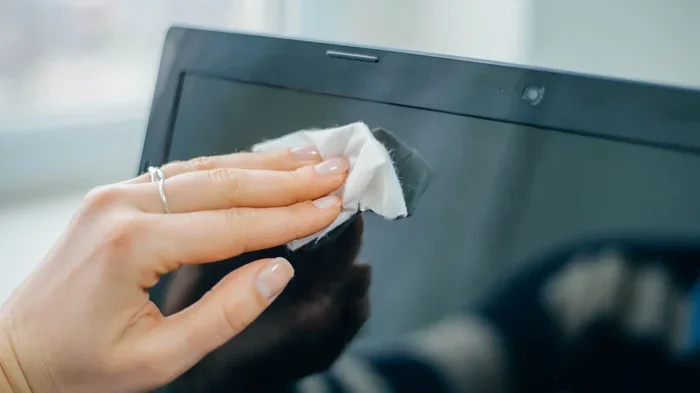
To use it, dampen your microfiber cloth with distilled water. Wring it out so it is just slightly moist. Gently wipe the screen in circular motions. Never pour water directly onto the screen. Liquid can seep into the edges and damage internal components.
Screen Cleaner Sprays
If distilled water alone does not cut through stubborn smudges, a dedicated screen cleaner spray is a great option. These sprays are formulated specifically for electronic displays. They are gentle and streak-free.
Look for sprays that say “safe for all screen types” on the label. Avoid any spray that contains alcohol, ammonia, or acetone. These ingredients are too harsh and can damage your screen over time. Spray the cleaner onto the cloth, not directly onto the screen.
Vinegar and Water Solution
A simple mixture of white vinegar and distilled water works wonders for cleaning screens. Mix equal parts vinegar and distilled water in a small spray bottle. This solution is natural, non-toxic, and very effective at cutting through grease and fingerprints.
Apply the solution to your microfiber cloth, not the screen. Wipe gently and dry any excess moisture with a dry part of the cloth. This method is cheap, eco-friendly, and completely safe for your display.
Compressed Air for Dust
Before you clean your screen with any liquid, remove loose dust first. Compressed air is perfect for this. It blows dust particles away without touching the screen surface. Hold the can upright and use short bursts. Keep the can a few inches away from the screen.
Dusting first prevents you from grinding dirt into the screen when you start wiping. This simple step makes any cleaning method more effective and safer for your display.
How to Properly Clean Your Computer Screen
Now that you know what to use, let us talk about how to clean your screen the right way. Proper technique matters just as much as using the right products.
Step-by-Step Cleaning Process
- Turn off your screen: This makes it easier to see dirt and smudges. It also reduces the risk of moisture getting into the electronics while the device is powered on.
- Remove loose dust: Use compressed air or a dry microfiber cloth to blow or wipe away loose particles.
- Dampen your cloth: Use distilled water or a screen-safe cleaner on your microfiber cloth. Never soak the cloth. It should be damp, not wet.
- Wipe gently: Use light pressure and wipe in circular motions. Do not press hard. The screen is delicate and can be damaged by excessive force.
- Dry the screen: Use a dry part of the microfiber cloth to remove any remaining moisture. Make sure the screen is completely dry before turning it back on.
- Clean your cloth: After each use, wash your microfiber cloth and let it dry. This keeps it ready for the next cleaning session.
How Often Should You Clean Your Screen?
How often you clean depends on your environment and usage. If you work in a dusty office or have pets, you may need to clean more often. For most people, a quick wipe with a dry microfiber cloth once a week is enough. A deeper clean with a damp cloth once a month keeps things looking great.
The key is to make cleaning a habit. Regular light cleaning prevents buildup and reduces the need for heavy cleaning sessions. Think of it like brushing your teeth. A little effort every day saves you from bigger problems later.
Common Mistakes People Make When Cleaning Screens
Even with good intentions, people make mistakes when cleaning their screens. Here are the most common ones to avoid.
Using Paper Towels or Regular Cloth
Paper towels might feel soft, but they are actually abrasive at a microscopic level. They can scratch your screen over time. Regular cloths from around the house may contain rough fibers that do the same damage. Always stick with a proper microfiber cloth.
Spraying Cleaner Directly on the Screen
This is one of the most common mistakes people make. Spraying liquid directly onto your screen allows moisture to seep into the edges and internal components. This can cause short circuits and permanent damage. Always apply cleaner to the cloth first.
Using Too Much Pressure
Your screen is not a kitchen counter. It does not need heavy scrubbing. Pressing too hard can damage the pixels and internal layers of the display. Use light, gentle pressure and let the cloth do the work.
Ignoring the Manufacturer’s Instructions
Every screen is different. Some manufacturers provide specific cleaning guidelines for their products. Always check the user manual or the manufacturer’s website before trying any new cleaning method. This is especially important for expensive monitors and high-end laptops.
Using Household Cleaners
Window cleaners, all-purpose sprays, and household disinfectants are not safe for screens. They contain chemicals like ammonia and alcohol that can strip coatings and cause discoloration. Stick to products made specifically for electronics or simple household items like distilled water and vinegar.
Expert Tips for Keeping Your Screen Spotless
Keeping your screen clean does not have to be a chore. A few simple habits can make a huge difference.
Wash Your Hands Before Using Your Computer
Oil and dirt from your hands are the biggest enemies of a clean screen. Washing your hands before you use your computer reduces the amount of grime that ends up on your display. It is a small habit that pays off big time.
Keep Your Screen Covered When Not in Use
A simple screen cover or cloth draped over your monitor keeps dust from settling. This is especially helpful if your workspace is near a window or in a dusty area. Less dust means less cleaning.
Use a Screen Protector
A screen protector adds an extra layer of defense. It catches fingerprints, smudges, and dust before they reach your actual screen. When the protector gets dirty, you can replace it easily. This is one of the best investments you can make for your laptop or monitor.
Keep Cleaning Supplies at Your Desk
Having a microfiber cloth and a small spray bottle of screen cleaner right at your desk makes it easy to do quick wipes throughout the day. When cleaning is convenient, you are more likely to do it regularly.
Avoid Eating and Drinking Near Your Screen
Crumbs and spills are enemies of electronics. Eating near your screen increases the chance of particles landing on it and liquids spilling. Keep food and drinks at a safe distance to protect your display.
Get into a Routine
Set a reminder to clean your screen once a week. Make it part of your regular workspace maintenance. A clean screen not only looks better but also reduces eye strain and improves your overall computing experience.
What the Experts Say About Cleaning Computer Screens
Most electronics manufacturers agree on one thing. Clorox wipes and similar household cleaning products are not safe for screens. Companies like Apple, Dell, and HP all recommend using a soft, lint-free cloth slightly dampened with water for routine cleaning.
Apple’s official support page advises against using cleaning products containing alcohol or bleach on their displays. Dell recommends the same approach. These guidelines exist because manufacturers design their screens with specific coatings that can be damaged by harsh chemicals.
Professional cleaning services for electronics also agree. They use specialized tools and solutions that are gentle yet effective. For most home users, a microfiber cloth and distilled water are all you need. You do not need expensive products or professional services to keep your screen looking great.
The Cost of Ignoring Safe Cleaning Practices
You might be thinking that one Clorox wipe will not hurt. Maybe it will not, maybe it will. But the risk is not worth it. A single screen replacement can cost anywhere from $100 to over $500 depending on your device. That is a lot of money to save a few seconds of cleaning time.
Even if the screen does not crack or break, chemical damage can void your warranty. Most manufacturers consider chemical damage caused by improper cleaning as user damage. This means they will not cover the cost of repairs. Using safe cleaning methods protects both your screen and your wallet.
Over time, repeated use of harsh cleaning products leads to cumulative damage. The screen might look fine at first, but the coatings slowly wear away. Colors become less vibrant. Glare increases. The overall viewing experience gets worse. By the time you notice the damage, it is already too late.
Final Thoughts on Cleaning Your Computer Screen Safely
So, Can I Use Clorox Wipes On My Computer Screen? The answer is a clear no. Clorox wipes are great for many things, but your computer screen is not one of them. The chemicals in these wipes can strip protective coatings, leave streaks, and cause permanent damage to your display.
The good news is that safe cleaning is easy and inexpensive. A microfiber cloth and distilled water handle most cleaning needs. A screen-safe spray or a vinegar and water solution works for tougher smudges. These methods are gentle, effective, and safe for all screen types.
Make it a habit to clean your screen the right way. Your display will look better, last longer, and give you a better viewing experience for years to come. Take care of your screen, and it will take care of you.
Start today. Grab a microfiber cloth, dampen it with distilled water, and give your screen a gentle wipe. You will be amazed at the difference it makes. Your screen will look like new, and you will have peace of mind knowing you are protecting your investment the right way.
Frequently Asked Questions
Can I use Clorox wipes on my laptop screen in an emergency?
It is best to avoid Clorox wipes on your laptop screen even in an emergency. If you must use one, do so very sparingly and make sure the wipe is only slightly damp. Wipe gently and dry the screen immediately with a dry microfiber cloth. However, regular use of Clorox wipes will damage the screen coating over time, so it is not a habit you want to build.
What happens if I already used Clorox wipes on my screen?
If you have used Clorox wipes a few times, do not panic. Stop using them right away. Switch to a microfiber cloth and distilled water for future cleaning. The damage may not be immediately visible, but repeated use can degrade the screen coating. Monitor your screen for any changes in clarity or coating texture over the coming weeks.
Are there any Clorox products safe for computer screens?
Clorox does not manufacture any products specifically designed for computer screens. Their wipes and sprays are formulated for hard surfaces like countertops and desks. For safe screen cleaning, use products labeled as screen-safe or electronics-safe. These are designed to be gentle on delicate display coatings.
Can I use baby wipes to clean my computer screen?
Baby wipes are generally gentler than Clorox wipes, but they are still not ideal for computer screens. Many baby wipes contain moisturizers and fragrances that can leave residue on your display. A microfiber cloth with distilled water is always the better and safer choice for cleaning electronic screens.
How do I remove stubborn streaks after using Clorox wipes?
If streaks remain after using a Clorox wipe, dampen a clean microfiber cloth with distilled water and gently wipe the screen in circular motions. Dry the screen immediately with a dry part of the cloth. For persistent streaks, a small amount of screen cleaner spray applied to the cloth can help. Never apply liquid directly to the screen.
Is it safe to use hand sanitizer on my computer screen?
No, hand sanitizer is not safe for computer screens. Most hand sanitizers contain high concentrations of alcohol, which can damage screen coatings just like Clorox wipes. Stick to distilled water, microfiber cloths, or dedicated screen-safe cleaning products for the best results and to keep your display protected.
=== CONCLUSION ===
Taking care of your computer screen does not have to be complicated. The answer to Can I Use Clorox Wipes On My Computer Screen is simple. Avoid them. Your screen deserves better. Use a microfiber cloth, distilled water, and gentle cleaning techniques to keep your display looking its best. These small habits will protect your investment and give you a clearer, brighter screen for years to come. Start using safe cleaning methods today and your screen will thank you tomorrow.