Can You Run Hdmi Through Coax Everything You Need To Know
Can you run HDMI through coax? The short answer is yes, but you need the right equipment. HDMI over coax requires a converter or adapter to transform the digital signal into a format that travels through coaxial cable. This guide covers everything from signal conversion to setup steps so you can get your home theater running smoothly.
Key Takeaways
- Yes, HDMI can travel through coax: You need a converter or adapter to make it work properly.
- Coax cables like RG6 are common in homes: Many houses already have coax wiring installed.
- Signal quality matters: Long runs or poor equipment can degrade your picture and sound.
- You need both sides covered: A sender and receiver unit handle the conversion process.
- Common mistakes cause problems: Using the wrong cable or skipping the power supply leads to frustration.
- HDMI over coax saves time and money: It lets you reuse existing wiring instead of running new HDMI cables.
- Read the FAQ section: It answers the most common questions about HDMI through coax setups.
📑 Table of Contents
- Can You Run HDMI Through Coax? Here Is the Full Picture
- What Is HDMI Over Coax?
- How Does HDMI Through Coax Work?
- What Equipment Do You Need?
- Step-by-Step Setup Guide
- Common Mistakes to Avoid
- Expert Tips for Best Performance
- HDMI Over Coax vs. Other HDMI Extension Methods
- When Should You Use HDMI Over Coax?
- Key Takeaways
Can You Run HDMI Through Coax? Here Is the Full Picture
If you have ever looked at the back of your TV and your wall plate, you know they do not match. Your devices use HDMI cables. But your walls might have coaxial outlets from an older cable TV setup. So what do you do? Can you run HDMI through coax? The answer is yes, but there is a little more to it than just plugging things in.
This article breaks down everything you need to know. We cover how the technology works, what gear you need, and how to set it up the right way. Whether you are wiring a new home theater or just trying to get one more device connected, this guide has you covered. HDMI over coax is a practical solution that many people overlook, and once you understand it, it makes a lot of sense.
Let us dive into the details so you can get your setup running without any headaches.
What Is HDMI Over Coax?
HDMI over coax means sending an HDMI signal through a coaxial cable instead of a standard HDMI cable. Coaxial cable, often called coax for short, has been around for decades. You probably have it in your walls from cable TV or internet service. It uses a central copper wire surrounded by insulation, shielding, and an outer jacket.
Standard HDMI cables carry a pure digital signal. Coax was originally designed for analog signals like those from cable television. So the two are not naturally compatible. To make them work together, you need a device that converts the signal from one format to another.
Think of it like translating between two languages. The HDMI device speaks digital. The coax cable speaks analog. The converter acts as the translator between them. Without it, the two simply cannot communicate.
Why Does This Matter for Your Setup?
Many homes built before the 2010s have coax wiring already in the walls. Running new HDMI cables through walls, floors, or ceilings can be a real pain. It means drilling holes, fishing cables, and patching drywall. Using existing coaxial outlets saves you a ton of time and money.
Also, coax cables can handle longer runs better than standard HDMI cables. A typical HDMI cable starts to lose signal quality past 50 feet. A good coaxial cable like RG6 can go much farther without significant signal loss. This makes it ideal for larger homes or setups where your devices are far from your TV.
How Does HDMI Through Coax Work?
The process of sending HDMI through coax involves signal conversion. Here is a simple breakdown of how it works.
First, your HDMI source device sends a digital signal out through an HDMI cable. This signal goes into a sender unit, also called a transmitter. The sender converts the digital HDMI signal into a format that can travel through coax. It then pushes that signal out through the coaxial cable to your TV location.
At the other end, a receiver unit picks up the signal from the coax cable. It converts it back into a standard HDMI signal. That signal then connects to your TV or display through a short HDMI cable. The whole process happens in real time, so you do not notice any delay in most cases.
The Role of Signal Conversion
Signal conversion is the heart of this process. The sender unit takes the high-bandwidth digital signal from HDMI and modulates it onto a carrier frequency that can travel through coax. At the receiver, it demodulates that signal and reconstructs the original HDMI output.
Some systems use a technology called HDBaseT. This allows the signal to travel over coax or even CAT5 or CAT6 Ethernet cables. HDBaseT can carry not just video and audio but also power and control signals through a single cable. That is a huge advantage for clean installations.
Not all HDMI over coax systems use HDBaseT, though. Some use simpler modulation methods. The key thing is that the sender and receiver must match. You cannot mix brands or models and expect them to work together.
What Equipment Do You Need?
To get HDMI running through coax, you need a few specific pieces of gear. Let us go through each one so you know exactly what to buy.
1. HDMI Over Coax Converter Kit
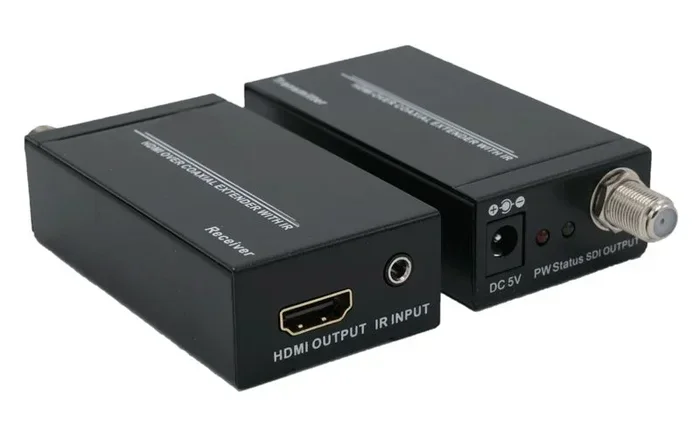
This is the most important piece of equipment. A coax to HDMI converter kit comes with a sender and a receiver. The sender connects to your source device. The receiver connects to your TV. Popular brands include HDMI-over-Coax adapters from companies like Cable Matters, Sewell, and Monoprice.
When shopping for one, check these specs:
- Resolution support: Look for kits that handle at least 1080p or 4K.
- Cable compatibility: Make sure it works with RG59 or RG6 coax.
- Distance rating: Check how far the signal can travel through coax.
- Audio support: Ensure it handles the audio format you need.
2. Coaxial Cable
You will need a coaxial cable to carry the signal. RG6 is the most common type used in modern homes. It has better shielding and lower signal loss than older RG59 cables. If you are running the cable more than 50 feet, RG6 is strongly recommended.
Make sure the cable has BNC connectors at both ends, or buy adapters to connect to your converter kit. Some kits come with the connectors included, but many do not.
3. Power Supply
Most converter kits need power to work. The sender and receiver usually each need a small power adapter. Check that your kit includes these or that you have them available. Some kits can pass power through the coax cable, which eliminates the need for a separate power source at the receiver end.
4. Short HDMI Cables
You still need short HDMI cables to connect your source device to the sender and the receiver to your TV. These can be any standard HDMI cables you already have. Keep them as short as possible to avoid unnecessary cable clutter.
Step-by-Step Setup Guide
Setting up HDMI through coax is not as hard as it might sound. Here is a simple walkthrough.
Step 1: Plan Your Route
Look at where your source device is and where your TV is. Identify the coax outlet near your TV and the coax outlet near your source device. If you do not have a coax outlet where you need one, you may need to run a new coax cable or use an existing one from another device like a cable box.
Step 2: Connect the Sender Unit
Plug a short HDMI cable from your source device into the HDMI input on the sender unit. Then connect the coax cable from the sender unit to your wall coax outlet or to the other end of your coax run. Plug in the power adapter for the sender.
Step 3: Connect the Receiver Unit
At the TV end, connect the coax cable from the wall outlet to the coax input on the receiver unit. Then use a short HDMI cable from the receiver to your TV. Plug in the power adapter for the receiver.
Step 4: Power On and Test
Turn on your source device and your TV. Switch your TV to the correct HDMI input. You should see the picture from your source device on the screen. If you do not, double-check all connections and make sure both units are powered on.
Quick Tips for a Smooth Setup
- Label your cables: It is easy to get confused with sender and receiver cables. Label them at both ends.
- Test before you wall it up: If you are running cable through walls, test the full connection before you close up any holes.
- Keep power adapters accessible: Do not hide them where they cannot be unplugged or replaced easily.
- Use high-quality coax: Cheap coax cable with poor shielding can introduce interference and degrade your picture.
Common Mistakes to Avoid
Even with the right equipment, people make mistakes that cause problems. Here are the most common ones and how to avoid them.
Using the Wrong Coax Cable
Not all coax cables are the same. RG59 is an older cable with thinner shielding. It works for short runs but struggles with longer distances. RG6 is the better choice for most HDMI over coax setups. Using the wrong cable can result in a weak or no signal at all.
Skipping the Power Supply
Some people assume the coax cable provides power to the units. In most cases, it does not. Both the sender and receiver need their own power. Forgetting to plug in one of them is the number one reason setups fail to work.
Mixing Sender and Receiver Brands
This is a big one. The sender and receiver must be from the same kit or at least the same model. They use matching modulation frequencies and protocols. Mixing them will not work, even if they are the same brand but different models.
Ignoring Signal Distance Limits
Every converter kit has a maximum distance rating. Going beyond that rating means signal loss, pixelation, or no signal at all. If you need to cover a long distance, consider using a higher-quality coax cable or a signal booster.
Forgetting About Resolution Limits
Not all converter kits support 4K or even 1080p at 60Hz. Check the resolution before you buy. If you have a 4K source device and a 4K TV, make sure the kit can handle that resolution. Otherwise, you may get a lower-quality picture than expected.
Expert Tips for Best Performance
Once your setup is working, you can take a few extra steps to get the best possible experience.
Use shielded coax cable. Shielding prevents electromagnetic interference from other cables and electronics in your walls. This is especially important in homes with lots of wiring bundled together.
Keep coax connections tight. Loose BNC connections can cause intermittent signal dropouts. Use cable staples or clips to keep the coax cable secure and prevent it from pulling loose at the connectors.
Update firmware if available. Some higher-end converter kits have firmware updates that improve compatibility and performance. Check the manufacturer’s website after setup.
Consider an HDMI splitter with coax output. If you need to send the same signal to multiple TVs, look for a kit that includes a built-in splitter. This lets you distribute the signal to several coax runs from one sender unit.
Test your signal quality. After setup, check the picture on your TV carefully. Look for any artifacts, color issues, or audio sync problems. If you see any, check all connections and make sure your coax cable is not damaged.
HDMI Over Coax vs. Other HDMI Extension Methods
There are several ways to extend an HDMI signal beyond the standard cable length. Here is how HDMI over coax compares to other methods.
| Method | Max Distance | Uses Existing Wiring | Setup Difficulty | Cost |
|---|---|---|---|---|
| HDMI over Coax | 100-300 feet | Yes (coax in walls) | Easy to moderate | $$ |
| Standard HDMI Cable | Up to 50 feet | No | Very easy | $ |
| HDMI Extender over CAT5/6 | 100-330 feet | Yes (Ethernet in walls) | Moderate | $$ |
| Fiber Optic HDMI | Up to 1000 feet | No | Easy | $$$ |
| Wireless HDMI | Up to 100 feet | No | Very easy | $$ |
HDMI over coax stands out because many homes already have coax wiring in place. This makes it a cost-effective solution without the need to run new cables. It also handles longer distances than standard HDMI cables and is more reliable than wireless options that can suffer from interference.
However, fiber optic HDMI cables offer the longest reach and the best signal quality. If you are building a new home or have the freedom to run cables, fiber optic might be the better long-term choice. But for retrofitting an existing home with coax wiring, HDMI over coax is hard to beat.
When Should You Use HDMI Over Coax?
Can you run HDMI through coax in every situation? Not quite. Here are the scenarios where this approach makes the most sense.
- Your home has existing coax wiring: This is the biggest reason. If your walls already have coax outlets, using them saves a lot of effort.
- You need a long cable run: If your TV is more than 50 feet from your source device, standard HDMI will struggle. Coax handles longer distances much better.
- You want a clean, hidden installation: Running coax through walls is often easier than running HDMI, especially if the coax paths already exist.
- You are wiring a multi-room setup: Coax can be split to multiple rooms from one source, making it great for whole-home entertainment.
- You are working with older homes: Many older homes were pre-wired with coax for cable TV. Repurposing this wiring is a smart move.
On the other hand, if your home has no coax wiring at all, you are better off running standard HDMI or using a wireless HDMI extender. The cost and effort of installing new coax cable usually does not make sense when HDMI cables are simpler and cheaper.
Key Takeaways
- HDMI over coax is totally possible: You just need a converter kit with a sender and receiver unit.
- Coax cables like RG6 are ideal: They handle long runs and carry the converted signal with minimal loss.
- Signal conversion is the key process: The sender converts digital HDMI to analog for coax, and the receiver converts it back.
- Matching sender and receiver is critical: They must be from the same kit or compatible model.
- Avoid common mistakes: Use the right cable, provide power to both units, and respect distance limits.
- It is a great retrofit solution: For homes with existing coax wiring, this is one of the easiest ways to connect modern devices.
- Read the FAQ below: It covers the most common questions about running HDMI through coax.
Frequently Asked Questions
Can any coax cable carry HDMI signals?
Not directly. Coax cable cannot carry a raw HDMI signal. You need a converter kit that includes a sender and receiver to translate the HDMI signal into a format that coax can carry. The kit does the conversion at both ends so the signal travels properly through the coax cable.
How far can HDMI travel through coax cable?
Most HDMI over coax kits support runs of 100 to 300 feet depending on the cable quality and kit specifications. RG6 coax cable performs better over long distances than RG59. Always check the manufacturer’s rated distance before purchasing a kit.
Do I lose video or audio quality when running HDMI through coax?
Some quality loss can occur, especially over very long runs or with lower-quality cables. However, good converter kits with RG6 coax maintain excellent picture and sound quality for most home setups. If you need the highest quality, keep your runs under 150 feet and use quality components.
Can I use HDMI over coax for 4K content?
Yes, but only if your converter kit supports 4K resolution. Not all kits handle 4K. Check the product specifications carefully before buying. A 4K-compatible kit will transmit 4K video and audio through the coax cable without downscaling the resolution.
Is running HDMI through coax better than wireless HDMI?
It depends on your situation. Coax provides a more stable and interference-free connection compared to wireless HDMI, which can suffer from latency and signal drops. However, wireless HDMI is simpler to set up since it does not require cables at all. For reliability and consistent quality, coax is the better choice.
Can I split an HDMI signal to multiple TVs using coax?
Yes, you can. Some HDMI over coax kits include a built-in splitter. This lets you send one HDMI source to multiple coax runs and then to multiple TVs. You will need a receiver unit at each TV location. Make sure the kit you buy supports the number of outputs you need.
=== CONCLUSION ===
Can you run HDMI through coax? Absolutely. With the right converter kit, a coaxial cable, and a little patience, you can extend your HDMI signal through existing coax wiring in your home. This is one of the smartest moves you can make if your house has coax outlets but you want to connect modern HDMI devices.
The process comes down to converting the signal at both ends and making sure your equipment matches. Avoid the common mistakes we covered, follow the setup guide step by step, and you will have a clean, reliable connection in no time. HDMI over coax saves you from running new cables, keeps your walls intact, and delivers solid performance for most home entertainment needs.
Take what you learned here and apply it to your own setup. Whether you are mounting a TV in a different room or connecting a gaming console that is far from your display, HDMI through coax gives you a practical, proven solution. Get the right gear, plan your route, and enjoy your setup with confidence.