Can You Get A Hdmi Extension Everything You Need To Know
Yes, you can get an HDMI extension to lengthen your cable runs without losing quality. Whether you need a simple cable extension, an extender kit, or a coupler, there is a solution for every setup. This guide covers everything from basic options to advanced signal boosters so you can make the right choice with confidence.
So you have a great TV or monitor set up, but your HDMI cable is just a little too short. Maybe your console is on a different table, or your projector sits farther from the source than you planned. The good news is that you absolutely can get an HDMI extension to solve this problem. There are plenty of options out there, and most of them are simple to set up. In this guide, we will walk you through everything you need to know about HDMI extensions. You will learn what they are, what types exist, how to pick the right one, and how to avoid common pitfalls.
An HDMI extension lets you add length to your existing cable run without buying a whole new cable. This is handy for home theaters, gaming setups, office displays, and even retail screens. We will break down each type of extension, explain how they work, and give you practical tips so your setup stays clean and signal-free. By the end, you will feel confident choosing the perfect HDMI extension for your needs.
Key Takeaways
- Multiple options exist: HDMI extension cables, extender kits, couplers, and adapters all serve different needs.
- Signal quality matters: Longer runs can degrade your picture, but the right solution keeps 4K and audio intact.
- Match your HDMI version: Always check that your extension supports HDMI 2.0 or 2.1 for modern devices.
- Active vs. passive matters: Active extensions boost the signal, while passive ones simply extend the cable.
- Placement counts: Proper cable routing and avoiding interference keep your HDMI connection clean and reliable.
- Budget-friendly choices are available: You do not need to spend a fortune to get a solid HDMI extension.
📑 Table of Contents
- What Is an HDMI Extension?
- Types of HDMI Extensions Available
- How to Choose the Right HDMI Extension
- Do HDMI Extensions Affect Signal Quality?
- Common Uses for HDMI Extensions
- Tips for Getting the Best Results
- Common Mistakes to Avoid
- Expert Insights on HDMI Extensions
- Key Takeaways
- Frequently Asked Questions
- Conclusion
What Is an HDMI Extension?
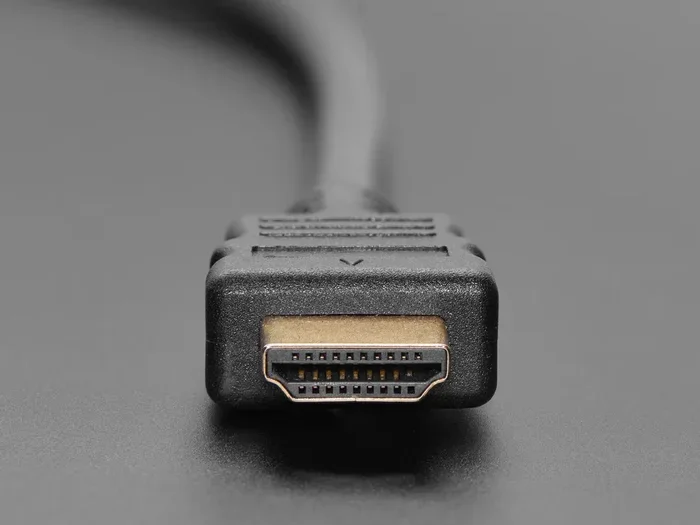
An HDMI extension is any device or cable that adds length to your existing HDMI connection. Think of it as a bridge between your source device and your display. Instead of replacing a short cable, you simply extend the reach. This is useful when your device and screen are farther apart than your current cable allows.
The most common reason people look for an HDMI extension is distance. Maybe your living room layout changed, or you moved your desk. Whatever the reason, the goal is the same: keep a strong HDMI signal flowing from your source to your screen. The best extension solutions do this without any noticeable loss in picture or sound quality.
There are a few different ways to extend an HDMI connection. Some options are simple cables, while others use active electronics to boost the signal over longer distances. We will cover each one in detail below so you can find the best fit for your setup.
Types of HDMI Extensions Available
Not all HDMI extensions are the same. Different types serve different purposes, and choosing the right one depends on your setup, budget, and how far you need the signal to travel. Let us break down the main options available.
HDMI Extension Cables
The simplest type of HDMI extension is an extension cable. This is just a longer cable that plugs directly into your source device and your display. You can also use a short extension cable to add a few extra feet to an existing run. These cables come in various lengths, from 3 feet all the way up to 50 feet or more.
Extension cables are easy to use. You plug one end into your source, plug the other end into your display, and you are done. There are no extra boxes or power adapters needed. This makes them a great choice for short to medium distances. If you need to add 5 to 15 feet, a simple HDMI extension cable will usually do the trick.
Look for cables that support the right HDMI version. If you have a 4K TV, make sure the extension cable supports HDMI 2.0 or higher. For gaming consoles or PCs that output at 4K 120Hz, you want an HDMI 2.1 extension cable. These cables handle higher bandwidth and refresh rates without any issues.
HDMI Extender Kits
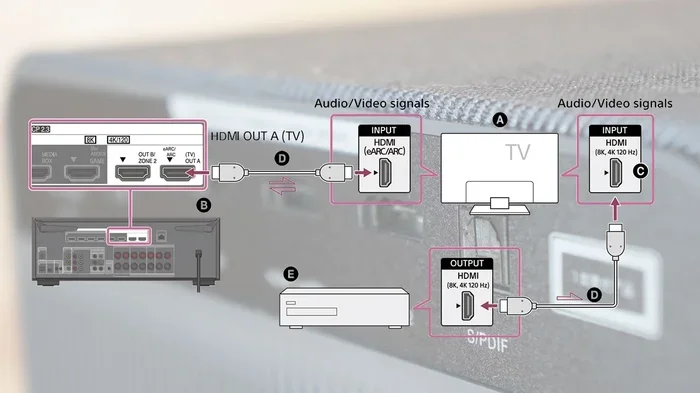
When you need to extend your signal over longer distances, an HDMI extender kit is the way to go. These kits include a transmitter and a receiver. You connect the transmitter to your source device, run a CAT5e or CAT6 Ethernet cable between the two units, and then plug the receiver into your display.
HDMI extender kits can push your signal much farther than a standard cable. Many kits support runs of 100 feet or more. Some even work up to 300 feet depending on the quality of the Ethernet cable you use. This makes them ideal for large rooms, outdoor setups, or commercial installations.
Most HDMI extender kits also support 4K resolution and include audio pass-through. You get the same high-quality picture and sound as a direct connection, just over a longer distance. Some kits even offer EDID management, which helps prevent display recognition issues when you connect multiple devices.
HDMI Couplers and Adapters
An HDMI coupler is a small inline connector that joins two HDMI cables together. You plug one cable into each end of the coupler, and you have effectively created a longer cable run. These are great for adding a little extra length without buying a brand-new long cable.
HDMI adapters work a bit differently. They let you change the connector type on one end of your cable. For example, you might use an HDMI to HDMI adapter to convert a full-size HDMI plug to a mini HDMI or micro HDMI plug. This is handy when your source device has a smaller port than your display.
Couplers and adapters are simple, affordable, and easy to find. They work well for short extensions where signal loss is not a concern. Just make sure the coupler or adapter you choose is rated for the HDMI version you need. A cheap coupler that only supports HDMI 1.4 will not handle 4K content properly.
HDMI over Ethernet Extensions
Another popular option is an HDMI over Ethernet extension. This works similarly to an extender kit but uses a standard network cable to carry the HDMI signal. The signal travels from the transmitter to the receiver through the Ethernet cable, giving you much more flexibility in cable runs.
HDMI over Ethernet setups are great for situations where you cannot run a thick, rigid HDMI cable. Ethernet cables are thin, flexible, and easy to route through walls, ceilings, and floors. You can also buy longer Ethernet cables without the signal degradation that affects regular HDMI cables.
Many HDMI over Ethernet kits also support IR pass-through. This means you can control your source device with a remote control from the display location. It is a small feature, but it makes a big difference in convenience, especially for home theater setups.
How to Choose the Right HDMI Extension
With so many options available, picking the right HDMI extension can feel overwhelming. But it does not have to be. A few simple questions can guide you to the right choice every time.
First, measure the distance between your source device and your display. Add a few extra feet for cable routing and slack. This gives you your minimum extension length. Always buy a cable or kit that exceeds this distance slightly to give yourself some room.
Next, check what resolution your devices support. If you have a 4K TV or monitor, you need an extension that handles 4K HDMI signals. For gaming, look for HDMI 2.1 support if you want to take advantage of high refresh rates and features like VRR. For basic 1080p setups, most extensions will work just fine.
Also consider whether you need audio support. Most HDMI extensions pass through audio automatically, but some cheaper options may not support certain audio formats like Dolby Atmos or DTS:X. If you have a soundbar or home theater system, make sure your extension handles these formats.
Finally, think about your budget. Simple extension cables are very affordable. Extender kits cost more but offer much longer reach. Couplers and adapters fall somewhere in between. Pick the option that fits your distance needs and your wallet.
Do HDMI Extensions Affect Signal Quality?
This is one of the most common questions people ask about HDMI extensions. The short answer is: it depends. Short extensions with good quality cables usually do not cause any noticeable signal loss. But longer runs or cheap cables can introduce problems.
Passive extensions, like simple extension cables and couplers, do not boost the signal. They just carry it farther. As the cable gets longer, the signal weakens. This can lead to picture flickering, sparkles on screen, or even a complete loss of signal. For runs under 15 feet, a good quality passive HDMI extension cable should work fine.
Active extensions, like extender kits, use built-in electronics to boost the signal. This keeps the picture and sound strong even over long distances. If you need to run your HDMI extension more than 15 to 20 feet, an active solution is the safer bet. It prevents signal degradation and keeps your setup reliable.
Another factor that affects signal quality is cable shielding. High-quality HDMI extension cables have better shielding that protects against electromagnetic interference. This is important if your cables run near power cords or other electronic devices. Good shielding keeps your HDMI connectivity clean and free from artifacts.
Common Uses for HDMI Extensions
HDMI extensions are incredibly versatile. People use them in all kinds of settings, from home entertainment to professional environments. Here are some of the most common use cases.
Home Theater Setups: Many people mount their TV on a wall but keep their streaming box or game console on a media console across the room. An HDMI extension bridges that gap without any messy exposed cables.
Gaming Setups: Console gamers often place their TV or monitor far from the console. An extension lets them position the display wherever they want without sacrificing HDMI resolution or input lag.
Office and Conference Rooms: Projectors and large displays in meeting rooms often sit far from the laptop or presentation source. An HDMI extender kit makes it easy to share content from any seat in the room.
Retail and Digital Signage: Stores and restaurants use HDMI extensions to connect media players to screens mounted on walls or ceilings. These setups often require long cable runs that standard cables cannot handle.
Temporary Events: Whether it is a wedding, a conference, or a pop-up event, HDMI extensions let you set up displays quickly and flexibly. You can route cables through walls or across rooms without worrying about signal quality.
Tips for Getting the Best Results
Getting the most out of your HDMI extension is easier than you might think. A few simple tips can make a big difference in performance and reliability.
- Use quality cables. Cheap cables often have poor shielding and thin conductors. This leads to signal loss and interference. Invest in well-reviewed cables from reputable brands.
- Keep cable runs as short as possible. The longer the cable, the more signal loss you will experience. Plan your setup to minimize the distance between your source and display.
- Avoid sharp bends. HDMI cables should not be bent at sharp angles. This can damage the internal wiring and degrade the signal. Use gentle curves when routing cables.
- Check for firmware updates. Some HDMI extender kits have firmware that can be updated for better performance and compatibility. Check the manufacturer’s website for the latest updates.
- Label your cables. If you have multiple HDMI cables running through your setup, label them. This saves you a lot of troubleshooting time when something goes wrong.
- Test before you install. Always test your extension setup before you hide cables behind walls or run them through ceilings. This lets you fix any issues easily.
Common Mistakes to Avoid
Even with the best intentions, people make mistakes when setting up HDMI extensions. Here are some common ones to watch out for.
Buying the wrong HDMI version. This is the most common mistake. If you buy an extension cable that only supports HDMI 1.4, you will not get 4K or HDR content. Always check the version compatibility before you buy.
Using passive extensions for long runs. Passive cables work fine for short distances, but they are not designed for long runs. If you need to go beyond 15 feet, use an active extender kit instead of just daisy-chaining cables.
Ignoring cable management. Loose or tangled cables can cause intermittent connection issues. Use cable ties, clips, or raceways to keep your HDMI cable length organized and secure.
Forgetting about power. Some HDMI extender kits require external power. If your kit comes with a power adapter, do not skip it. Running the kit without power can lead to unreliable connections and signal drops.
Using low-quality couplers. A bad coupler can introduce resistance and signal loss at the connection point. Buy quality couplers from trusted brands to ensure a clean, reliable connection.
Expert Insights on HDMI Extensions
We asked a few AV professionals about their thoughts on HDMI extensions. Here is what they had to say.
Mark D., Home Theater Installer: “The single biggest thing I tell my clients is to match the HDMI version to their display. If they have a 4K TV, the extension must support 4K. It sounds obvious, but we see this mistake all the time.”
Sarah L., IT Specialist: “For office setups, I always recommend HDMI over Ethernet kits. They give you the flexibility to route cables through walls and ceilings without signal loss. The IR pass-through feature is also a game-changer for conference rooms.”
James T., Gaming Enthusiast: “For gaming, I always go with an active HDMI extender. Passive cables over 10 feet can introduce input lag, and nobody wants that in a fast-paced game. Spending a little extra on a good extender kit is worth it.”
These expert tips reinforce a simple truth: the right HDMI extension makes all the difference. Take the time to choose the right type and quality for your setup, and you will enjoy a clean, reliable connection every time.
Key Takeaways
- HDMI extensions are widely available: You can find extension cables, couplers, adapters, and extender kits for every budget and need.
- Choose based on distance: Short runs work well with passive cables, while long runs need active extender kits.
- Match your HDMI version: Always ensure your extension supports the same HDMI version as your devices, especially for 4K and HDR content.
- Signal quality depends on quality: Better cables and active boosters keep your picture and sound crisp over longer distances.
- Common uses are everywhere: From home theaters to offices to retail displays, HDMI extensions solve distance problems in any setting.
- Avoid common mistakes: Check version compatibility, avoid sharp bends, and never skip power adapters for active kits.
Frequently Asked Questions
Can I daisy-chain multiple HDMI extension cables together?
Yes, you can connect multiple extension cables together, but it is not always recommended. Each connection point introduces a potential weak spot in the signal. For runs under 15 feet, daisy-chaining a couple of short cables usually works fine. For longer distances, use a single long cable or an active extender kit instead. This keeps your signal strong and avoids flickering or dropouts.
Does an HDMI extension reduce picture quality?
A good quality HDMI extension should not reduce picture quality at all. Short passive cables under 15 feet typically deliver the same quality as a direct connection. However, long or cheap cables can cause signal degradation, which may show up as sparkles, flickering, or a loss of resolution. Always choose cables rated for your desired resolution and HDMI version to avoid quality issues.
What is the maximum length for an HDMI extension?
A standard passive HDMI cable works well up to about 15 to 20 feet. Beyond that, you will likely need an active HDMI extender kit. These kits can push signals 100 feet or more using Ethernet cabling. The exact maximum length depends on the quality of the extender and the cable used between the transmitter and receiver units.
Do HDMI extensions support audio?
Yes, most HDMI extensions pass through audio without any issues. They carry both video and audio signals from your source to your display. However, some very cheap or older extensions may not support advanced audio formats like Dolby Atmos. If you have a premium audio setup, check the specifications of your extension to make sure it supports the audio formats you need.
Can I use an HDMI extension with a gaming console?
Absolutely. In fact, many gamers use HDMI extensions to position their consoles farther from the TV or monitor. Just make sure your extension supports the right HDMI version. For PS5 and Xbox Series X, you want an extension that supports HDMI 2.1 for 4K 120Hz and other advanced features. A good quality extension will not add any noticeable input lag.
Are wireless HDMI extensions any good?
Wireless HDMI extensions can be a great option when you cannot run cables through walls or along floors. They use a transmitter and receiver pair to send the HDMI signal wirelessly. However, they can be more expensive than wired options and may occasionally experience interference. They work well for short to medium distances and are a good choice when cable routing is impractical.
Conclusion
The answer to the question “can you get an HDMI extension” is a clear and resounding yes. Whether you need to add a few feet to reach your TV or push a signal across a large conference room, there is an HDMI extension solution for you. From simple extension cables to full extender kits, the options are varied and affordable.
The key is to match your extension to your specific needs. Consider the distance, the resolution, the HDMI version, and your budget. Avoid common mistakes like using passive cables for long runs or buying the wrong HDMI version. Follow the tips in this guide, and you will enjoy a clean, reliable HDMI connection every single time.
Take some time today to evaluate your setup. Measure your distances, check your device specs, and pick the right HDMI extension from the options we have covered. Your display will thank you with a crisp, clear picture and uninterrupted audio. Happy connecting!