Can Thunderbolt 2 Deliver Power and Charge Your Gear
Can Thunderbolt 2 deliver power? Yes, but with important limits. Thunderbolt 2 can supply up to 10 watts of power through its cable, which is enough to charge lightweight devices and peripherals. However, it falls short for power-hungry laptops and external GPUs that need more wattage to function properly.
Can Thunderbolt 2 deliver power to your favorite gadgets? This is a question many tech users still ask today. Thunderbolt 2 has been around since 2013, and it brought some exciting changes to the connectivity world. But when it comes to charging your gear, things get a bit tricky.
The short answer is yes, Thunderbolt 2 can deliver power. But the real question is whether it delivers enough power for what you need. This guide breaks down everything you need to know. We will look at the specs, real-world use cases, and how Thunderbolt 2 compares to newer standards like Thunderbolt 3 and USB-C power delivery.
Whether you are using an older MacBook, a Thunderbolt docking station, or external storage drives, understanding power delivery matters. It saves you from buying the wrong cables or adapters. It also helps you set realistic expectations for your gear. Let us dive in and explore what Thunderbolt 2 can really do when it comes to charging your devices.
Key Takeaways
- Limited Power Delivery: Thunderbolt 2 provides up to 10 watts, which is far less than modern USB-C or Thunderbolt 3 standards.
- Best for Peripherals: It works well for charging smaller devices like external drives, hubs, and docking stations.
- Not Ideal for Laptops: Most laptops need 45 to 100 watts, so Thunderbolt 2 cannot fully charge or power them while in use.
- Daisy Chaining Works: You can connect multiple devices in a chain, but power sharing becomes a limitation.
- Thunderbolt 3 Is Better: If you need real power delivery, Thunderbolt 3 or 4 with USB-C is the way to go.
- Check Your Gear: Always verify what your device needs before relying on Thunderbolt 2 for charging.
📑 Table of Contents
- What Is Thunderbolt 2 and How Does It Work?
- Can Thunderbolt 2 Deliver Power Effectively?
- Thunderbolt 2 vs Thunderbolt 3: Power Delivery Comparison
- Common Uses for Thunderbolt 2 Power Delivery
- Limitations of Thunderbolt 2 Power Delivery
- Tips for Getting the Most Out of Thunderbolt 2 Power
- Expert Insights on Thunderbolt 2 Power Delivery
- Key Takeaways
- Conclusion
What Is Thunderbolt 2 and How Does It Work?
Thunderbolt 2 is an I/O technology developed by Intel. It combines data transfer and display output into a single cable. When it launched, it was a big step forward for professionals who needed fast connectivity. But how does it handle power delivery?
The Technical Basics of Thunderbolt 2
Thunderbolt 2 uses a Mini DisplayPort connector. It offers a total bandwidth of 20 Gbps, which is double the original Thunderbolt speed. This makes it great for connecting high-resolution displays and fast storage devices.
When it comes to power, Thunderbolt 2 follows the PCIe and DisplayPort protocols. It provides up to 10 watts of power through the cable. This is enough to power small peripherals. But it is not enough for most laptops or power-hungry accessories.
Here are the key specs of Thunderbolt 2 at a glance:
- Connector Type: Mini DisplayPort
- Bandwidth: 20 Gbps
- Power Delivery: Up to 10 watts
- Data Transfer Speed: 20 Gbps
- Display Support: Single 4K display at 60Hz
- Daisy Chaining: Up to 6 devices
How Thunderbolt 2 Differs from Thunderbolt 1
Thunderbolt 1 offered 10 Gbps bandwidth and 10 watts of power. Thunderbolt 2 doubled the bandwidth to 20 Gbps while keeping the same power delivery. This means Thunderbolt 2 is faster for data and display, but it does not improve charging capability.
Both Thunderbolt 1 and 2 use the same Mini DisplayPort connector. This is an important detail because it affects compatibility. You can plug a Thunderbolt 1 device into a Thunderbolt 2 port and vice versa. But the power output remains the same at 10 watts.
Can Thunderbolt 2 Deliver Power Effectively?
This is the core question many users want answered. The answer depends on what you are trying to charge and what your expectations are. Let us break it down by device type and use case.
Power Delivery Capabilities
Thunderbolt 2 delivers a maximum of 10 watts through the cable. To put this in perspective, 10 watts can charge a smartphone fairly quickly. It can also power small external hard drives and USB hubs. But it cannot charge a laptop.
Most modern laptops need 45 to 100 watts to charge properly. Even lightweight ultrabooks typically require at least 30 watts. So Thunderbolt 2 power delivery is simply not enough for laptop charging. You would need a separate power adapter for your laptop.
Here is a quick comparison of what 10 watts can power:
- Smartphones: Yes, charges at normal speed
- Tablets: Yes, charges at normal speed
- External SSDs: Yes, powers and charges
- USB Hubs: Yes, powers the hub
- Bluetooth Speakers: Yes, charges while in use
- Laptops: No, not enough power
- External GPUs: No, not enough power
- Large Monitors: No, needs separate power
Real-World Charging Scenarios
Let us look at some real-world examples. If you connect a Thunderbolt 2 external drive to your Mac, it will power the drive and transfer data. This works great for backup drives and portable storage.
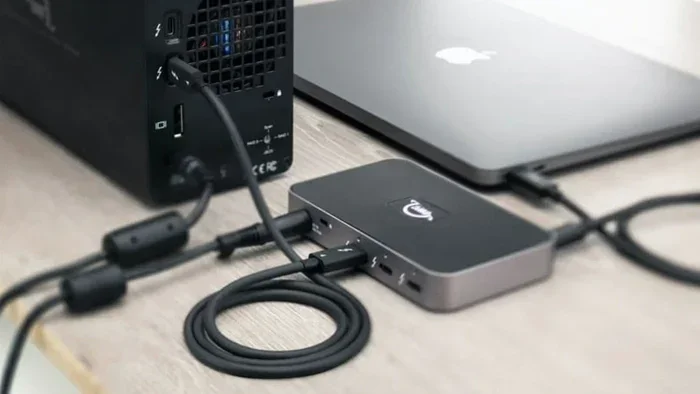
If you use a Thunderbolt 2 docking station, the dock will receive 10 watts. The dock can then distribute power to connected devices. But the total power available is still limited to 10 watts. So you cannot charge a laptop and power multiple peripherals through a single Thunderbolt 2 connection.
For professionals who use Thunderbolt 2 for audio interfaces or video capture cards, power delivery is usually sufficient. These devices draw very little power. They are designed to work with bus-powered connections.
Thunderbolt 2 vs Thunderbolt 3: Power Delivery Comparison
The biggest leap in Thunderbolt technology came with Thunderbolt 3. This is where the real difference in power delivery becomes clear. Understanding this comparison helps you make better decisions about your setup.
Thunderbolt 3 Power Delivery
Thunderbolt 3 uses the USB-C connector. It supports USB Power Delivery (USB PD) specifications. This means it can deliver up to 100 watts of power through the cable. That is a massive jump from Thunderbolt 2’s 10 watts.
With 100 watts, Thunderbolt 3 can fully charge laptops while connected to peripherals. It can also power external monitors, storage arrays, and eGPUs without needing separate power supplies. This is why Thunderbolt 3 has become the standard for modern docking stations and hubs.
Head-to-Head Comparison Table
| Feature | Thunderbolt 2 | Thunderbolt 3 |
|---|---|---|
| Connector Type | Mini DisplayPort | USB-C |
| Max Power Delivery | 10 watts | 100 watts |
| Bandwidth | 20 Gbps | 40 Gbps |
| Laptop Charging | No | Yes |
| Daisy Chaining | Up to 6 devices | Up to 6 devices |
| 4K Display Support | Single 4K at 60Hz | Dual 4K at 60Hz |
| USB-C Compatibility | No | Yes |
| External GPU Support | Limited | Full Support |
As you can see, Thunderbolt 3 is far superior for power delivery. If you need to charge your laptop and connect peripherals through one cable, Thunderbolt 2 simply cannot do that. This is the main reason many users have moved to Thunderbolt 3 or USB-C setups.
Common Uses for Thunderbolt 2 Power Delivery
Even though Thunderbolt 2 has limited power delivery, it still has many practical uses. Let us explore the scenarios where Thunderbolt 2 power works well.
Docking Stations and Hubs
Many Thunderbolt 2 docking stations use the 10 watts to power their own internal electronics. They then provide additional USB ports for charging smaller devices. The dock itself stays powered through the Thunderbolt 2 connection.
These docks are great for office setups. You can connect your keyboard, mouse, and external monitor through the dock. The dock handles the connections and provides a clean workspace. Just remember that your laptop still needs its own power adapter.
External Storage and RAID Arrays
External hard drives and RAID arrays often work well with Thunderbolt 2 power. Bus-powered drives do not need a separate wall plug. They draw power directly from the Thunderbolt 2 connection.
This is especially useful for video editors who need fast storage on the go. A Thunderbolt 2 RAID array can provide both speed and convenience. You get fast data transfer and power in one cable.
Audio and Video Equipment
Audio interfaces and video capture cards are perfect for Thunderbolt 2 power. These devices typically draw less than 10 watts. They benefit from the high-speed data transfer that Thunderbolt 2 offers.
Podcasters and videographers often use Thunderbolt 2 connections for their gear. The combination of fast data transfer and sufficient power makes it a reliable choice for creative professionals.
Limitations of Thunderbolt 2 Power Delivery
While Thunderbolt 2 has its strengths, it also has clear limitations. Understanding these helps you avoid frustration and plan your setup properly.
Cannot Charge Laptops
This is the biggest limitation. Thunderbolt 2 simply cannot deliver enough power to charge a laptop. If you are using a MacBook Pro or any Windows laptop, you will still need your charger plugged in.
Some users try to use Thunderbolt 2 to supplement their laptop charging. But this does not work in practice. The 10 watts is far too low to make a meaningful difference. Your laptop will still drain its battery while connected to Thunderbolt 2 peripherals.
Limited Peripheral Support
Power-hungry devices will not work properly with Thunderbolt 2. External graphics cards need at least 15 to 30 watts. Large monitors with built-in USB hubs also draw more power than Thunderbolt 2 can provide.
If you try to connect a device that needs more than 10 watts, it may not work at all. Or it might work intermittently, causing data loss or disconnections. Always check the power requirements of your devices before connecting them.
Daisy Chain Power Sharing
Thunderbolt 2 supports daisy chaining up to 6 devices. But the 10 watts of power is shared across all devices in the chain. This means each device gets even less power as you add more devices.
For example, if you connect three bus-powered external drives in a daisy chain, each drive gets roughly 3 watts. This might not be enough to keep them running reliably. Keep your daisy chains short and limit the number of power-hungry devices.
Tips for Getting the Most Out of Thunderbolt 2 Power
If you are still using Thunderbolt 2 devices, there are ways to maximize the power delivery. Here are some practical tips to help you get the best performance.
Use High-Quality Cables
Not all Thunderbolt 2 cables are created equal. Cheap cables may have higher resistance, which reduces power delivery. Invest in certified Thunderbolt 2 cables from reputable brands.
A good cable ensures you get the full 10 watts of power. It also provides better data transfer speeds and more reliable connections. Look for cables that are Thunderbolt certified and meet the official specifications.
Prioritize Your Devices
When you have limited power, prioritize the devices that need it most. Connect your most critical peripherals directly to the Thunderbolt 2 port. Use powered USB hubs for devices that need more power.
This simple strategy can make a big difference. It ensures your essential devices stay powered while less critical ones get the power they need through a separate hub.
Consider a Thunderbolt 2 Dock with Its Own Power Supply
Many Thunderbolt 2 docking stations come with their own power adapter. These docks can provide more power to connected devices because they draw power from the wall.
This is a great workaround for Thunderbolt 2 limitations. The dock handles the power distribution, and your peripherals get the power they need. Just remember that the Thunderbolt 2 connection itself still only delivers 10 watts to the dock.
Plan for Future Upgrades
Thunderbolt 2 is an older technology. If you are building a new setup or upgrading your workspace, consider moving to Thunderbolt 3 or USB-C. The power delivery improvements alone are worth the upgrade.
Thunderbolt 3 and 4 offer 100 watts of power delivery, faster data speeds, and better display support. They are backward compatible with Thunderbolt 2 using adapters. So you can keep your existing Thunderbolt 2 devices while future-proofing your setup.
Expert Insights on Thunderbolt 2 Power Delivery
Industry experts generally agree that Thunderbolt 2 was designed for a specific era of computing. When it launched, most peripherals were bus-powered and did not need much electricity. The 10-watt power delivery was sufficient for that time.
Today, devices have become more power-hungry. Larger displays, faster storage, and more capable peripherals all demand more power. This is why Thunderbolt 2 power delivery feels limited by modern standards.
However, Thunderbolt 2 still has a place in many professional environments. Studios, broadcast facilities, and older Mac ecosystems still rely on Thunderbolt 2. For these users, understanding the power limitations is key to building a reliable setup.
Experts also note that Thunderbolt 2 is not meant to replace a power adapter. It is an I/O technology first and a power delivery method second. Treating it as a charging solution will always lead to disappointment.
Key Takeaways
- Thunderbolt 2 delivers up to 10 watts: Enough for small peripherals but not for laptops.
- It works great for external drives and docks: Bus-powered devices benefit from Thunderbolt 2 connectivity.
- Thunderbolt 3 is a massive upgrade: 100 watts of power delivery makes it far more versatile.
- Daisy chaining shares the 10 watts: Keep chains short to avoid power issues.
- Use certified cables: Quality cables ensure you get the full power delivery Thunderbolt 2 offers.
- Always check device power requirements: Not all peripherals work well with limited power.
- Consider upgrading if you need more power: Thunderbolt 3 and USB-C offer much better charging capabilities.
Conclusion
So, can Thunderbolt 2 deliver power? Yes, it absolutely can. But it delivers a modest 10 watts, which limits its usefulness for charging larger devices. Thunderbolt 2 is best suited for powering peripherals, external storage, and smaller accessories. It is not designed to charge laptops or power-hungry equipment.
If you are happy with your Thunderbolt 2 setup and your devices work well with 10 watts of power, there is no urgent need to change anything. Thunderbolt 2 remains a reliable and fast connectivity option for many professional workflows.
However, if you find yourself needing more power, it is time to look at Thunderbolt 3 or USB-C alternatives. The jump to 100 watts of power delivery changes everything. You can charge your laptop, power external monitors, and connect all your peripherals through a single cable.
Understanding what Thunderbolt 2 can and cannot do helps you make smarter choices. It saves you money, prevents compatibility headaches, and ensures your gear works the way you expect. Whether you stick with Thunderbolt 2 or upgrade to a newer standard, knowing the facts puts you ahead of the game.
Take a moment to review your current setup. Check the power requirements of your devices. And decide whether Thunderbolt 2 power delivery is enough for your needs. If it is, great. If not, the upgrade path is clear and well worth the investment.
Frequently Asked Questions
Can Thunderbolt 2 charge a MacBook?
No, Thunderbolt 2 cannot charge a MacBook. It delivers only 10 watts, which is far below what MacBooks need to charge. You will still need your MacBook’s original power adapter to charge the battery.
What devices can Thunderbolt 2 power?
Thunderbolt 2 can power small peripherals like external hard drives, USB hubs, audio interfaces, and Bluetooth speakers. These devices typically draw less than 10 watts and work well with Thunderbolt 2 power delivery.
Can I use a Thunderbolt 2 cable for charging?
Yes, but only for devices that require 10 watts or less. Thunderbolt 2 cables can deliver power, but they are not designed as primary charging cables for laptops or power-hungry devices.
Is Thunderbolt 2 power delivery the same as USB-C charging?
No, they are very different. Thunderbolt 2 delivers up to 10 watts through a Mini DisplayPort connector. USB-C with Power Delivery can deliver up to 100 watts. USB-C charging is far more versatile and powerful.
Can I use a Thunderbolt 2 docking station to charge my laptop?
No, a Thunderbolt 2 docking station cannot charge your laptop. The dock receives only 10 watts from the Thunderbolt 2 connection. It cannot pass that power back to your laptop for charging. You will still need a separate charger for your laptop.
Should I upgrade from Thunderbolt 2 to Thunderbolt 3 for better power?
If you need more power delivery and faster data speeds, upgrading to Thunderbolt 3 is a great idea. Thunderbolt 3 offers 100 watts of power, 40 Gbps bandwidth, and USB-C compatibility. It is a significant improvement over Thunderbolt 2 in every way.
=== META TITLE ===
Can Thunderbolt 2 Deliver Power and Charge Your Devices?
=== URL SLUG ===
can-thunderbolt-2-deliver-power