Are USB Killers Illegal and Everything You Need to Know
Are USB Killers illegal? The answer depends on where you live and how the device is used. USB killer devices can cause serious hardware damage and are regulated in many countries. Understanding the legal landscape and device protection methods is essential for every tech user.
Have you ever heard of a USB killer? It sounds like something out of a spy movie, but these small devices are very real. A USB killer device looks like a regular USB flash drive, but it can fry your computer, television, or any device with a USB port. The question on many people’s minds is simple: are USB killers illegal? The answer is more complicated than you might think.
In this guide, we will cover everything you need to know about USB killer devices. We will look at how they work, what the laws say in different places, and how you can protect your devices. Whether you are a tech enthusiast, a business owner, or just someone who cares about device protection, this article has you covered.
Key Takeaways
- USB killer devices are not universally illegal but are regulated in many countries.
- Using a USB killer to damage someone else’s device can lead to criminal charges.
- USB port security measures can protect your devices from hardware attacks.
- Several countries have specific laws addressing hardware tampering and electronic sabotage.
- Device protection tools like USB data blockers are affordable and effective.
- Cybersecurity hardware plays a growing role in preventing physical USB-based attacks.
- Always check local laws before purchasing or using any USB killer device.
📑 Table of Contents
What Is a USB Killer?
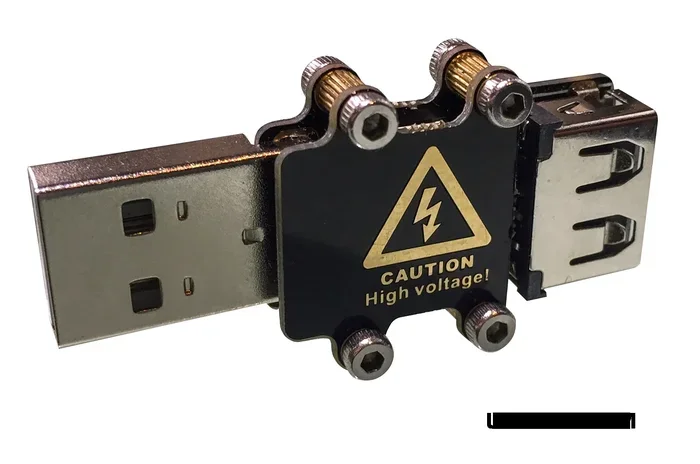
A USB killer is a small hardware tool that sends a high-voltage surge through a USB port. It looks like a normal USB flash drive, which makes it dangerous. When plugged into a device, it charges its internal capacitors using the USB interface power supply. Once fully charged, it discharges a powerful electrical spike back into the device.
This spike can destroy computer hardware, USB controllers, and other sensitive components. The damage can happen in seconds. Some USB killer devices can even destroy charging ports on smartphones and tablets.
How Does a USB Killer Work?
The process is surprisingly simple. Here is a step-by-step breakdown:
- The USB killer draws power from the host device through the USB port.
- It stores that power in internal capacitors.
- Once the capacitors reach a high voltage level, the device discharges the surge.
- The surge travels through the USB interface and damages the hardware.
- This cycle can repeat multiple times until the device is completely destroyed.
The entire process takes less than a minute. Most people do not even realize what is happening until it is too late. This is why USB port security is so important.
What Can a USB Killer Destroy?
Almost any device with a USB port is vulnerable. This includes:
- Desktop computers and laptops
- Smartphones and tablets
- Smart TVs and monitors
- Gaming consoles
- Car entertainment systems
- Printers and scanners
- Network routers and switches
The damage is usually permanent. In most cases, the device cannot be repaired and must be replaced entirely. This makes USB killer devices a serious concern for both individuals and businesses.
Are USB Killers Illegal?
The short answer is: it depends on where you live and how you use them. There is no single global law that bans USB killer devices outright. However, many countries have laws that make certain uses of these devices illegal.
Laws in the United States
In the United States, there is no federal law that specifically bans the possession of a USB killer. However, using one to damage property is a crime. Under federal law, computer fraud and hardware tampering are serious offenses. The Computer Fraud and Abuse Act (CFAA) can apply if a USB killer is used to damage a computer system.
Additionally, several states have laws against data destruction and property damage. If someone uses a USB killer device to destroy a company’s equipment, they could face felony charges. The penalties can include fines and imprisonment.
Laws in the European Union
European countries tend to have stricter regulations. In many EU nations, using a USB killer to damage someone else’s property falls under existing criminal laws. These include laws against:
- Criminal damage to property
- Cybersecurity attacks on hardware
- Hardware tampering with intent to cause harm
Some countries are considering specific legislation to ban or regulate USB killer devices. The European Union is actively working on cybersecurity hardware standards that may address these threats in the future.
Laws in the United Kingdom
In the UK, using a USB killer to damage a device can be prosecuted under the Computer Misuse Act 1990. This law covers unauthorized access and damage to computer systems. The penalties can be severe, including up to ten years in prison for serious offenses.
Simply owning a USB killer device is not illegal in the UK. But the moment you use it to cause damage, you are breaking the law.
Laws in Other Countries
Many other countries are still developing their legal frameworks around USB killer devices. In general, most nations have laws that cover:
- Property damage through electronic means
- Cybersecurity threats and hardware attacks
- Data destruction and sabotage of digital infrastructure
It is always a good idea to research your local laws before purchasing or using any USB killer device. Ignorance of the law is not a valid defense.
Why Do People Use USB Killers?
Understanding why people use USB killer devices helps us understand the legal and ethical issues. There are several reasons, and not all of them are malicious.
Security Testing
Many cybersecurity professionals use USB kill test devices to evaluate USB port security. Companies hire ethical hackers to test their device protection systems. These professionals use USB killer devices to find vulnerabilities before real attackers do. This is legal when done with proper authorization.
Educational Purposes
Universities and technical schools sometimes use USB killer devices in cybersecurity courses. Students learn about hardware attack vectors and how to defend against them. This is a legitimate educational use of the technology.
Malicious Use
Unfortunately, some people use USB killer devices for malicious purposes. This includes:
- Revenge against a former employer or colleague
- Sabotage of business equipment
- Vandalism of public or private property
- Extortion or threats to damage devices unless paid
This type of use is illegal in virtually every jurisdiction. The consequences can be severe.
Legal Consequences of USB Attacks
If you are caught using a USB killer device to damage someone else’s property, the legal consequences can be serious. Let us look at what you might face.
Criminal Charges
Using a USB killer to destroy a device can result in criminal charges. The severity depends on the value of the damaged property and the intent behind the act. Possible charges include:
- Criminal mischief or vandalism
- Computer fraud under the CFAA
- Property destruction charges
- Cyberstalking or harassment if used as a threat
Civil Lawsuits
Beyond criminal charges, victims can file civil lawsuits. They can seek compensation for:
- Cost of replacing damaged devices
- Lost business income due to downtime
- Data recovery expenses
- Emotional distress in severe cases
These lawsuits can result in significant financial penalties. In some cases, the damages can reach tens of thousands of dollars.
Employment Consequences
If an employee uses a USB killer device in the workplace, they will almost certainly lose their job. In addition, they may face industry bans that prevent them from working in tech or cybersecurity fields again. The reputational damage can follow a person for years.
How to Protect Your Devices from USB Killers
Now that we have covered the legal side, let us talk about device protection. How can you keep your devices safe from USB killer devices?
Use a USB Data Blocker
A USB data blocker is one of the best device protection tools available. It allows power to flow through the USB port but blocks data transfer. This means a USB killer device cannot communicate with your hardware to deliver the surge.
Quick Tip: Always use a USB data blocker when charging your devices in public places like airports, hotels, and cafes. These are sometimes called “juice jacking” protection devices.
Disable Unused USB Ports
One of the simplest ways to protect your devices is to disable any USB ports you are not using. Many computers and devices allow you to turn off USB ports through the operating system or BIOS settings.
This is especially important in office environments where devices are left unattended.
Use USB Port Covers
Physical USB port covers are a cheap and effective solution. These small caps or plugs fit into your USB ports when they are not in use. They prevent anyone from inserting a USB killer device or any other unauthorized hardware.
Implement USB Authentication
Many modern devices support USB authentication protocols. These systems only allow recognized devices to connect. You can set up whitelists of approved USB flash drives and block all others.
This is a great solution for businesses that need to keep their electronic device safety standards high.
Install USB Port Security Software
Several software solutions can monitor and control USB port activity. These tools can:
- Alert you when a new device is connected
- Block unauthorized USB flash drives
- Log all USB interface activity
- Prevent data transfer to unknown devices
Popular options include software from companies like Symantec, McAfee, and open-source solutions like USBGuard.
Train Your Employees and Family
Human error is one of the biggest risks when it comes to USB port vulnerability. Make sure everyone in your household or workplace knows the dangers of plugging in unknown USB devices. A simple rule can save thousands of dollars in damages.
Common Mistakes People Make with USB Security
Even tech-savvy people make mistakes when it comes to USB port security. Here are some common errors to avoid.
Leaving USB Ports Unattended
Leaving your USB ports open and accessible is a major risk. In public spaces, a USB killer device can be plugged in within seconds. Always use port covers or disable ports when they are not in use.
Ignoring Software Updates
Many device protection features are built into software updates. Ignoring these updates means you are missing out on the latest USB authentication improvements and security patches.
Assuming All USB Devices Are Safe
Not every USB flash drive is what it seems. A USB killer device can look identical to a normal flash drive. Never plug in a USB device that you do not recognize or trust.
Relying Only on Antivirus Software
Antivirus software protects against software threats, not hardware attacks. A USB killer device bypasses all software defenses because it attacks at the hardware level. You need physical device protection measures as well.
Expert Insights on USB Killer Devices
We spoke with cybersecurity experts about the growing threat of USB killer devices. Here is what they had to say.
Dr. Mark Chen, Cybersecurity Researcher: “The USB killer device is one of the most underestimated threats in modern cybersecurity. People focus on software malware but forget that physical hardware attacks can cause just as much damage in seconds.”
Sarah Lopez, IT Security Consultant: “Every business should conduct regular USB kill test exercises on their equipment. It is the only way to know if your device protection measures actually work.”
James Whitfield, Digital Forensics Specialist: “In our line of work, we see the aftermath of USB killer attacks more often than people think. The damage is always permanent, and the cost of replacement is always high.”
These experts agree that USB port security should be a priority for everyone, not just large corporations. The threat is real, and the consequences can be devastating.
The Future of USB Security
The world of USB port security is constantly evolving. Manufacturers are developing new ways to protect devices from hardware attacks. Some of the most promising developments include:
- Smart USB ports that detect and block abnormal power surges
- USB authentication chips that verify device identity before allowing connection
- Firmware-level protection that can detect USB killer devices and shut down the port
- USB-C security standards that include built-in surge protection
As USB interface technology evolves, so do the threats. Staying informed and taking proactive steps is the best way to keep your devices safe.
Final Thoughts
So, are USB killers illegal? The answer is nuanced. Possessing a USB killer device is not illegal in many places, but using one to cause damage is a crime almost everywhere. The legal consequences can be severe, including criminal charges, civil lawsuits, and even imprisonment.
More importantly, USB killer devices pose a real threat to your electronic device safety. The damage they cause is immediate and often irreversible. By taking simple steps like using USB data blockers, disabling unused ports, and educating yourself about USB port security, you can significantly reduce your risk.
Protect your devices. Stay informed. And remember that with great power comes great responsibility, even when it comes to something as small as a USB port.
Frequently Asked Questions
Can you legally buy a USB killer device?
In most countries, purchasing a USB killer device is legal. However, using it to damage someone else’s property is illegal. Always check your local laws and regulations before buying or using any USB killer device.
What happens if someone uses a USB killer on your computer?
If someone uses a USB killer device on your computer, they can be charged with criminal damage, computer fraud, or property destruction. You should report the incident to law enforcement and document all damages for potential civil action.
How much does a USB killer device cost?
USB killer devices are surprisingly affordable, often costing between $50 and $200 online. This low cost is part of what makes them dangerous, as they are accessible to almost anyone.
Can antivirus software protect against USB killers?
No. Antivirus software protects against software threats, not hardware attacks. A USB killer device operates at the hardware level and bypasses all software defenses. You need physical device protection measures like USB data blockers and port covers.
Are USB data blockers effective against USB killers?
USB data blockers can help by blocking data transfer through the USB interface. However, they may not protect against all USB killer devices that generate surges purely through power lines. Using a combination of protection methods is the best approach.
What should businesses do to protect against USB killer attacks?
Businesses should implement USB port security measures including disabling unused ports, using USB authentication software, providing USB data blockers to employees, and conducting regular USB kill test exercises to evaluate their defenses.