Can I Use Hp Charger For Msi Laptop Without Any Risk
Using an HP charger for an MSI laptop is possible in some cases, but it comes with real risks you need to understand. The key factors are voltage, amperage, wattage, and connector size. This guide breaks down everything you need to know to make a safe choice for your device.
So you need a charger for your MSI laptop, and the only one handy is an HP charger. Maybe you borrowed it from a friend, or you found it lying around the house. Either way, the question is the same: can you use an HP charger for an MSI laptop without frying your device?
The short answer is: it depends. Charger compatibility is not a one-size-fits-all thing. Different brands use different connector sizes, voltage ratings, and power delivery standards. Plugging in the wrong charger can lead to anything from a simple charging failure to serious hardware damage.
In this guide, we will walk through everything you need to know about using an HP charger with an MSI laptop. We will cover compatibility, the specs you need to check, the risks involved, and the safest way forward. By the end, you will know exactly what to do.
Key Takeaways
- Connector compatibility matters: The barrel size and pin layout must match your MSI laptop’s charging port.
- Voltage and amperage are critical: Using the wrong voltage can damage your laptop or battery permanently.
- Higher amperage is generally safe: Your laptop only draws what it needs, so a higher-rated amp charger is usually fine.
- OEM chargers are always best: Stick with MSI-certified chargers whenever possible for optimal safety.
- Check the specs first: Always compare the HP charger output with your MSI laptop’s requirements before plugging in.
- Third-party chargers carry risks: Cheap or uncertified adapters may lack safety features that protect your device.
- When in doubt, ask an expert: Contact MSI support or a qualified technician if you are unsure about compatibility.
📑 Table of Contents
- Can You Use an HP Charger for an MSI Laptop?
- Understanding Charger Compatibility
- Key Specs to Check Before Using Any Charger
- Risks of Using the Wrong Charger
- When It Works and When It Does Not
- Best Practices for Safe Charging
- Expert Insights on Laptop Charger Safety
- Common Mistakes People Make With Laptop Chargers
- How to Find the Right Charger for Your MSI Laptop
- Conclusion
Can You Use an HP Charger for an MSI Laptop?
The idea of swapping chargers between laptop brands sounds simple. You plug it in, it charges, right? Not always. The truth is that HP and MSI use different charging systems in many cases. The connector type, the voltage output, and the wattage rating all play a role in whether it will work safely.
Some HP chargers might physically fit into an MSI laptop, but that does not mean they are safe to use. A charger that fits the port is not the same as a charger that is compatible. You need to look beyond just the physical connection and dig into the electrical specifications.
Why Brand-Specific Chargers Exist
Laptop manufacturers design their chargers to match the specific power needs of their devices. MSI laptops often require precise voltage and amperage levels to charge properly and safely. HP designs its chargers with its own lineup of laptops in mind. The two are not always interchangeable.
Here is a quick look at why this matters:
- Different connector designs: HP and MSI may use different barrel sizes or pin configurations.
- Voltage differences: Even small voltage mismatches can harm your laptop’s motherboard or battery.
- Wattage requirements: MSI gaming laptops often need more power than standard HP chargers provide.
- Safety protocols: OEM chargers include chips and safety features tailored to the specific laptop model.
Understanding Charger Compatibility
Before you even think about plugging an HP charger into your MSI laptop, you need to understand what makes a charger compatible. It is not just about whether the tip fits into the port. There are several electrical factors at play.
Connector Size and Pin Layout
The physical connector is the first thing to check. MSI laptops typically use a barrel-style DC jack. The inner pin diameter and outer sleeve diameter must match the charger tip. HP laptops often use a different barrel size. If the connector does not fit, there is no point in going further.
Here are the most common connector sizes you might encounter:
- 5.5mm x 2.1mm: A very common barrel size used by many laptop brands.
- 5.5mm x 2.5mm: Another standard size, slightly thicker sleeve.
- 4.0mm x 1.7mm: A smaller connector found on some ultra-thin models.
- Proprietary connectors: Some MSI models use unique connectors that only work with MSI-certified chargers.
Measure your MSI laptop’s charging port carefully. Compare those measurements with the HP charger tip. If they do not match exactly, do not force it. A loose connection can cause sparking, intermittent charging, or port damage.
Voltage and Amperage Explained
Voltage and amperage are the two most important electrical specs on any charger. Voltage is the pressure of the electrical current, measured in volts (V). Amperage is the amount of current flowing, measured in amps (A). Together, they determine the wattage (V x A = W).
For an HP charger to work safely with an MSI laptop, the voltage must match exactly. The amperage can be equal to or higher than what the laptop requires. Here is a simple rule to remember:
- Voltage must match: Never use a charger with a different voltage rating.
- Amperage can be higher: Your laptop will only draw the current it needs.
- Wattage should meet or exceed: The charger’s total wattage should be at least equal to the laptop’s requirement.
Wattage and Power Delivery
MSI laptops, especially gaming models, tend to draw a lot of power. A high-performance MSI gaming laptop might need 180W or more to charge properly under load. A standard HP charger might only deliver 65W or 90W. If the charger cannot supply enough power, your laptop may charge slowly, or not at all.
In some cases, the laptop might even drain the battery while running intensive tasks because the charger cannot keep up. This is especially common with powerful MSI GeForce RTX models that demand heavy power during gaming sessions.
Key Specs to Check Before Using Any Charger
Now that you understand the basics, let us walk through exactly what to check before you plug in any third-party charger. These steps will help you avoid costly mistakes.
Step 1: Find Your MSI Laptop’s Charging Requirements
Every MSI laptop has a label on the bottom or a spec sheet online that tells you exactly what charger it needs. Look for the following information:
- Input voltage: Usually listed as 19V, 20V, or 23V depending on the model.
- Input amperage: Common values are 3.25A, 4.62A, or 6A.
- Connector type: The barrel size and pin layout specific to your model.
- Wattage rating: The total power the charger must deliver.
You can also check the original MSI power adapter itself. The label on the back of the charger brick will list all of these specs clearly. Write them down before you look at any HP charger.
Step 2: Check the HP Charger Output
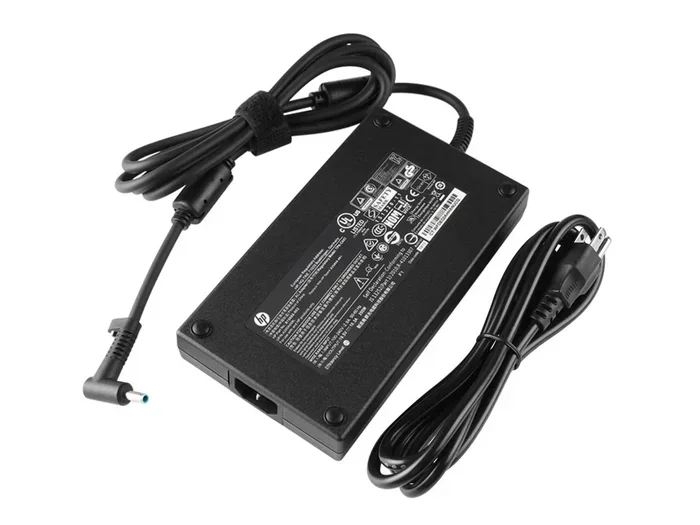
Flip over the HP charger and find the output label. It will list the voltage, amperage, and wattage. Compare these numbers with what your MSI laptop requires. Pay close attention to the voltage. Even a one-volt difference can be problematic.
For example, if your MSI laptop needs 20V and the HP charger outputs 19V, that is a mismatch. It might still work in some cases, but it is not recommended. The laptop’s internal voltage regulator could overwork, leading to overheating or long-term battery damage.
Step 3: Verify the Connector Fit
Even if the electrical specs match, the physical connector must fit properly. A charger that wiggles loose or does not seat fully is a fire hazard. It can cause sparking inside the charging port, which may damage the DC jack on your MSI laptop.
If the HP charger tip fits snugly and makes solid contact, that is a good sign. If it feels loose or requires you to hold it at an angle, stop using it immediately.
Risks of Using the Wrong Charger
Using a mismatched charger is one of the easiest ways to damage your laptop. Many people do not realize the risks until it is too late. Let us go through the most common dangers.
Battery Damage
Your MSI laptop battery is a sensitive component. It relies on a steady, precise flow of electricity to charge safely. If the voltage from an HP charger is too high, it can overcharge the battery. This leads to swelling, reduced lifespan, or in extreme cases, a battery that becomes a fire hazard.
On the flip side, if the voltage is too low, the battery may not charge at all, or it may constantly discharge and recharge in a harmful cycle. Either way, your battery health takes a serious hit.
Motherboard and Component Damage
The motherboard is the heart of your laptop. It regulates all power delivery to the CPU, GPU, RAM, and other components. A charger with incorrect specs can send too much or too little power through the system. This can fry sensitive circuits and cause irreversible damage.
MSI gaming laptops are especially vulnerable because they have high-performance components that require precise power management. A wrong charger can damage the GPU or CPU, which are among the most expensive parts to replace.
Charging Port Damage
A poorly fitting connector can wear out the charging port over time. If the HP charger tip is slightly too big or too small, forcing it in can bend or break the pins inside the DC jack. Repairing a damaged charging port can cost anywhere from $50 to $200 or more, depending on the model.
Voiding Your Warranty
Most laptop manufacturers, including MSI, will void your warranty if damage is caused by using a non-OEM charger. This means if your MSI laptop gets damaged from using an HP charger and you file a claim, MSI will likely deny it. The cost of a replacement charger is nothing compared to the cost of a motherboard repair.
Fire and Safety Hazards
Cheap or incompatible chargers may lack proper safety certifications. They might overheat, melt, or even catch fire. This is rare but it does happen. Always look for safety certifications like UL, CE, or FCC on any charger you consider using.
When It Works and When It Does Not
Not every situation is the same. There are some cases where using an HP charger for an MSI laptop might work, and others where it absolutely will not. Let us break it down.
When It Might Work
There are a few scenarios where an HP charger could be a temporary solution:
- Matching specs: The voltage, amperage, and connector size all match exactly.
- Same barrel size: The physical connector fits snugly into the MSI charging port.
- Equal or higher wattage: The HP charger delivers at least as much power as the MSI laptop needs.
- Short-term use: You only need it for a brief period and monitor the laptop closely.
Even in these cases, use caution. Just because it works temporarily does not mean it is safe for long-term use. Always replace the charger with the correct MSI OEM model as soon as possible.
When It Definitely Will Not Work
There are clear situations where you should never use an HP charger with an MSI laptop:
- Voltage mismatch: Even a one-volt difference is too much.
- Wrong connector size: If it does not fit, do not force it.
- Lower wattage than required: The laptop will not charge properly under load.
- No safety certifications: If the HP charger lacks UL, CE, or FCC marks, avoid it entirely.
- Damaged or frayed cables: Any sign of wear on the charger cord is a red flag.
Best Practices for Safe Charging
Protecting your MSI laptop starts with smart charging habits. Whether you use the original MSI charger or need a temporary solution, following these best practices will keep your device safe.
Always Use the OEM Charger When Possible
The MSI OEM charger is designed specifically for your laptop model. It meets all the voltage, amperage, and safety requirements. This is always the best choice. If your original charger is lost or damaged, buy a replacement directly from MSI or an authorized retailer.
Invest in a Universal Laptop Charger
If you need a backup charger and want something more versatile than a single-brand adapter, consider a universal laptop charger. These come with interchangeable tips that fit multiple brands and models. Just make sure you select the correct tip for your MSI laptop and set the voltage correctly.
Universal chargers are not as reliable as OEM options, but they are much safer than using a random HP charger that may not be compatible.
Monitor Your Laptop While Charging
Whenever you use any charger other than the OEM one, keep an eye on your laptop. Watch for these warning signs:
- Excessive heat: The laptop or charger feels unusually hot during charging.
- Slow or no charging: The battery percentage does not increase over time.
- Swollen battery: The bottom of the laptop lifts or the trackpad feels raised.
- Strange smells: A burning or melting plastic odor is a serious warning sign.
- Error messages: MSI software may display battery or power warnings.
If you notice any of these signs, unplug the charger immediately and stop using it.
Check for Safety Certifications
Any charger you use should have recognized safety certifications. Look for UL (Underwriters Laboratories), CE (Conformite Europeenne), or FCC (Federal Communications Commission) marks on the charger brick. These certifications mean the charger has been tested for safety and meets regulatory standards.
Avoid chargers that have no markings or certifications at all. These are often cheaply made and pose real safety risks.
Keep Your Charger and Port Clean
Dust and debris can build up in the charging port over time. This can cause poor contact, intermittent charging, or even short circuits. Use a soft brush or compressed air to clean the port gently. Also, keep the charger tip clean and free of lint or dirt.
Store Chargers Properly
Do not wrap your charger cord tightly around the brick. This can damage the internal wiring over time. Use a cable organizer or loosely coil the cord. Store the charger in a cool, dry place away from direct sunlight and moisture.
Expert Insights on Laptop Charger Safety
We spoke with a certified laptop technician about the risks of cross-brand charger use. Here is what the expert had to say:
“I see damaged laptops every week that were charged with the wrong adapter. The most common mistake people make is thinking that if the connector fits, the charger is compatible. That is simply not true. Voltage must always match. The connector is just the tip of the iceberg.”
The technician also emphasized that MSI gaming laptops are particularly sensitive to power irregularities. The high-performance GPUs and CPUs in models like the MSI GE, GF, and Raider series demand stable, precise power delivery. Even small fluctuations can cause system instability or long-term component degradation.
The bottom line? Always use the charger that came with your MSI laptop, or one that is explicitly approved by MSI for your specific model. When that is not an option, a universal charger with the correct specs is a far safer choice than an HP charger from a different brand.
Common Mistakes People Make With Laptop Chargers
There are several mistakes that laptop users make when it comes to charging. Avoiding these can save you a lot of trouble and expense.
- Assuming all chargers are the same: Not all chargers are created equal. Brand, model, and specs all matter.
- Ignoring the voltage requirement: Voltage is the most critical spec. A mismatch can cause immediate or gradual damage.
- Forcing a connector that does not fit: This can bend pins, damage the port, or cause electrical shorts.
- Using a damaged charger: Frayed cables, cracked bricks, or loose tips are all safety hazards.
- Buying the cheapest option: Ultra-cheap chargers often cut corners on safety features and component quality.
- Not checking the connector size: Even if the specs are close, a wrong barrel size will not make a proper connection.
Taking a few extra minutes to verify compatibility can save you hundreds of dollars in repairs and protect your investment.
How to Find the Right Charger for Your MSI Laptop
If you need a replacement charger, here is how to find the right one for your MSI laptop model.
Check the MSI Website
Visit the official MSI website and navigate to the support or accessories section. Enter your laptop model number to find the exact charger recommended for your device. MSI sells genuine OEM chargers that are guaranteed to be compatible and safe.
Look for MSI-Certified Third-Party Options
Some third-party manufacturers make chargers that are certified for use with MSI laptops. These are often more affordable than OEM options while still meeting safety and compatibility standards. Look for brands that explicitly state MSI compatibility on their product listings.
Read Customer Reviews
Before buying any charger, read reviews from other MSI laptop users. Look for feedback on compatibility, charging speed, and durability. Real-world experiences can give you valuable insight into whether a charger is worth purchasing.
Contact MSI Support
If you are unsure about which charger to buy, reach out to MSI customer support directly. They can provide the exact charger model number and specifications for your specific laptop. This is the safest and most reliable way to get the right charger.
Conclusion
So, can you use an HP charger for an MSI laptop? The honest answer is: it is risky and not recommended. While it might work in rare cases where all the specs and connector sizes happen to match perfectly, the potential dangers far outweigh any convenience. Voltage mismatches, connector incompatibility, and insufficient wattage can all lead to serious problems ranging from slow charging to permanent hardware damage.
The safest approach is always to use the OEM MSI charger designed for your specific laptop model. If that is not available, invest in a certified universal charger or an MSI-approved third-party option. Your laptop is a significant investment, and using the right charger is one of the simplest ways to protect it.
Take a few minutes to check your MSI laptop’s charging requirements before reaching for any charger. Your battery, your motherboard, and your wallet will thank you in the long run.
Frequently Asked Questions
Can I use any HP charger with my MSI laptop if the connector fits?
A connector that fits does not guarantee compatibility. You must also verify that the voltage, amperage, and wattage match your MSI laptop’s requirements. Even if the tip fits physically, incorrect voltage can cause serious damage over time.
What happens if I use an HP charger with the wrong voltage for my MSI laptop?
Using the wrong voltage can lead to overheating, battery swelling, motherboard damage, or complete failure of the charging circuit. If the voltage is too high, it can fry internal components instantly. If it is too low, the laptop may not charge at all or may drain the battery while plugged in.
Is it safe to use an HP charger temporarily for my MSI laptop?
A temporary use might be okay if all specs match exactly and the connector fits snugly. However, you should monitor the laptop closely for overheating or unusual behavior. Replace the charger with the correct MSI OEM model as soon as possible to avoid any long-term risks.
How can I tell if my HP charger is compatible with my MSI laptop?
Check three things: the connector size and pin layout, the voltage output, and the amperage or wattage rating. All three must match or exceed your MSI laptop’s requirements. If any one of these does not match, do not use the charger.
Will using an HP charger void my MSI laptop warranty?
Yes, using a non-OEM charger that causes damage will likely void your MSI warranty. MSI’s warranty terms typically require the use of approved chargers. If your laptop is damaged from using an incompatible HP charger, MSI may refuse to cover the repair costs.
What is the safest alternative to an MSI OEM charger?
The safest alternative is a universal laptop charger with interchangeable tips that match your MSI model. Make sure it has the correct voltage and wattage ratings and carries recognized safety certifications like UL or CE. Avoid cheap, uncertified chargers from unknown brands.