Can Composite Video Be Converted To Hdmi Made Simple
Yes, you can convert composite video to HDMI using a simple converter box or adapter. This guide breaks down every option, from budget RCA to HDMI converters to advanced upscalers, so you can connect your old devices to modern TVs with ease. You will learn how the conversion works, which products to buy, and common mistakes to avoid.
Have you ever dug through a closet and found an old VCR, a retro game console, or a camcorder collecting dust? These devices still work great, but there is one big problem. They use composite video connections, and most modern TVs only have HDMI ports. You cannot plug an RCA cable directly into an HDMI input. So what do you do?
The good news is that converting composite video to HDMI is absolutely possible. It is simpler than most people think. You just need the right converter. In this guide, we will walk you through every option, explain how the process works, and help you pick the best solution for your setup. Whether you are a retro gamer, a vintage tech collector, or just trying to use an old camera, this article has you covered.
We will cover everything from basic adapter boxes to advanced upscaling units. We will also share tips to avoid common pitfalls. By the end, you will know exactly what to buy and how to set it up. Let us get started.
Key Takeaways
- Conversion is possible: A composite to HDMI converter box can turn your old RCA signal into a clean digital HDMI output.
- Multiple methods exist: You can use standalone converter boxes, AV receivers, or upscaling adapters depending on your needs and budget.
- Quality varies: Not all converters are equal. Cheap adapters may produce blurry or laggy results, while dedicated scalers deliver crisp HD output.
- Retro gaming benefits: Converting composite to HDMI is a game-changer for classic console owners who want to play on modern displays.
- Setup is simple: Most converters plug and play with no drivers or software needed.
- Avoid common mistakes: Using the wrong cable, skipping power supplies, or buying low-quality converters can cause frustration.
- Audio matters too: Make sure your converter handles both video and audio signals for a complete experience.
📑 Table of Contents
- What Is Composite Video and Why Does It Matter?
- How Composite to HDMI Conversion Works
- Types of Converters for Composite to HDMI
- Step-by-Step Guide to Converting Composite Video to HDMI
- Common Mistakes When Converting Composite Video to HDMI
- Best Converters for Composite to HDMI in 2024
- FAQ: Common Questions About Converting Composite Video to HDMI
- Final Thoughts on Converting Composite Video to HDMI
What Is Composite Video and Why Does It Matter?
Understanding the Composite Video Signal
Composite video is one of the oldest analog video formats still in use. It carries all video information through a single yellow RCA connector. You have probably seen this yellow plug on the back of old DVD players, VCRs, and retro game consoles. The signal is simple, but it has limitations. It only supports standard definition resolution, typically 480i or 576i. This means the picture is much less sharp than what modern HD and 4K displays can show.
The composite video signal combines luminance and chrominance into one cable. This was fine back when TVs had similar capabilities. But today’s screens are built for digital signals and high resolutions. When you feed a composite signal into a modern TV, the TV has to stretch and interpret that old analog data. The result is often a blurry or pixelated image.
Why Composite Video Feels Outdated
There are several reasons composite video feels dated. First, the resolution is very low. Standard definition simply does not fill a large modern screen well. Second, composite cables are prone to interference. You may notice static, color bleeding, or ghosting on the screen. Third, composite audio is separate, usually carried by red and white RCA cables. This means three cables for one device, which is messy and inconvenient.
Despite these drawbacks, many people still have devices that only output composite video. Old home security cameras, vintage arcade cabinets, and classic gaming consoles like the Nintendo NES or Sega Genesis all use this connection. The question is not whether composite video still has value. It is how to make it work with today’s equipment.
How Composite to HDMI Conversion Works
The Basics of Analog to Digital Conversion
At its core, converting composite video to HDMI means changing an analog signal into a digital one. A composite video cable carries a continuous electrical wave that represents the image. An HDMI cable carries discrete digital data. A converter box sits between these two worlds. It takes the analog input from the RCA cable, processes it, and outputs a digital HDMI signal that your TV can display.
This process is called analog-to-digital conversion, or ADC for short. The converter samples the analog signal many times per second and translates those samples into digital data. The quality of this conversion depends heavily on the converter’s internal processor. Better processors produce sharper, more accurate images. Cheaper converters may introduce lag, noise, or color distortion.
What Happens During the Conversion Process
When you plug in a composite source and connect the converter to your TV, several things happen in real time. First, the converter reads the composite signal from the yellow RCA plug. It separates the luminance and chrominance data. Then it scales the image to a higher resolution, typically 720p or 1080p. Finally, it packages that data into an HDMI signal and sends it to your TV.
Some converters also handle the audio. Composite setups usually have separate left and right audio cables. A good converter will take those RCA audio inputs and combine them with the video into a single HDMI output. This gives you both picture and sound through one cable to your TV. It is a huge upgrade from the messy three-cable setup.
Upscaling vs. Pass-Through
Not all converters work the same way. There are two main approaches. Upscaling converters actively improve the image by increasing the resolution. They use internal processors to sharpen the picture and reduce noise. Pass-through converters simply take the composite signal and wrap it in an HDMI signal without changing the resolution. The image stays at its original quality, which means it still looks standard definition on your HDTV.
For most users, an upscaling converter is the better choice. It makes the old content look much better on a modern screen. However, for purists who want zero latency and an unaltered image, pass-through has its appeal. We will look at specific products later in this guide.
Types of Converters for Composite to HDMI
Standalone Composite to HDMI Converter Boxes
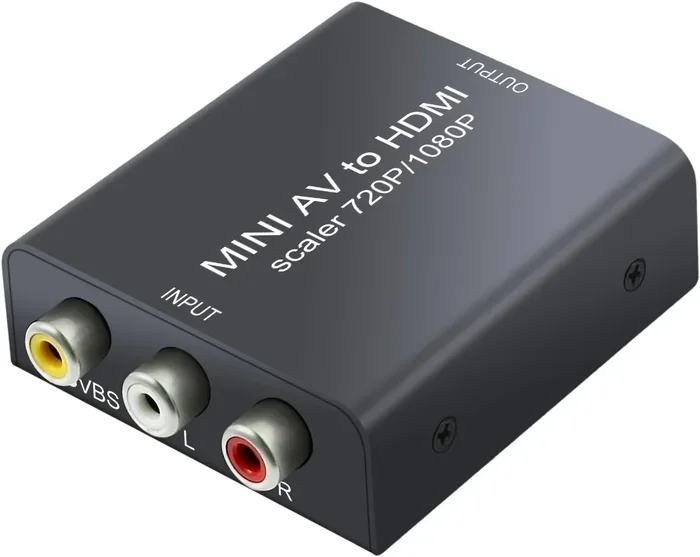
The most popular option is a standalone converter box. These are small devices that sit between your composite source and your TV. You plug the RCA cables into the input side, connect an HDMI cable from the output side to your TV, and power the unit with a USB cable or wall adapter. That is it. No software, no drivers, no complicated setup.
Standalone converters come in many shapes and sizes. Some are tiny and portable. Others are larger and offer more features. Prices range from under twenty dollars to over a hundred, depending on the build quality and upscaling capability. Brands like RetroTINK, OSSC, and various budget options on Amazon all fall into this category.
AV Receivers with Composite Inputs
If you already own an AV receiver, you might not need a separate converter. Many AV receivers have composite RCA inputs and HDMI outputs. You can connect your composite source to the receiver and then run an HDMI cable from the receiver to your TV. The receiver handles the conversion and often provides better audio processing too.
This approach works well for home theater setups. You get clean video conversion and improved sound all in one device. The downside is cost. AV receivers are more expensive than simple converter boxes. They also take up more space and may be overkill if you just want to connect one old device.
USB Capture Cards with Composite Input
Another option is a USB capture card. These devices are primarily designed for streaming and recording, but many models accept composite RCA input. You connect the composite cables to the capture card, plug it into your computer, and use software to view or record the signal. Some capture cards can also output HDMI through a computer with the right setup.
Capture cards are not ideal for casual viewing. They introduce some latency and are meant for PC use. However, if you want to record old gameplay footage or preserve vintage video content, a capture card is a versatile tool. It serves double duty as both a converter and a recording device.
Retro Gaming Scalers
For serious retro gamers, dedicated scalers offer the best picture quality. Devices like the RetroTINK 5X or the Open Source Scan Converter (OSSC) are built specifically for this purpose. They accept composite, S-Video, and component inputs and output clean HDMI signals at high resolutions. These scalers use advanced algorithms to produce stunning results from old hardware.
Scalers are expensive compared to basic converters. They are also more complex to set up. But if you want the absolute best picture quality from your retro consoles, they are worth every penny. The difference between a cheap converter and a dedicated scaler is night and day.
Step-by-Step Guide to Converting Composite Video to HDMI
What You Will Need
Before you start, gather everything you need. Here is a simple checklist:
- A composite video source (VCR, retro console, camera, etc.)
- Composite RCA cables (yellow, red, white)
- A composite to HDMI converter box
- An HDMI cable
- A power supply for the converter (usually USB or a wall plug)
- A TV or monitor with an HDMI input
Setting Up Your Converter
Start by connecting the RCA cables from your source device to the input side of the converter. Match the colors. Yellow goes to the yellow port for video. Red and white go to the red and white ports for audio. Make sure each plug is pushed in firmly.
Next, connect one end of the HDMI cable to the output port on the converter. Plug the other end into an available HDMI port on your TV. Then power on the converter using its USB cable or wall adapter. Switch your TV to the correct HDMI input using your remote.
Most converters work instantly. You should see the image from your source device appear on the TV screen. If you do not see anything, double-check all connections. Make sure the converter is powered on. Try a different HDMI port on your TV if needed.
Adjusting Settings for Best Results
Once you have a picture, take a moment to adjust the settings. Many converter boxes have a small button or remote control for changing the output resolution. Try 720p first. It is a good balance between sharpness and compatibility. If your TV supports 1080p, try that too. Some converters also let you adjust the aspect ratio, which is important for older content that was designed for 4:3 screens.
Pay attention to the audio as well. Make sure both left and right channels are coming through. If the sound is distorted or missing, check the RCA audio connections. A loose cable is the most common culprit.
Quick Tips for the Best Experience
- Use short, high-quality HDMI cables to avoid signal loss.
- Keep the converter in a well-ventilated area. Some units get warm during use.
- Clean the RCA connectors on your source device with a soft cloth. Oxidation on old connectors can cause a weak signal.
- Test with a known working source first to rule out device issues.
- If you notice flickering, try a different power outlet or USB port for the converter.
Common Mistakes When Converting Composite Video to HDMI
Buying the Wrong Type of Converter
The biggest mistake is buying the wrong converter. Not all composite to HDMI adapters are created equal. Some are simple pass-through devices that do not upscale the image at all. Others claim to be converters but are really just signal repeaters. Before you buy, check the product description carefully. Look for terms like upscaling, analog-to-digital conversion, and supported output resolution.
Read reviews from other buyers. Pay attention to comments about picture quality, audio sync, and latency. A converter with hundreds of positive reviews and clear mentions of good upscaling is a safe bet. Avoid products with vague descriptions and no brand name.
Ignoring Audio Connections
It is easy to focus only on video and forget about audio. Composite setups use separate RCA cables for sound. If your converter does not accept audio input, you will get video but no sound. Make sure your converter has RCA audio inputs or a 3.5mm jack for external audio. Some converters even have optical audio output for advanced setups.
Using Damaged or Low-Quality Cables
Old RCA cables can develop corrosion, bent pins, or internal wire breaks. Using damaged cables leads to a poor signal, flickering, or no signal at all. Replace old cables if you notice any physical damage. Even with a great converter, bad cables will ruin the experience. Invest in quality RCA cables with gold-plated connectors for the best results.
Expecting 4K Quality from a Composite Source
Here is a reality check. Composite video was never designed for high definition. No converter can magically turn a 480i signal into true 4K quality. Good converters will upscale to 720p or 1080p and make the image look much better than standard definition. But the source material itself has limits. Manage your expectations and enjoy the improved picture for what it is.
Skipping the Power Supply
Some converter boxes need external power. Do not try to power them solely through the HDMI connection. Without proper power, the converter may not work at all, or it may produce a poor-quality image. Always use the included power adapter or a reliable USB power source.
Best Converters for Composite to HDMI in 2024
The market has many options, which can make choosing difficult. Here are some of the top-rated converters for converting composite video to HDMI right now. These picks cover different budgets and use cases.
- RetroTINK 5X: A premium scaler for retro enthusiasts. It delivers exceptional picture quality with multiple input options including composite. It is expensive but unmatched in quality.
- Generic RCA to HDMI Converter Box: Budget-friendly options under thirty dollars work well for casual use. They may not offer perfect upscaling, but they get the job done for basic viewing.
- OSSC (Open Source Scan Converter): A versatile open-source scaler that supports composite, S-Video, and component inputs. It requires some technical knowledge but offers incredible results.
- USB Capture Cards with RCA Input: Devices like the Elgato Cam Link or budget alternatives let you capture and convert composite video through a computer. Great for recording and streaming.
- AV Receiver with Composite Inputs: If you need audio and video processing in one unit, a mid-range AV receiver with composite inputs and HDMI output is a solid all-in-one solution.
When choosing a converter, consider your primary use case. Are you connecting a single retro console for casual play? A budget converter will suffice. Are you building a dedicated retro gaming setup with multiple devices? Invest in a quality scaler like the RetroTINK or OSSC. The right choice depends on your needs and budget.
FAQ: Common Questions About Converting Composite Video to HDMI
Can I convert composite video to HDMI without a converter box?
No, you cannot directly connect composite video to an HDMI port. The two signals are completely different. Composite is analog and HDMI is digital. You need a converter box or adapter to bridge the gap. There is no cable alone that can make this conversion work. Any product claiming otherwise is misleading.
Does converting composite video to HDMI improve picture quality?
It depends on the converter. A good upscaling converter will significantly improve the picture by increasing the resolution and reducing noise. However, the source material still matters. A composite signal from a VHS tape will never look as sharp as a native HD Blu-ray. But compared to viewing composite video on an old CRT television, the difference on a modern HDTV is dramatic.
Is there any lag when using a composite to HDMI converter?
Most modern converters have minimal lag, usually under fifty milliseconds. This is fine for casual viewing and most games. However, competitive gamers and retro purists who play fast-paced action games may notice a slight delay. Dedicated scalers like the OSSC offer the lowest latency and are preferred by serious retro gamers. Budget converters tend to have more lag, so check reviews if input delay matters to you.
Can I use a composite to HDMI converter with any TV?
Yes, as long as your TV has an HDMI input. Virtually all TVs made in the last fifteen years include HDMI ports. You simply plug the converter’s HDMI output into any available port and switch your TV to that input. The converter will work with LED, OLED, LCD, and even older HDMI-equipped TVs. Just make sure your TV supports the output resolution of your converter.
Do I need special cables to connect composite to a converter?
You need standard composite RCA cables with yellow, red, and white plugs. These are the same cables that came with your old devices. You also need a standard HDMI cable to connect the converter to your TV. Both cable types are inexpensive and widely available. There is no need for special or proprietary cables in most setups.
Are wireless composite to HDMI converters any good?
Wireless converters exist, but they are not always the best choice. They add latency and can suffer from signal interference. For a reliable, stable connection, a wired converter is almost always better. Wireless options might be convenient if you cannot run cables, but expect some compromise in picture and audio quality. Stick with wired converters for the best experience.
Final Thoughts on Converting Composite Video to HDMI
Converting composite video to HDMI opens up a world of possibilities. You can bring old devices back to life and enjoy them on modern, high-definition screens. Whether you are dusting off a classic game console, setting up a vintage home theater, or connecting an old security camera, the right converter makes it all possible.
The process is straightforward. Pick a converter that fits your budget and needs. Connect your RCA cables to the input, run an HDMI cable to your TV, and power everything on. Adjust the settings for the best picture and sound. Within minutes, you will be watching content from decades ago in crisp digital quality.
Remember to avoid the common mistakes we covered. Buy from reputable brands, check your audio connections, and use quality cables. And manage your expectations. A converter can do wonders, but it cannot create detail that does not exist in the source material.
The technology behind analog-to-digital conversion has come a long way. Today’s converters are affordable, easy to use, and deliver impressive results. You do not need to be a tech expert to set one up. With the right converter in hand, your old composite devices will feel brand new again. So go ahead, dig out those old gadgets, and give them the upgrade they deserve.
Converting composite video to HDMI is one of the simplest and most satisfying upgrades you can make to your home entertainment setup. It costs very little, takes minutes to set up, and instantly breathes new life into old hardware. Try it today and see the difference for yourself.