Can I Charge My Phone With Usb C Everything You Need to Know
Yes, you can charge your phone with USB C — and it is faster, more versatile, and more convenient than older charging methods. This guide explains everything you need to know about USB-C charging, including compatibility, cable types, charging speeds, and the best chargers to use.
Can I charge my phone with USB C? If you have been asking yourself this question, you are not alone. The short answer is yes — and it is one of the best upgrades you can make for your daily charging routine. USB-C has completely changed how we power our devices. It is faster, more reliable, and works with almost every modern phone on the market today.
Whether you just bought a new phone or are trying to figure out if your current device supports USB-C, this guide has you covered. We will walk through everything step by step. You will learn about compatibility, charging speeds, the right cables to buy, and how to avoid common mistakes. By the end, you will feel confident about switching to USB-C charging for good.
Key Takeaways
- Universal Compatibility: USB-C is now the standard charging port on most modern phones, tablets, and laptops.
- Fast Charging: USB-C supports rapid power delivery, meaning your phone charges much faster than with older cables.
- Reversible Design: The USB-C connector flips both ways, so you never have to worry about orientation.
- One Cable for Everything: A single USB-C cable can charge phones, tablets, laptops, and more.
- Not All Cables Are Equal: Cheap or damaged cables can slow charging or damage your device.
- Check Your Phone: Older phones may need an adapter to use USB-C charging.
📑 Table of Contents
- What Is USB-C and Why Does It Matter for Phone Charging?
- Can I Charge My Phone With USB C on Any Device?
- How Fast Is USB-C Charging Compared to Other Methods?
- What USB-C Cables and Chargers Should You Buy?
- Common Mistakes People Make When Charging With USB-C
- Can You Use One USB-C Cable for Multiple Devices?
- Is USB-C Charging Safe for Your Phone Battery?
- Expert Tips to Get the Most Out of USB-C Charging
- The Future of USB-C Charging
- Conclusion
What Is USB-C and Why Does It Matter for Phone Charging?
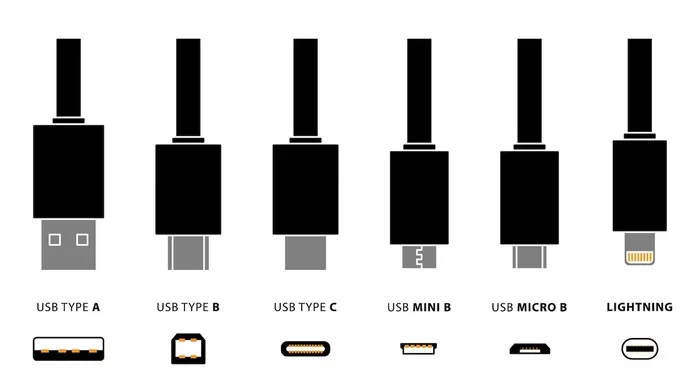
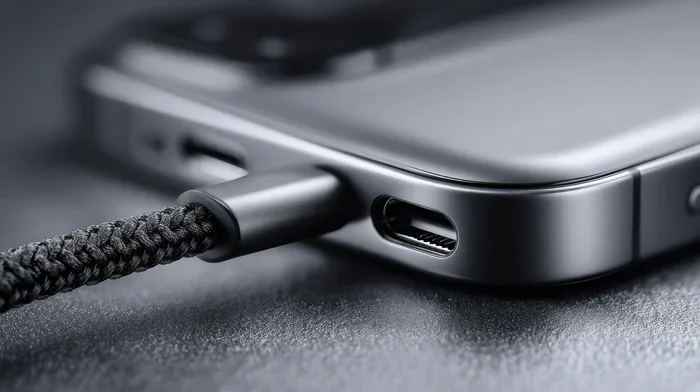
USB-C stands for Universal Serial Bus Type-C. It is a small, oval-shaped connector that has become the go-to standard for charging and data transfer. Unlike the old USB-A ports that were flat and one-directional, USB-C is reversible. You can plug it in either way, which saves you from the frustrating flip-flip struggle of older cables.
The USB-C connector is also much more powerful. It can carry significantly more power than older USB standards. This means your phone charges faster, your data transfers happen in seconds, and you can even use one cable to charge multiple devices. For phone users, this is a game changer.
Most major phone brands have fully adopted USB-C. Apple switched iPhones to USB-C starting with the iPhone 15 lineup. Samsung, Google, OnePlus, and many others have used USB-C for years now. If your phone was made in the last few years, there is a very good chance it already uses a USB-C port.
Why USB-C Replaced Older Charging Ports
The shift to USB-C happened for several important reasons. First, USB-C is universal. One cable type works for phones, tablets, laptops, earbuds, and even some gaming devices. Second, USB-C supports higher wattage, which enables fast charging technology. Third, the reversible design makes daily use much more convenient.
Governments around the world also pushed for this change. The European Union passed a law requiring USB-C as the standard charging port for most electronics sold in the region. This forced even Apple to make the switch. As a result, USB-C is now the most common phone charging port on the planet.
Can I Charge My Phone With USB C on Any Device?
The answer depends on what phone you have. Most modern smartphones fully support USB-C charging right out of the box. However, some older devices or budget phones may still use micro-USB or other older ports. In those cases, you will need an adapter to use a USB-C cable.
Checking If Your Phone Supports USB-C
Before you grab a USB-C cable, check your phone first. Look at the charging port on the bottom of your device. If it is a small oval shape, you have USB-C. If it is a flat rectangular port, you likely have micro-USB, which is different.
You can also check your phone settings. Go to Settings, then look for battery or device information. Many phones list the charging port type there. Another quick way is to check the original box or manual that came with your phone.
If your phone does not have USB-C, do not worry. USB-C adapters are inexpensive and widely available. You can plug a USB-C cable into a micro-USB adapter and charge your phone just fine. Just keep in mind that older ports may not support the fastest USB-C charging speeds.
How Fast Is USB-C Charging Compared to Other Methods?
USB-C charging is significantly faster than older charging methods. The speed depends on several factors, including the charger wattage, the cable quality, and your phone’s charging technology. Let us break this down so you understand what to expect.
Standard USB-C charging typically delivers about 15 to 18 watts. This is already much faster than the 5-watt chargers that came with older phones. But with USB Power Delivery technology, you can get 30, 65, or even 100 watts of power through a USB-C connection.
Understanding USB Power Delivery
USB Power Delivery, often called USB-PD, is a protocol that allows USB-C cables to carry more power safely. Your phone and charger communicate with each other to decide the right amount of power. This happens automatically, so you do not need to adjust anything.
For example, a phone that supports USB-PD can go from zero to 50 percent in about 30 minutes. The same phone with an older charger might take two hours or more to reach the same level. The difference is huge, especially when you are in a rush.
Some brands have their own fast charging tech on top of USB-C. OnePlus has Warp Charge. Samsung has Super Fast Charging. Qualcomm has Quick Charge. All of these work over a USB-C connection. The key is to use a charger and cable that match your phone’s fast charging requirements.
USB-C Charging Speed Comparison
Here is a simple look at how USB-C charging stacks up against older methods:
- Standard 5W charger (micro-USB): Slow charging, takes 2+ hours for a full charge.
- USB-C 15W charger: Moderate charging, full charge in about 1.5 to 2 hours.
- USB-C 30W charger with USB-PD: Fast charging, 50 percent in 30 minutes.
- USB-C 65W+ charger: Very fast, full charge in under an hour for most phones.
As you can see, the higher the wattage and the better the cable, the faster your phone charges. This is why investing in a good USB-C charger matters more than you might think.
What USB-C Cables and Chargers Should You Buy?
Not all USB-C cables are created equal. This is one of the most important things to understand about USB-C charging. A cheap or low-quality cable can limit your charging speed, overheat, or even damage your phone over time.
What to Look for in a USB-C Cable
When shopping for a USB-C cable, look for these key features:
- USB-IF Certification: This means the cable has been tested and meets official standards.
- Power Rating: Check the wattage the cable supports. A 60W cable handles more than a 15W cable.
- Cable Length: Shorter cables charge slightly faster, but any length under six feet works great.
- Braided Construction: Braided cables last longer and resist fraying better than rubber ones.
- Brand Reputation: Stick with trusted brands like Anker, Belkin, Cable Matters, or the cable that came with your phone.
Best USB-C Chargers for Phone Charging
The charger you pair with your USB-C cable matters just as much as the cable itself. Here are some solid options for different needs:
- Basic Wall Charger (15-20W): Great for overnight charging or less urgent situations. These are affordable and get the job done.
- Fast Wall Charger (30-45W): Perfect for daily use when you need your phone charged quickly in the morning.
- GaN Charger (30-65W): Gallium Nitride chargers are smaller and cooler than traditional chargers. They are compact and travel-friendly.
- Portable Power Bank with USB-C: Great for travel or emergencies. Look for one that supports at least 18W input and output.
GaN chargers deserve a special mention. They use newer technology to deliver the same power in a much smaller size. They stay cooler too, which means they last longer. If you travel often, a GaN charger is one of the best accessories you can buy.
Common Mistakes People Make When Charging With USB-C
Even though USB-C is simple to use, there are a few common mistakes that can hurt your charging experience. Avoiding these will help you get the best performance and keep your phone healthy.
Using Cheap or Uncertified Cables
This is the number one mistake. Those $3 no-name cables from the gas station might work, but they often use thin wires that cannot handle fast charging. They can also overheat, which is a safety risk. Always use certified cables from reputable brands.
Ignoring Cable Condition
Over time, USB-C cables can wear out. Frayed ends, bent connectors, and exposed wires all reduce performance. If your cable looks damaged, replace it right away. A worn cable can charge slowly or not at all, and in rare cases, it can cause short circuits.
Using the Wrong Power Source
Not all USB ports are the same. A USB port on your laptop might only deliver 5 watts, which is very slow for phone charging. A wall charger delivers much more power. For the fastest charging, always use a wall plug with a proper USB-C charger.
Charging Through Cases While Fast Charging
Some phone cases trap heat, and fast charging generates extra heat. If your phone gets very hot while charging, take the case off. Excessive heat over time can degrade your battery faster.
Can You Use One USB-C Cable for Multiple Devices?
Yes! One of the biggest advantages of USB-C is its versatility. You can use the same cable to charge your phone, tablet, wireless earbuds, smartwatch, and even some laptops. This means fewer cables cluttering your bag and fewer things to remember when you travel.
Just keep in mind that the charger needs to match the device too. Your laptop might need a 65W charger, while your phone works fine with a 20W one. The cable stays the same, but the power delivery changes based on what you plug into it.
This universality is exactly why USB-C became the universal standard. Before USB-C, you needed different cables for every device. Now, one cable handles almost everything. It is a small change that makes a big difference in everyday life.
What About Data Transfer?
USB-C does more than just charge. It also transfers data at high speeds. USB 3.0 and USB 3.1 cables can move files at speeds up to 10 Gbps. USB 4 cables go even faster at 20 or 40 Gbps. This means you can connect your phone to a computer and transfer photos, videos, and documents in seconds.
Not all USB-C cables support data transfer, though. Some cables are charge-only, meaning they carry power but not data. If you need to transfer files, make sure your cable supports data. This is usually listed on the packaging or product description.
Is USB-C Charging Safe for Your Phone Battery?
Many people worry that fast charging through USB-C might damage their phone battery over time. The good news is that modern phones are designed to handle USB-C fast charging safely. Your phone has built-in chips that regulate the power flow and protect the battery.
That said, there are a few tips to keep your battery healthy in the long run:
- Avoid charging to 100 percent every time. Keeping your battery between 20 and 80 percent extends its lifespan.
- Remove the case during fast charging. This helps dissipate heat, which is the biggest enemy of battery health.
- Use the right charger. Do not use a charger with a much higher wattage than your phone supports unless your phone explicitly supports it.
- Avoid extreme temperatures. Do not charge your phone in very hot or very cold environments.
Follow these simple tips, and your phone battery will stay healthy for years. USB-C fast charging is safe and convenient when used correctly.
Expert Tips to Get the Most Out of USB-C Charging
Here are some practical tips that will help you get the best USB-C charging experience every single day:
- Keep a backup cable at work and in your car. USB-C cables wear out over time. Having a spare means you are never stuck with a dead phone.
- Invest in a GaN charger. They are smaller, cooler, and more efficient than traditional chargers. A single GaN charger can power your phone, tablet, and laptop.
- Clean your charging port regularly. Dust and lint can build up in the USB-C port and cause slow or intermittent charging. Use a toothpick or compressed air gently.
- Use a quality power bank for travel. Look for one with USB-C input and output at 18W or higher for the best results.
- Check for firmware updates. Phone manufacturers sometimes release updates that improve charging performance and battery management.
These small habits add up over time. They keep your phone charging fast, your cables lasting longer, and your battery staying healthy.
The Future of USB-C Charging
USB-C is only going to become more important going forward. The European Union has already mandated USB-C as the standard for all phones, tablets, and cameras sold in the region. Other countries are likely to follow. This means every new device you buy will use the same USB-C connector.
Technology is also improving. USB4 is the latest standard, offering even faster data transfer and higher power delivery. New phones are supporting faster charging speeds every year. Some manufacturers are already pushing beyond 100 watts for laptops and tablets, and phone speeds will continue to increase too.
Wireless charging is also growing, but USB-C remains the fastest and most reliable method for powering up your phone. Even wireless charging pads usually connect to a USB-C power source. So USB-C is the backbone of modern device charging, whether you use it directly or indirectly.
Conclusion
So, can I charge my phone with USB C? Absolutely yes. USB-C is the present and the future of phone charging. It is faster, safer, more versatile, and more convenient than older charging methods. Whether you have an iPhone, an Android phone, or any other modern device, USB-C charging will make your daily routine easier.
The key is to use the right cable, the right charger, and to take care of your charging habits. With a good USB-C setup, you can charge your phone quickly, transfer data easily, and use one cable for all your devices. It is one of the simplest upgrades that makes a real difference in how you use technology every day.
If you have not made the switch to USB-C yet, now is the perfect time. Grab a quality cable, pick up a reliable charger, and experience the difference for yourself. Your phone — and your sanity — will thank you.
Frequently Asked Questions
Can I charge my phone with USB C if it originally had a micro-USB port?
Yes, you can use a USB-C to micro-USB adapter. This lets you plug a USB-C cable into your older phone. However, your charging speed will be limited by the older micro-USB port. You will not get the full benefits of USB-C fast charging this way.
Do all USB-C cables charge phones at the same speed?
No, not all USB-C cables are the same. Cheap or low-quality cables may limit charging speed or not support fast charging at all. Always look for USB-IF certified cables from reputable brands to get the best charging performance.
Is USB-C charging safe for my phone battery?
Yes, USB-C charging is completely safe. Modern phones have built-in safety chips that regulate power flow and protect your battery. Just avoid charging in extreme heat and try to keep your battery level between 20 and 80 percent for long-term health.
Can I use a USB-C charger from my laptop to charge my phone?
Yes, you can. USB-C chargers are universal and will automatically deliver the right amount of power for your phone. Your phone will only draw the power it needs, so using a higher-wattage charger will not damage it.
How do I know if my USB-C cable supports fast charging?
Check the packaging or product description for wattage ratings. A cable rated for at least 18W or higher supports fast charging. Also look for USB-IF certification or mentions of USB Power Delivery support on the product listing.
Can I use a USB-C cable to transfer data between my phone and computer?
Yes, but you need a cable that supports data transfer. Some USB-C cables are charge-only and cannot transfer data. Look for cables labeled as supporting USB 3.0, USB 3.1, or USB4 for the fastest data speeds.
=== META TITLE ===
Can I Charge My Phone With USB C? Complete Guide 2024
=== SEO TITLE ===
Can I Charge My Phone With USB C Everything You Need to Know
=== URL SLUG ===
can-i-charge-my-phone-with-usb-c
=== OPENING SUMMARY ===
Can I charge my phone with USB C? The answer is a simple and definitive yes. USB-C charging has become the universal standard for modern smartphones, and for good reason. It is faster, more convenient, and works with almost every phone made in the last few years. Whether you have an iPhone 15, a Samsung Galaxy, or any other popular Android device, USB-C charging will transform your daily routine. In this guide, we will walk you through everything you need to know, from compatibility and cable choices to fast charging tips and common mistakes to avoid.