Are There Different Sizes Of Micro USB Cables Available
Yes, different sizes of Micro USB cables do exist. You will find variations in connector types, cable lengths, and USB standards that affect how they work with your devices. Understanding these differences helps you avoid buying the wrong cable and saves you time and money.
Have you ever reached for a Micro USB cable only to realize it does not fit your device? You are not alone. Many people assume all Micro USB cables are the same, but the truth is that different sizes of Micro USB cables do exist. Whether you are charging your phone, transferring files, or connecting a peripheral, picking the right cable size makes a big difference.
This guide breaks down everything you need to know about Micro USB cable sizes. We will explore the various connector types, explain why size differences matter, and help you choose the right cable for your devices. By the end, you will never grab the wrong cable again.
Key Takeaways
- Micro USB cables come in different sizes: Micro-A, Micro-B, and Micro-B 3.0 connectors each have unique dimensions and purposes.
- Not all Micro USB cables are interchangeable: Using the wrong connector type can mean your cable simply will not fit or charge your device.
- Cable length matters for performance: Longer cables may cause slower charging or data transfer speeds in some cases.
- USB On-The-Go (OTG) cables: These special cables allow your phone or tablet to act as a host device, connecting to USB drives and peripherals.
- Quality and brand matter: Cheap, low-quality Micro USB cables can damage your devices or fail to deliver proper power.
- Micro USB is being phased out: Many newer devices now use USB-C, but millions of older devices still rely on Micro USB cables.
- Always check your device manual: Knowing the exact connector type and cable size prevents compatibility headaches.
📑 Table of Contents
- Understanding the Different Sizes of Micro USB
- Micro-A vs Micro-B: Why the Difference Matters
- Common Devices That Use Different Sizes of Micro USB
- How to Choose the Right Micro USB Cable Size
- Micro USB Cable Sizes Compared
- Common Mistakes When Buying Micro USB Cables
- Expert Tips for Getting the Most from Your Micro USB Cable
- The Future of Micro USB and the Rise of USB-C
- Conclusion
Understanding the Different Sizes of Micro USB
The world of USB connectors can feel confusing at first glance. But when it comes to different sizes of Micro USB, the answer is straightforward. There are three main types of Micro USB connectors, and each one has a distinct size and shape. Let us break them down so you can tell them apart easily.
Micro-A Connector
The Micro-A connector is one of the smaller USB connector types. It measures about 6.85 millimeters wide and 1.8 millimeters tall. This connector is less common than Micro-B, but you will still find it in some older tablets, GPS devices, and certain portable gadgets. The Micro-A plug is always black in color, which helps you distinguish it from other connectors at a glance.
Micro-B Connector
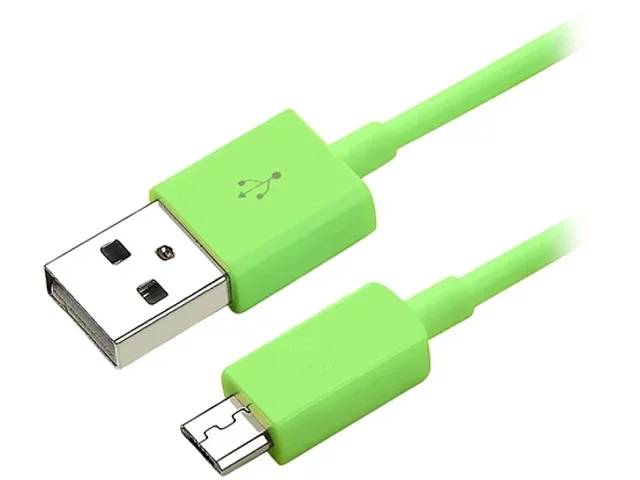
The Micro-B connector is the most widely recognized Micro USB type. It has the same height as the Micro-A but is slightly wider at about 6.85 millimeters. Most Android smartphones, fitness trackers, Bluetooth speakers, and portable chargers use the Micro-B connector. You will notice that the Micro-B plug is typically black or sometimes white, depending on the manufacturer.
Micro-B 3.0 Connector
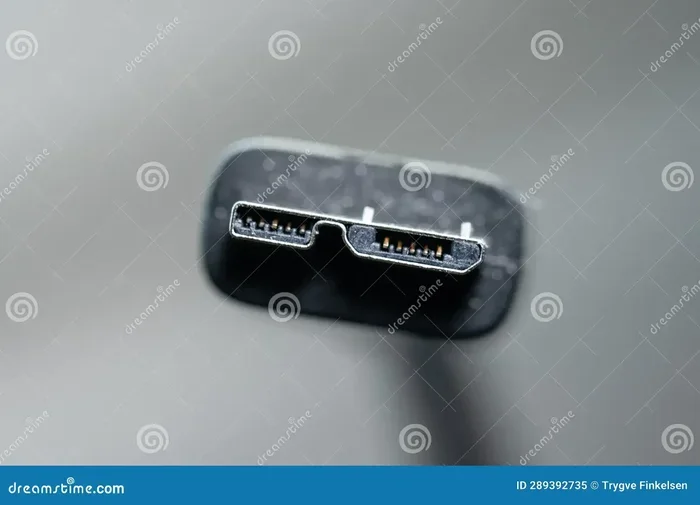
The Micro-B 3.0 connector, also called Micro-B SuperSpeed, is designed for faster data transfer. It shares the same width as the standard Micro-B connector but adds an extra pin on the side. This extra pin enables USB 3.0 speeds, which means quicker file transfers and faster charging in supported devices. The Micro-B 3.0 plug is usually blue, making it easy to identify.
Micro-A vs Micro-B: Why the Difference Matters
You might wonder why there are even different sizes of Micro USB cables in the first place. The answer comes down to how devices communicate with each other. The USB On-The-Go, or OTG, standard allows devices like smartphones to act as a host. This means your phone can connect to a USB flash drive, a keyboard, or even a mouse without a computer.
Here is how the two connector types work together. A device with a Micro-A receptacle acts as the host. The device with a Micro-B receptacle acts as the peripheral, or the device being controlled. When you plug a Micro-A cable into a Micro-A port on your device, it can communicate with a Micro-B device on the other end. This is the basic idea behind USB OTG functionality.
Quick Tip: If you want to connect a USB drive to your phone, make sure you have the right OTG cable. A regular Micro-B to USB-A cable will not give you host mode on most devices. You need a specific Micro-A to Micro-B OTG adapter for that to work properly.
Common Devices That Use Different Sizes of Micro USB
Micro USB cables are everywhere. They have been the go-to charging and data cable for over a decade. Even though USB-C is taking over, millions of devices still rely on Micro USB connections. Here is a look at the most common devices you will find using different sizes of Micro USB cables.
Smartphones and Tablets
Before USB-C became standard, nearly every Android phone used a Micro-B connector. Brands like Samsung, LG, Motorola, and Huawei all relied on Micro USB cables for charging and data transfer. Many budget smartphones and older tablets still use Micro-B connectors today. If you have an older e-reader, a budget tablet, or a second phone, there is a good chance it uses a Micro USB cable.
Portable Electronics and Gadgets
Beyond phones and tablets, you will find Micro USB cables in a surprising number of devices. Portable Bluetooth speakers, action cameras, fitness trackers, and smartwatches often use Micro-B connectors. GPS navigation units, handheld gaming consoles, and e-readers like older Kindle models also depend on Micro USB cables. Even some car dash cams and drone controllers use Micro USB for charging and data transfer.
Home and Office Devices
Do not overlook home and office equipment either. Many routers, modems, and smart home hubs use Micro USB cables for power. Some printers, scanners, and external hard drives also include Micro USB cables in the box. These devices may use the standard Micro-B connector, but always double-check before purchasing a replacement cable.
How to Choose the Right Micro USB Cable Size
Picking the right Micro USB cable does not have to be complicated. But with so many options on the market, it is easy to grab the wrong one. Here are some simple steps to help you choose the correct cable size every time.
Step 1: Check Your Device Port
The first and most important step is to look at the port on your device. Is it a Micro-A port or a Micro-B port? Does it have the extra pin on the side that indicates a Micro-B 3.0 port? You can use a flashlight to get a closer look. The port shape and color will tell you exactly which cable you need.
Step 2: Consider the Cable Length
Micro USB cables come in various lengths, from a few inches to over 10 feet. The length you choose depends on how you plan to use the cable. A short cable works well for desk charging or syncing data. A longer cable is better for reaching a distant outlet or using your device while it charges. Keep in mind that very long cables, especially those over 6 feet, may cause a slight drop in charging speed.
Step 3: Match the USB Standard
Not all Micro USB cables support the same data transfer speeds. Standard Micro USB cables support USB 2.0, which handles basic charging and slow file transfers. If you need faster speeds, look for a Micro-B 3.0 cable that supports USB 3.0 SuperSpeed. For most everyday charging needs, a standard USB 2.0 Micro USB cable works just fine.
Expert Insight: According to USB-IF certification standards, not all cables labeled as Micro USB meet the same quality benchmarks. Always look for cables from reputable brands that carry USB-IF certification. This ensures the cable delivers the power and data speeds it promises.
Micro USB Cable Sizes Compared
To make things even clearer, here is a comparison of the main Micro USB cable types you will encounter.
| Connector Type | Width | Height | USB Standard | Common Uses |
|---|---|---|---|---|
| Micro-A | 6.85 mm | 1.8 mm | USB 2.0 | OTG host devices, older tablets |
| Micro-B | 6.85 mm | 1.8 mm | USB 2.0 | Smartphones, fitness trackers, speakers |
| Micro-B 3.0 | 6.85 mm | 1.8 mm | USB 3.0 | External hard drives, cameras, faster data transfer |
| Mini-B (for comparison) | 7.5 mm | 3.1 mm | USB 2.0 | Older cameras, MP3 players |
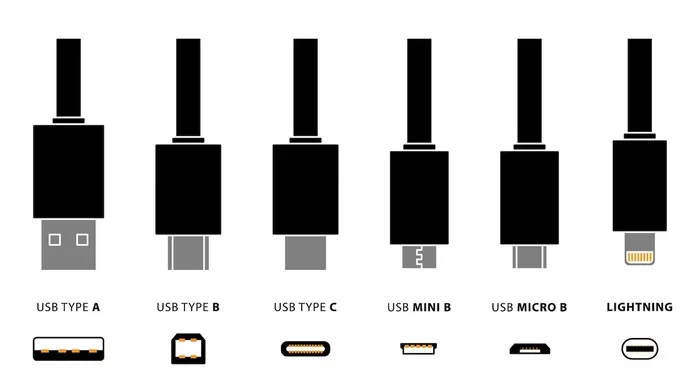
As you can see, the Micro-A, Micro-B, and Micro-B 3.0 connectors share the same height but differ slightly in design and function. The Mini-B connector, included here for comparison, is noticeably taller and wider. It belongs to an older USB standard that has mostly been replaced by Micro USB.
Common Mistakes When Buying Micro USB Cables
Even experienced buyers make mistakes when shopping for Micro USB cables. Avoid these common pitfalls to save money and protect your devices.
Assuming All Micro USB Cables Are the Same
This is the biggest mistake people make. Not all different sizes of Micro USB cables are compatible with every device. A Micro-A cable will not fit into a Micro-B port, and vice versa. Always match the connector type to your device port before making a purchase.
Ignoring Cable Quality
Cheap, unbranded Micro USB cables may seem like a great deal, but they can cause real problems. Low-quality cables may deliver inconsistent power, which can damage your battery over time. Some cables also have thinner wiring that limits charging speed and data transfer rates. Investing in a quality cable from a trusted brand pays off in the long run.
Overlooking the USB Standard
If you need fast file transfers, a standard USB 2.0 Micro USB cable will not cut it. Make sure you buy a USB 3.0 Micro-B cable if your device supports SuperSpeed. Check your device specifications before purchasing to avoid frustration.
Buying the Wrong Length
A cable that is too short can be annoying, especially if you want to use your device while it charges. On the other hand, a cable that is too long can create clutter and may reduce charging efficiency. Measure your intended use case before deciding on a cable length.
Common Mistakes to Avoid:
- Buying a Micro-A cable for a Micro-B device
- Choosing the cheapest cable without checking reviews
- Ignoring USB 2.0 vs USB 3.0 compatibility
- Purchasing a cable that is too long or too short for your needs
- Forgetting to check if your device needs an OTG cable
Expert Tips for Getting the Most from Your Micro USB Cable
Getting the most out of your Micro USB cables is easier than you think. A few simple habits can extend the life of your cables and improve your charging and data transfer experience.
Avoid Bending the Connector
Bending a Micro USB connector at sharp angles can damage the internal wires and the connector itself. Always plug and unplug the cable gently. If you notice the connector wobbling or feeling loose, it is time to replace the cable before it causes further issues.
Store Cables Properly
Coiling cables tightly or tossing them into a bag can lead to fraying and internal wire damage. Use a cable organizer or a simple over-under wrapping technique to keep your cables in good shape. Proper storage extends the lifespan of your Micro USB cable sizes significantly.
Clean Your Ports Regularly
Dust and lint can build up inside your device’s Micro USB port over time. This buildup can cause poor contact, slow charging, and interrupted data transfers. Use a soft brush or compressed air to gently clean the port. A clean port ensures a solid connection every time you plug in your cable.
Use Cable Protectors
Cable protectors or reinforced connectors can prevent the most common point of failure, which is where the cable meets the connector. These small accessories are inexpensive and can save you from buying replacement cables frequently.
Quick Tips:
- Always check the connector color to identify the USB standard
- Keep a spare Micro USB cable in your bag or car
- Label your cables if you have multiple devices
- Buy cables with braided sleeves for extra durability
- Test new cables with a multi-meter if you need reliable power delivery
The Future of Micro USB and the Rise of USB-C
While different sizes of Micro USB cables still serve millions of devices today, the industry is moving toward USB-C. USB-C offers a reversible connector, faster data transfer speeds, and higher power delivery. Many new smartphones, laptops, and tablets now ship with USB-C as the default port.
However, USB-C is not the only option. The European Union has even pushed for USB-C to become a universal charging standard. Despite this shift, Micro USB cables are far from obsolete. If you own older devices, portable electronics, or budget gadgets, Micro USB cables will remain essential for years to come.
The best approach is to keep a few Micro USB cables on hand while gradually transitioning to USB-C for your newer devices. This way, you are prepared for any situation and do not get caught without a compatible cable.
Conclusion
The answer to whether there are different sizes of Micro USB cables is a clear yes. From Micro-A to Micro-B to Micro-B 3.0, each connector type serves a specific purpose and fits specific devices. Understanding these differences helps you make smarter purchasing decisions, avoids compatibility issues, and keeps your devices running smoothly.
Micro USB cable sizes may seem like a small detail, but they make a big impact on how your devices charge and transfer data. Whether you are replacing a lost cable or stocking up on spares, knowing what to look for saves you time, money, and frustration. Take a moment to check your device ports, choose the right cable type, and invest in quality cables that will last.
With the right knowledge and a few good cables, you will always be ready to charge, sync, and connect your devices with confidence. The world of different sizes of Micro USB cables does not have to be confusing. Now that you know the basics, you can navigate it with ease.
Frequently Asked Questions
Are all Micro USB cables the same size?
No, they are not. While Micro-A and Micro-B connectors share the same height, they differ in design and function. Micro-B 3.0 connectors have an extra pin for faster data transfer. Always check your device port before buying a replacement cable to ensure compatibility.
Can I use a Micro-B cable on a Micro-A port?
No, you cannot. Micro-A and Micro-B connectors have different shapes and will not fit into each other’s ports. Using the wrong connector type will not damage your device, but it will not connect either. Always match the cable connector to the correct port type on your device.
Do longer Micro USB cables charge slower?
Longer cables can cause a slight drop in charging speed due to increased resistance in the wire. For best results, use a shorter cable for fast charging. If you need a longer cable, look for one with thicker wiring and a higher gauge rating to minimize power loss.
What is the difference between Micro USB and Mini USB?
Mini USB connectors are larger than Micro USB connectors. Mini-B cables measure about 7.5 millimeters wide and 3.1 millimeters tall, while Micro-B cables are smaller at 6.85 millimeters wide and 1.8 millimeters tall. Mini USB was used in older devices like cameras and MP3 players, but Micro USB has mostly replaced it.
Are Micro USB cables still worth buying in 2024?
Absolutely. Millions of devices still use Micro USB cables, including older smartphones, fitness trackers, Bluetooth speakers, and portable electronics. Even as USB-C becomes more popular, having a few quality Micro USB cables on hand remains practical and necessary for many devices.
How can I tell if my Micro USB cable supports USB 3.0?
Look at the connector. USB 3.0 Micro-B cables have an extra pin on the side of the connector and are usually colored blue. Standard Micro USB cables only have five pins and are typically black or white. Check your device specifications to confirm whether it supports USB 3.0 SuperSpeed.