How Do I Cancel My Verizon Wireless Plan Right Now
Canceling your Verizon Wireless plan is straightforward if you know the right steps. Whether you want to switch carriers or end your contract, this guide walks you through every option — online, by phone, or in-store. You will learn about fees, what happens to your account, and how to avoid common mistakes.
So you want to know how to cancel my Verizon Wireless plan. Maybe you found a better deal. Maybe you are switching to a different wireless carrier. Or maybe you just need a break from the monthly bill. Whatever the reason, you are in the right place.
Cancelling a wireless plan can feel overwhelming. There are contracts, fees, and a bunch of tiny print nobody reads. But here is the good news — the process is actually simpler than most people think. You just need the right information and a clear plan of action.
This guide covers everything you need to know. From understanding your contract to the exact steps for cancel online, we have you covered. Let us walk through this together so you can make the best decision for your situation.
Key Takeaways
- Multiple cancellation methods exist: You can cancel online, by phone, or in person at a Verizon store.
- Early termination fees may apply: Understand your contract terms before you cancel to avoid surprise charges.
- Your device balance matters: If you still owe on your phone, that balance stays with you after cancellation.
- Porting your number is easy: You can keep your phone number when you switch to a new wireless provider.
- Alternatives exist: Consider pausing your plan or switching to a prepaid option before fully canceling.
📑 Table of Contents
- Understanding Your Verizon Wireless Plan Before Cancelling
- How to Cancel Your Verizon Wireless Plan Online
- Canceling Over the Phone With Verizon Customer Service
- What Happens After You Cancel Your Wireless Plan
- Alternatives to Cancelling Your Verizon Plan
- Tips to Avoid Fees and Smooth the Transition
- Common Mistakes to Avoid When Cancelling
- Final Thoughts on Cancelling Your Verizon Wireless Plan
Understanding Your Verizon Wireless Plan Before Cancelling
Before you do anything, take a moment to understand your current plan. This step saves you money and headaches down the road. Not all Verizon Wireless plans are the same, and the cancellation process depends on your specific situation.
Check Your Contract Terms
Log into your Verizon account login and review your agreement. Look for the contract end date and any early termination clauses. If you are still within your contract period, you may face an early termination fee. This fee varies but typically ranges from $15 to $350 depending on your plan and how many lines you have.
Here is what to look for in your contract:
- Contract end date — Knowing this tells you if you are still locked in.
- Early termination fee amount — This is the cost of breaking the contract early.
- Device payment balance — If you are paying off a phone, that balance does not disappear when you cancel.
- Promotional offers — Some deals require you to stay for 12 or 24 months.
Review Your Device Payment Plan
If you bought your phone through Verizon, you likely have a device payment plan. When you cancel mobile plan service, the remaining balance on your device stays with you. You will need to pay it off in full. This is separate from any wireless contract payoff fees.
To check your device balance, go to your Verizon account and look under “Device Payments.” Write this number down. It is important for your final bill.
Gather Your Account Information
Before you start the cancellation process, gather everything you need. Having your account details ready makes the process faster and smoother. You will need your account PIN or password, your phone number, and your Verizon bill details.
Here is a quick checklist:
- Your Verizon account password or PIN
- The phone number you want to cancel
- Your most recent bill for reference
- Your device IMEI number (found in Settings about phone)
- A backup of your contacts and data
Taking five minutes to gather these items will save you a lot of time later.
How to Cancel Your Verizon Wireless Plan Online
Many people prefer to cancel online because it is fast and convenient. Verizon does offer online cancellation options, though the process can vary depending on your plan type and account status.
Step-by-Step Online Cancellation
Follow these steps to cancel your plan through your Verizon account:
- Go to the Verizon website and log into your account.
- Navigate to the “My Account” or “Manage Plans” section.
- Select the line or plan you want to cancel.
- Look for the “Cancel Service” or “End Plan” option.
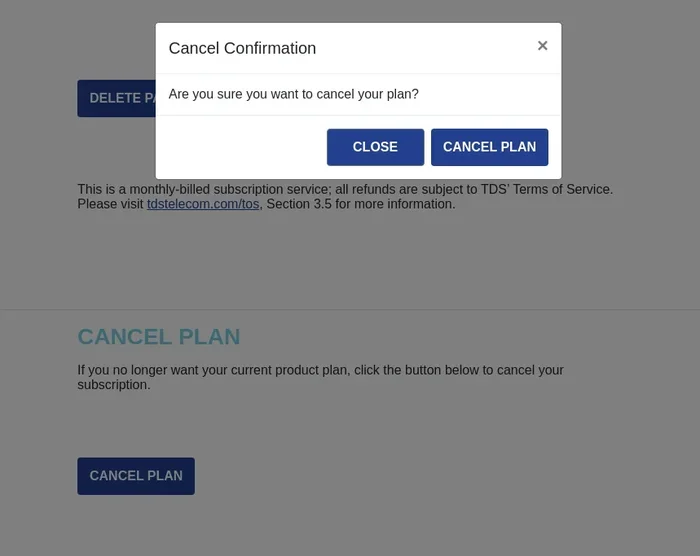
- Follow the on-screen prompts to confirm your cancellation.
- Review any fees or final charges before submitting.
Keep in mind that online cancellation may not always be available for every account type. If you do not see the option, do not worry. There are other ways to cancel, which we will cover below.
What to Do If the Online Option Is Not Available
Sometimes Verizon restricts online cancellation for certain plans or account types. This is more common with family plans, shared data plans, or accounts with outstanding balances. If you cannot find the online option, try the phone method described next.
Some users also report that Verizon retention offers may appear during the online process. These are discounts or perks designed to keep you on the plan. If you are set on canceling, politely decline these offers and continue with the cancellation.
Canceling Over the Phone With Verizon Customer Service
Calling Verizon customer service is one of the most reliable ways to cancel phone service. A live representative can handle your request, answer your questions, and process everything in real time.
How to Reach Verizon Customer Service
Dial 1-800-922-0204 from the phone number on your Verizon account. This is the main customer service line. You may need to verify your identity, so have your account PIN or last four digits of your Social Security number ready.
Here are some tips for a smooth phone call:
- Call during off-peak hours (early morning or late evening) for shorter wait times.
- Have your account information handy before you dial.
- Be clear and direct about your intention to cancel.
- Ask the representative to confirm all fees before you agree.
- Request a confirmation number or email for your records.
What to Expect During the Call
The representative will likely ask why you are canceling. This is standard — they want to understand customer reasons. You do not owe them a detailed explanation. A simple “I am switching providers” or “I no longer need the service” is perfectly fine.
They will then walk you through the cancellation. Make sure they confirm:
- The exact cancellation date
- Any early termination fees or remaining balances
- Whether your port number will be transferred
- The final bill amount and payment method
Do not hang up until you have all of this confirmed in writing or via email. This protects you from surprise charges later.
What Happens After You Cancel Your Wireless Plan
Once your Verizon Wireless cancellation is complete, several things happen. Understanding these helps you avoid confusion and ensures a smooth transition to your next wireless provider.
Service Disconnection Timeline
Your service typically disconnects on the date you specified during cancellation. If you cancel mid-cycle, you may still have access until the end of your billing period. Verizon will prorate any unused service, which may appear as a credit on your final bill.
Here is what the timeline generally looks like:
- Day of cancellation request: You still have full service.
- Cancellation effective date: Service is disconnected at midnight.
- Final bill: Arrives within 1-2 weeks after disconnection.
- Account closure: Your account is marked as closed in Verizon systems.
Your Phone Number and Porting
If you want to keep your phone number, you will need to port your number to your new provider. This is a standard process and most carriers handle it for you. You will need your port number or account number from Verizon to complete the transfer.
Make sure you initiate the port with your new carrier before or on the same day you cancel Verizon. This ensures you do not lose your number during the transition.
What About Your Devices?
Your phones, tablets, and other devices are yours to keep. However, if you still owe money on a device, you must pay that balance. Verizon will not repossess your phone for an unpaid device balance, but it will affect your credit if left unpaid.
Also, remember to remove your Verizon SIM card if you are switching to a different carrier. The SIM card is small and usually located under the battery or in a tray on the side of your phone.
Alternatives to Cancelling Your Verizon Plan
Before you fully cancel, consider these alternatives. They might save you money and give you more flexibility.
Pause Your Plan
Verizon offers a plan pause feature for certain account types. This lets you temporarily suspend service without fully canceling. You may still pay a reduced monthly fee, but you avoid early termination fees. This is great if you are traveling or between contracts.
To check if this option is available, log into your Verizon account and look for “Pause Service” or “Suspend Line.”
Switch to a Prepaid Plan
If you want to stay with Verizon but pay less, consider switching to a prepaid plan. Verizon Prepaid offers many of the same network benefits at lower prices. You can switch without canceling and losing your Verizon account login history.
Downgrade Your Plan
Sometimes the real issue is cost, not the carrier itself. Verizon offers several Verizon plan options at different price points. Downgrading to a smaller data plan might solve your budget problem without the hassle of switching carriers entirely.
Explore Other Internet Options
If you are canceling because you want to get internet in my home without a phone line, there are plenty of alternatives available. You can explore portable Wi-Fi options or even be my own internet provider with a home network setup. Many people find that combining a standalone internet plan with Wi-Fi without an internet provider solutions gives them more control and often saves money in the long run.
Tips to Avoid Fees and Smooth the Transition
Canceling does not have to be a headache. With the right preparation, you can avoid fees and make the switch seamless.
Time Your Cancellation Wisely
The best time to cancel is right after your billing cycle ends. This way, you do not pay for a full month of service you are not using. Check your billing cycle date in your Verizon account before you submit the cancellation.
Check for Retention Offers
Verizon often offers discounts or perks to keep customers from canceling. These are called Verizon retention offers. They might include bill credits, free months of service, or upgraded plans at a lower rate. If you are open to staying, these offers can be valuable. But if you are set on leaving, politely decline and proceed.
Back Up Your Data
Before canceling, make sure all your important data is backed up. This includes contacts, photos, messages, and app data. If you are switching to a new wireless provider, you will want everything ready on your new device or SIM card.
Return Any Rental Equipment
If you rented a modem, router, or other equipment from Verizon, return it before canceling. Failure to return equipment can result in additional charges on your final bill. Check your account for any rental items and find the nearest return location.
Keep Records of Everything
Save all emails, confirmation numbers, and call logs related to your cancellation. If there is ever a dispute about your final bill or account status, these records are your best protection. Take screenshots of online confirmations and save them in a safe place.
Common Mistakes to Avoid When Cancelling
Many people make avoidable mistakes when canceling their wireless plan termination. Here are the most common ones and how to steer clear.
- Forgetting to pay off device balances: This can lead to collections and credit issues.
- Canceling without a backup plan: Make sure your new wireless provider is ready before you cancel Verizon.
- Ignoring the final bill: Your final bill may include prorated charges, fees, or equipment costs you did not expect.
- Not porting your number: If you want to keep your number, initiate the port immediately.
- Canceling during peak billing: This can result in paying for extra days of service you do not need.
Avoiding these mistakes keeps your cancellation clean and your finances in order. It is all about being prepared and staying organized.
Final Thoughts on Cancelling Your Verizon Wireless Plan
Canceling your Verizon Wireless plan does not have to be complicated. Whether you choose to cancel online, call customer service, or visit a store in person, the key is preparation. Know your contract terms, understand your fees, and have a backup plan ready.
Remember, you have options. You can fully cancel, pause your plan, downgrade, or switch to a prepaid version. Each path has its own benefits, and the right choice depends on your personal situation.
Take your time, do your research, and make the decision that works best for you. Whether you are moving to a different carrier or simply taking a break from wireless service, you now have everything you need to make the process smooth and stress-free.
If you are exploring other connectivity options, check out whether you can cancel my wifi plan if you also have a home internet service with Verizon. And if you are looking for ways to stay connected at home without a traditional phone line, learn more about how to get internet in my home without a phone line. For those interested in building their own home network, you might also explore whether you can be my own internet provider to save on monthly costs.
With the right approach, canceling your Verizon Wireless plan is a quick and manageable process. You are now equipped with the knowledge to handle it confidently.
Frequently Asked Questions
Can I cancel my Verizon Wireless plan online?
Yes, you can cancel online through your Verizon account. Log in, go to “My Account,” select the line you want to cancel, and follow the prompts. However, some account types may require a phone call or store visit to complete the cancellation.
What is the early termination fee for canceling a Verizon plan?
The early termination fee varies based on your contract and plan type. It typically ranges from $15 to $350 per line. Check your specific contract or call Verizon customer service to get the exact amount for your account.
Will I lose my phone number when I cancel Verizon?
No, you do not have to lose your number. You can port your phone number to a new carrier by requesting your port number from Verizon and providing it to your new provider during the switch.
Do I still owe money on my device if I cancel my Verizon plan?
Yes, any remaining device payment balance stays with you after cancellation. You will need to pay off the device balance in full, even after your wireless service is disconnected.
How long does it take for Verizon service to disconnect after cancellation?
Service is typically disconnected on the effective date you specify during cancellation. If you cancel mid-cycle, you may retain service until the end of your billing period. Your final bill arrives within 1-2 weeks after disconnection.
Can I pause my Verizon plan instead of canceling it?
Yes, Verizon offers a plan pause or suspension option for eligible accounts. This lets you temporarily stop service without fully canceling. You may pay a reduced fee during the pause period, and you can reactivate your line later.
=== CONCLUSION ===
Cancelling your Verizon Wireless plan is a process, but it does not have to be stressful. You now know how to review your contract, cancel online or by phone, handle fees, and explore alternatives. The most important thing is to be prepared and informed before you take the first step.
Whether you are switching to a new wireless carrier, pausing your service, or exploring options like getting portable Wi-Fi or setting up your own home network, the power is in your hands. Make the choice that fits your life and budget best.
Take action today. Review your account, understand your terms, and start the process with confidence. Your next wireless plan is waiting, and you are ready to make the move.