Can I Be My Own Internet Provider and How to Get One
Yes, you can be your own internet provider in certain situations, though it requires the right equipment, knowledge, and location. This guide walks you through every step, from choosing your connection type to setting up hardware and avoiding common pitfalls. DIY internet service is more achievable than most people think, especially with modern technology.
Have you ever wondered if you could cut the cord and skip your local internet company altogether? The idea of being your own internet provider sounds exciting, doesn’t it? You get full control over your connection, your data, and your monthly costs. But is it really possible? The short answer is yes, under the right conditions. This guide breaks down everything you need to know about setting up your own internet connection at home or on your property.
Many people assume internet service is something you simply buy from a company. And in most cases, that’s true. But technology has opened doors that didn’t exist a decade ago. Today, you can build a DIY internet service using wireless signals, satellite links, or even share a neighbor’s connection. Whether you live in a rural area with no options or just want more control over your network, this article covers it all. Let’s dive in.
Key Takeaways
- It is possible: You can set up your own internet connection using wireless, satellite, or fixed wireless methods.
- Equipment matters: The right router, antenna, or satellite dish makes all the difference in signal quality.
- Location is key: Rural areas often have more DIY options than dense urban environments.
- Legal rules apply: Some regions have regulations about broadcasting your own signal.
- Cost savings exist: Going DIY can reduce monthly bills, but upfront investment is real.
- Speed varies: Your DIY setup may not match commercial fiber speeds, but it can still work well.
📑 Table of Contents
What Does It Mean to Be Your Own Internet Provider?
Being your own internet provider means you set up and manage the connection that brings the internet to your home or device. You skip the middleman. Instead of paying a big company each month, you build or access your own broadband connection using hardware you own or control. This doesn’t mean you create the internet itself. The internet is a global network of networks. What you do is set up the local link that connects your home to that global network.
Think of it like this. The internet is like a highway system. Commercial ISPs are like toll roads. They maintain the roads and charge you to use them. When you go DIY, you’re building your own driveway to that highway. You still need to connect to the highway somehow, but you control the last part of the journey. This last part is called the “last mile,” and it’s where most DIY setups focus their efforts.
Why Do People Want to Do This?
There are many reasons someone might want to become their own internet service provider. High monthly bills are a big one. Some people live in areas where the only options are slow or expensive. Others simply want more privacy and control over their data. Here are the most common reasons:
- High costs: Monthly internet bills keep rising. A DIY setup can save money over time.
- Poor service: Some areas only have slow or unreliable options from commercial providers.
- Privacy concerns: Some users want more control over their data and online activity.
- Rural isolation: Many rural homes lack access to good wired internet options.
- Learning and fun: Tech enthusiasts enjoy the challenge of building their own network.
- No contracts: Breaking free from long-term service agreements with big providers.
Can You Actually Be Your Own Internet Provider?
The honest answer is: it depends. Your ability to become your own provider depends on your location, budget, technical skills, and what kind of connection you want. In some cases, it’s very doable. In others, it’s nearly impossible without significant investment. Let’s look at the main options available to you.
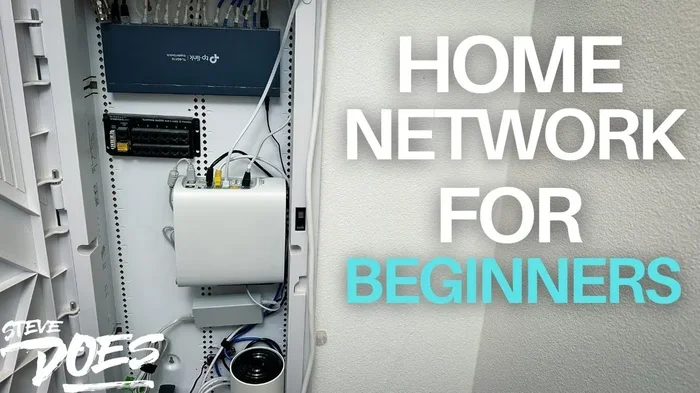
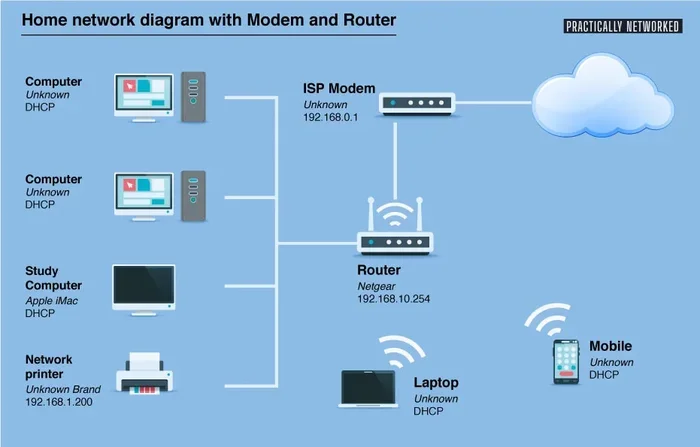
Before you start, you should understand that setting up your own ISP is not the same as setting up a home Wi-Fi network. A home network connects your devices to a modem or router that talks to an existing ISP. Being your own provider means you create or capture the connection that reaches the wider internet. That’s a different beast entirely.
Types of DIY Internet Connections
There are several ways you can build or access your own internet connection. Each method has different requirements, costs, and performance levels. Here’s a breakdown of the most common options:
Fixed Wireless Internet. This is one of the most popular DIY approaches. You install an antenna on your roof or property that picks up a wireless signal from a distant tower or another provider’s access point. Fixed wireless can deliver decent speeds if you have line-of-sight to a signal source. Many rural users rely on this method successfully.
Satellite Internet. Satellite-based connections let you access the internet from almost anywhere. You need a satellite dish and a modem. Companies like HughesNet and Starlink make this relatively easy. While Starlink is technically a commercial service, you own the equipment and manage the setup yourself. This is one of the simplest paths to self-managed internet.
Mesh Network Sharing. In some communities, neighbors pool resources to create a shared wireless network. One person connects to a commercial ISP and shares the signal through a mesh network setup. Everyone in the group gets access. This works best in close-knit neighborhoods where people trust each other.
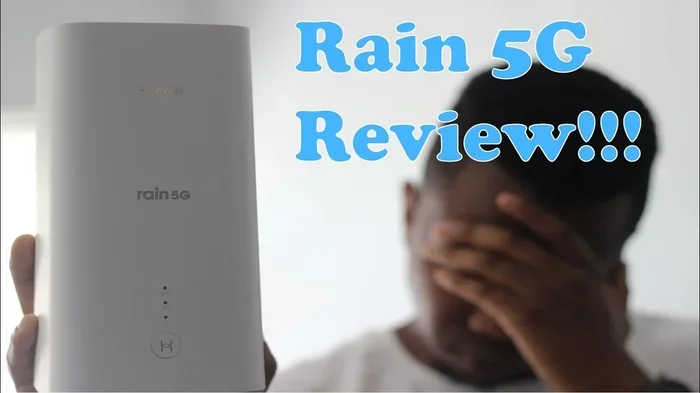
Cellular Hotspot or Fixed LTE/5G. You can use a cellular hotspot device or a fixed 4G/5G modem to pull internet from mobile networks. This works well in areas with strong cellular coverage. It’s not the fastest option, but it’s affordable and easy to set up.
Fiber or Cable Self-Installation. In rare cases, you can negotiate directly with a fiber or cable company to self-install service. Some providers allow this if you have the right equipment and technical knowledge. This is uncommon but worth exploring in your area.
What Equipment Do You Need?
Every DIY internet setup needs the right hardware. The exact equipment varies based on your chosen method, but there are some essentials that apply across the board. Let’s go through the key pieces of internet hardware you’ll likely need.
Antenna or Dish. For fixed wireless or satellite setups, you need a directional antenna or a satellite dish. These capture the signal from a distant source. The quality of your antenna directly impacts your connection speed and stability. Look for antennas rated for the frequency bands used by nearby towers.
Modem or Router. You need a device that translates the signal into something your computers and phones can use. Many modern routers include modem functions, but for some setups, you may need separate devices. Make sure your router supports the speeds and connection types you plan to use.
Cables and Connectors. Don’t overlook the basics. Coaxial cables, Ethernet cables, and power cables all play a role. High-quality cables reduce signal loss and improve performance. Keep your cable runs as short as possible for the best results.
Mounting Hardware. If you’re installing an outdoor antenna, you need proper mounting brackets, poles, and weatherproofing materials. Safety matters here. Make sure your setup can handle wind, rain, and sun exposure without degrading.
Network Switch or Access Point. If you’re sharing your connection with multiple devices or neighbors, you may need a network switch or additional access points. These help distribute the signal throughout your property or community network.
| Equipment | Best For | Approximate Cost |
|---|---|---|
| Directional Antenna | Fixed wireless setup | $50 – $300 |
| Satellite Dish + Modem | Satellite internet | $200 – $600 |
| Cellular Hotspot Device | Mobile/4G/5G internet | $100 – $400 |
| Mesh Wi-Fi System | Home or community sharing | $100 – $500 |
| Outdoor Router/Access Point | Long-distance wireless links | $80 – $250 |
| Cables and Mounting Kit | All setups | $30 – $100 |
Step-by-Step: How to Set Up Your Own Internet
Ready to get started? Setting up your own internet connection is a process you can follow step by step. Here’s a practical roadmap to guide you through it.
Step 1: Research Your Area. Before buying anything, study your location. What signal towers are nearby? What ISPs serve your area? Use tools like cell tower maps or wireless signal scanners to understand what’s available. This research saves you money and prevents frustration later.
Step 2: Choose Your Connection Type. Based on your research, pick the method that fits your needs best. Consider factors like speed requirements, budget, and technical comfort level. If you’re in a rural area, fixed wireless or satellite might be your best bet. In a suburban setting, cellular or mesh sharing could work well.
Step 3: Gather Your Equipment. Purchase the hardware you need. Buy from reputable brands and read reviews before committing. Make sure all your equipment is compatible with each other. Some antennas work only with specific frequency bands, so double-check the specs.
Step 4: Install the Antenna or Dish. Find the best location for your outdoor equipment. A higher mounting point usually gives better signal reception. Point your directional antenna toward the nearest signal tower. Use a signal strength meter or app to fine-tune the angle for maximum performance.
Step 5: Connect and Configure. Run your cables from the antenna to your modem or router. Power everything on and access your router’s settings page through a web browser. Configure the connection type, enter any required credentials, and set up your Wi-Fi network name and password.
Step 6: Test Your Connection. Run an internet speed test to check your download and upload speeds. Compare the results to what you expected. If speeds are lower than desired, try adjusting the antenna position or moving your router to a better location. Patience and small adjustments often make a big difference.
Step 7: Secure Your Network. Change default passwords on all your devices. Enable WPA3 encryption on your Wi-Fi network if available. Set up a firewall and keep your firmware updated. A secure network protects your data and prevents unauthorized users from leeching off your connection.
Quick Tips for a Smooth Setup
- Start with a signal strength app before buying equipment. It helps you choose the right antenna.
- Keep a log of your signal readings at different antenna positions. This helps you find the sweet spot.
- Use weatherproof cable connectors for any outdoor runs. Moisture can kill your signal over time.
- Document every step of your setup. You’ll thank yourself if you need to troubleshoot later.
- Join online forums or communities focused on DIY internet. Other enthusiasts share valuable tips and local insights.
Pros and Cons of Being Your Own ISP
Like any major project, becoming your own internet provider has advantages and disadvantages. Understanding both sides helps you make an informed decision. Let’s lay it all out clearly.
The Advantages
- Cost savings over time. After the initial equipment investment, your monthly costs drop significantly compared to commercial plans.
- Full control. You manage your own network, your own security, and your own uptime.
- No contracts or hidden fees. You’re free from the long-term commitments that trap many people with big ISPs.
- Privacy and data ownership. Your traffic doesn’t pass through a third-party company’s logging systems.
- Learning experience. You gain real technical skills that are valuable in today’s connected world.
- Customization. You can tailor your setup exactly to your needs, from speed to coverage area.
The Disadvantages
- Upfront costs. Quality equipment isn’t cheap. You might spend several hundred to several thousand dollars at the start.
- Technical knowledge required. You need to understand networking basics, signal propagation, and equipment configuration.
- Weather dependence. Wireless and satellite connections can degrade during heavy rain, snow, or storms.
- Legal gray areas. Some jurisdictions regulate who can broadcast wireless signals or operate as an ISP.
- No guaranteed support. When something breaks, you’re on your own. There’s no customer service hotline to call.
- Speed limitations. DIY setups rarely match the raw speeds of commercial fiber connections.
Common Mistakes to Avoid
Many people dive into DIY internet without proper planning, and they run into problems. Here are the most common mistakes you should avoid to set yourself up for success.
Skipping the research phase. Too many people buy equipment before understanding what’s available in their area. Always map your signal sources first. A $300 antenna won’t help if there’s no strong signal to capture.
Buying cheap equipment. Bargain-bin antennas and routers often disappoint. They may work initially but fail under load or in adverse weather. Invest in quality gear from trusted brands. Your internet equipment is the foundation of your entire setup.
Ignoring local regulations. Some areas have rules about outdoor antennas, satellite dishes, or wireless signal broadcasting. Check with your local government or homeowners association before installing anything. Fines or forced removals can waste your time and money.
Poor cable management. Exposed cables degrade faster and create signal loss. Use proper conduit, weatherproofing, and cable ties to keep everything neat and protected. This small effort pays off in long-term reliability.
Not planning for growth. Your needs might change over time. Choose equipment and setups that can scale. A router that works today might struggle if you add more devices or need higher speeds later.
Forgetting about backup options. What happens if your DIY connection goes down? Having a backup plan, like a cellular hotspot, keeps you connected during outages. Don’t put all your eggs in one basket.
Expert Tips for Long-Term Success
Building a reliable DIY internet setup takes more than just buying the right gear. Experienced users and networking professionals share these practical tips that make a real difference.
Invest in a signal meter. A handheld signal meter or a smartphone app that shows signal strength in real time is invaluable. It helps you position your antenna perfectly and troubleshoot issues fast. This small tool pays for itself many times over.
Keep firmware updated. Router and modem firmware updates often include performance improvements and security patches. Check for updates monthly and apply them promptly. Outdated firmware can cause slow speeds and security vulnerabilities.
Build relationships with neighbors. If you’re exploring mesh networking or community internet, strong relationships with neighbors make everything smoother. Communication, trust, and clear agreements prevent conflicts down the road.
Monitor your usage. Keep an eye on your data usage and connection quality over time. Tools like Nagios, PRTG, or even simple router dashboards help you spot patterns and catch problems early. Monitoring turns reactive troubleshooting into proactive maintenance.
Stay informed about local infrastructure. ISPs and tower operators sometimes upgrade their equipment or change frequencies. Stay connected to local tech communities and news sources so you can adapt your setup when needed. Being informed keeps your connection competitive and reliable.
Key Takeaways for Your DIY Journey
- Start small. Begin with a simple setup and expand as you gain confidence and knowledge.
- Document everything. Write down your configurations, signal readings, and troubleshooting steps.
- Be patient. Finding the perfect setup takes time and experimentation. Don’t get discouraged.
- Join communities. Online forums and local tech groups are goldmines of practical advice.
- Keep learning. Networking technology evolves constantly. Stay curious and keep updating your skills.
Conclusion
So, can I be my own internet provider? Yes, you absolutely can, and thousands of people already have. Whether you choose fixed wireless, satellite, cellular, or community mesh networking, the path to DIY internet service is open to anyone willing to learn and invest some effort. The key is understanding your options, choosing the right equipment, and planning carefully before you start.
Being your own internet provider isn’t just about saving money. It’s about taking control of your digital life. You decide how your connection works, who has access, and what level of service you receive. That sense of independence is powerful. Start with the steps outlined in this guide, take it one phase at a time, and don’t be afraid to ask for help from online communities along the way. Your journey to self-managed internet starts with a single step, and now you have the roadmap to take it.
Frequently Asked Questions
Can I really replace my commercial ISP with a DIY setup?
Yes, in many cases you can replace your commercial provider with a DIY internet setup. Fixed wireless, satellite, and cellular options can provide reliable connections. However, the feasibility depends on your location, signal availability, and your technical willingness to manage the setup yourself.
How much does it cost to become your own internet provider?
Costs range widely based on your chosen method. A basic cellular hotspot setup might cost $100 to $300 upfront. A fixed wireless setup with a quality antenna and router could run $300 to $800. Satellite setups like Starlink start around $600 for the equipment. These upfront costs often pay for themselves within months of canceled monthly bills.
Is it legal to be your own internet provider?
In most places, setting up your own internet connection for personal use is legal. However, broadcasting wireless signals on certain frequencies may require licenses or comply with specific regulations. Always check your local laws and FCC guidelines before setting up any outdoor transmitting equipment.
What internet speed can I expect from a DIY setup?
DIY speeds vary widely. Cellular hotspots typically offer 25 to 100 Mbps. Fixed wireless can deliver 50 to 200 Mbps depending on distance and signal quality. Satellite internet ranges from 25 Mbps to over 200 Mbps with newer services like Starlink. Your actual speeds depend on equipment quality, signal strength, and environmental factors.
Do I need technical skills to set up my own internet?
Basic technical skills help, but you don’t need to be an expert. Most modern equipment comes with setup wizards and detailed instructions. If you can set up a home Wi-Fi network today, you can likely handle a DIY internet setup with a bit of research and patience. Online tutorials and community forums fill in most knowledge gaps.
What’s the best DIY internet option for rural areas?
Fixed wireless and satellite are typically the best options for rural areas. Fixed wireless works well if you’re within range of a signal tower with clear line-of-sight. Satellite internet works almost anywhere with a clear view of the sky. Both options have improved dramatically in recent years and offer viable alternatives to traditional rural broadband.