Can You Hear The Difference Between Optical And HDMI
Many people wonder whether they can actually hear the difference between optical and HDMI audio connections. Both cables carry digital sound, but they differ in bandwidth, supported formats, and convenience. In most real-world listening scenarios, the average listener may not notice a huge gap. However, audiophiles and home theater enthusiasts often prefer HDMI for its ability to transmit uncompressed, high-resolution audio. This guide breaks down everything you need to know to make the right choice.
When you are setting up a home theater, soundbar, or stereo system, one question keeps popping up. Can you hear the difference between optical and HDMI? It sounds like a simple question, but the answer has more layers than most people expect. Both cables send digital audio from one device to another. Both are widely used. Both get the job done in most situations. But they are not exactly the same.
The difference between optical and HDMI comes down to bandwidth, audio formats, and convenience features. Optical cables use light to send data through a fiber strand. HDMI cables use a single cable to carry both video and audio in high resolution. Understanding these differences helps you pick the right connection for your needs. In this article, we will break everything down in plain language. No jargon. No fluff. Just clear, helpful info you can use right away.
Key Takeaways
- HDMI supports more audio formats: It can carry uncompressed, high-resolution audio that optical cables cannot.
- Optical cables are simpler and reliable: They work well for most everyday listening and surround sound setups.
- Most people cannot hear a big difference: Unless you have high-end audio gear and trained ears, the gap is often minimal.
- HDMI ARC and eARC add extra convenience: They allow two-way audio communication between devices and TVs.
- Your choice depends on your setup: Consider your devices, speakers, and listening habits before deciding.
- Both connections are widely available: Nearly all modern TVs, soundbars, and receivers support both options.
- Cable quality matters less than you think: A basic, certified cable from either type will perform well in most cases.
📑 Table of Contents
What Is Optical Audio?
How Optical Cables Work
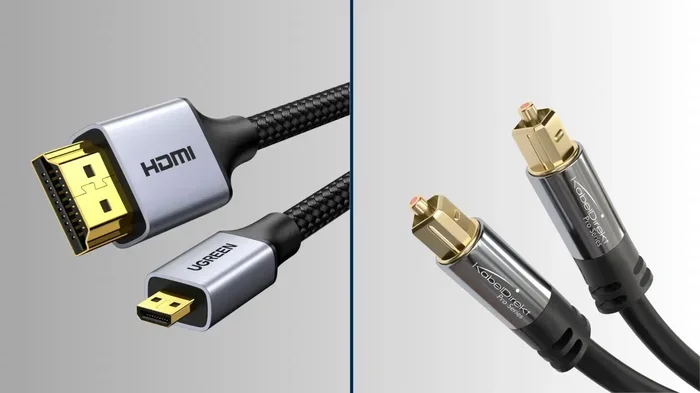
An optical audio cable, sometimes called a Toslink cable, uses light pulses to transmit audio signals. Inside the cable, there is a thin glass or plastic fiber. A light source at one end sends pulses through the fiber. A receiver at the other end reads those pulses and converts them back into sound. Because it uses light, the signal is not affected by electromagnetic interference. This makes optical cables very reliable in setups with lots of electronic devices nearby.
Optical cables have been around for a long time. They were a big step forward when they first appeared. Before optical, most audio connections were analog. You had RCA cables, coaxial connections, and other bulky options. The digital optical connection offered a cleaner, more stable signal. It became a standard feature on TVs, receivers, and soundbars throughout the 2000s and 2010s.
What Audio Formats Does Optical Support?
Optical cables support several common audio formats. These include Dolby Digital, DTS, and PCM. These formats cover most of what the average listener needs. Dolby Digital and DTS are the backbone of surround sound in movies and games. PCM is a basic uncompressed format used for stereo music.
However, optical cables have a limitation. They cannot carry newer, high-resolution audio formats. Formats like Dolby TrueHD, Dolby Atmos, and DTS-HD Master Audio require more bandwidth than optical can provide. This is where HDMI pulls ahead. If you want to experience the full range of modern audio formats, HDMI is the way to go.
What Is HDMI Audio?
How HDMI Carries Audio
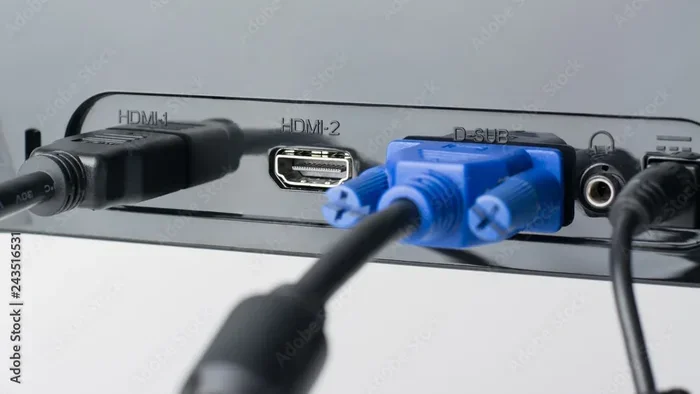
HDMI stands for High-Definition Multimedia Interface. It is a single cable that handles both video and audio. This is a huge advantage. Instead of running two or three cables from your streaming box to your TV and sound system, one HDMI cable does it all. It carries uncompressed video and multiple audio channels at the same time.
HDMI audio has evolved a lot over the years. Older HDMI versions supported basic formats like Dolby Digital and PCM. Newer versions, especially HDMI 2.0 and HDMI 2.1, can handle uncompressed high-resolution audio. This includes formats that optical simply cannot touch. If you are building a modern home theater, HDMI gives you the most flexibility.
Another big plus is HDMI ARC and eARC. ARC stands for Audio Return Channel. It lets your TV send audio back to your soundbar or receiver through the same HDMI cable. eARC, or Enhanced Audio Return Channel, does this with higher bandwidth and better format support. This feature is incredibly useful and makes setup much simpler. You can learn more about choosing the right cables and connections for your setup in our guide on alternatives to traditional cable setups that covers modern connectivity options.
HDMI Audio Formats Explained
HDMI supports a wide range of audio formats. Here are the most important ones:
- Dolby Digital: The standard surround format for most movies and TV shows.
- DTS: Another popular surround format with great sound quality.
- Dolby TrueHD: A lossless format used for Blu-ray and streaming content.
- Dolby Atmos: Object-based surround sound that creates a 3D audio experience.
- DTS-HD Master Audio: A lossless format that preserves every detail of the original recording.
- PCM and LPCM: Basic uncompressed formats for stereo and multi-channel audio.
- Multichannel AAC: A compressed format used by streaming services like Netflix and Spotify.
As you can see, HDMI covers a much wider range than optical. For the best audio experience, especially with modern content, HDMI is hard to beat.
Sound Quality Comparison
Can You Actually Hear a Difference?
This is the question everyone wants answered. Can you hear the difference between optical and HDMI in everyday listening? The honest answer is: it depends. For most people, in most rooms, with most equipment, the difference is very small or even nonexistent.
Here is why. If you are listening to Dolby Digital through optical, you get a perfectly good surround sound experience. The audio is compressed, yes, but the compression is designed to be transparent. Most listeners cannot tell the difference between Dolby Digital over optical and Dolby Digital over HDMI. The compression artifacts are subtle and rarely noticeable on standard speakers or soundbars.
Where things change is with high-resolution formats. If you are playing a Blu-ray with Dolby TrueHD or DTS-HD Master Audio, HDMI delivers that full-quality signal. Optical cannot carry these formats at all. Your receiver or soundbar would need to downconvert the audio, which means some quality is lost. But again, whether you can actually hear that loss depends on your equipment and your ears.
Uncompressed vs Compressed Audio
Understanding the difference between compressed and uncompressed audio helps clarify things. Compressed audio, like Dolby Digital over optical, removes some data to save space. Uncompressed audio, like Dolby TrueHD over HDMI, keeps all the original data intact. Think of it like a photo. A compressed photo looks fine on your phone. But if you zoom in on a large screen, you might see pixelation. Uncompressed is like a high-resolution photo. It holds more detail.
For casual listening, the compressed version is usually more than enough. For serious audiophiles, the uncompressed version matters more. The good news is that HDMI handles both, while optical only handles compressed formats.
Interestingly, the concept of digital versus analog signal transmission has evolved a lot over the decades. If you are curious about the broader history of digital versus analog technology, our article on 10 differences between analog and digital computers offers great context on how digital signals transformed the tech world.
Which Connection Should You Choose?
Best for Home Theater Setups
If you are building a home theater or a serious audio setup, HDMI is the clear winner. It supports the latest audio formats, carries both video and audio in one cable, and offers features like ARC and eARC. You get the best sound quality and the most convenience. For gaming, 4K Blu-ray, and streaming services that offer high-resolution audio, HDMI is the way to go.
Here are some quick tips for setting up HDMI audio in a home theater:
- Use an HDMI cable that supports the version you need. HDMI 2.0 or higher for high-resolution audio.
- Enable eARC on your TV if your soundbar or receiver supports it.
- Check your TV settings to make sure audio output is set to HDMI, not optical, when you want the best quality.
- Make sure your soundbar or receiver is set to the correct input mode.
Best for Casual Listening
If you just want to connect a TV to a basic soundbar or a pair of powered speakers, optical works great. It is simple. It is reliable. It does the job without any fuss. Many people have been using optical connections for years and have never had a problem. If you are not chasing the highest possible audio quality, optical is a perfectly fine choice.
There are also situations where optical makes more sense than HDMI. Some older TVs and audio devices only have optical outputs. Some soundbars only have optical inputs. In these cases, optical is your only option. And honestly, it works well. You do not need to upgrade your entire setup just because HDMI is newer.
Quick Comparison Table
| Feature | Optical | HDMI |
|---|---|---|
| Max Bandwidth | Lower | Higher |
| Uncompressed Audio | No | Yes |
| Dolby Atmos Support | No (via Dolby Digital Plus only) | Yes (via eARC) |
| Carries Video | No | Yes |
| ARC/eARC Support | No | Yes |
| Interference Resistance | High (light-based) | High (shielded) |
| Ease of Use | Very Simple | Simple |
| Common Availability | Very Common | Very Common |
Common Setup Mistakes To Avoid
Setting up audio connections seems straightforward, but people make mistakes all the time. Here are some common ones to watch out for.
Mistake 1: Using the wrong cable version. Not all HDMI cables are the same. An older HDMI 1.4 cable may not support eARC or high-resolution audio formats. Check your cable specifications before buying. A basic certified High Speed HDMI cable handles most needs, but for the best experience, look for Premium High Speed or Ultra High Speed cables.
Mistake 2: Ignoring TV audio settings. Many people plug in an HDMI cable and assume the audio will just work. But TVs often default to different audio output settings. Go into your TV menu and make sure the audio output is set correctly. If it is set to optical when you are using HDMI, you will not get the best sound.
Mistake 3: Using a damaged or low-quality cable. A cheap, poorly made cable can cause audio dropouts, static, or no sound at all. Buy cables from reputable brands or trusted sellers. You do not need to spend a fortune, but avoid the absolute cheapest options. A good quality cable ensures a clean, reliable signal.
Mistake 4: Not checking format compatibility. Your devices need to support the same audio formats for the best experience. If your TV outputs Dolby Atmos but your soundbar only supports Dolby Digital, you will not get the full effect. Check the specs of all your devices and match them up.
Expert Insights
Audio engineers and home theater installers often share the same advice. For most setups, the difference between optical and HDMI in day-to-day listening is minimal. The real differences show up with high-resolution content and advanced formats like Dolby Atmos. If you are watching a movie on a streaming service that supports Atmos over HDMI, you will notice the immersive sound. The same movie over optical will sound good but not quite as three-dimensional.
That said, many experts also point out that room acoustics, speaker placement, and source quality matter far more than the cable type. A well-set-up stereo system with a basic optical connection can sound better than a poorly configured HDMI setup. Focus on the big picture first. Get your speakers in the right place. Treat your room if possible. Then worry about the cable connection.
If you are on a budget, do not stress too much about which cable to use. Both optical and HDMI deliver excellent sound for the vast majority of content. The best cable is the one that works with your devices and fits your setup. Do not let cable confusion stop you from enjoying great audio today.
Final Verdict
So, can you hear the difference between optical and HDMI? In most cases, probably not. But the difference exists under the hood. HDMI carries more data, supports more formats, and offers more features. Optical is simpler, reliable, and perfectly adequate for everyday use.
If you want the best possible audio quality and have modern devices, go with HDMI. If you want a simple, dependable connection and do not need the latest formats, optical is a great choice. Both cables have their place. The right one depends on your specific needs and equipment.
Take a look at your current setup. Check what your TV, soundbar, or receiver supports. Make your choice based on that. And remember, the best audio setup is the one you actually use and enjoy. Do not overthink it. Just connect, sit back, and enjoy the sound.
Frequently Asked Questions
Is optical or HDMI better for soundbars?
HDMI is generally better for soundbars, especially if your TV and soundbar both support HDMI ARC or eARC. These features allow for better audio formats and simpler setup. However, if your soundbar only has an optical input, optical will work just fine for most content. The sound quality difference is minimal for everyday listening.
Can optical cables carry Dolby Atmos?
Standard optical cables cannot carry native Dolby Atmos. They can carry Dolby Digital Plus, which is a compressed version of Atmos. Some soundbars can decode this signal and deliver a basic Atmos-like experience. For full Dolby Atmos, you need an HDMI connection with eARC support.
Does cable length affect audio quality for optical or HDMI?
For most home setups, cable length does not noticeably affect audio quality. Optical signals can degrade over very long distances, but standard room lengths are not an issue. HDMI cables can also carry signals reliably up to about 50 feet. Beyond that, you may need an active repeater or a higher-quality cable.
Why does my HDMI audio sometimes not work?
Common reasons include incorrect TV audio settings, an outdated HDMI cable, or a mismatch in audio format support between devices. Try checking your TV audio output settings first. Make sure the HDMI cable is firmly connected. Also check that your soundbar or receiver is set to the correct HDMI input.
Is there a big price difference between optical and HDMI cables?
Not really. Both types of cables are affordable and widely available. A decent optical cable costs about the same as a decent HDMI cable. You do not need to spend a lot on either type. Focus on buying from a reputable brand and getting a certified cable.
Can I use both optical and HDMI at the same time?
Yes, you can connect both cables to your devices at the same time. However, your TV or soundbar will typically use one as the primary audio output. You may need to go into the settings and choose which input to use. Using both can be helpful as a backup if one connection fails.
=== CONCLUSION ===
The difference between optical and HDMI audio connections comes down to bandwidth, format support, and features. HDMI offers more, especially for modern home theater setups. Optical remains a solid, simple choice for everyday listening. Most people will be happy with either option. The key is to match your connection to your devices and your listening goals.
Take what you have learned here and apply it to your own setup. Check your cables. Check your settings. Make the choice that fits your needs best. Great audio does not require the most expensive cable. It requires the right connection for your situation. Now go enjoy your sound.