Can I Use My Usb Port As Audio Output Instead Of Headphone
Yes, you can absolutely use your USB port as audio output instead of a headphone jack. This method works by treating your USB connection as a digital audio source, bypassing your computer’s built-in sound card entirely. Whether your 3.5mm jack is broken, you want better sound quality, or your laptop lacks a headphone port, a USB audio adapter or USB DAC can solve the problem fast.
This is a comprehensive guide about Can I Use My Usb Port As Audio Output.
Key Takeaways
- USB ports can replace headphone jacks: You can use any USB port for audio playback with the right adapter or device.
- USB sound cards are affordable: A basic USB audio adapter costs under $15 and works instantly.
- Better audio quality is possible: External USB DACs deliver cleaner sound than most built-in sound cards.
- Driver setup is usually automatic: Modern operating systems recognize USB audio devices without extra software.
- USB-C and USB-A both work: The type of USB port does not limit your audio output options.
- Common issues are easy to fix: Most problems with USB audio come down to drivers or default settings.
[FEATURED_IMAGE_PLACEHOLDER]
Can I Use My USB Port As Audio Output?
If you have ever plugged in headphones and found that your headphone jack is not working, you are not alone. Many people face this exact problem every day. The good news is that you can use your USB port as audio output instead of relying on the traditional 3.5mm jack. It is simpler than most people think, and it opens up a whole world of better sound options.
Using a USB port for audio means your computer sends digital audio signals through the USB connection to an external device. That device then converts the signal into analog sound you can hear through your headphones or speakers. This process is called digital-to-analog conversion, and it happens inside a small adapter or a dedicated USB DAC.
In this guide, we will walk through everything you need to know. We will cover how it works, what you need to get started, and how to fix common issues. By the end, you will feel confident using your USB port as audio output for music, calls, gaming, and more.
How USB Audio Works Compared to a Headphone Jack
What Happens When You Plug In Headphones the Normal Way
A standard 3.5mm headphone jack uses an analog signal. Your computer’s built-in sound card handles the conversion from digital to analog. The signal then travels through the cable and into your headphones. This has been the standard for decades, and it works fine for most everyday tasks.
However, built-in sound cards have limitations. They can pick up electrical interference from other parts of your computer. This sometimes causes a buzzing or humming noise in your audio. The sound quality also depends heavily on the cheap components manufacturers use inside most laptops and desktops.
How USB Audio Output Changes the Game
When you use a USB audio output, the conversion happens outside your computer. A small device called a USB DAC or USB sound card receives the digital signal and does the conversion itself. This means your computer’s internal sound card is no longer involved.
The result is often cleaner, clearer audio. You get less background noise and interference. Many people notice a big difference in audio quality right away. This is why musicians, gamers, and audiophiles often prefer USB audio devices over built-in options.
USB Audio Class: Why It Just Works
Most modern USB audio devices use something called the USB Audio Class standard. This is a built-in protocol that your operating system understands natively. What this means for you is simple: plug in the device, and your computer recognizes it as an audio output option. You usually do not need to install any extra software.
This is one of the biggest advantages of using a USB port for audio. It is plug-and-play in most cases. Whether you are on Windows, Mac, or even Linux, the system handles the setup for you.
How to Use Your USB Port as Audio Output
Option 1: A Simple USB Audio Adapter
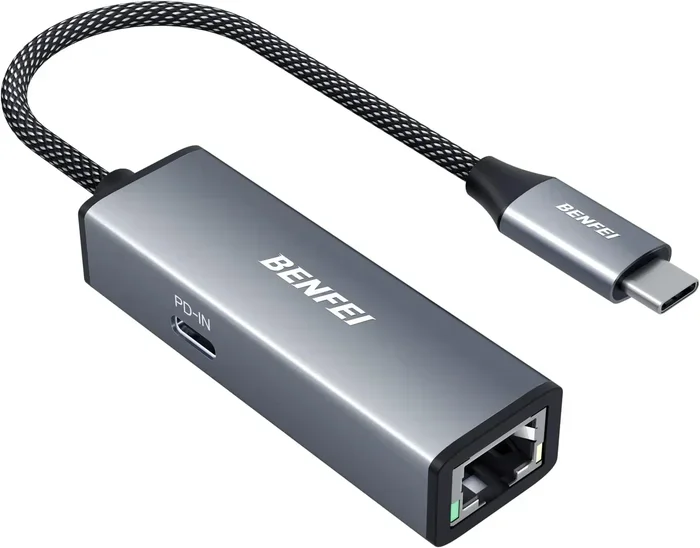
The easiest way to get audio from a USB port is with a basic USB audio adapter. These small devices plug right into any USB port. They usually have a standard 3.5mm output jack where you connect your headphones or speakers.
Here is what you need to do:
- Plug the USB audio adapter into an available port.
- Wait for your computer to recognize the device.
- Go to your sound settings and select the USB device as the default output.
- Plug your headphones into the adapter and enjoy your audio.
A basic USB audio adapter costs between $5 and $20. You can find them at any electronics store or online. They work great for everyday listening, video calls, and casual gaming.
Option 2: A USB DAC for Better Sound Quality
If you want a serious upgrade in sound quality, a USB DAC is the way to go. DAC stands for Digital-to-Analog Converter. These devices are built with higher-quality components that produce much better audio than a simple adapter.
USB DACs are popular with music lovers and professionals. They reduce distortion and deliver a more detailed soundstage. You can find entry-level models for around $30, and higher-end options go well beyond $100.
Using a USB DAC is just as easy as using an adapter. Plug it into your USB port, install any driver if needed, and select it as your output device. The difference in sound quality is noticeable immediately.
Option 3: USB-C Audio Devices
If your computer has USB-C ports, you have even more options. Many modern laptops no longer include a 3.5mm jack at all. In these cases, a USB-C audio device becomes essential rather than optional.
You can get USB-C adapters that include a headphone jack. You can also use dedicated USB-C DACs for premium audio. Some high-end headphones even come with USB-C cables built in, making the connection direct and simple.
Just make sure your USB-C port supports audio output. Most do, but some docking stations or hubs may need a separate audio profile. Check your device specifications if you run into issues.
USB Audio Adapters and DACs Worth Trying
Not all audio adapters are created equal. Some are great for basic needs, while others offer studio-quality sound. Here is a quick comparison of the most common types you will find.
| Type | Price Range | Best For | Audio Quality |
|---|---|---|---|
| Basic USB Audio Adapter | $5 – $20 | Everyday listening, calls | Good |
| Mid-Range USB DAC | $30 – $80 | Music enthusiasts, gaming | Very Good |
| Premium USB DAC | $100+ | Audiophiles, studio work | Excellent |
| USB-C to 3.5mm Adapter | $8 – $25 | Laptops without a jack | Good |
| External USB Sound Card | $20 – $60 | Gamers, streamers | Very Good |
For most people, a basic USB audio adapter or a mid-range USB DAC is all you need. You do not have to spend a lot of money to get great results. Start simple and upgrade later if you feel the need.
Quick Tips for Choosing the Right Device
- Check compatibility first: Make sure the adapter works with your operating system.
- Look for driver support: Some USB audio devices need specific drivers for full functionality.
- Read reviews: Other users often mention real-world audio quality and durability issues.
- Consider portability: If you travel often, a small and lightweight adapter is a smart choice.
- Go for a trusted brand: Brands like Sabrent, UGREEN, and Fiio offer reliable options at fair prices.
Common Problems and How to Fix Them
No Sound After Plugging In the USB Device
This is the most common issue people face with USB audio output. The device is plugged in, but nothing plays through it. The first thing to check is your default audio output settings. On Windows, right-click the speaker icon in your taskbar and select your USB device from the list. On Mac, go to System Settings and choose the USB device under Output.
If the device does not show up at all, try a different USB port. Some ports, especially those on USB hubs, may not provide enough power or proper data support for audio devices.
Audio Driver Issues
Sometimes your computer needs a driver to recognize the USB audio device properly. Most modern systems have the USB audio class driver built in. But on older systems or certain setups, you may need to update your audio drivers manually.
Visit your computer manufacturer’s website or the adapter manufacturer’s site to download the latest drivers. After installing, restart your computer and try again. This fixes the problem in most cases.
Buzzing or Static Noise
If you hear a buzzing sound when using a USB audio adapter, it is usually caused by electrical interference. This can happen when the adapter is plugged into a USB port that is too close to other internal components.
Try using a different USB port. If the noise persists, a USB DAC with better shielding can help reduce interference. Also, make sure your headphones or speakers are fully plugged into the adapter. A loose connection often causes crackling or static sounds.
USB Port Not Recognizing the Audio Device
On rare occasions, a USB port simply will not recognize the audio device. This can happen for several reasons. The port might be damaged. The device might need a firmware update. Or there could be a conflict with another USB device sharing the same controller.
Try unplugging other USB devices and see if the audio adapter gets recognized. You can also try restarting your computer with the adapter already plugged in. This forces the system to detect the device during boot-up.
Is USB Audio Better Than a Headphone Jack?
When USB Audio Wins
There are clear situations where using a USB port as audio output beats a traditional headphone jack. If your 3.5mm jack is damaged or missing entirely, a USB option is your best fix. If you care about sound quality and want cleaner audio with less interference, an external USB DAC is hard to beat.
Gamers also benefit from USB audio. Many gaming headsets come with USB connections because they include built-in sound processing. This gives you surround sound, equalizer controls, and microphone mixing all through one cable. The audio quality and features are usually far superior to what a basic headphone jack can offer.
When a Headphone Jack Still Makes Sense
That said, a 3.5mm jack is not obsolete. It is simple, universal, and requires no extra equipment. If you are traveling light and do not want to carry an adapter, the built-in jack is the most convenient option. It also works on virtually any device without any setup.
For casual listening at moderate volumes, a good built-in sound card still does the job well. The difference in sound quality may not be noticeable for background music or podcasts. It is really only when you push for high-fidelity audio that the advantages of USB audio output become clear.
The Bottom Line on Audio Quality
In terms of raw audio quality, a dedicated USB DAC almost always wins over a built-in sound card. The components inside a USB audio device are purpose-built for sound reproduction. They have better amplifiers, cleaner power supplies, and superior digital-to-analog conversion chips.
But the jump from a basic USB audio adapter to a premium USB DAC is where you really hear the difference. A $10 adapter is a huge improvement over a broken headphone jack. A $150 DAC is a massive step up from both. Your budget and your ears will decide what is right for you.
Expert Insights on USB Audio
Audio engineers often recommend external USB audio devices for anyone who spends significant time listening to music or creating content. The reason is straightforward: offloading the digital-to-analog conversion to a dedicated device reduces the electrical noise inside your computer. Cleaner signal path means better audio quality.
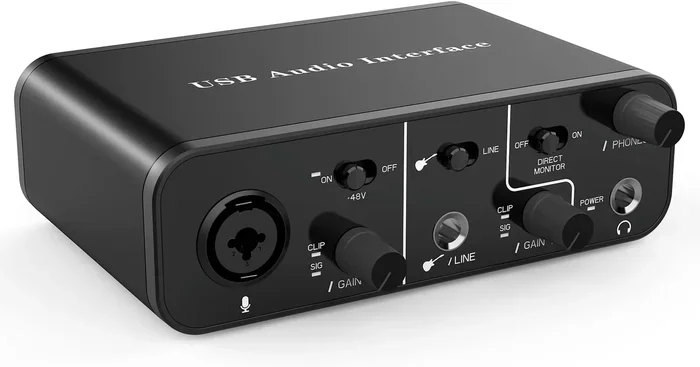
For content creators and musicians, an audio interface that connects via USB is essentially a must-have tool. These devices handle both audio input and output with professional-grade converters. They also provide low audio latency, which means there is almost no delay between the signal going in and coming out.
Even for regular users, investing in a quality USB sound card can extend the life of your favorite headphones. Good headphones deserve a clean audio source to perform their best. A USB audio adapter gives them exactly that.
Conclusion
So, can you use your USB port as audio output instead of a headphone jack? Absolutely yes. Whether you choose a simple USB audio adapter, a premium USB DAC, or a USB-C audio device, the process is straightforward and accessible to everyone.
The benefits are clear. You get a working audio solution when your 3.5mm jack fails. You can enjoy better audio quality with less interference. You gain flexibility in how and where you listen to sound. And the setup is almost always automatic, requiring no technical expertise.
Take a few minutes to explore your options. Pick an external sound card or USB audio device that fits your budget and needs. Once you make the switch, you may never go back to relying on your built-in headphone jack again. Your ears will thank you.
FAQs
Can I use any USB port for audio output?
Yes, most USB ports work for audio output. Whether you have a USB-A or USB-C port, you can connect an USB audio adapter or USB DAC and use it for sound. Just make sure the port is functional and provides enough power. Some older USB 2.0 ports may have slightly more latency, but they still work perfectly for audio playback.
Do I need to install drivers for a USB audio device?
In most cases, no. Modern operating systems like Windows 10 and 11, macOS, and Linux include the USB audio class driver by default. This means your device should work the moment you plug it in. However, some advanced USB DACs or gaming sound cards may require a specific driver for full features. Check the manufacturer’s website if your device is not recognized automatically.
Is USB audio better than a 3.5mm headphone jack?
It can be, depending on your setup. A dedicated USB DAC almost always produces better sound than a built-in sound card connected through a 3.5mm jack. The external device handles the digital-to-analog conversion with higher-quality components, resulting in cleaner audio with less noise. However, a basic USB audio adapter may not be dramatically better than a working headphone jack.
Can I use a USB audio adapter with my smartphone or tablet?
Yes, many Android devices support USB audio output through an OTG (On-The-Go) adapter. You can plug a USB audio adapter into the OTG cable and then connect your headphones. iPhones and iPads with USB-C ports also support this. However, some devices may require a specific app or driver to recognize the audio output over USB.
Why is there no sound even after selecting the USB device as output?
This is usually caused by a few common issues. First, check the volume on the USB device itself, as some adapters have their own volume control. Second, make sure the device is set as the default audio output in your system settings. Third, try a different USB port or a different USB cable. If none of these work, reinstalling the USB audio driver or testing the device on another computer can help isolate the problem.
Does using a USB port for audio add latency?
Most modern USB audio devices have very low latency, especially those using the USB Audio Class standard. For music listening and video watching, you will not notice any delay. However, some budget adapters or older USB 2.0 connections may introduce slight latency. If you are doing live audio work or gaming, choose a device specifically marketed for low latency and check user reviews before purchasing.
Frequently Asked Questions
What is Can I Use My Usb Port As Audio Output?
Can I Use My Usb Port As Audio Output is an important topic with many practical applications.