How Do I Connect My 3 5 Mm Jack to My Bluetooth Speaker
Connecting your 3 5 Mm jack to a Bluetooth speaker is easier than you think. Whether you want to stream music from an old device or upgrade your audio setup, this guide walks you through every method, from using a Bluetooth adapter to pairing devices wirelessly. You will learn what equipment you need, how to pair your devices, and how to fix common problems so you can enjoy wireless audio in minutes.
Have you ever wanted to play music from a device with a 3.5mm jack through a Bluetooth speaker but did not know where to start? You are not alone. Many people have older devices, portable music players, or audio equipment that only offers a wired audio output. The good news is that bridging that gap to wireless audio is simpler than most people think.
In this guide, we will walk you through every step of connecting your 3 5 Mm jack to a Bluetooth speaker. Whether you are at home, in the car, or setting up a backyard party, you will find practical solutions that work. We will cover the equipment you need, the pairing process, common problems, and expert tips to get the best sound quality. Let us dive in.
Key Takeaways
- Multiple methods exist: You can use a Bluetooth adapter, a 3.5mm to Bluetooth transmitter, or a smart device with built-in Bluetooth to connect your 3.5mm jack to a speaker.
- You need minimal equipment: A Bluetooth audio transmitter or adapter is the most common and affordable solution for this connection.
- Pairing is simple: Most Bluetooth speakers follow a straightforward pairing process that takes under a minute once your adapter is ready.
- Troubleshooting is easy: Most connection issues stem from distance, battery levels, or incorrect pairing mode, and we cover quick fixes for each.
- Audio quality matters: Using the right cable and keeping your devices close ensures the best sound output from your wireless speaker setup.
- Older devices can go wireless too: Even if your device only has a 3.5mm headphone jack, you can still enjoy Bluetooth connectivity with the right adapter.
📑 Table of Contents
- What Is a 3.5mm Jack and Why Connect It to a Bluetooth Speaker?
- What You Need Before You Start
- Step-by-Step Guide to Connecting Your 3.5mm Jack to a Bluetooth Speaker
- Troubleshooting Common Connection Problems
- Tips for Getting the Best Audio Quality
- Can You Use a 3.5mm Jack With Any Bluetooth Speaker?
- Final Thoughts on Connecting Your 3.5mm Jack to a Bluetooth Speaker
What Is a 3.5mm Jack and Why Connect It to a Bluetooth Speaker?
A 3.5mm jack is a small, round audio plug found on many devices. You probably recognize it as the standard headphone port on phones, laptops, and music players. It carries an analog audio signal from your device to headphones or speakers. For decades, this has been the most common way to deliver personal audio.
But here is the thing. Bluetooth speakers do not have a 3.5mm input jack in most cases. They receive audio wirelessly through Bluetooth connectivity. So how do you bridge the gap between a wired output and a wireless speaker? The answer is simple. You use an adapter or transmitter that converts the analog audio signal from your 3.5mm jack into a Bluetooth signal your speaker can understand.
This connection opens up a lot of possibilities. You can use your old portable music player with a modern portable speaker. You can set up a speaker in a room where running a cable is inconvenient. And you can enjoy wireless audio without buying a whole new device. That is the real power of knowing how to make this connection work.
Why Go Wireless with a 3.5mm Device?
There are several reasons you might want to connect a device with a 3.5mm jack to a Bluetooth speaker:
- Convenience: No cables to trip over or manage. You can place your speaker anywhere within Bluetooth range.
- Portability: Many Bluetooth speakers are small and battery-powered. You can take them to the beach, a picnic, or a camping trip.
- Multiple device support: A single Bluetooth speaker can connect to different devices throughout the day.
- Better sound: Many modern wireless speakers deliver richer, louder sound than the tiny built-in speakers on older devices.
- Shared listening: Instead of one person listening through headphones, everyone in the room can enjoy the music.
What You Need Before You Start
Before you begin, make sure you have the right equipment. The good news is that you do not need much. Here is a simple list of what you will need to connect speaker devices wirelessly:
Essential Equipment
- A device with a 3.5mm audio output: This could be a phone, MP3 player, laptop, or any device with a 3.5mm headphone jack.
- A Bluetooth speaker: Any wireless speaker that supports Bluetooth pairing will work.
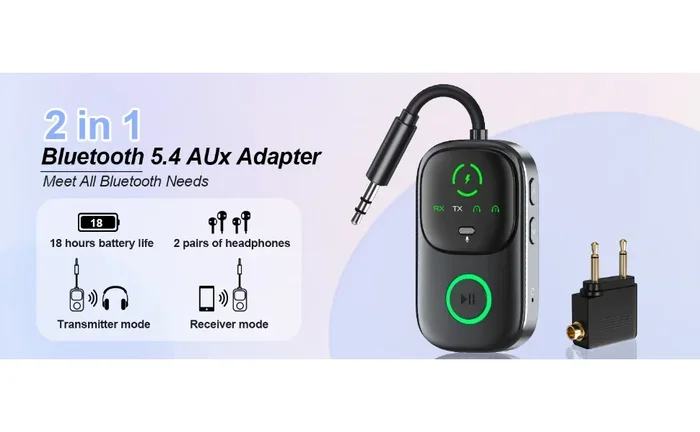
- A Bluetooth audio transmitter or adapter: This is the key piece of equipment. It plugs into your 3.5mm jack and sends the audio signal wirelessly to your speaker.
- A charging cable or batteries: Make sure both your speaker and transmitter are powered on and ready.
Optional but Helpful Extras
- A 3.5mm audio cable: Some Bluetooth transmitters come with one included, but having a spare cable is always helpful.
- A USB power bank: If you are setting up outdoors, a portable power source keeps everything running.
- A phone or tablet as a bridge: If your device does not have Bluetooth but your phone does, you can sometimes use your phone as an intermediate device.
If you are wondering about converting a 3.5mm connection to other types, check out our guide on Can I Convert 3 5 Mm To USB for more options.
Step-by-Step Guide to Connecting Your 3.5mm Jack to a Bluetooth Speaker
Now that you have everything ready, let us walk through the actual connection process. Follow these steps carefully and you will be listening to your favorite music in no time.
Step 1: Charge Everything
Before you do anything else, make sure your Bluetooth speaker and your Bluetooth audio transmitter are fully charged or have fresh batteries. A low battery can cause connection drops or weak audio. Plug in your devices and wait at least 30 minutes if needed.
Step 2: Plug the Transmitter into Your Device
Take your 3.5mm to Bluetooth adapter and plug it into the audio output jack on your device. It should fit snugly into the port. If your device has a 3.5mm audio output and a microphone port combined into one jack (called a TRRS jack), make sure you are using the correct adapter. Using the wrong one can result in no sound or very low volume.
Step 3: Turn on the Bluetooth Speaker
Power on your wireless speaker and set it to Bluetooth pairing mode. Most speakers have a dedicated Bluetooth button or a flashing light that indicates they are ready to pair. Check your speaker’s manual if you are not sure how to activate pairing mode.
Step 4: Pair the Devices
On your Bluetooth transmitter, look for a pairing button or switch. Press it and wait for the transmitter to search for nearby Bluetooth devices. Your speaker should appear on the transmitter’s display or indicator. Select your speaker to complete the pairing. You will usually hear a confirmation tone or see a steady light.
Step 5: Test the Connection
Play some music on your device. The audio should stream wirelessly to your Bluetooth speaker. If you hear sound, congratulations! You have successfully set up your wireless connection. If not, do not worry. We will cover troubleshooting in the next section.
Quick Tips for Smooth Pairing
- Keep your devices within 3 to 5 feet of each other during the initial pairing process.
- Turn off other Bluetooth devices nearby that might interfere with the connection.
- Restart both devices if pairing does not work on the first try.
- Make sure your speaker is not already connected to another device from a previous use.
If you are also interested in using speakers with other devices, you might find our article on Can I Plug Speakers Into My Laptop helpful for understanding general speaker connectivity.
Troubleshooting Common Connection Problems
Even with the best equipment, things do not always go smoothly. Here are the most common issues you might face when trying to connect your 3 5 Mm jack to a Bluetooth speaker and how to fix them.
No Sound at All
If you do not hear any audio, start with the basics. Check that both devices are powered on. Make sure the volume is turned up on both your source device and the speaker. Verify that the transmitter is properly plugged into the 3.5mm audio output and not the microphone input. Sometimes a loose connection is all it takes to fix the problem.
Bluetooth Pairing Fails
If your devices will not pair, try these steps:
- Turn off Bluetooth on both devices and turn them back on.
- Remove the speaker from your transmitter’s list of saved devices and try pairing again.
- Move the devices closer together to rule out Bluetooth range issues.
- Check if your speaker is connected to a different device. Some speakers remember previous pairings and auto-connect.
Poor Audio Quality or Interference
If your music sounds crackly or cuts out, the issue is likely interference or distance. Move closer to the speaker. Avoid placing the transmitter near Wi-Fi routers, microwaves, or other electronic devices that operate on the same 2.4 GHz frequency. If you are in a crowded area with many Bluetooth devices, that can also cause problems.
For older audio devices, you might also consider making them Bluetooth capable. Our guide on Can I Make My Old Bose Wave Radio Bluetooth covers similar concepts for retrofitting wireless capability to older audio equipment.
Speaker Disconnects Frequently
If your connection keeps dropping, your transmitter or speaker battery may be low. Charge both devices fully and try again. Also, make sure you are not too far from the speaker. Most Bluetooth audio transmitters have a range of about 30 to 50 feet, but walls and obstacles can reduce that distance significantly.
Tips for Getting the Best Audio Quality
Once your connection is working, you will want to make sure you are getting the best possible sound. Here are some expert tips to improve your wireless audio experience.
Use a Quality Bluetooth Transmitter
Not all Bluetooth transmitters are created equal. Cheaper models may compress the audio signal, resulting in lower quality sound. Look for transmitters that support Bluetooth 5.0 or higher, as these offer better range and audio fidelity. Some premium transmitters also support aptX or LDAC codecs, which deliver near-lossless audio quality over Bluetooth connectivity.
Keep Your Devices Close
The closer your transmitter is to your speaker, the stronger the signal and the better the sound. Try to keep them in the same room or within line of sight. Walls, furniture, and other obstacles weaken the wireless signal and can degrade audio quality.
Minimize Background Interference
Other wireless devices can interfere with your Bluetooth audio signal. If you notice poor quality, try turning off nearby Wi-Fi devices or moving your setup to a less crowded area. A clean signal path means clearer sound.
Adjust EQ Settings on Your Device
Many phones and music apps have built-in equalizer settings. Experiment with these to get the best sound for your speaker and listening environment. Boosting the bass slightly can make a big difference on smaller portable speakers.
Consider Your Cable Quality
The audio cable you use between your device and the transmitter matters. A cheap or damaged cable can introduce static or reduce volume. Use a well-shielded aux cable with gold-plated connectors for the cleanest audio signal possible.
For those who enjoy analog audio sources like vinyl records, you might be interested in how to stream that through Bluetooth. Check out our article on Can I Play My Record Player Through Bluetooth for more on bridging analog and wireless audio.
Can You Use a 3.5mm Jack With Any Bluetooth Speaker?
The short answer is yes. Most Bluetooth speakers can receive audio from any source that transmits a Bluetooth signal. As long as you have a Bluetooth transmitter that connects to your 3.5mm jack, you can pair it with virtually any wireless speaker on the market.
However, there are a few things to keep in mind. Some older Bluetooth speakers only support older Bluetooth versions, which may limit range and audio quality. Very cheap speakers may also have lower-quality built-in amplifiers that do not fully showcase the potential of your audio source. That said, for most everyday listening situations, any Bluetooth speaker will work fine with a 3.5mm transmitter setup.
If you are looking to extend your Wi-Fi or Bluetooth range for better coverage, our guide on How Can I Extend My Wifi Range With Wired Connection offers additional strategies for improving your wireless setup at home.
Final Thoughts on Connecting Your 3.5mm Jack to a Bluetooth Speaker
Connecting a device with a 3 5 Mm jack to a Bluetooth speaker is one of the simplest and most satisfying upgrades you can make to your audio setup. You do not need expensive equipment or technical expertise. A basic Bluetooth transmitter, a 3.5mm audio cable, and your wireless speaker are all it takes.
We have covered everything from the equipment you need to the step-by-step pairing process. We have also shared troubleshooting tips and audio quality tricks to help you get the most out of your setup. Whether you are reviving an old music player or setting up a speaker for a casual gathering, this connection method gives you the freedom of wireless audio without replacing your favorite devices.
The key takeaway is this: wireless does not have to mean complicated. With the right adapter and a few simple steps, you can stream music from any device with a 3.5mm output straight to your Bluetooth speaker. So go ahead, give it a try, and enjoy the freedom of wireless sound.