Do Aux To Bluetooth Adapters Work And Should You Buy One
Aux to Bluetooth adapters are simple, affordable devices that let you stream wireless audio from your phone to any system with a standard 3.5mm jack. They work by receiving a Bluetooth signal and converting it into an analog audio output. Most adapters deliver solid sound quality for music, podcasts, and hands-free calls. If you have an older car stereo, speaker, or home audio setup, an aux to Bluetooth adapter is one of the easiest upgrades you can make.
Have you ever been stuck in your car, staring at an old stereo that only has a tape deck or a dusty aux port? Or maybe you just bought a great pair of wired speakers but your phone has no headphone jack anymore. The frustration is real. That is where an aux to Bluetooth adapter comes in. These little gadgets promise to make any audio device wireless. But do they actually work? And should you spend your money on one?
The short answer is yes. Aux to Bluetooth adapters work surprisingly well for most everyday situations. They take the Bluetooth signal from your phone, tablet, or laptop and turn it into an analog audio signal that any device with a 3.5mm input can understand. Think of them as a simple bridge between your wireless world and your older audio gear. In this article, we will break down exactly how they work, what to expect, and whether one is right for you.
Key Takeaways
- Aux to Bluetooth adapters work reliably: They convert Bluetooth signals into audio you can hear through any aux-in device.
- They are easy to set up: Most adapters pair in under a minute with no extra software or apps needed.
- Sound quality is good enough for most uses: You will notice the difference compared to high-end wired systems, but for everyday listening, the quality is more than acceptable.
- Battery life varies: Some adapters last 8+ hours on a single charge, while others need frequent recharging.
- They are affordable: You can get a reliable adapter for under $30, making them a budget-friendly upgrade.
- They solve a real problem: If your car, speaker, or home system lacks Bluetooth, an adapter is the cheapest fix.
📑 Table of Contents
- What Exactly Is an Aux to Bluetooth Adapter?
- How Do Aux to Bluetooth Adapters Work?
- Benefits of Using an Aux to Bluetooth Adapter
- Common Problems and How to Fix Them
- How to Choose the Right Aux to Bluetooth Adapter
- Should You Buy an Aux to Bluetooth Adapter?
- Final Thoughts on Aux to Bluetooth Adapters
What Exactly Is an Aux to Bluetooth Adapter?
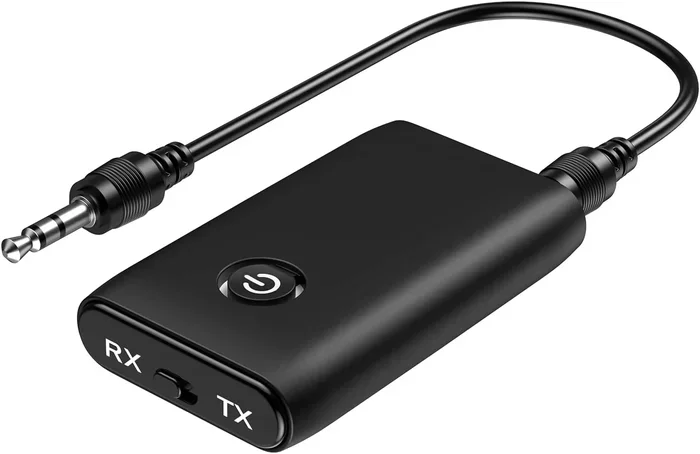
An aux to Bluetooth adapter is a small device that receives Bluetooth audio from your phone and sends it out through a standard aux cable. It has two sides. One side connects to your audio source using a Bluetooth connection. The other side plugs into your speaker, car stereo, headphones, or any device with a 3.5mm audio input.
These adapters come in two main types:
- Bluetooth receivers: These plug into the aux port of your device. They accept the wireless signal and play the audio through your speakers or stereo.
- Bluetooth transmitters: These plug into the aux output of your device. They send audio wirelessly to Bluetooth headphones or speakers.
For most people looking to add wireless capability to an older system, a Bluetooth receiver is the right choice. It is simple, plug-and-play, and does exactly what you need.
How Do Aux to Bluetooth Adapters Work?
The technology behind these adapters is simpler than you might think. Here is a step-by-step look at how the process works.
Step 1: Pairing
First, you power on the adapter and put it into pairing mode. Your phone detects it as a new Bluetooth device. You tap to connect. Most adapters use Bluetooth version 4.0 or higher, which means the pairing process is fast and stable.
Step 2: Signal Transmission
Once paired, your phone sends the audio signal wirelessly through the air. The adapter receives this signal using its built-in Bluetooth antenna. The range is typically around 30 feet, which is plenty for most uses.
Step 3: Digital-to-Analog Conversion
This is the key step. The adapter takes the digital Bluetooth signal and converts it into an analog audio signal. It then sends this signal out through the aux cable to your speaker, car stereo, or headphones. The conversion happens in real time, so there is virtually no delay.
Step 4: Audio Output
Your device plays the audio through its speakers or headphone jack. That is it. No apps, no cables between your phone and the adapter, no fuss. Just wireless audio from your phone to any aux-enabled device.
Benefits of Using an Aux to Bluetooth Adapter
There are many reasons people choose to use an aux to Bluetooth adapter. Here are the biggest benefits:
Wireless Freedom
The most obvious benefit is freedom from cables. Once paired, your phone can sit in your pocket or on the dashboard while audio plays through your speakers. No more stretching a cable across the car console or tripping over wires on the desk.
Works with Older Devices
Many cars, speakers, and home audio systems still rely on aux inputs. If your device does not have Bluetooth built in, an adapter gives it that capability without needing a full replacement. This is a huge cost saver.
Easy to Use
These adapters are designed for simplicity. No technical skills required. Plug it in, pair your device, and play. Even if you are not tech-savvy, you can set one up in minutes.
Hands-Free Calling
Most adapters include a built-in microphone. This means you can take phone calls through your car stereo or speakers without holding your phone. It is a safer and more convenient option for drivers.
Portable and Compact
Most adapters are small enough to fit in your glove box, desk drawer, or bag. You can move them between devices easily. Some even come with a USB charging port so you can charge your phone while streaming audio.
Common Problems and How to Fix Them
While aux to Bluetooth adapters work well overall, they are not perfect. Here are some common issues and quick fixes.
Audio Lag or Delay
Some users notice a slight delay between the video on their phone and the audio coming through the adapter. This is called latency. It happens because Bluetooth takes a tiny bit longer to transmit the signal than a direct cable would.
Quick fix: Look for adapters that support aptX or aptX Low Latency codecs. These reduce delay significantly. For music, the lag is usually unnoticeable. For watching videos, a low-latency adapter makes a big difference.
Connection Drops
Sometimes the Bluetooth connection drops, especially if you move too far from the adapter or if there are walls in the way.
Quick fix: Keep your phone within 30 feet of the adapter. Avoid placing the adapter near microwaves or Wi-Fi routers, as these can interfere with the Bluetooth signal. Re-pairing the device usually fixes the issue quickly.
Poor Sound Quality
If your audio sounds crackly or muffled, the problem is usually the aux cable or the adapter itself.
Quick fix: Try a higher-quality aux cable. Make sure the cable is not damaged or frayed. Also check that the adapter is fully charged, as low battery can affect audio output.
Difficulty Pairing
Sometimes your phone will not find the adapter during the pairing process.
Quick fix: Turn Bluetooth off and back on. Reset the adapter by holding the power button for 10 seconds. Make sure the adapter is in pairing mode. Also check that your phone’s Bluetooth is not already connected to another device.
How to Choose the Right Aux to Bluetooth Adapter
Not all adapters are created equal. Here is what to look for before you buy.
Bluetooth Version
Go for an adapter with Bluetooth 4.0 or higher. Bluetooth 5.0 is even better because it offers a longer range and more stable connection. The Bluetooth version directly affects how well the adapter performs.
Codec Support
Codecs determine how audio is compressed and sent over Bluetooth. Look for adapters that support aptX or AAC codecs. These deliver better sound quality than the standard SBC codec. If sound quality matters to you, this is a key feature.
Battery Life
Battery life varies widely. Some adapters last only 4 to 5 hours, while others can go 10 hours or more on a single charge. If you use the adapter daily for long commutes or road trips, choose one with a longer battery life.
Build Quality
Look for an adapter with a solid build. Metal housings tend to last longer than plastic ones. A good adapter should feel sturdy and reliable, not flimsy or cheap.
Extra Features
Some adapters come with useful extras like a USB charging port, an LCD display, or a built-in microphone. These are nice to have but not essential. Focus on the core features first.
Price
You can find decent adapters for as low as $10 to $15. Higher-end models with better codecs and longer battery life cost between $25 and $50. You do not need to spend a lot to get a reliable product.
Should You Buy an Aux to Bluetooth Adapter?
After all of this, the big question remains: should you buy one? The answer depends on your situation.
If you have an older car stereo without Bluetooth, an adapter is a no-brainer. It costs less than replacing your entire stereo system. You get wireless streaming in minutes. If you have wired speakers at home that you want to use with your phone, the same logic applies.
On the other hand, if your devices already have Bluetooth built in, an adapter is not necessary. You would be spending money on something you do not need.
Here is a quick comparison to help you decide:
- Buy an adapter if: Your car, speaker, or audio device has an aux port but no Bluetooth. You want a quick, affordable wireless upgrade.
- Skip the adapter if: Your device already has Bluetooth. You are planning to replace your audio system soon anyway.
One thing worth noting is that these adapters are not just for cars. People use them with home speakers, portable Bluetooth speakers that have an aux input, gaming setups, and even office speakers. The versatility is one of the biggest selling points.
If you are curious about other wireless audio solutions, you might also want to explore how baby monitors use Wi-Fi and Bluetooth connectivity to stream audio wirelessly. The underlying technology is similar, and understanding how wireless audio works in different devices can help you make better choices.
Also, if you are looking to cut costs on monthly subscriptions and use wireless streaming instead of cable, check out alternatives to Dish Network and DirecTV for ways to save money while still enjoying great content.
Final Thoughts on Aux to Bluetooth Adapters
Aux to Bluetooth adapters work and they work well. They are simple, affordable, and solve a real problem for millions of people who still use older audio devices. Whether you want to stream music in your car, connect your phone to home speakers, or take hands-free calls, an adapter gets the job done.
The technology has come a long way. Modern adapters offer solid sound quality, stable connections, and long battery life. You do not need to spend a fortune to get a great one. A $20 adapter can transform your listening experience in just a few minutes.
If your device has an aux port but lacks Bluetooth, there is no reason not to grab one. It is one of the smallest, cheapest upgrades that makes the biggest difference in daily convenience. Pick up an aux to Bluetooth adapter today and start enjoying wireless audio the easy way.
Frequently Asked Questions
Do aux to Bluetooth adapters work with all devices?
Yes, they work with any device that has a 3.5mm aux input. This includes car stereos, home speakers, headphones with a wired connection, and portable audio systems. As long as the device has an aux port, the adapter will work with it.
Is the audio quality good enough for music?
For most everyday listening, the audio quality is very good. You will notice a slight difference compared to a premium wired connection, but for casual music listening, podcasts, and calls, the quality is more than sufficient. Adapters with aptX codec support deliver even better sound.
How far can I move away from the adapter?
Most adapters have a range of about 30 feet. This means you can keep your phone in your pocket, bag, or on the dashboard without losing the connection. Obstacles like walls can reduce the range slightly.
Do aux to Bluetooth adapters work for phone calls?
Yes, most adapters come with a built-in microphone. This allows you to take and make phone calls through your car stereo or speakers. It is a convenient and hands-free option, especially while driving.
How long does the battery last on an adapter?
Battery life varies by model. Most adapters last between 5 and 10 hours on a single charge. Some high-capacity models can go even longer. Charging usually takes about 1 to 2 hours using a standard USB cable.
Can I use an aux to Bluetooth adapter with multiple devices?
Yes, most adapters can remember multiple paired devices. You can switch between your phone, tablet, and laptop easily. Just make sure to disconnect one device before connecting another for the smoothest experience.
=== CONCLUSION ===
Aux to Bluetooth adapters work reliably and affordably. They bridge the gap between your wireless devices and older audio equipment with ease. Whether you are upgrading your car stereo, connecting home speakers, or just wanting hands-free convenience, a simple adapter solves the problem in minutes. They are easy to set up, cost very little, and deliver solid performance for everyday use. If your device has an aux port but no Bluetooth, there is no reason to hesitate. Grab an aux to Bluetooth adapter and start enjoying wireless audio today.