Can I Play Music Through A Usb C And Get Great Sound
Yes, you can absolutely play music through a USB C port and get great sound. Whether you use a DAC adapter, USB C earbuds, or a direct connection, USB C audio offers high-quality playback for phones, laptops, and tablets. This guide shows you every method, device, and tip you need to know.
Music is a big part of daily life. You listen while you commute, cook, work, or just relax. But here is the thing. Many newer devices have dropped the classic 3.5mm headphone jack. Instead, they use a USB C port. So the question comes up fast. Can I play music through a USB C port and still get great sound? The short answer is yes. The longer answer is even better. USB C audio has opened up a whole new world of music playback. It offers better quality, more options, and more flexibility than ever before. In this guide, we will walk you through everything you need to know. We will cover how USB C audio works, what gear you need, which devices support it, and how to get the best sound possible. Let us dive in.
You might be wondering why USB C has become the go-to port for audio. The truth is simple. USB C is small, fast, and versatile. It can carry power, data, and audio signals all at once. This makes it perfect for modern gadgets. Whether you have an Android phone, a MacBook, or a Windows laptop, there is a good chance it uses USB C. And the audio capabilities are impressive. With the right setup, USB C music sounds clean, detailed, and rich. You do not have to settle for cheap earbuds or deal with cable tangles. USB C gives you choices. Let us explore those choices together.
Key Takeaways
- USB C audio works on most modern devices: phones, laptops, and tablets all support USB C music playback.
- A USB C DAC adapter greatly improves sound quality: it converts digital signals to analog for richer, clearer audio.
- You can connect USB C earbuds, speakers, and headphones directly: no extra gear is always needed.
- USB C to AUX cables are a simple and cheap option: they let you use old headphones with new devices.
- Bluetooth USB C adapters add wireless freedom: great for car stereos and desktop setups.
- USB C audio quality can match or beat traditional jacks: digital connections reduce noise and interference.
📑 Table of Contents
- What Is USB C Audio and How Does It Work?
- How to Play Music Through USB C (Step by Step)
- Best Devices and Gear for USB C Music
- USB C Sound Quality — Is It as Good as a Headphone Jack?
- Common Problems and How to Fix Them
- USB C Music for Different Devices
- Expert Insights: Getting the Most Out of USB C Audio
- Conclusion
What Is USB C Audio and How Does It Work?
USB C audio is simply sound that travels through a USB C connection instead of a traditional headphone jack. The USB C port sends digital audio signals from your device to your headphones, speakers, or external DAC. A DAC, or digital-to-analog converter, turns those digital signals into analog sound that your ears can hear. Some devices have a built-in DAC. Others need an external one for the best results.
Here is how it works in plain terms. Your phone or laptop stores music as digital data. When you hit play, that data travels through the USB C cable. It reaches either a built-in chip or an external DAC. That chip converts the data into an electrical signal. The signal then flows to your headphones or speakers. And out comes the music. It is fast, clean, and surprisingly simple.
USB C Digital Audio vs. Analog Audio
There are two main types of audio signals. Digital and analog. A traditional headphone jack outputs analog sound. The DAC is already built into your device. USB C audio often stays digital until it reaches an external DAC. This gives you more control over sound quality. External DACs are usually better than the tiny chips inside phones. They reduce noise and deliver a clearer, more detailed sound.
Think of it this way. A built-in DAC is like a small kitchen. It can cook a good meal. But a dedicated external DAC is like a professional kitchen. The ingredients are the same. The result is just much better. If you care about sound quality, an external USB C DAC is worth considering.
USB C Audio Protocols You Should Know
Your device uses specific protocols to send audio over USB C. The most common ones are USB Audio Class (UAC) 1.0 and 2.0. These protocols define how audio data moves through the connection. Most modern devices support UAC 2.0. This means higher quality audio and lower latency. You do not need to know the technical details. Just make sure your gear supports these standards. Most USB C audio products on the market today do.
How to Play Music Through USB C (Step by Step)
Playing music through USB C is easier than you might think. There are several methods, and each one works great for different situations. Let us walk through them one by one.
Method 1: Use USB C Earbuds or Headphones Directly
The simplest way to listen to music is to plug USB C earbuds or headphones straight into your device. Many companies now make USB C headphones. Brands like Samsung, Apple, and Google offer great options. These headphones have a built-in DAC right inside the cable or the earpiece. You just plug them in and play. No extra gear needed.
This method works well for everyday listening. Commuting, working out, or relaxing at home. The sound quality is good. It is not the absolute best, but it is more than enough for most people. If you want convenience and simplicity, USB C earbuds are the way to go.
Method 2: Use a USB C to AUX Cable
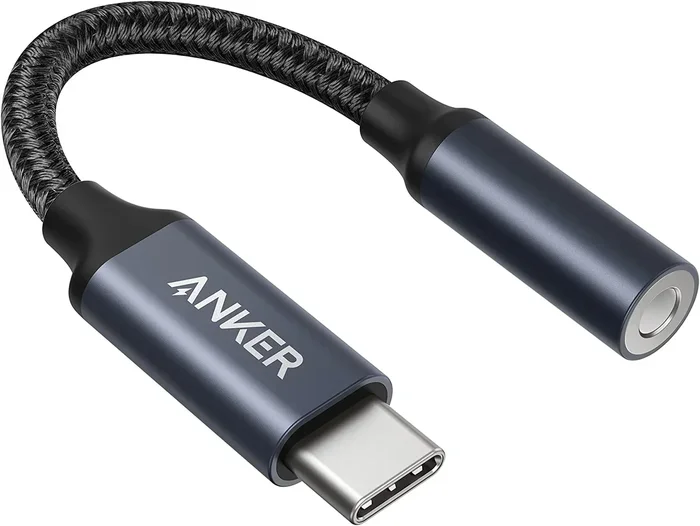
Do you have a favorite pair of 3.5mm headphones that you love? You do not have to throw them away. A USB C to AUX cable lets you connect your old headphones to a USB C device. The cable has a USB C plug on one end and a standard headphone jack on the other. Inside the cable is a small DAC that does the conversion for you.
These cables are affordable. You can find them for under fifteen dollars. They are a great budget option. Just keep in mind that the sound quality depends on the DAC inside the cable. Cheap cables may not sound as good. Look for well-known brands with good reviews. A quality USB C to AUX cable can still deliver solid audio.
Method 3: Use a USB C DAC Adapter
This is the best method for serious music lovers. A USB C DAC adapter plugs into your device. Then you connect your headphones or speakers to the adapter. The DAC handles all the audio conversion. The result is noticeably better sound. More detail, more bass, and less noise.
Popular options include the Fiio KA11, the Apple USB C to 3.5mm Headphone Jack Adapter, and the Creative Sound Blaster Audigy FX. These adapters range in price from twenty to over a hundred dollars. The more you spend, the better the sound usually gets. But even a budget DAC can make a big difference over built-in audio.
Method 4: Use a USB C Bluetooth Adapter
Not a fan of wires? You can use a USB C Bluetooth adapter. This small dongle plugs into your device and sends audio wirelessly to your Bluetooth headphones or speakers. It is perfect for cars, desktops, or any situation where cables get in the way.
Most USB C Bluetooth adapters support aptX or LDAC codecs. These codecs deliver high-quality wireless audio. You get near-lossless sound without any cables. It is a great option if you want freedom and flexibility. Just make sure your headphones support the same codec for the best results.
Method 5: Use a USB C Hub with Audio Output
If you use a USB C hub, many of them include an audio jack. This lets you plug in regular headphones while still using the hub for charging and data. It is a neat all-in-one solution. You get music, power, and data connections all through one port. USB C hubs are especially useful for laptops and tablets.
Best Devices and Gear for USB C Music
Not all USB C audio gear is created equal. Some products deliver amazing sound, while others are just okay. Here are some of the best options across different categories.
USB C DAC Adapters
- Fiio KA11: A compact and affordable DAC amp. Great for USB C Android phones and laptops.
- Apple USB C to 3.5mm Adapter: Simple and reliable. Works perfectly with iPhones and iPads.
- Creative Sound Blaster Audigy FX: A desktop USB C DAC with powerful audio processing.
- Qudelix 5K: A premium portable DAC. Delivers audiophile-quality sound on the go.
USB C Earbuds and Headphones
- Samsung Galaxy Buds2 Pro: Great sound and a comfortable fit. Works seamlessly with Samsung phones.
- 1MORE USB C In-Ear Earbuds: Budget-friendly with surprisingly good audio quality.
- Apple AirPods Pro (USB C): The latest version uses USB C. Excellent noise cancellation and sound.
- Sony WF-1000XM5 (with USB C charging case): Top-tier noise cancellation and rich sound.
USB C Speakers
- JBL Charge 5: A portable USB C speaker with bold, room-filling sound.
- Anker Soundcore Motion+: Great value. Strong bass and clear highs.
Quick Tips for Choosing the Right Gear
- Check compatibility: Make sure the gear works with your specific device.
- Read reviews: Look for real user feedback on sound quality.
- Consider your use case: Commuting needs differ from home listening.
- Set a budget: Good USB C audio gear exists at every price point.
USB C Sound Quality — Is It as Good as a Headphone Jack?
This is one of the most common questions. And the answer might surprise you. USB C audio can actually sound better than a traditional headphone jack. Here is why.
A 3.5mm jack relies on the DAC built into your phone or laptop. These tiny chips are okay, but they are not great. They add a small amount of noise and distortion. A USB C connection bypasses that limitation. When you use an external DAC, the audio processing happens in a dedicated chip. The result is cleaner, more detailed sound with better separation between instruments and vocals.
In blind tests, many listeners cannot tell the difference between a good USB C DAC setup and a dedicated music player. That is how far USB C audio has come. Of course, the quality also depends on your headphones or speakers. Even the best DAC cannot fix poor-quality headphones. But with decent gear, USB C audio delivers an excellent listening experience.
Factors That Affect USB C Audio Quality
Several things influence how your USB C music sounds. Understanding these helps you make better choices.
- The DAC quality: A better DAC means better sound conversion.
- The cable quality: Cheap cables can introduce interference and signal loss.
- The headphones or speakers: Good gear makes good audio gear shine.
- The source file quality: High-resolution audio files sound better than compressed ones.
- The device’s USB C port: Some ports have better audio output than others.
Keep these factors in mind when setting up your USB C audio system. Small upgrades can make a big difference.
Common Problems and How to Fix Them
USB C audio is not perfect. Sometimes things go wrong. Here are the most common issues and how to solve them.
No Sound When Plugging In USB C Gear
This happens more often than you think. The first thing to check is whether the device recognizes the gear. Try unplugging and plugging it back in. Make sure the connection is firm. If you are using an adapter, try a different one. Some adapters only work with specific devices.
On Android phones, go to Settings and check the audio output. Make sure USB C audio is selected. On Windows laptops, open Sound Settings and set the USB C device as the default output. A simple restart can also fix the problem more often than not.
Poor Sound Quality or Distortion
If your music sounds fuzzy or crackly, the cable or adapter might be the culprit. Cheap USB C cables often have poor shielding. This leads to interference and noise. Try a higher-quality cable from a trusted brand. Also, check if your DAC needs a driver update. On Windows, visit the manufacturer’s website for the latest USB C audio driver.
Charging and Playing Music at the Same Time
One limitation of USB C audio is that you cannot always charge and listen at the same time. When you plug in a DAC adapter, it uses the USB C port for audio. Your phone may stop charging. The fix is simple. Use a USB C hub that has both audio output and a charging port. This way, you get music and power at the same time.
Compatibility Issues Between Devices
Not all USB C audio gear works with all devices. Apple devices, for example, sometimes have stricter compatibility rules. Android phones are generally more flexible. Before buying any USB C audio product, check the compatibility list. Look at the product description and user reviews. This saves you time and money.
USB C Music for Different Devices
USB C audio works differently depending on the device you use. Let us break it down by device type.
USB C Music on Android Phones
Most Android phones use USB C as their main port. This makes USB C audio very straightforward. You can plug in a DAC adapter, USB C earbuds, or a USB C to AUX cable. Android supports USB Audio Class protocols natively. This means most USB C audio gear works right out of the box. No extra software or drivers needed.
Samsung, Google Pixel, OnePlus, and other Android brands all support USB C audio. The experience is smooth and reliable. If you want the best sound, pair your phone with a quality USB C DAC. You will notice the difference immediately.
USB C Audio on iPhones and iPads
Apple made the switch to USB C with the iPhone 15 and iPad models. This opened up USB C audio for iPhone users. You can now use USB C DAC adapters and USB C earbuds with your iPhone. Apple sells its own USB C to 3.5mm adapter, which works well. Third-party options from Fiio and others also work great.
One thing to keep in mind. iPhones sometimes have stricter compatibility requirements. Make sure any USB C audio accessory you buy is MFi certified or listed as compatible with iOS. This avoids frustration and ensures a smooth experience.
USB C Audio on Laptops and Desktops
Laptops with USB C ports are perfect for USB C audio. Whether you use a MacBook, Dell, HP, or Lenovo, USB C audio works well. On Windows laptops, you might need to install a USB C audio driver. Most DAC adapters come with one. On MacBooks, USB C audio works seamlessly with no extra setup.
Desktop computers benefit a lot from USB C DACs. A desktop DAC adapter sits on your desk all the time. You get better sound for music, movies, and gaming. It is a simple upgrade that makes a noticeable difference.
USB C Music on Tablets
Tablets like the iPad Pro, Samsung Galaxy Tab, and Microsoft Surface all support USB C audio. Tablets are great for music because of their larger screens and speakers. But for private listening, USB C headphones or a DAC adapter work perfectly. You can also connect USB C speakers for a portable speaker setup. The options are plentiful.
Expert Insights: Getting the Most Out of USB C Audio
We asked a few audio experts for their tips on USB C music playback. Here is what they had to say.
Tip 1: Invest in a good DAC. A dedicated DAC adapter is the single best upgrade you can make for USB C audio. It transforms your listening experience.
Tip 2: Use high-resolution audio files. USB C supports high-resolution formats like FLAC and ALAC. These file formats carry more audio data than MP3s. You hear more detail and nuance in the music.
Tip 3: Keep your cables short and quality-made. Longer cables can degrade the audio signal. A shorter, well-shielded cable delivers cleaner sound.
Tip 4: Update your audio drivers. On Windows and some Android devices, outdated drivers can cause audio glitches. Keep them up to date for the best performance.
Tip 5: Experiment with different gear. Not all USB C audio products sound the same. Try a few options to find what works best for your ears. Everyone’s hearing is different. What sounds great to one person might not sound the same to another.
Conclusion
So, can you play music through a USB C port and get great sound? Absolutely. USB C audio has come a long way. It offers flexibility, convenience, and impressive sound quality. Whether you use direct USB C earbuds, a DAC adapter, a USB C to AUX cable, or a Bluetooth adapter, you have plenty of options. The key is finding the right setup for your needs and your budget.
USB C music playback is not just a workaround for missing headphone jacks. It is an upgrade. Better sound, fewer cables, and more compatibility. Once you make the switch, you will not want to go back. Start with one of the methods we covered. See how it changes your listening experience. You might be surprised at how good USB C audio can be. Give it a try and enjoy your music the way it was meant to be heard.
Frequently Asked Questions
Can I play music through any USB C port?
Most modern devices with USB C ports support audio playback. However, some budget devices may not have audio output support. Check your device specifications to confirm. Almost all smartphones, laptops, and tablets made after 2020 support USB C audio.
Do I need a DAC to play music through USB C?
You do not always need one. USB C earbuds and USB C to AUX cables have built-in DACs. But if you want the best possible sound quality, a dedicated USB C DAC adapter makes a big difference. It handles audio conversion better than built-in chips.
Is USB C audio better than a 3.5mm headphone jack?
It can be. A good USB C DAC delivers cleaner, more detailed sound than most built-in headphone jack DACs. The difference is most noticeable with quality headphones or in-ear monitors. For casual listening, both work well.
Can I charge my phone and play music through USB C at the same time?
It depends on your setup. A single USB C port can only do one thing at a time. But a USB C hub with both audio output and a charging port solves this problem. You can listen and charge simultaneously with the right gear.
Are USB C earbuds worth buying?
Yes, they are convenient and offer good sound quality. They eliminate the need for extra adapters. If you want a simple, no-fuss setup, USB C earbuds are a great choice. They work on any device with a USB C port.
What is the best USB C DAC for music?
The best DAC depends on your budget and needs. The Fiio KA11 is a popular affordable option. The Qudelix 5K is a premium choice for audiophiles. The Apple USB C adapter works great for iPhone users. Pick one that fits your device and listening habits.