Can I Get A New Charger For My Hp Laptop Right Now
Yes, you can absolutely get a new charger for your HP laptop right now. Whether your old one broke, got lost, or simply stopped working, finding a compatible HP laptop charger is easier than you think. This guide walks you through every option, from official HP chargers to affordable third-party alternatives, so you can get back to work without any downtime.
Let’s face it. Your HP laptop charger dies at the worst possible moment. You’re in the middle of a deadline, binge-watching your favorite show, or working on an important project. And suddenly, that little light on your laptop turns off. The screen starts flickering. Your heart drops. The first thing you think is, “Can I Get A New Charger For My Hp Laptop right now?”
The good news is yes. You absolutely can. Whether you need a replacement HP power adapter in the next hour or want to explore your options over the weekend, there are plenty of paths forward. This article breaks down everything you need to know. From finding the right HP charger model to understanding HP charger specifications, we’ve got you covered. Let’s dive in.
Key Takeaways
- Multiple Options Available: You can buy an original HP charger, a compatible third-party charger, or even use a universal adapter to power your laptop.
- Check Compatibility First: Always match the voltage, amperage, and connector type to avoid damaging your device.
- Where You Buy Matters: Authorized retailers, HP’s official store, and reputable online platforms offer the safest purchases.
- Cost Varies Widely: Prices range from budget-friendly third-party options to premium original HP chargers.
- Troubleshooting Helps: Sometimes the issue isn’t the charger itself but the charging port or battery.
- Warranty and Safety Count: Choosing certified chargers protects your laptop and keeps your warranty intact.
📑 Table of Contents
- Why Do HP Laptop Chargers Stop Working?
- How to Find the Right Charger for Your HP Laptop
- Where Can You Buy a New HP Laptop Charger?
- Quick Tips for Buying the Perfect HP Charger
- Common Mistakes People Make When Replacing Their HP Charger
- What to Do If Your New Charger Still Doesn’t Work
- How Much Should You Spend on an HP Laptop Charger?
- Final Thoughts on Getting a New HP Laptop Charger
Why Do HP Laptop Chargers Stop Working?
Before you rush out to buy a new one, it helps to understand why chargers fail in the first place. Knowing the cause can save you money and time.
Wear and Tear Over Time
Every charger has a lifespan. The cable gets bent, plugged in, and yanked out hundreds of times. The connector tip wears down. Eventually, the internal wires fray. This is the most common reason people search for a laptop charger replacement.
Power Surges and Electrical Issues
Sometimes a power surge fries the charger. This happens when there’s a spike in your home’s electrical current. A cheap surge protector can help prevent this, but it doesn’t always work. If your charger suddenly stops working after a storm or a power outage, this could be the culprit.
Manufacturing Defects
Rarely, a brand-new charger just doesn’t work right. This is especially true with cheaper, uncertified options. If your charger fails within the first few months, you might have a defective unit. This is why buying from authorized retailers matters so much.
Wrong Usage or Incompatible Charger
Using a charger with the wrong voltage or amperage can damage your laptop’s charging circuit. Some people buy a compatible charger for HP laptop without checking the specs. This mistake can lead to bigger problems down the road.
How to Find the Right Charger for Your HP Laptop
Not all HP chargers are the same. Different models need different power levels and connector types. Finding the right one means understanding a few basic specs.
Check Your Current Charger Label
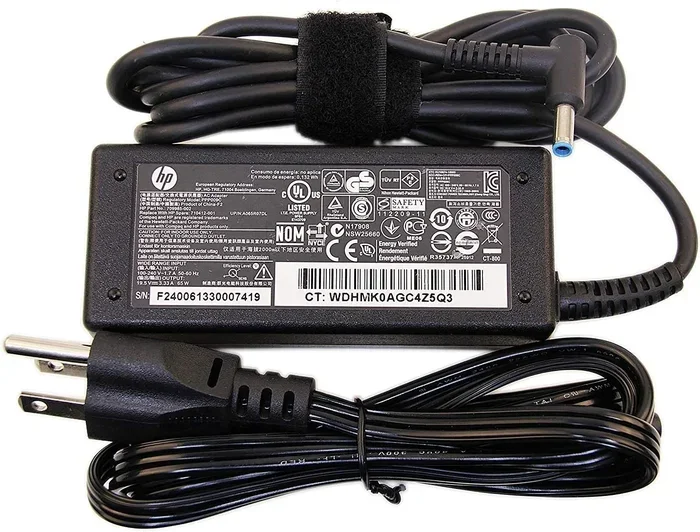
Flip over your existing HP AC adapter. Look for a label on the brick itself. You’ll see two key numbers:
- Voltage (V): This tells you the electrical pressure. Most HP laptops use 19V or 20V.
- Amperage (A): This tells you the current flow. Common values are 3.25A, 4.5A, or 6.5A.
The wattage is the product of these two numbers. For example, 19V times 3.25A equals 61.75 watts. This is your HP charger wattage, and your replacement must match or exceed it.
Identify Your Connector Type
HP laptops use different connector tips. Some have the classic barrel plug. Others use a USB-C charger design. A few older models still use the round pin connector. You need to match the physical connector to your laptop’s HP charging port.
Use HP’s Official Support Page
Go to HP’s website and enter your laptop’s model number. The support page will list the exact original HP charger part number. This is the safest way to ensure perfect HP charger compatibility. You can also check the sticker on the bottom of your laptop for the model and serial number.
Understand HP’s Charging Standards
HP has been shifting toward USB-C power delivery across newer models. This means you might be able to use a universal USB-C power adapter that delivers the right wattage. Older HP notebooks still rely on proprietary barrel connectors. Knowing which category your laptop falls into is the first step.
Where Can You Buy a New HP Laptop Charger?
Once you know what you need, the next question is where to buy it. You have more options than you might think.
HP’s Official Store and Website
Buying directly from HP guarantees you get an original HP charger. These come with a warranty, and they meet all safety standards. The downside? They can be pricey. If your laptop is still under warranty, HP might even replace the charger for free.
Authorized Retailers and Electronics Stores
Stores like Best Buy, Amazon, and Walmart sell HP power adapters from both HP and third-party brands. Amazon is especially convenient because you can often get same-day or next-day delivery. Just make sure you’re buying from a reputable seller with good reviews.
Third-Party Charger Brands
Companies like Targus, Insignia, and Anker make laptop charger replacements that work great and cost less. These are often USB-C compatible and support multiple laptop brands. They’re a solid choice if you want to save money without sacrificing quality.
Local Computer Repair Shops
Your neighborhood repair shop might carry HP notebook charger options in stock. They can also test your current charger to confirm it’s actually dead. Sometimes the problem is a loose port, not the charger itself. This is a quick and easy fix that costs much less than a new charger.
Online Marketplaces and Auction Sites
Sites like eBay or AliExpress offer HP laptop battery charger options at very low prices. But be careful. Counterfeit chargers are a real problem. They might not have proper safety certifications. Always check seller ratings and look for UL or CE marks on the product.
| Purchase Option | Price Range | Warranty | Risk Level |
|---|---|---|---|
| HP Official Store | $40 – $90 | Full HP warranty | Very Low |
| Authorized Retailers | $30 – $80 | Varies by seller | Low |
| Third-Party Brands | $15 – $50 | Brand-specific | Low to Medium |
| Local Repair Shops | $20 – $60 | Shop warranty | Low |
| Online Marketplaces | $8 – $35 | Seller-dependent | Medium to High |
Quick Tips for Buying the Perfect HP Charger
Here are some fast tips to keep in mind before you click “Buy Now.”
- Match the voltage exactly. A 1V difference won’t hurt, but a 3V or 5V mismatch can fry your laptop.
- Aim for equal or higher amperage. A charger with higher amperage than your laptop needs is safe. Lower amperage can cause overheating.
- Check the connector size. Measure the inner and outer diameter of your HP charging port to avoid buying the wrong tip.
- Look for safety certifications. UL, CE, and FCC marks mean the charger has been tested for safety.
- Read return policies. Buy from sellers who offer easy returns in case the charger doesn’t work.
- Consider a spare. If you use your laptop at a fixed desk, keeping a second charger at home or in the office is a smart move.
Expert Insight: According to laptop repair technicians, most charger failures happen at the connector tip where the cable bends the most. If your charger works when you wiggle it at a certain angle, the cable is about to fail completely. Replace it before it stops working entirely.
Common Mistakes People Make When Replacing Their HP Charger
Avoid these pitfalls to save money, time, and your laptop’s health.
Buying Based on Price Alone
The cheapest charger on the internet might seem like a great deal. But uncertified chargers can deliver inconsistent voltage. This stresses your laptop’s motherboard and battery. Over time, it can cause permanent damage. Always prioritize safety over savings.
Ignoring the Wattage
Some people buy a charger with lower wattage than their laptop needs. Your laptop will still charge, but it will charge slowly. Worse, it might drain faster than it charges while you’re using it. Always check the HP charger wattage before purchasing.
Forgetting to Check the Connector Type
This one is painfully common. You order a charger, it arrives, and the tip doesn’t fit. HP uses at least four or five different connector sizes across their laptop lineup. Double-check your model number and the connector type before placing your order.
Assuming All USB-C Chargers Work
If your HP laptop uses USB-C charging, not every USB-C charger will work. Your laptop needs a charger that supports USB Power Delivery (PD) protocol. A basic phone charger won’t cut it. Look for a charger that delivers at least 65W or whatever your laptop requires.
Skipping the Return Window
Some people buy a charger and don’t test it right away. When it doesn’t work, they realize the return window has closed. Always test a new charger within the first 24 hours. Keep your receipt and packaging until you’re sure it works.
What to Do If Your New Charger Still Doesn’t Work
So you bought a shiny new HP laptop charger, plugged it in, and nothing happens. Don’t panic. There are a few things you can check before assuming the charger is defective.
Check the Power Outlet
Sounds simple, but it’s often overlooked. Try a different wall outlet. Test the outlet with another device to confirm it’s working. A tripped breaker or a dead outlet can mimic charger failure.
Inspect the Charging Cable
Look closely at the entire length of the cable. Are there any frayed spots, kinks, or exposed wires? Even a small break in the insulation can stop the flow of electricity. If the cable looks damaged, you need a replacement cable, not just the charger brick.
Clean the Charging Port
Dust and lint build up inside your HP charging port over time. This can prevent the connector from making proper contact. Use a toothpick or compressed air to gently clean the port. Be very careful not to damage the pins inside.
Reset Your Laptop’s Battery
Sometimes the battery management system gets stuck. Unplug the charger, remove the battery (if removable), hold the power button for 15 seconds, then reinsert the battery and plug the charger back in. This hard reset often fixes charging issues.
Contact HP Support
If none of the above works, reach out to HP customer support. They can run diagnostics remotely or guide you through troubleshooting steps. If your laptop is still under warranty, they might send you a free replacement charger.
How Much Should You Spend on an HP Laptop Charger?
Price is a big factor for most people. Nobody wants to overspend, but you also don’t want to buy junk.
Original HP chargers typically range from $40 to $90 depending on the wattage and model. Third-party options from reputable brands like Anker or Targus cost between $15 and $50. Universal adapters can be even cheaper, starting around $10.
Here’s a rule of thumb: spend at least $20 on a charger. Anything cheaper is likely uncertified and potentially dangerous. Think of it as an investment in your laptop’s longevity. A quality HP power adapter protects your device and ensures safe, reliable charging every day.
If you’re on a tight budget, look for certified refurbished chargers. These are original HP chargers that have been tested and certified to work like new. They cost a fraction of the price and come with a warranty in most cases.
Quick Tips:
- Set a price alert on Amazon for your specific charger model to catch deals.
- Check if your HP laptop came with a spare charger in the box. Many models include one.
- Consider a charging dock or hub with a built-in power adapter for your desk setup.
Final Thoughts on Getting a New HP Laptop Charger
So, can I get a new charger for my HP laptop right now? Absolutely. You have more options than ever before. Whether you go with an original HP charger, a trusted third-party brand, or a universal adapter, the key is to match your HP charger specifications and ensure HP charger compatibility.
Take a moment to check your current charger’s label. Note the voltage, amperage, and connector type. Then explore your buying options. Buy from reputable sellers, look for safety certifications, and don’t be afraid to reach out to HP support if you need help.
Your laptop is a big investment. Treat its charger with the same care. A good HP laptop charger keeps your device running smoothly, safely, and efficiently for years to come. Don’t let a dead charger slow you down. Find your replacement today and get back to doing what you do best.
Remember, the right charger isn’t just about power. It’s about peace of mind. When you know your HP notebook charger is safe, compatible, and reliable, you can focus on what really matters. Your work, your creativity, and your productivity.
Frequently Asked Questions
Can I Use Any Charger for My HP Laptop?
No, you should not use just any charger. Your replacement charger must match the voltage and amperage of your original HP power adapter. Using the wrong charger can damage your laptop or void your warranty. Always check the specs before purchasing.
How Do I Know Which HP Charger Model I Need?
Look at the label on your current charger for the voltage and amperage. You can also check HP’s official support page by entering your laptop’s model number. The connector tip type is equally important to match.
Are Third-Party HP Chargers Safe to Use?
Yes, third-party chargers are safe as long as they are from reputable brands and carry proper safety certifications like UL or CE. Avoid cheap, uncertified chargers from unknown sellers, as they can pose fire or damage risks to your laptop.
How Much Does a Replacement HP Laptop Charger Cost?
Original HP chargers typically cost between $40 and $90. Third-party options range from $15 to $50, and universal adapters can start around $10. The price depends on the wattage, connector type, and brand you choose.
Why Does My HP Laptop Say “Plugged In, Not Charging”?
This message often means your battery needs recalibration. Try removing the battery (if possible), holding the power button for 15 seconds, and then reinserting it. If the issue persists, the battery or charging port may need professional inspection.
Can I Charge My HP Laptop with a USB-C Charger?
Yes, if your HP laptop supports USB-C charging. Make sure the USB-C charger supports USB Power Delivery and delivers the correct wattage your laptop requires. Check your laptop’s manual or HP’s website for the exact charging requirements.