Do All Earbuds Work With All Phones And Other Devices
Not all earbuds work with all phones. Compatibility depends on connection type, Bluetooth version, and your device’s ports. This guide breaks down everything you need to know about earphone compatibility with phones, tablets, and other devices.
You just bought a shiny new pair of wireless earbuds, and you’re excited to use them. But then it hits you — do all earbuds work with all phones? The short answer is no. The longer answer is a lot more interesting, and it can save you from buying gear that doesn’t fit your life.
Whether you use an iPhone, an Android phone, a tablet, or even a gaming console, device compatibility plays a huge role in how your earbuds perform. Some connections are universal. Others need adapters, apps, or specific settings. This guide walks you through everything you need to know about earbud compatibility with phones and other devices.
By the end, you’ll know exactly what to look for before you spend your hard-earned money. No more guessing. No more returning gear that doesn’t work. Just clear, practical advice you can use right away.
Key Takeaways
- Connection type matters: Bluetooth earbuds need compatible Bluetooth versions, while wired earbuds require the right jack or adapter.
- Apple and Android differ: Lightning and USB-C ports create different compatibility needs for wired earbuds.
- Bluetooth versions affect range and quality: Older Bluetooth versions may limit performance with newer earbuds.
- Some devices need extra steps: Smart TVs, gaming consoles, and older phones may require additional accessories.
- Multipoint pairing is a game changer: It lets you connect to multiple devices at once without re-pairing.
- Audio codecs impact sound quality: Not all phones support the same codecs, which affects what you hear.
- Always check compatibility before buying: A quick check saves time, money, and frustration.
📑 Table of Contents
- Why Don’t All Earbuds Work With All Phones?
- How Wireless Earbuds Connect to Phones
- Wired Earbuds and Phone Ports
- Do Earbuds Work With Smart TVs and Other Devices?
- Audio Codecs and Sound Quality
- Common Problems and How to Fix Them
- Quick Tips for Choosing Compatible Earbuds
- Expert Insights on Earbud Compatibility
- Key Takeaways
- Conclusion
Why Don’t All Earbuds Work With All Phones?
The idea that one pair of earbuds should work with every device sounds simple. But in reality, there are several factors that create compatibility gaps. Let’s break them down so you understand what’s really going on behind the scenes.
Connection Types Create Different Requirements
Earbuds connect to phones in two main ways: wirelessly through Bluetooth or through a physical cable. Wireless earbuds use Bluetooth technology to pair with your phone. Wired earbuds plug into a port, either a 3.5mm audio jack, USB-C, or Lightning connector.
Here’s the catch. Not every phone has the same port. iPhones used to have a 3.5mm headphone jack. Now they use Lightning. Most modern Android phones use USB-C. Some phones still include a 3.5mm jack. If your earbuds don’t match your phone’s port, you need an adapter.
Wireless earbuds avoid this problem entirely. But they bring their own requirement — Bluetooth compatibility. Both your earbuds and your phone need to support the same Bluetooth version for the best experience.
Bluetooth Versions Make a Big Difference
Bluetooth has evolved a lot over the years. Older versions like Bluetooth 4.0 and 4.2 are still common in budget devices. Newer versions like Bluetooth 5.0, 5.2, and 5.3 offer better range, lower power use, and improved audio quality.
When you pair older earbuds with a newer phone, things usually work. But you might not get the full benefits of the newer Bluetooth version. And when you pair very new earbuds with a very old phone, you could run into connection drops or limited features.
The sweet spot is when both devices support at least Bluetooth 5.0. That gives you solid range, stable connections, and good battery life. If you want to learn more about Bluetooth devices and how they work with different platforms, check out this guide on can I use Bluetooth headphones with Roku for a deeper look at cross-device pairing.
How Wireless Earbuds Connect to Phones
Wireless earbuds use Bluetooth to communicate with your phone. The process is called pairing, and it’s fairly simple. But there are important details that affect how well your earbuds work.
The Pairing Process
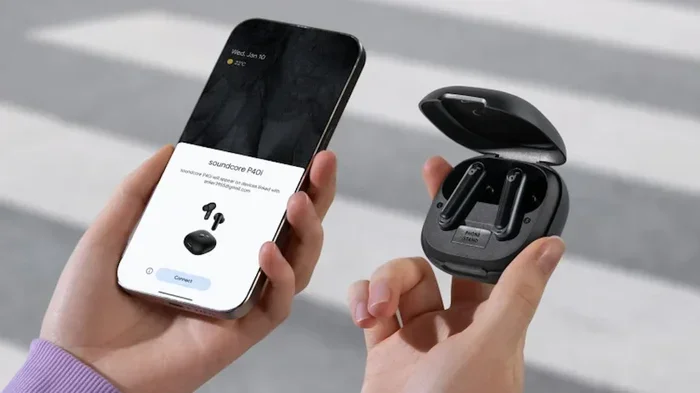
First, you put your earbuds in pairing mode. Usually, this means holding down a button on the charging case until a light flashes. Then you go to your phone’s Bluetooth settings and select the earbuds from the list of available devices.
Once paired, the earbuds remember your phone. The next time you turn them on near your phone, they reconnect automatically. This is called quick pairing, and it works because the devices save each other’s information.
Bluetooth Range and Stability
Most wireless earbuds work well within about 30 feet of your phone. Walls, furniture, and other obstacles can shorten that range. If you walk into another room, you might notice a brief pause in audio or a slight drop in quality.
Newer Bluetooth versions handle this much better. Bluetooth 5.0 and above can maintain a stable connection at greater distances. They also handle interference from Wi-Fi networks and other Bluetooth devices much more gracefully.
For a deeper look at how Bluetooth headphones work with gaming consoles like the PS5, take a look at this article on can I use any Bluetooth headphones with PS5. It covers compatibility nuances that apply to all Bluetooth audio devices.
Multipoint Connection
Some premium earbuds support multipoint pairing. This means they can connect to two devices at the same time. For example, your earbuds stay connected to your phone while also paired to your laptop. When a call comes in on your phone, the earbuds switch automatically.
This feature is incredibly useful if you switch between devices often. But not all earbuds have it. And not all phones support the multipoint protocol equally. Always check the specs before buying if this matters to you.
Wired Earbuds and Phone Ports
Even though wireless earbuds are popular, wired earbuds still have a place. They don’t need charging, they often cost less, and they work without any pairing. But the port situation has become messy.
The 3.5mm Jack Era
For decades, the 3.5mm audio jack was the universal standard. Every phone, tablet, and laptop had one. You could plug in any wired earbuds and they would work. It was simple and reliable.
Then Apple removed the headphone jack from the iPhone 7 in 2016. Other manufacturers followed. Today, very few phones still include a 3.5mm port. This changed the game for wired earbud users.
USB-C and Lightning Connectors
Now most phones use either USB-C or Lightning for wired audio. Android phones typically use USB-C. iPhones use Lightning. Some wired earbuds come with a USB-C or Lightning connector built in. Others come with a 3.5mm plug and need a dongle or adapter.
Here’s where things get tricky. Not all USB-C earbuds work with all phones. Some earbuds use specific digital audio protocols that only work with certain devices. A USB-C earbud designed for Samsung might not work perfectly with a Google Pixel, even though both use USB-C.
If you use Apple devices, you might wonder about cross-compatibility. For example, can you use AirPods with non-Apple devices? The answer is yes, but with limitations. Check out this guide on can I use AirPods with Cardo to understand how Apple earbuds behave outside the Apple ecosystem.
Adapter Solutions
If your phone doesn’t have the right port, adapters are your best friend. A USB-C to 3.5mm adapter lets you use traditional wired earbuds with modern phones. A Lightning to 3.5mm adapter does the same for iPhones.
These adapters are small, affordable, and easy to carry. But they add another thing to keep track of. And cheap adapters can cause audio quality issues or connection problems. Stick with well-known brands when buying adapters.
Do Earbuds Work With Smart TVs and Other Devices?
Phones aren’t the only devices you might want to use earbuds with. Smart TVs, tablets, laptops, and gaming consoles all play audio. But compatibility varies widely.
Smart TVs and Bluetooth
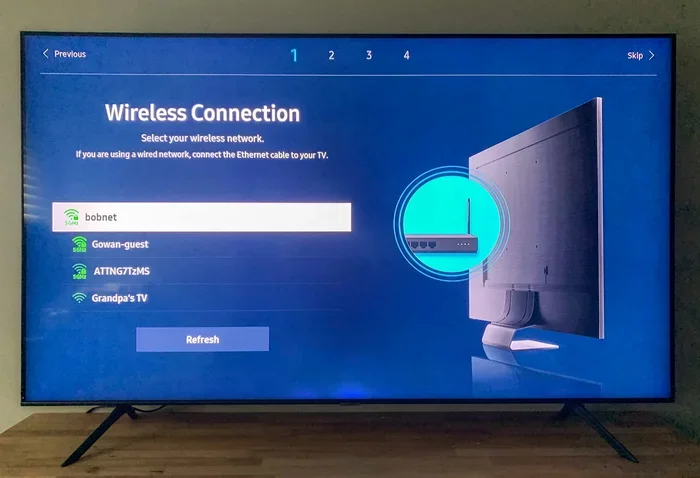
Many smart TVs support Bluetooth, which means you can pair wireless earbuds directly. But not all TVs make this easy. Some require you to go through a settings menu that’s buried deep in the interface. Others don’t support Bluetooth at all.
If your TV doesn’t have Bluetooth, you can use a Bluetooth transmitter. This small device plugs into your TV’s audio output and sends the signal to your earbuds wirelessly. It’s an affordable solution that works with almost any TV.
Tablets and Laptops
Tablets and laptops are generally great with earbuds. Most modern tablets and laptops support Bluetooth 5.0 or newer. They also have USB-C ports for wired connections.
The main challenge is multipoint pairing. Some laptops don’t handle it well, which means switching between your phone and laptop can require manual re-pairing.
Gaming Consoles
Gaming consoles like the PS5 and Xbox have their own rules for audio devices. Some support Bluetooth earbuds directly. Others require a USB dongle or a specific adapter. Compatibility can be hit or miss, so always check before buying earbuds for console gaming.
Audio Codecs and Sound Quality
You might not have heard of audio codecs, but they affect how your earbuds sound. A codec is a technology that compresses and decompresses audio data as it travels from your phone to your earbuds.
Different phones support different codecs. iPhones support AAC and now Lossless audio with AirPods. Android phones support a wider range, including LDAC, aptX, and aptX HD. If your earbuds support a codec your phone doesn’t, you fall back to a standard codec like SBC, which is fine but not the best.
If you care about sound quality, check which codecs your phone and earbuds support. Matching them gives you the best possible audio experience. This is especially important for high-resolution audio and lossless music streaming.
Common Problems and How to Fix Them
Even when your earbuds and phone are compatible, you might run into issues. Here are the most common problems and simple fixes.
Earbuds Won’t Pair
This is the most frustrating problem. Try these steps:
- Make sure your earbuds are in pairing mode.
- Turn Bluetooth off and on again on your phone.
- Remove the earbuds from your phone’s Bluetooth memory and pair fresh.
- Restart both your earbuds and your phone.
- Check if your earbuds are connected to a different device nearby.
Audio Cuts Out or Stutters
Interference is the usual culprit. Wi-Fi networks, microwaves, and other Bluetooth devices can all cause disruptions. Move closer to your phone and see if the problem goes away. If you’re using a Bluetooth transmitter with a TV, make sure it’s within range.
One Earbud Is Quieter
Try cleaning the earbud mesh with a dry cloth. Earwax and dust can block sound. Also check your phone’s audio balance settings. Sometimes one side gets turned down accidentally.
Battery Drains Fast
Older Bluetooth versions use more power. If your phone uses Bluetooth 4.0 and your earbuds use Bluetooth 5.0, the connection defaults to the older version. Update your phone’s software if possible. Also, turning off features like active noise cancellation can save battery.
Quick Tips for Choosing Compatible Earbuds
Shopping for earbuds can feel overwhelming. Here are some quick tips to make sure you buy gear that works with your devices.
- Check your phone’s ports before buying wired earbuds. Know if you need USB-C, Lightning, or a 3.5mm jack.
- Look for Bluetooth 5.0 or newer in both your earbuds and phone for the best experience.
- Read the compatibility list on the product box or website. Some earbuds list supported devices.
- Consider multipoint pairing if you switch between multiple devices often.
- Buy from reputable brands with good customer support and clear compatibility information.
- Check return policies before you buy. If the earbuds don’t work with your device, you want an easy return.
For more tips on getting the most out of your audio gear, explore our other resources on device compatibility and connectivity.
Expert Insights on Earbud Compatibility
We asked tech experts about the biggest mistakes people make when buying earbuds. Here’s what they had to say.
Don’t assume wireless means universal. Just because earbuds are wireless doesn’t mean they work perfectly with every device. Bluetooth profiles, codec support, and firmware all play a role. Always do a quick compatibility check.
Firmware updates matter. Many earbuds receive firmware updates that improve compatibility with new phones and devices. Check the manufacturer’s app for updates after you buy.
Budget earbuds can work great. You don’t need to spend a fortune to get good compatibility. Many affordable earbuds support the latest Bluetooth standards and work seamlessly with both iPhones and Androids.
Consider your use case. If you mainly listen to music on your phone, almost any modern earbuds will work. If you need earbuds for work calls on a laptop, look for ones with a good microphone and multipoint support.
Key Takeaways
- Connection type matters: Bluetooth earbuds need compatible Bluetooth versions, while wired earbuds require the right jack or adapter.
- Apple and Android differ: Lightning and USB-C ports create different compatibility needs for wired earbuds.
- Bluetooth versions affect range and quality: Older Bluetooth versions may limit performance with newer earbuds.
- Some devices need extra steps: Smart TVs, gaming consoles, and older phones may require additional accessories.
- Multipoint pairing is a game changer: It lets you connect to multiple devices at once without re-pairing.
- Audio codecs impact sound quality: Not all phones support the same codecs, which affects what you hear.
- Always check compatibility before buying: A quick check saves time, money, and frustration.
Conclusion
So, do all earbuds work with all phones? The answer is no, but the gap is getting smaller every year. Bluetooth technology has made wireless earbuds more universal than ever. And with the right adapters, even wired earbuds can work with almost any device.
The key is understanding what your phone supports and choosing earbuds that match. Check your ports. Check your Bluetooth version. Consider how you’ll use the earbuds. A little research goes a long way.
Whether you’re listening to music on your commute, taking calls at work, or watching a movie on your tablet, the right earbuds make all the difference. Now you have the knowledge to pick the perfect pair with confidence.
Happy listening, and enjoy your new earbuds!
Frequently Asked Questions
Can I use any earbuds with any phone?
Most wireless earbuds work with any phone that supports Bluetooth. But wired earbuds need the right port or adapter. Always check the connection type before buying.
Why won’t my earbuds connect to my phone?
This usually happens because the earbuds aren’t in pairing mode, Bluetooth is turned off, or the earbuds are connected to another device nearby. Try restarting both devices and removing the earbuds from your phone’s Bluetooth list before pairing again.
Do AirPods work with Android phones?
Yes, AirPods can connect to Android phones via Bluetooth. But you lose some features like automatic device switching and battery status pop-ups. Basic audio playback and calls work fine.
What Bluetooth version do I need for wireless earbuds?
Bluetooth 5.0 or newer is ideal. It offers better range, lower latency, and improved battery life. But even older Bluetooth versions can connect to modern earbuds — you just might not get the full experience.
Can I use earbuds with my smart TV?
It depends on your TV. Many smart TVs support Bluetooth, so you can pair wireless earbuds directly. If your TV doesn’t have Bluetooth, a Bluetooth transmitter solves the problem easily.
Do USB-C earbuds work with all Android phones?
Most USB-C earbuds work with Android phones. But some earbuds use specific digital protocols that may not work with every device. Check the manufacturer’s compatibility list before buying if you’re unsure.