Can You Watch Netflix on Samsung Freestyle Projector
Yes, you can watch Netflix on the Samsung Freestyle Projector. This portable smart projector supports built-in apps and wireless streaming, making it easy to enjoy your favorite shows on any surface. In this guide, we walk you through every step to get Netflix up and running on your Samsung Freestyle.
Can you watch Netflix on the Samsung Freestyle Projector? The short answer is yes. But the full story is much more interesting than a simple yes or no. The Samsung Freestyle is a portable smart projector that has changed the way people think about streaming. It’s compact, it’s sleek, and it packs enough punch to turn any room into a mini home theater. Whether you’re camping in the backyard or binge-watching on a Friday night, this little projector delivers.
In this guide, we’re going to cover everything you need to know about streaming Netflix on the Samsung Freestyle. From initial setup to troubleshooting tips, we’ve got you covered. We’ll also share some practical advice on getting the best viewing experience. So grab your popcorn, and let’s dive in.
Key Takeaways
- Samsung Freestyle Supports Netflix: The projector has a built-in smart platform that lets you stream Netflix directly without extra devices.
- Easy Setup Process: You just need a Wi-Fi connection, a Samsung account, and a few minutes to get started.
- Multiple Streaming Options: Beyond Netflix, the Freestyle supports many other apps and services for all your entertainment needs.
- Portable and Versatile: The compact design means you can set up Netflix streaming anywhere, indoors or outdoors.
- Troubleshooting Is Simple: Most common issues have quick fixes that don’t require technical expertise.
📑 Table of Contents
- What Is the Samsung Freestyle Projector?
- Can You Watch Netflix on the Samsung Freestyle?
- How to Set Up Netflix on Samsung Freestyle
- Connecting Your Phone to Samsung Freestyle for Netflix
- Best Setup Options for Watching Netflix on Samsung Freestyle
- Troubleshooting Netflix on Samsung Freestyle
- Samsung Freestyle vs. Other Projectors for Netflix
- Can You Use the Samsung Freestyle Without Wi-Fi for Netflix?
- Final Thoughts on Watching Netflix on Samsung Freestyle
What Is the Samsung Freestyle Projector?
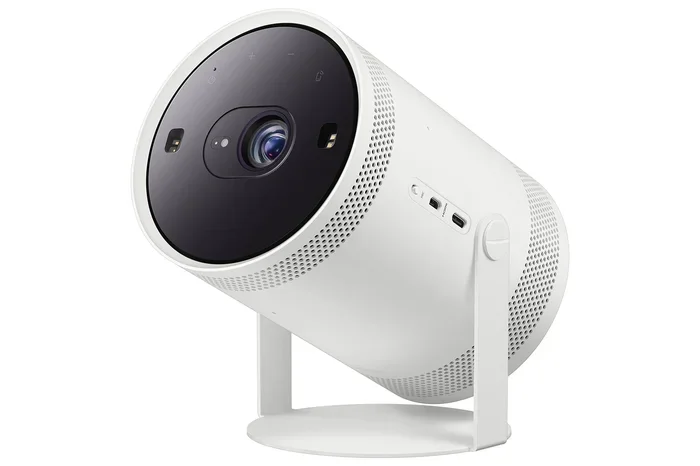
The Samsung Freestyle is a portable smart projector designed for modern living. It’s compact enough to fit in a backpack and powerful enough to project a bright image on a wall or screen. The device runs on Samsung’s smart platform, which gives you access to a variety of streaming apps right out of the box.
One of the standout features of the Freestyle is its versatility. You can place it on a table, hang it from a ceiling, or even set it up outside. The built-in battery lasts for a couple of hours, which is plenty for a movie night. And because it supports Wi-Fi and Bluetooth, connecting your devices is a breeze.
The projector supports Full HD resolution, which means your Netflix content looks sharp and vibrant. The built-in speakers also deliver decent sound, though you can always pair external speakers for a richer audio experience.
Can You Watch Netflix on the Samsung Freestyle?
Absolutely. The Samsung Freestyle comes with a built-in app store where you can download the Netflix app directly. Once installed, you can sign in with your Netflix account and start streaming right away. There’s no need for extra cables, adapters, or streaming sticks. The projector handles everything on its own.
This makes the Freestyle one of the most convenient projectors for Netflix streaming. Unlike older projectors that require a separate device to run streaming apps, the Freestyle is a self-contained unit. You just power it on, connect to Wi-Fi, and you’re ready to go.
If you’ve ever used a laptop to project Netflix from a laptop to a projector, you’ll appreciate how much simpler the Freestyle makes the process. Everything is built in, so there’s one less thing to worry about.
Supported Streaming Apps on Samsung Freestyle
Netflix isn’t the only app you can use on the Samsung Freestyle. The smart platform supports a wide range of streaming services. Here are some of the most popular ones:
- Netflix – The go-to app for movies and TV shows.
- YouTube – Great for music videos and free content.
- Disney+ – Perfect for family-friendly entertainment.
- Amazon Prime Video – A solid alternative for exclusive content.
- Hulu – Good for TV series and live TV.
- Spotify – For music streaming when you’re not watching video.
Having access to all these apps makes the Samsung Freestyle a true entertainment hub. You don’t need a separate smart TV or streaming device to enjoy your favorite content.
How to Set Up Netflix on Samsung Freestyle
Setting up Netflix on the Samsung Freestyle is straightforward. Follow these steps, and you’ll be watching in no time.
Step 1: Power On the Projector. Plug in the Samsung Freestyle and turn it on. The first-time setup will walk you through the basics, including language selection and Wi-Fi connection.
Step 2: Connect to Wi-Fi. A stable internet connection is essential for smooth Netflix streaming. The Freestyle supports both 2.4 GHz and 5 GHz Wi-Fi bands. For the best streaming quality, connect to a 5 GHz network if your router supports it.
Step 3: Sign In to Your Samsung Account. You’ll need a Samsung account to access the app store. If you don’t have one yet, you can create one during the initial setup.
Step 4: Open the App Store. Navigate to the SmartThings app store on the Freestyle. Search for Netflix and select the app.
Step 5: Download and Install Netflix. The app will download and install automatically. This usually takes just a minute or two, depending on your internet speed.
Step 6: Sign In to Netflix. Open the Netflix app and enter your Netflix email and password. If you don’t have a Netflix subscription, you can sign up for one directly through the app.
Step 7: Start Streaming. Browse Netflix, pick a show or movie, and enjoy it on the big screen. That’s all there is to it.
Tips for the Best Netflix Experience
To get the most out of Netflix on your Samsung Freestyle, keep these tips in mind:
- Use a strong Wi-Fi signal. The closer you are to your router, the better your streaming quality will be.
- Project on a light-colored surface. A white wall or a dedicated projector screen will give you the best image quality.
- Dim the lights. Ambient light can wash out the projected image, so dimming the room makes a big difference.
- Adjust the focus. The Samsung Freestyle has an auto-focus feature, but you can manually adjust it for the sharpest image.
- Keep the projector level. The Freestyle has keystone correction, but a level setup reduces the need for adjustments.
Connecting Your Phone to Samsung Freestyle for Netflix
While the Samsung Freestyle has a built-in Netflix app, you can also stream Netflix from your phone. This is useful if you want to mirror your phone’s screen or if you prefer using the Netflix app on your mobile device. The Freestyle supports Bluetooth and screen mirroring, making this process easy.
If you want to pair your phone to a projector for Netflix, the Samsung Freestyle makes it simple. Just go to your phone’s screen mirroring settings, select the Freestyle, and your phone’s display will appear on the projected image.
You can also use the Samsung SmartThings app to control the Freestyle from your phone. This lets you adjust settings, switch apps, and even control volume without getting up from the couch.
Using Bluetooth with Samsung Freestyle
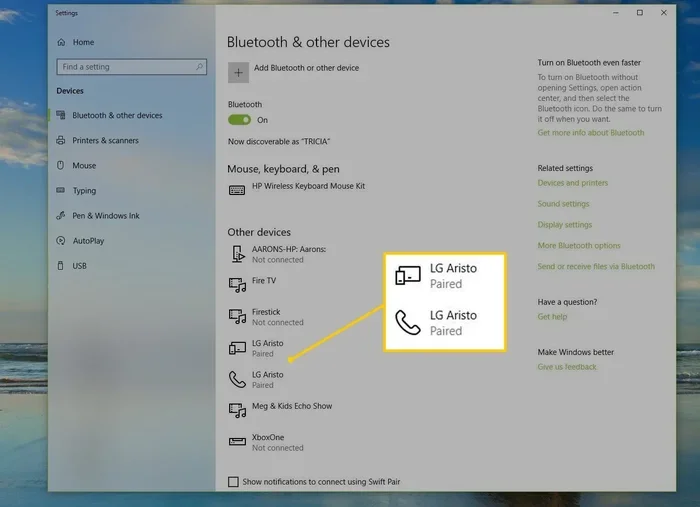
The Samsung Freestyle has built-in Bluetooth, which means you can connect wireless headphones or external speakers. This is great for late-night Netflix sessions where you don’t want to disturb anyone. Just pair your Bluetooth device through the Freestyle’s settings menu, and you’re good to go.
Bluetooth connectivity also opens up the possibility of using Bluetooth headphones with your projector setup, similar to how you would with a Roku device. The Freestyle handles Bluetooth audio devices seamlessly.
Best Setup Options for Watching Netflix on Samsung Freestyle
Where and how you set up your Samsung Freestyle can make a big difference in your Netflix viewing experience. Here are some of the best setup options.
Indoor Setup
For indoor Netflix viewing, the Samsung Freestyle works best on a stable surface at a moderate distance from the wall. A distance of about 6 to 8 feet will give you a screen size of around 80 to 100 inches. You can place the projector on a table, shelf, or even the floor.
If you want a more permanent setup, consider mounting the Freestyle on a ceiling bracket. This frees up table space and gives you a more immersive viewing angle. Just make sure the projector is positioned so the image isn’t blocked by any furniture.
Outdoor Setup
One of the coolest things about the Samsung Freestyle is that it works great outdoors. You can set it up on a patio, balcony, or even while camping. For the best results, project onto a light-colored wall or a portable screen.
If you don’t have a screen handy, a plain white bedsheet works surprisingly well. Many people ask, can I use a sheet as a projector screen, and the answer is yes. A smooth white sheet stretched taut makes a decent projection surface for Netflix movies.
For outdoor setups, keep in mind that the Freestyle’s built-in battery will last about two hours on a full charge. If you’re planning a longer movie marathon, bring a portable power bank or keep the projector plugged in.
Using a Projector Screen vs. a Wall
You might wonder whether you need a dedicated projector screen or if a wall will do. The truth is, a wall works fine for most situations. But a projector screen will give you a sharper, more vibrant image. If you’re serious about your Netflix viewing, a screen is worth the investment.
Some people wonder if they can use blackout curtains as a projector screen. The answer is that blackout curtains can work in a pinch, but they’re not ideal for long-term use. A proper projector screen will always give you better results.
Troubleshooting Netflix on Samsung Freestyle
Even with a great device like the Samsung Freestyle, you might run into occasional issues. Here are some common problems and their solutions.
Netflix App Won’t Open
If the Netflix app won’t open, try restarting the projector first. Power it off completely, wait a few seconds, and turn it back on. If that doesn’t work, try uninstalling and reinstalling the Netflix app from the SmartThings store.
Buffering or Stuttering
Buffering is usually caused by a weak Wi-Fi signal. Move the projector closer to your router or reduce the number of devices connected to your network. You can also try lowering the streaming quality in the Netflix app settings to reduce the bandwidth requirement.
No Sound
If you’re getting video but no sound, check the volume settings on both the projector and the Netflix app. Make sure the audio output is set to the Freestyle’s built-in speakers. If you’re using Bluetooth audio, ensure the headphones or speakers are properly connected.
Image Quality Issues
If the image looks blurry or washed out, try adjusting the focus ring on the projector. You can also check the keystone settings to make sure the image isn’t distorted. For the sharpest picture, project onto a flat, light-colored surface in a dimly lit room.
Netflix App Not Available in Your Region
In some cases, the Netflix app may not be available in the Samsung Freestyle’s app store for your region. This is a rare issue, but it can happen. If this occurs, you might need to change your Samsung account’s region settings or use a VPN to access Netflix from a supported region.
Samsung Freestyle vs. Other Projectors for Netflix
How does the Samsung Freestyle stack up against other projectors for Netflix streaming? Here’s a quick comparison.
| Feature | Samsung Freestyle | Traditional Projector | Smart TV |
|---|---|---|---|
| Portability | Excellent | Poor | None |
| Built-in Apps | Yes | Rarely | Yes |
| Setup Time | Minutes | 30+ minutes | Minutes |
| Battery Life | 2+ hours | None (plugged in) | N/A |
| Price Range | Mid-range | Varies widely | Varies widely |
| Netflix Support | Built-in | Needs external device | Built-in |
The Samsung Freestyle holds its own against both traditional projectors and smart TVs. Its combination of portability, built-in apps, and easy setup makes it a strong choice for Netflix fans who want flexibility.
Can You Use the Samsung Freestyle Without Wi-Fi for Netflix?
Netflix requires an internet connection to stream content, and the Samsung Freestyle is no different. You need Wi-Fi to access the Netflix app and stream movies and shows. Without Wi-Fi, you won’t be able to use Netflix on the projector.
However, there are a few workarounds. You can use a mobile hotspot from your phone as a Wi-Fi source. This works well if you’re in an area without a traditional Wi-Fi network. Just make sure your phone has a strong data connection and enough data allowance for streaming.
It’s also worth noting that some people ask, can you answer calls without Wi-Fi, and the same principle applies here. Streaming services like Netflix need an active internet connection to function, whether that’s through Wi-Fi or a mobile hotspot.
Final Thoughts on Watching Netflix on Samsung Freestyle
The Samsung Freestyle is an excellent choice for anyone who wants to watch Netflix on a big screen without the hassle of traditional projectors. Its built-in smart platform, portable design, and easy setup make it one of the best options for streaming Netflix at home or on the go.
Whether you’re setting up a movie night in the living room or an outdoor screening in the backyard, the Freestyle delivers a quality viewing experience. The Netflix app runs smoothly, the image quality is impressive, and the portability means you can take it anywhere.
If you’re in the market for a projector that can handle Netflix and more, the Samsung Freestyle is definitely worth considering. It combines convenience, performance, and style in a package that’s hard to beat.
So go ahead, set up your Samsung Freestyle, open Netflix, and enjoy your favorite shows on the big screen. You won’t be disappointed.
Frequently Asked Questions
Do I need a Netflix subscription to watch Netflix on the Samsung Freestyle?
Yes, you need an active Netflix subscription to stream content on the Samsung Freestyle. The projector itself doesn’t include a Netflix subscription. You’ll need to sign in with your existing Netflix account or create a new one through the Netflix app.
Can I watch Netflix in 4K on the Samsung Freestyle?
The Samsung Freestyle supports Full HD resolution, which is 1080p. It does not support 4K resolution. So while Netflix will stream at the best quality available, it will be capped at 1080p on this projector. For most viewers, this is more than sufficient for an enjoyable viewing experience.
Can I use the Samsung Freestyle to project Netflix from my phone?
Yes, you can mirror your phone’s Netflix screen to the Samsung Freestyle using screen mirroring or Bluetooth connectivity. However, using the built-in Netflix app on the projector directly is usually the smoother and more reliable option. It avoids any potential lag or connectivity issues that can come with screen mirroring.
Is the Samsung Freestyle loud when running Netflix?
The Samsung Freestyle has a built-in fan that can be noticeable in a quiet room. It’s not extremely loud, but you might hear it during quiet scenes in a movie. If you find it distracting, you can adjust the fan speed in the settings or use external Bluetooth speakers to focus on the audio instead.
Can I use the Samsung Freestyle outdoors for Netflix movie nights?
Absolutely. The Samsung Freestyle is designed to be portable and works well outdoors. Just make sure you have a Wi-Fi connection or a mobile hotspot, and project onto a light-colored wall or a portable screen. The built-in battery gives you about two hours of runtime, which is enough for most movies.
What internet speed do I need for Netflix on the Samsung Freestyle?
For smooth Netflix streaming at 1080p, you need at least 5 Mbps of internet speed. For the best experience, aim for 15 Mbps or higher. The Samsung Freestyle supports both 2.4 GHz and 5 GHz Wi-Fi bands, so connecting to a 5 GHz network will give you a more stable and faster connection for streaming.