How Do Apple Wireless Headphones Work Step by Step
Apple wireless headphones use Bluetooth technology, custom Apple chips, and advanced audio codecs to deliver seamless wireless sound. This guide walks you through every step of how they connect, pair, stream audio, and manage battery life. You will learn about the pairing process, how the H1 and H2 chips work, and practical tips to get the best performance from your Apple wireless headphones.
Key Takeaways
- Bluetooth Pairing: Apple wireless headphones use a simple Bluetooth handshake process to connect to your devices instantly.
- Apple Chips: The H1 and H2 chips handle audio processing, noise cancellation, and power management efficiently.
- Battery Life: Most Apple wireless headphones offer 5 to 8 hours of listening time on a single charge with the case providing extra power.
- Seamless Switching: Apple devices switch between your iPhone, iPad, and Mac automatically when you use Apple wireless headphones.
- Audio Quality: Advanced audio codecs and adaptive EQ deliver rich, clear sound tailored to your ear shape.
📑 Table of Contents
- How Do Apple Wireless Headphones Work Step by Step
- Step 1: Bluetooth Connectivity and Pairing
- Step 2: Audio Streaming and Sound Processing
- Step 3: Battery Management and Charging
- Step 4: Seamless Device Switching
- Step 5: Microphone and Call Quality
- Step 6: Wireless Charging and Accessories
- Common Issues and How to Fix Them
- Final Thoughts
How Do Apple Wireless Headphones Work Step by Step
Apple wireless headphones have changed the way we listen to music, take calls, and watch videos. They look simple on the outside, but there is a lot happening inside every pair. From Bluetooth signals to custom-built chips, these headphones use smart technology to give you a wireless experience that just works.
If you have ever wondered what happens the moment you open the case and place them in your ears, this guide is for you. We will break down how do Apple wireless headphones work in clear, easy steps. You will learn about the hardware, the software, and the clever tricks Apple uses to make wireless audio feel effortless.
Whether you own AirPods Pro, AirPods Max, or the standard AirPods, the core technology is similar. Understanding how these pieces fit together helps you get more out of your gear. Let us dive into the step-by-step process behind every listen.
What Makes Apple Wireless Headphones Different
Not all wireless headphones are the same. Apple builds its own custom chips and software that work tightly with iOS, iPadOS, and macOS. This integration is what makes Apple wireless headphones feel faster and smoother than many competitors.
Here are the key components that make these headphones special:
- Apple H1 Chip: Found in AirPods (2nd generation and later), this chip handles Bluetooth connections, audio processing, and voice activation.
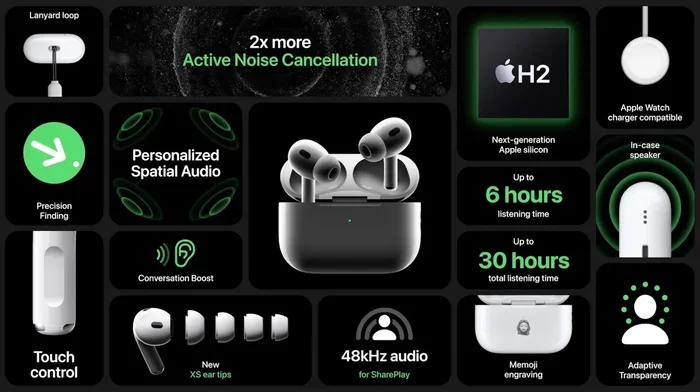
- Apple H2 Chip: The newer H2 chip powers AirPods Pro (2nd generation) and newer models. It improves noise cancellation and reduces latency.
- Custom Audio Drivers: Apple designs its own speakers and microphones to work perfectly with its processing chips.
- W1 Chip (Older Models): The first-generation AirPods used the W1 chip, which laid the foundation for seamless pairing.
Each of these parts plays a role in making your listening experience smooth. The chips do the heavy lifting behind the scenes so you do not have to think about it.
Step 1: Bluetooth Connectivity and Pairing
The first thing that happens when you use Apple wireless headphones is Bluetooth connectivity. Bluetooth is the wireless technology that sends audio from your device to your headphones without any cables.
Apple uses Bluetooth 5.0 or later in its newer models. This version offers a stronger signal, longer range, and lower power consumption. Here is how the pairing process works step by step:
- You open the lid of the charging case near your iPhone or iPad.
- The case sends out a Bluetooth signal that announces its presence.
- Your Apple device recognizes the headphones and shows a popup.
- You tap “Connect” and the devices complete a Bluetooth handshake.
- Once paired, the headphones remember the device and reconnect automatically.
The Bluetooth handshake is a quick exchange of information between devices. They agree on the best audio codec, encryption method, and connection settings. This all happens in less than a second, which is why Apple wireless headphones feel instant when you open the case.
For non-Apple devices, the process is slightly different. You need to put the headphones in pairing mode manually through the case button. This is also the same method you would use when pairing Bluetooth headphones to a TV or other smart device. The underlying Bluetooth technology works the same way regardless of the device.
Understanding the Bluetooth Handshake
The Bluetooth handshake might sound technical, but it is simple. Think of it as two devices introducing themselves. Your phone says, “I can send audio,” and the headphones say, “I can receive it.” They agree on the best format and start streaming. This process ensures a stable and secure connection every time.
Step 2: Audio Streaming and Sound Processing
Once the Bluetooth connection is established, audio streaming begins. When you press play on a song or video, your device sends audio data to the headphones over the Bluetooth link.
Apple wireless headphones use advanced audio codecs to compress and decompress audio data. A codec is a tool that encodes audio for transmission and decodes it for playback. Apple supports several codecs depending on the model:
- AAC: The default codec for most Apple devices. It offers good sound quality at efficient bitrates.
- Apple Lossless: Available on newer models, this codec delivers CD-quality audio over Bluetooth.
- Adaptive Audio: Found in AirPods Pro 2, this feature adjusts sound based on your environment.
The H1 and H2 chips process the audio data as it arrives. They apply equalization, noise cancellation, and spatial audio adjustments in real time. This processing happens so fast that you hear the sound almost instantly with no noticeable delay.
How Noise Cancellation Works
Active noise cancellation is one of the standout features of Apple wireless headphones. The headphones use tiny microphones on the outside to pick up ambient noise. The H2 chip then generates an “anti-noise” signal that cancels out the unwanted sound.
Here is how it works in simple steps:
- External microphones listen to the surrounding noise.
- The chip analyzes the noise patterns thousands of times per second.
- It creates an inverted sound wave that perfectly cancels the noise.
- You hear only your music or call audio, free from distractions.
This technology is also useful in noisy environments like offices or commutes. It makes a big difference in call clarity too. If you want to learn more about using the microphone feature, check out our guide on how to talk through Bluetooth headphones.
Step 3: Battery Management and Charging
Battery life is a big part of how Apple wireless headphones work. Apple uses smart power management to squeeze every bit of juice from the battery. The H1 and H2 chips are designed to be extremely energy efficient.
Here is a typical battery breakdown for popular Apple models:
| Model | Listening Time (Headphones) | Total with Case | Quick Charge Time |
|---|---|---|---|
| AirPods (3rd Gen) | 6 hours | 30 hours | 5 min = 1 hour |
| AirPods Pro 2 | 6 hours | 30 hours | 5 min = 1 hour |
| AirPods Max | 20 hours | 20 hours | 5 min = 1.5 hours |
The charging case does most of the heavy lifting. It stores extra power and recharges the headphones automatically when you place them inside. The case itself charges through Lightning or USB-C depending on the model.
Tips to Extend Battery Life
Want your Apple wireless headphones to last longer? Try these simple tips:
- Turn off noise cancellation when you do not need it.
- Lower the volume when listening at home.
- Keep the firmware updated through your iPhone settings.
- Store the case in a cool, dry place when not in use.
- Avoid letting the battery drain completely before recharging.
These small habits add up over time and keep your headphones performing at their best for years.
Step 4: Seamless Device Switching
One of the most impressive features of Apple wireless headphones is automatic device switching. If you are listening to music on your iPhone and then open a video on your iPad, the headphones switch over without you doing anything.
This works because Apple devices share the same iCloud account and use a feature called “Automatic Switching.” Here is how it works behind the scenes:
- Your headphones maintain a low-energy Bluetooth connection to all signed-in Apple devices.
- When you start playing audio on a new device, the system detects it.
- The headphones disconnect from the current device and connect to the new one.
- The entire switch happens in about one to two seconds.
This seamless experience is possible because of the tight integration between Apple hardware and software. It is something that most other headphone brands cannot match. Even when using Bluetooth headphones with a Roku or other streaming device, the connection process is similar but not as automatic. You can read more about using Bluetooth headphones with streaming devices in our guide on using Bluetooth headphones with Roku.
What About Non-Apple Devices?
Apple wireless headphones work with Android and Windows devices too, but with fewer features. You lose automatic switching and some spatial audio capabilities. The core Bluetooth connection and audio quality remain solid. You can still enjoy great sound and a reliable connection on any Bluetooth-enabled device.
Step 5: Microphone and Call Quality
Apple wireless headphones are not just for listening to music. They also work as high-quality headsets for phone calls and voice assistants. The microphones on Apple headphones are designed to pick up your voice clearly while blocking out background noise.
Most models use at least three microphones per earbud. Here is how the call setup works:
- Beamforming Microphones: These focus on your voice and ignore sounds from other directions.
- Noise Reduction Algorithms: The H1 or H2 chip filters out wind, traffic, and background chatter.
- Voice Amplification: The system boosts your voice so the person on the other end hears you clearly.
The result is crystal-clear call quality even in noisy places. This is why many people use AirPods for work calls and virtual meetings. The technology is the same reason why Bluetooth headphones in general have become so popular for remote work.
Step 6: Wireless Charging and Accessories
Apple wireless headphones support Qi wireless charging on certain models. This means you can place the case on any compatible charging pad and it charges without cables.
MagSafe compatibility adds another layer of convenience. The case magnets snap perfectly onto MagSafe chargers, ensuring alignment every time. You can also charge through a Lightning or USB-C cable for faster results.
Apple offers several accessories that enhance the experience:
- MagSafe Charging Case: Snaps onto iPhone MagSafe chargers for convenient top-up charges.
- Find My Support: You can locate lost headphones using the Find My network.
- Custom Ear Tips: Silicone and foam tips in multiple sizes for a comfortable fit.
- Audio Sharing: Share audio between two pairs of headphones from one device.
These accessories and features round out the overall experience. They show how Apple thinks about the entire ecosystem, not just the headphones themselves.
Common Issues and How to Fix Them
Even the best Apple wireless headphones can have occasional hiccups. Here are common problems and quick fixes:
- Headphones Will Not Connect: Make sure Bluetooth is on and the headphones are charged. Try resetting by holding the case button for 15 seconds.
- Poor Sound Quality: Check that your device is not connected to a low-quality Bluetooth codec. Restart both devices to refresh the connection.
- Short Battery Life: Update your firmware and disable features you are not using, like noise cancellation or spatial audio.
- Connectivity Drops: Move closer to your device. Bluetooth range is typically about 30 feet. If you are experiencing signal issues, you might want to check your Wi-Fi signal strength as a first step since wireless interference can affect Bluetooth too.
Most issues resolve with a simple reset or firmware update. Apple provides detailed troubleshooting steps in the Settings app on your iPhone.
Final Thoughts
Understanding how do Apple wireless headphones work helps you appreciate the engineering behind a product that feels simple to use. From Bluetooth pairing to real-time noise cancellation, every step is carefully designed to give you the best possible experience.
The combination of custom Apple chips, advanced audio codecs, and seamless ecosystem integration sets these headphones apart. Whether you are listening to music, taking calls, or watching a movie, the technology works quietly in the background to deliver quality sound without any hassle.
Take some time to explore the settings on your device. Experiment with noise cancellation modes, try spatial audio, and keep your firmware updated. The more you know about how your Apple wireless headphones work, the more you can get out of them every single day.
Frequently Asked Questions
How long do Apple wireless headphones last on a single charge?
Most Apple wireless headphones last between 5 and 8 hours on a single charge. The AirPods Max can last up to 20 hours. The charging case provides multiple additional charges, extending total listening time significantly.
Can I use Apple wireless headphones with Android phones?
Yes, Apple wireless headphones work with Android phones via Bluetooth. However, you will lose features like automatic device switching and some spatial audio capabilities. The core audio quality and Bluetooth connection remain fully functional.
How do I reset my Apple wireless headphones?
To reset, place the headphones in the case, open the lid, and hold the setup button on the back of the case for 15 seconds until the LED flashes amber. Then release the button and re-pair the headphones with your device.
What is the difference between the H1 and H2 chips?
The H1 chip is found in AirPods (2nd gen and later) and AirPods Max. The H2 chip is newer and powers AirPods Pro (2nd gen). The H2 chip offers better noise cancellation, lower latency, and improved energy efficiency compared to the H1.
Do Apple wireless headphones support lossless audio?
Yes, newer Apple wireless headphones support Apple Lossless audio over Bluetooth. This feature requires an iPhone or iPad with iOS 14 or later and an Apple Music subscription. It delivers CD-quality sound without any loss in audio fidelity.
Why do my Apple wireless headphones disconnect randomly?
Random disconnections can happen due to Bluetooth interference, low battery, or outdated firmware. Move closer to your device, ensure both are charged, and check for software updates. Resetting the headphones often resolves persistent connection issues.