Do Wireless Home Security Cameras Really Need Internet
Wireless home security cameras don’t always need internet to record and store footage. Many modern wireless security cameras can still work offline using local storage like SD cards or hard drives. However, you lose key features like remote viewing, cloud backup, and smart alerts when there’s no connection.
Wireless home security cameras have become one of the most popular ways to protect our homes. They’re easy to install, flexible in placement, and offer features that older wired systems simply can’t match. But here’s a question many homeowners ask: do wireless home security cameras really need internet to do their job?
The short answer is no, not always. The longer answer is much more interesting and might save you a lot of money and frustration. Whether you’re dealing with frequent outages, living in a rural area with spotty connectivity, or just curious about what your camera can actually do offline, this guide covers everything you need to know.
Wireless home security cameras need internet for some features but not for basic recording. Understanding this difference is key to making the right choice for your home. Let’s dive into how these cameras work, what happens when the internet goes down, and how to get the most out of your system no matter what.
Key Takeaways
- Offline recording is possible: Many wireless cameras store footage locally without any internet connection at all.
- Remote access requires Wi-Fi: You need a stable internet connection to view live feeds or get alerts on your phone.
- Cloud storage depends on the web: Without internet, you cannot save footage to cloud services like Google Drive or Dropbox.
- Smart features go dark offline: Motion detection alerts, two-way audio streaming, and smart home integration all need a connection.
- Battery cameras handle outages better: Wireless battery-powered cameras often have built-in storage that keeps working during internet downtime.
- Boosting your Wi-Fi helps cameras perform better: A strong signal means fewer dropped recordings and smoother live streams.
📑 Table of Contents
- What Wireless Home Security Cameras Are and How They Work
- Why Internet Matters for Wireless Security Cameras
- Can Wireless Security Cameras Work Without Internet
- Features You Lose When Cameras Go Offline
- How to Set Up Wireless Home Security Cameras for Best Performance
- Smart Home Integration and Wireless Cameras
- Common Mistakes People Make With Wireless Security Cameras
- Expert Insights on Wireless Camera Internet Dependency
- Key Takeaways
- Conclusion
What Wireless Home Security Cameras Are and How They Work
Before we answer whether cameras need internet, let’s talk about what “wireless” actually means. A lot of people confuse wireless cameras with cameras that need Wi-Fi. But these are two very different things. A wireless security camera uses radio waves or cellular signals to transmit data instead of a physical cable. Some connect to your home Wi-Fi network, while others use cellular data or store everything locally on a device.
How Wireless Cameras Connect
Most wireless home security cameras connect to your home router using Wi-Fi. Once connected, they can stream live video to your phone, send motion alerts, and upload footage to the cloud. This is the setup most people think of when they hear “wireless security camera.”
But there are other types too. Some cameras use cellular data like a smartphone does. Others use a dedicated hub or base station that connects to your network. And some cameras don’t connect to anything wirelessly at all — they record to an SD card or local hard drive and you physically remove the media to review footage.
Common Types of Wireless Security Cameras
- Wi-Fi cameras: These connect directly to your home network. Examples include brands like Ring, Arlo, and Wyze. They offer the most features but depend heavily on a stable internet connection.
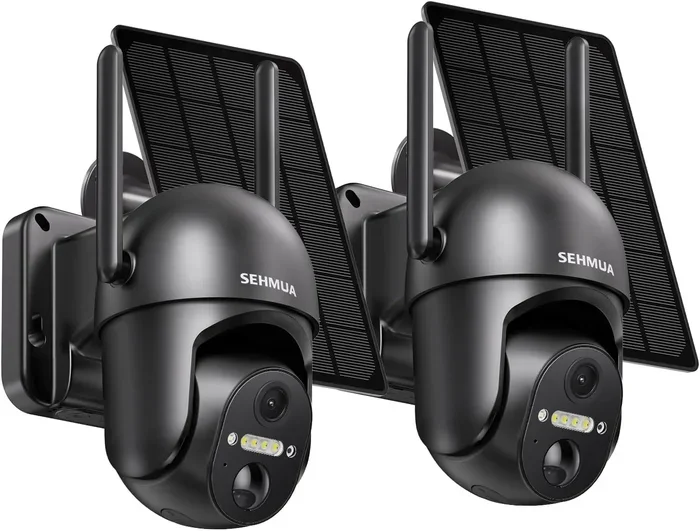
- Cellular cameras: These use a SIM card and mobile data. They’re great for locations where Wi-Fi isn’t available, like cabins or remote properties.
- Local storage cameras: These record to an SD card, NVR (network video recorder), or a local server. They don’t need the internet to record, but you lose remote access.
- Hybrid cameras: These can record locally and also connect to the cloud when internet is available. They offer the best of both worlds.
Why Internet Matters for Wireless Security Cameras
Internet plays a big role in what your wireless home security cameras can do. Without it, you’re limited to basic recording at best. Let’s break down exactly why internet matters and what features depend on it.
Live Streaming and Remote Viewing
One of the biggest reasons people buy wireless cameras is the ability to check on their home from anywhere. You can look at a live feed while you’re at work, on vacation, or just in another room. This feature requires a constant internet connection on both ends — the camera and your phone or computer.
When the internet goes down, live streaming stops. You simply can’t see what’s happening at home unless you’re physically near the camera. For many homeowners, this is the feature they value most, and losing it can feel like a major security gap.
Cloud Storage and Footage Backup
Most modern wireless cameras offer cloud storage as an option. This means your video footage gets uploaded to remote servers over the internet. The benefit is huge: even if someone steals your camera or breaks into your home, your footage is safe in the cloud.
Without internet, cloud storage becomes impossible. The camera can’t upload anything, so your footage stays on the device itself. If the device is damaged or stolen, you lose the footage too. This is a real risk that many people don’t think about until it’s too late.
Motion Detection and Smart Alerts
Smart motion detection is a game-changer. Modern wireless security cameras can distinguish between a person, a pet, or just wind blowing a tree branch. They send instant alerts to your phone when they detect something unusual.
But here’s the catch — most of these smart features rely on cloud processing. The camera sends a small clip or image to a server, the server analyzes it, and then sends you a notification. Without internet, these alerts don’t work. Some cameras have basic onboard motion detection that triggers local recording, but you won’t get phone notifications.
Two-Way Audio and Smart Home Integration
Many wireless cameras let you talk through the camera using two-way audio. You can warn off an intruder or speak to a delivery person. This feature works over your internet connection and stops working when the connection drops.
Similarly, smart home integration depends on the internet. If you want your camera to trigger lights, lock doors, or send alerts through Alexa or Google Home, you need a working connection. Does Alexa need Wi-Fi password to connect? Yes, and without that connection, your smart home ecosystem goes quiet.
Can Wireless Security Cameras Work Without Internet
Yes, they absolutely can — at least partially. The key is understanding what “work” means to you. If you just want a camera that records when motion is detected and stores the footage locally, you don’t need the internet at all.
Local Storage Options That Don’t Require Internet
Local storage is the backbone of offline camera operation. Here are the most common options:
- SD cards: Many wireless cameras have a built-in or external SD card slot. They record directly to the card and you can remove it to review footage on a computer. This is the simplest and most affordable offline solution.
- NVR systems: A network video recorder connects to your cameras via a local network. It stores all footage on a hard drive. You can access it from a monitor on-site but can’t view it remotely without internet.
- USB drives: Some cameras support USB storage. These work similarly to SD cards but offer larger capacity options.
- Built-in storage: A few cameras come with built-in storage chips. They don’t need any external media and work completely offline.
What You Can Still Do Offline
Even without internet, your wireless cameras can still do a lot:
- Record motion-triggered or continuous video to local storage
- Capture footage at scheduled times
- Store footage on SD cards or hard drives for later review
- Provide on-site monitoring through a direct connection
- Trigger local alarms or sirens (if the camera has this feature)
So while you lose remote access and smart alerts, the camera still does its core job: capturing video. For many homeowners, that’s enough — especially if they’re home most of the time and just want evidence in case of a break-in.
What You Cannot Do Without Internet
On the flip side, here’s what you lose when there’s no connection:
- Remote viewing on your phone or computer
- Push notifications and instant alerts
- Cloud backup and off-site storage
- Two-way audio communication
- Smart home automation triggers
- Firmware updates and new features
- Facial recognition or advanced AI detection
This list is important because it shows that internet-free cameras are really just basic recorders. They capture footage but can’t do the smart, connected things that make wireless cameras so valuable in the first place.
Features You Lose When Cameras Go Offline
Let’s dig deeper into what happens when your wireless cameras lose their internet connection. Understanding these limitations helps you plan better and choose the right setup for your needs.
Live Feed and Remote Monitoring
This is the most obvious loss. Without internet, you can’t see what’s happening at home from anywhere else. If you’re on vacation or at work, your camera becomes a blind spot. For parents checking on kids at home or pet owners monitoring their animals, this can be really frustrating.
One workaround is to use a Wi-Fi extender or signal booster near your cameras. Sometimes the internet isn’t down — it’s just a weak signal. If you want to learn more about boosting your connection, check out our guide on boosting your Wi-Fi at home.
Instant Alerts and Notifications
Imagine someone walking up to your door. With internet, your camera sends you a push notification within seconds. Without internet, you won’t know anything happened until you physically check the camera or review the stored footage later.
This delay can be a serious security concern. Many homeowners rely on instant alerts to call police or check on their property in real time. Losing this feature means you’re reacting after the fact instead of preventing incidents.
Cloud Recording and Evidence Preservation
Cloud storage is your safety net. If a burglar steals your camera or destroys it, your footage lives on in the cloud. Without internet, that safety net disappears. All your footage stays on a local device that can be taken or damaged.
This is why many security experts recommend having both local and cloud storage. If your internet goes down, local storage keeps recording. When the connection comes back, the camera syncs everything to the cloud automatically.
Smart Home Automation
If your camera is part of a larger smart home setup, losing internet breaks the automation chain. Your camera won’t trigger smart lights, smart locks, or alarm systems. Each device works independently when offline, but the magic of them working together disappears.
For example, a camera detecting motion and automatically turning on porch lights requires a working internet connection to communicate between devices. Without it, you’re left with a camera that records but can’t do anything else.
How to Set Up Wireless Home Security Cameras for Best Performance
Setting up your cameras the right way makes a huge difference in performance, especially during internet outages. Here are practical tips to get the most out of your wireless home security camera system.
Choose the Right Camera for Your Needs
Not all wireless cameras are the same. Before buying, think about what matters most to you:
- If you want full smart features: Choose a Wi-Fi camera with cloud storage and app support. Just be aware it won’t work offline.
- If you want offline reliability: Choose a camera with local storage via SD card or NVR. You’ll sacrifice smart features but gain independence from the internet.
- If you want both: Choose a hybrid camera that records locally and syncs to the cloud when connected. This gives you the best of both worlds.
Optimize Your Wi-Fi Signal for Cameras
Camera performance depends heavily on your Wi-Fi signal strength. A weak connection means dropped frames, failed uploads, and missed alerts. Here’s how to keep your signal strong:
- Place your router in a central location in your home
- Keep cameras within range of your router (typically 100-150 feet indoors)
- Use a Wi-Fi extender or mesh network for larger homes
- Avoid placing cameras near microwaves, baby monitors, or other devices that cause interference
- Use the 5GHz band for cameras when possible — it’s faster and less congested than 2.4GHz
Set Up Redundant Storage
Don’t rely on just one storage method. Use both local and cloud storage so you always have a backup. If the internet goes down, your camera keeps recording to the SD card. When the connection returns, everything syncs to the cloud automatically.
Some cameras also support FTP uploads to a personal server, which can serve as another backup layer. The more ways you have to preserve your footage, the safer your recordings are.
Test Your System During an Outage
Once you have your cameras set up, do a test run during an internet outage. See what still works and what doesn’t. This gives you peace of mind and helps you understand the limitations of your specific setup before a real emergency happens.
Smart Home Integration and Wireless Cameras
Wireless security cameras are often the centerpiece of a smart home security system. They work together with smart locks, door sensors, motion lights, and alarm systems to create a layered defense for your home.
How Cameras Connect to Smart Home Ecosystems
Most modern wireless cameras integrate with platforms like Alexa, Google Home, or Apple HomeKit. This lets you control your cameras with voice commands, create automation routines, and view camera feeds on smart displays.
For example, you can say “Alexa, show me the front door camera” on an Echo Show with a screen. Or you can set up a routine where your cameras arm automatically when you say “goodnight.” These integrations require a working internet connection to function.
Alternative Smart Home Hubs
If you’re worried about internet dependency, consider cameras that work with local smart home hubs. Some systems use a dedicated hub that processes commands locally instead of in the cloud. This means some smart features continue working even during an internet outage.
You can also explore whether your preferred smart home platform supports local processing. For instance, Home Assistant is an open-source platform that can control many cameras and devices without needing an internet connection. It’s a great option for tech-savvy homeowners who want reliability.
Common Mistakes People Make With Wireless Security Cameras
Avoid these common pitfalls to get the best performance from your wireless security cameras:
- Assuming all wireless cameras need Wi-Fi: Some cameras use cellular data or store locally. Read the specs carefully before buying.
- Ignoring signal strength: A camera placed too far from the router will have poor video quality and missed recordings. Test the signal at the camera location before mounting it.
- Relying only on cloud storage: If the internet goes down, you have no backup. Always use local storage as a fallback.
- Not updating firmware: Outdated firmware can cause connectivity issues and security vulnerabilities. Keep your cameras updated whenever the internet is available.
- Overlooking power options: Wireless cameras still need power. Battery-powered cameras are great for outages, but they need regular recharging or battery replacement.
- Skipping the test run: Always test your system under real conditions. An internet outage test reveals weaknesses you can fix before you need them.
Expert Insights on Wireless Camera Internet Dependency
Security professionals generally agree that the ideal setup combines both connected and offline capabilities. A camera that records locally and syncs to the cloud when possible gives you the most flexibility and reliability.
“The best wireless security camera is the one that works when you need it most,” says a common sentiment among home security experts. “Internet outages happen to everyone. Your camera system should be resilient enough to keep recording no matter what.”
One thing to keep in mind is that Wi-Fi password management matters too. If you change your Wi-Fi password or set up a new router, you’ll need to reconnect all your cameras. Some cameras make this easy through their app, while others require a manual reset. Keeping your network credentials handy saves a lot of headaches.
Also, consider your internet plan’s data usage. Wireless cameras that stream continuously or upload to the cloud can eat through a lot of data. If you have a data cap, you might want to adjust your camera settings to lower the resolution or reduce the upload frequency. This keeps your system running without hitting your data limit.
Key Takeaways
- Offline recording is possible: Many wireless cameras store footage locally without any internet connection at all.
- Remote access requires Wi-Fi: You need a stable internet connection to view live feeds or get alerts on your phone.
- Cloud storage depends on the web: Without internet, you cannot save footage to cloud services like Google Drive or Dropbox.
- Smart features go dark offline: Motion detection alerts, two-way audio streaming, and smart home integration all need a connection.
- Battery cameras handle outages better: Wireless battery-powered cameras often have built-in storage that keeps working during internet downtime.
- Boosting your Wi-Fi helps cameras perform better: A strong signal means fewer dropped recordings and smoother live streams.
- Hybrid setups are the most reliable: Cameras with both local and cloud storage give you the best of both worlds.
Conclusion
The answer to whether wireless home security cameras need internet depends on what you expect them to do. For basic recording and local storage, they don’t need the internet at all. But for remote viewing, smart alerts, cloud backup, and home automation, a reliable internet connection is essential.
The smartest approach is to choose a system that works both online and offline. Look for cameras with local storage options, hybrid cloud capabilities, and battery backup. This way, your home stays protected whether the internet is working or not.
Take the time to set up your system properly. Optimize your Wi-Fi signal, use redundant storage, and test your cameras during an outage. A little planning goes a long way toward peace of mind. Your wireless home security cameras are a valuable investment — and with the right setup, they’ll keep working hard for you no matter what.
Remember, the goal isn’t just to have cameras. It’s to have a system you can trust. And trust comes from understanding how your equipment works, what it needs, and what happens when things go wrong. With that knowledge, you’re already ahead of most homeowners when it comes to keeping your home safe and secure.
Frequently Asked Questions
Can wireless security cameras record without Wi-Fi?
Yes, many wireless security cameras can record without Wi-Fi if they have local storage like an SD card or connected hard drive. The camera will still detect motion and save footage, but you won’t be able to view it remotely or receive alerts until the Wi-Fi connection is restored.
How long can wireless security cameras store footage offline?
It depends on the storage capacity and how much the camera records. A 128GB SD card can typically store several days of continuous footage. Some cameras overwrite the oldest files when the storage is full, so regular review is important if you want to keep specific clips.
Do all wireless cameras need a router to work?
No, not all wireless cameras need a router. Cellular cameras use mobile data and don’t connect to your home Wi-Fi at all. Some cameras also work entirely offline with local storage and no network connection. Always check the specifications before purchasing.
What happens to my cloud recordings if the internet goes down?
Cloud recordings stop being created during an internet outage because the camera can’t upload to the cloud. However, most cameras continue recording to local storage. Once the internet comes back, the footage syncs to the cloud automatically if the camera supports dual storage.
Can I use a wireless security camera in an RV or remote location without home internet?
Yes, cellular-based wireless cameras are designed for locations without home internet. They use a SIM card and mobile data to connect. You can also use cameras with local storage that don’t need any internet connection at all. If you’re interested in using home internet solutions in an RV, you might want to check if Verizon home internet can be used in an RV.
How do I know if my wireless camera is still working when the internet is down?
Most cameras have a status light or indicator on the device itself. You can also check the camera’s local storage to see if new footage is being recorded. Some cameras have a companion app that shows the connection status, but this requires internet to access remotely. For the most reliable offline monitoring, choose a camera with a clear LED indicator that shows recording status regardless of internet connectivity.