How Do Bluetooth Light Bulbs Work Explained Simply
Bluetooth light bulbs use wireless radio signals to connect directly to your phone or tablet, letting you control brightness, color, and schedules without a hub. They work through a built-in Bluetooth chip that pairs with your device, and many support mesh networking to extend range across your home. This guide breaks down everything you need to know about how these smart bulbs actually function.
You have probably seen those sleek smart bulbs at the store or online. They promise to change the color of your room with a tap on your phone. But have you ever wondered what is actually happening behind the scenes? Bluetooth light bulbs are more than just fancy replacements for your old switches. They use real wireless technology to communicate with your devices and bring lighting control right to your fingertips.
In this guide, we will walk through exactly how Bluetooth light bulbs work. We will cover the technology inside them, how they pair with your phone, and what makes them different from other smart lighting options. Whether you are a tech beginner or a curious homeowner, this article will give you a clear picture of how these bulbs bring wireless lighting into your life.
Key Takeaways
- Direct Connection: Bluetooth light bulbs connect wirelessly to your phone without needing a central hub in most cases.
- Mesh Networking: Many Bluetooth bulbs support mesh technology, allowing them to pass signals through each other to extend range.
- Easy Pairing: Setting up a Bluetooth bulb is simple and usually takes less than two minutes from start to finish.
- Energy Efficient: Most Bluetooth bulbs use LED technology, which means they consume very little power compared to traditional bulbs.
- Hub-Free Option: Unlike some smart bulbs, Bluetooth models often work without a separate hub or bridge device.
- Limited Range: Bluetooth has a shorter range than Wi-Fi, typically around 30 to 50 feet, though mesh networking helps overcome this.
- Smart Home Compatible: Many Bluetooth light bulbs work with voice assistants and smart home platforms for hands-free control.
📑 Table of Contents
- What Are Bluetooth Light Bulbs?
- How Bluetooth Light Bulbs Work: The Technology Inside
- Setting Up Your Bluetooth Light Bulbs
- Bluetooth vs Wi-Fi Smart Bulbs: What Is the Difference?
- Benefits of Using Bluetooth Light Bulbs
- Common Limitations and How to Overcome Them
- Quick Tips for Getting the Most Out of Your Bluetooth Light Bulbs
- Expert Insight: The Future of Bluetooth Lighting
What Are Bluetooth Light Bulbs?
A Bluetooth light bulb is a smart bulb that uses Bluetooth wireless technology to connect to your phone, tablet, or other smart device. Instead of flipping a physical switch, you use an app on your device to turn the bulb on or off, dim it, or change its color. These bulbs replace your regular light bulbs in any standard lamp or fixture. They look just like normal bulbs on the outside but contain a tiny computer chip and Bluetooth radio inside.
The magic happens because of a small Bluetooth chip embedded in the bulb. This chip sends and receives wireless signals using the same basic Bluetooth protocol your headphones or speakers use. The difference is that the bulb uses these signals to receive commands and adjust the light output accordingly. Most Bluetooth light bulbs are LED-based, which means they are energy efficient and last a long time.
One of the biggest advantages of Bluetooth light bulbs is that they do not always need a hub. Many models connect directly to your phone. This makes them a simple and affordable way to start using smart lighting in your home without buying extra equipment.
How Bluetooth Light Bulbs Work: The Technology Inside
Understanding how Bluetooth light bulbs work starts with the technology packed inside them. These bulbs are small computers in disguise. They contain a processor, a Bluetooth radio, an LED driver, and sometimes a color mixing engine. All of these parts work together to receive your commands and produce the right light output.
The Bluetooth Protocol Explained
Bluetooth is a short-range wireless communication standard. It uses radio waves to send data between devices over short distances. When you open your smart lighting app and tap the on button, your phone sends a tiny radio signal through the air. The Bluetooth chip inside the bulb picks up that signal and translates it into an action. That action might be turning the LED on, dimming it, or shifting the color.
Bluetooth operates on the 2.4 GHz frequency band. This is the same band used by Wi-Fi and many other wireless devices. Bluetooth is designed to use very little power, which is why Bluetooth light bulbs can run for years on a small LED bulb without draining much energy. The Bluetooth protocol has evolved over the years, and newer versions offer faster connections, longer range, and better battery efficiency.
How Pairing Works Between Your Phone and the Bulb
Pairing is the process that links your phone to the Bluetooth light bulb. When you first set up the bulb, you put it into pairing mode. This is usually done by turning it on and off a certain number of times or by holding down a button on the bulb or its app. Once in pairing mode, the bulb broadcasts its presence to nearby devices.
Your phone detects the bulb and shows it as an available device. When you select it, the two devices exchange security keys. This creates a secure, encrypted connection. After pairing, your phone remembers the bulb, and you can control it instantly every time you open the app. The pairing process is fast and straightforward. Most Bluetooth light bulbs guide you through it step by step in the companion app.
One important thing to know is that Bluetooth pairing is different from Wi-Fi pairing. Bluetooth light bulbs do not connect to your home network. They create a direct link between your phone and the bulb. This means you do not need a router or internet connection to control them locally. However, some advanced features like remote access or voice control may require an internet connection through a bridge or hub.
Mesh Networking: How Bulbs Talk to Each Other
Many modern Bluetooth light bulbs support something called Bluetooth mesh networking. This is a clever technology that lets multiple bulbs communicate with each other. Instead of each bulb connecting directly to your phone, they form a network. Each bulb acts as a signal repeater, passing commands along to other bulbs in the mesh.
This is especially useful in larger homes. If your phone is in the living room and you want to change a bulb in the bedroom, the signal can hop from bulb to bulb until it reaches the right one. Bluetooth mesh extends the effective range of your smart wireless lighting setup well beyond the normal 30 to 50 feet of standard Bluetooth. It also makes the system more reliable because if one bulb goes offline, the others can still route the signal.
Setting Up Your Bluetooth Light Bulbs
Setting up Bluetooth light bulbs is one of the easiest parts of the whole experience. You do not need to be a tech expert to get them working. Here is how the process typically goes:
- Screw in the bulb like you would any regular bulb.
- Turn the light on using the wall switch.
- Download the companion app from the App Store or Google Play.
- Open the app and follow the on-screen setup instructions.
- Put the bulb into pairing mode as directed by the app.
- Wait for your phone to detect the bulb and tap to connect.
- Start controlling your light right from your phone.
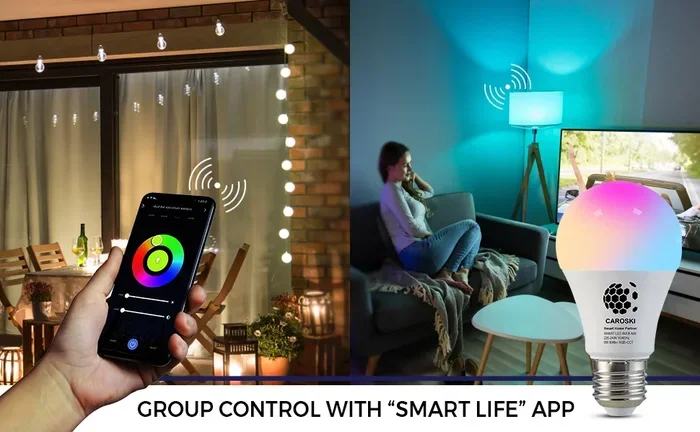
The entire setup usually takes less than five minutes. Once paired, your Bluetooth light bulb is ready to go. You can turn it on or off, adjust brightness, and change colors from anywhere in range. Some apps also let you set schedules, create scenes, and group multiple bulbs together for coordinated control.
For the best experience, make sure your phone is within range of the bulb when setting it up. Bluetooth range is typically around 30 to 50 feet indoors. Walls and furniture can reduce this range, so keep that in mind. If you have trouble connecting, try moving closer to the bulb and restarting the app.
Bluetooth vs Wi-Fi Smart Bulbs: What Is the Difference?
When shopping for smart bulbs, you will often see both Bluetooth light bulbs and Wi-Fi smart bulbs. They both offer wireless control, but they work quite differently. Understanding these differences helps you choose the right option for your home.
| Feature | Bluetooth Light Bulbs | Wi-Fi Smart Bulbs |
|---|---|---|
| Connection Type | Direct phone-to-bulb | Connects to home Wi-Fi network |
| Hub Required | Usually no | |
| Range | 30 to 50 feet (up to 100+ with mesh) | Full home Wi-Fi coverage |
| Power Use | Very low | Slightly higher due to Wi-Fi radio |
| Setup Complexity | Very simple | Simple, but requires network setup |
| Remote Access | Limited without a hub | Full remote access anywhere |
| Price | Generally lower | Varies widely |
| Best For | Small spaces, apartments, starter setups | Whole-home setups, remote control |
Bluetooth light bulbs shine in simplicity. They do not rely on your home network, so they work even if your internet goes down. This is a big advantage. Wi-Fi smart bulbs connect to your router, which means you can control them from anywhere in the world as long as you have internet. However, they also add traffic to your Wi-Fi network, and too many connected devices can slow things down.
If you live in a small apartment or want to control a few bulbs in a single room, Bluetooth light bulbs are a great choice. They are affordable, easy to set up, and do not require any extra equipment. For whole-home coverage or remote access from far away, Wi-Fi bulbs or a Bluetooth-to-Wi-Fi bridge might be a better fit. Some people even use both types in the same home for different purposes.
It is also worth noting that some Bluetooth light bulbs can connect to a bridge device. This bridge links your Bluetooth bulbs to your home Wi-Fi network. The result is you get the simplicity of Bluetooth with the remote access of Wi-Fi. This hybrid approach gives you the best of both worlds.
Benefits of Using Bluetooth Light Bulbs
Bluetooth light bulbs offer several real-world benefits that make them a popular choice for homeowners and renters alike.
Energy Savings: Most Bluetooth light bulbs use LED technology. LEDs use up to 80 percent less energy than traditional incandescent bulbs. Over time, this adds up to real savings on your electricity bill. You also get the added benefit of dimming, which reduces energy use even further when you do not need full brightness.
Convenience: Imagine walking into a dark room and turning on the lights with your phone before you even flip the wall switch. Or setting your bedroom lights to slowly dim at bedtime. Bluetooth light bulbs make these scenarios easy. You can create schedules, scenes, and automations that fit your daily routine without any extra hardware.
No Hub Required: Many Bluetooth bulbs work right out of the box with just your phone. You do not need to buy a separate hub or bridge. This keeps the initial cost low and the setup simple. It is one of the biggest reasons people choose Bluetooth light bulbs over other smart lighting options.
Color and Mood Control: RGB Bluetooth bulbs let you choose from millions of colors. You can set a warm white for relaxing evenings or a vibrant color for parties. Some bulbs also support different color temperatures, letting you shift from cool daylight to soft warm light with a single tap.
Integration with Smart Home Systems: Many Bluetooth light bulbs work with popular voice assistants like Alexa and Google Assistant. You can control your lights with simple voice commands. Just make sure your setup supports this feature, as some Bluetooth bulbs need a bridge to connect to voice assistants.
Common Limitations and How to Overcome Them
While Bluetooth light bulbs are fantastic, they do come with some limitations. Knowing these ahead of time helps you set realistic expectations and find the best solutions.
Limited Range: Standard Bluetooth has a range of about 30 to 50 feet. Thick walls, large furniture, and other obstacles can reduce this. If you have a large home, a single bulb might not be reachable from every room. The solution is to choose bulbs that support Bluetooth mesh networking. Mesh networks extend the range by having each bulb relay signals to the next one. This can push the effective range well beyond 100 feet.
No Internet-Based Remote Control: Because Bluetooth connects directly to your phone, you cannot control your bulbs when you are away from home unless you have a bridge or hub. If remote access is important to you, look for Bluetooth bulbs that come with a bridge or consider a Wi-Fi model instead.
Device Compatibility: Not all phones support Bluetooth in the same way. Most modern smartphones work fine with Bluetooth light bulbs, but very old devices may not. Always check the bulb manufacturer’s compatibility list before buying. Also, keep in mind that having many Bluetooth devices in one space can sometimes cause interference.
Interference From Other Devices: Bluetooth operates on the same 2.4 GHz band as many other devices, including Wi-Fi routers and microwaves. In crowded environments, this can cause occasional connection hiccups. To reduce interference, keep your Bluetooth bulbs away from thick walls and large metal objects. If you experience frequent disconnects, moving closer to the bulb or reducing the number of active Bluetooth devices nearby can help.
Brightness and Compatibility with Fixtures: Not all Bluetooth light bulbs fit every fixture. Check the bulb size and shape before purchasing. Also, some smart bulbs may not work properly with traditional dimmer switches. Always verify compatibility with your existing fixtures and switches to avoid frustration.
Quick Tips for Getting the Most Out of Your Bluetooth Light Bulbs
Here are some practical tips to help you get the best experience with your Bluetooth light bulbs:
- Keep your app updated. Manufacturers regularly release firmware updates that improve performance and add new features.
- Place bulbs strategically. For mesh networks, position bulbs within range of each other to create a strong signal path throughout your home.
- Use schedules and scenes. Setting up automated routines saves time and makes your smart lighting feel truly smart.
- Name your bulbs clearly. Give each bulb a descriptive name in the app so you can easily identify and control the right one.
- Group bulbs by room. Most apps let you group multiple bulbs together. This makes it easy to control all the lights in a room at once.
- Check for firmware updates regularly. Updates can improve connection stability and add new color modes or features.
- Consider a bridge if you need remote access. A bridge connects your Bluetooth bulbs to your Wi-Fi network, allowing you to control them from anywhere.
Expert Insight: The Future of Bluetooth Lighting
The world of Bluetooth light bulbs is evolving fast. Newer Bluetooth versions, like Bluetooth 5.0 and beyond, offer significantly longer range and faster data transfer. This means future bulbs will be even more reliable and capable. Mesh networking is becoming a standard feature, making whole-home wireless lighting setups more practical than ever.
Experts also predict deeper integration between Bluetooth lighting and other smart home devices. Imagine your lights automatically adjusting when your Bluetooth headphones connect to your TV, or your bulbs responding to your smart lock when you arrive home. The possibilities are expanding as Bluetooth technology continues to improve.
One thing is certain: Bluetooth light bulbs are here to stay. They offer a perfect balance of simplicity, affordability, and functionality. Whether you are upgrading a single lamp or outfitting your entire home, Bluetooth smart lighting gives you wireless control with minimal hassle.
As more people discover the benefits of smart wireless lighting, the technology will only get better. Bulbs will become more efficient, connections will become more stable, and integration with other devices will become seamless. If you have not yet tried Bluetooth light bulbs, now is a great time to start exploring what they can do for your home.
The beauty of Bluetooth light bulbs lies in their simplicity. You do not need a computer science degree to set them up or use them. Just screw one in, open an app, and start controlling your light. It is that easy. And once you experience the convenience of wireless lighting control, you will wonder how you ever lived without it.
Take some time to explore the options available today. Compare different brands, read user reviews, and find the Bluetooth light bulbs that fit your needs and budget. With the right setup, you can transform any room into a smart, responsive space that adapts to your lifestyle. Wireless lighting is not just a trend. It is a practical upgrade that makes your home more comfortable, efficient, and fun to live in.
Frequently Asked Questions
Can I control Bluetooth light bulbs without Wi-Fi?
Yes, you can. Bluetooth light bulbs connect directly to your phone using Bluetooth, not Wi-Fi. This means you can turn them on and off, dim them, and change colors even when your internet is down. You just need to be within Bluetooth range of the bulb, usually about 30 to 50 feet.
How many Bluetooth light bulbs can I connect to one phone?
Most phone apps allow you to connect and control multiple Bluetooth light bulbs at the same time. The exact number depends on the app and your phone model. Some apps support up to 10 or more bulbs. If you have a large setup, look for bulbs that support mesh networking to keep everything connected smoothly.
Do Bluetooth light bulbs work with voice assistants like Alexa or Google Assistant?
Many Bluetooth light bulbs do work with voice assistants, but it depends on the model. Some bulbs connect directly, while others require a bridge or hub to link to Alexa or Google. Check the product description before buying if voice control is important to you.
Can I use Bluetooth light bulbs outdoors?
Some Bluetooth light bulbs are rated for outdoor use. Look for bulbs with an appropriate IP rating, which indicates water and dust resistance. Keep in mind that Bluetooth range can be reduced outdoors due to distance and obstacles, so mesh networking is helpful for outdoor setups.
Are Bluetooth light bulbs secure?
Yes, Bluetooth light bulbs use encrypted connections during pairing and communication. This means your data is protected from casual eavesdropping. However, like any wireless device, it is always a good idea to keep your app updated and use strong passwords for your smart home accounts.
What happens if I lose my phone that is paired to a Bluetooth light bulb?
You can pair a new phone to the bulb just like you did the first time. Put the bulb into pairing mode, download the app on your new phone, and follow the setup steps. Your bulb settings and schedules are usually stored in the cloud if you create an account with the app.
=== CONCLUSION ===
Bluetooth light bulbs are a simple and powerful way to bring smart lighting into your home. They use wireless Bluetooth technology to connect directly to your phone, letting you control brightness, color, and schedules with ease. From the tiny Bluetooth chip inside the bulb to the mesh networking that extends their range, the technology behind these bulbs is both clever and practical.
Whether you are upgrading a single lamp or building a whole-home smart lighting setup, Bluetooth light bulbs offer a great balance of simplicity, affordability, and functionality. They do not require a hub, they work without Wi-Fi for basic control, and they use very little energy. With features like mesh networking, voice assistant compatibility, and easy app control, they make wireless lighting accessible to everyone.
Now that you understand how Bluetooth light bulbs actually work, you are ready to make an informed choice. Pick the bulbs that fit your space, follow the simple setup process, and enjoy the convenience of controlling your lights from anywhere in range. Smart lighting is not just a luxury. It is a practical upgrade that adds comfort, efficiency, and a touch of modern convenience to your everyday life.